DonationCoder.com forum
 
Read-only archive. This is a static copy of the DonationCoder.com forum. Reading and searching work as before; logging in, posting and private messages do not.
Archive of 2026-10-21 · About this archive · Main site

Last post Author Topic: Do you know a free HTML editor with real time preview in adjacent pane?  (Read 104,922 times)

David.P

  • Ergonomics Junkie
  • Supporting Member
  • Joined in 2008
  • **
  • Posts: 208
OK, two more free Editors that look very promising are a) Microsoft Office SharePoint Designer 2007, and b) Amaya.

While both have WYSIWYG editing and synchronized html source split view/edit, SharePoint Designer probably is somewhat overly complex for simple editing tasks.

Amaya OTOH seems to have just the right degree of complexity vs. functions for doing quick edits on a page.

Cheers David.P

urlwolf

  • Charter Member
  • Joined in 2006
  • ***
  • Posts: 1,837
    • Gathering Badge
    • Linux User
It´s easier to use a normal editor, and have a browser that autorefreshes with changes next to it.
For FF, you have autoreload: https://addons.mozilla.org/en-US/firefox/addon/auto-reload/?src=api

flamerz

  • Supporting Member
  • Joined in 2011
  • **
  • Posts: 157
    • Participated in NANY Challenge Once
i want to recommend Webcoder 2010. (is paid, but its worth the price)

HankFriedman

  • A computer nerd whose also a psychic & astrologer
  • Supporting Member
  • Joined in 2006
  • **
  • Posts: 147
I had already evaluated SharePoint Designer and Amaya on earlier pages, and the problem with urlwolf's suggestion, which I tried out, is that you have to save the file to see the changes in FireFox, which is inconvenient at best. :(

And I tried Webcoder 2010 and the preview was not active, or at least when it refreshed it jumped to the top of the page, instead of keeping focus on where one is working. That's not useful. :(

Am I missing something?

David.P

  • Ergonomics Junkie
  • Supporting Member
  • Joined in 2008
  • **
  • Posts: 208
Hank, what was wrong with SharePoint Designer?

I had to make sure to get the 2007 version (not the 2010 version) because the former doesn't need access to SharePoint (whatever that is) in order to edit my webpages.

Regards David.P
--
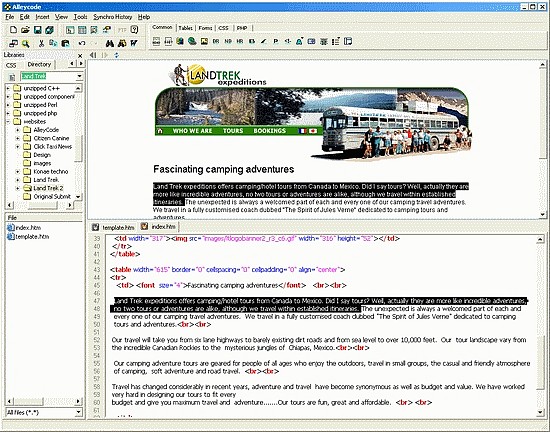
PS: two more editors with split screen mode -- and two caveats: 1.) I haven't tried them and 2.) they are payware.

Alleycode:


MyEclipse:


« Last Edit: March 28, 2012, 10:54 AM by David.P »

wraith808

  • Supporting Member
  • Joined in 2006
  • **
  • Posts: 11,205
    • Participated in NANY Challenge Fourteen Times
    • Coding Snacks
    • Writer
    • Hardware Hacker

HankFriedman

  • A computer nerd whose also a psychic & astrologer
  • Supporting Member
  • Joined in 2006
  • **
  • Posts: 147
I wish those adding comments would look over the whole thread first to see if a program has already been mentioned.  :(

I just tested Webcoder 2010, and corresponded with its very nice author.  :)

Unfortunately, while it has an active preview, one has to hit the F12 key every time one wants a refresh. I have been looking for a program that has an effective auto-refresh.

In answer to the query, what did I think of the Microsoft Sharepoint, the answer is that the preview was well executed, but the HTML editing functions were way too few compared with most solid HTML editors.

Thank you all of your contributions. You have inspired me to keep on looking.

David.P

  • Ergonomics Junkie
  • Supporting Member
  • Joined in 2008
  • **
  • Posts: 208
hmmm, SharePoint Designer, and "way too few HTML editing functions"...?

Are we talking about the same software?

My impression is that SharePoint Designer is almost overly complex, compared to most Editors that have been mentioned in this thread:


Actually I think I'll stick with SharePoint Designer because it's WYSIWYG-editing capabilities, and synchronized source code view are the best I've seen so far in any software I've tried.

Btw, neither Webcoder, nor MyEclipse or Alleycode have been mentioned before.

HankFriedman

  • A computer nerd whose also a psychic & astrologer
  • Supporting Member
  • Joined in 2006
  • **
  • Posts: 147
To David.P:

I had evaluated Alleycode during my first swing years ago, and must have left it out.

I re-evaluated it just now and still don't find it worthwhile because:

1. It only offers a horizontal (and on top!) preview -- I wanted a side-by-side preview pane.

2. I am a big fan of macros, snippets, etc. and Alleycode doesn't offer these. They really speed up my coding, and I really need them.

And yes, I wasn't specifically referring to you with regard to people not reading the whole post before.

The yearly fee for MyEclipse seems a bit much to me, given that you can purchase other programs just once and be done with paying for them. But I will probably examine it too.

Thank you and everyone very much for keeping this thread alive.

David.P

  • Ergonomics Junkie
  • Supporting Member
  • Joined in 2008
  • **
  • Posts: 208
Alleycode? I thought we were discussing the functions of SharePoint Designer, lastly.

Anyway, I'll go for the latter -- I really have come to like it.

Cheers David.P

HankFriedman

  • A computer nerd whose also a psychic & astrologer
  • Supporting Member
  • Joined in 2006
  • **
  • Posts: 147
Dear David.P,

I just installed the 2007 Sharepoint Designer to evaluate it again, but it didn't create an icon on my desktop.

Can you tell me where to find the .exe so I can run it?

thanks

Hank

wraith808

  • Supporting Member
  • Joined in 2006
  • **
  • Posts: 11,205
    • Participated in NANY Challenge Fourteen Times
    • Coding Snacks
    • Writer
    • Hardware Hacker
The yearly fee for MyEclipse seems a bit much to me, given that you can purchase other programs just once and be done with paying for them.

I'd noticed the subscription fee, but thought it was like others that you got upgrades during the year for free.  After perusing the FAQ, I came across this gem:

Quote
[Subscriptions] What happens when my subscription expires?

MyEclipse will start reminding you that you are getting close to the expiration date a month in advance. If you decide to let your subscription expire, MyEclipse will disable itself within your Eclipse install. This means any MyEclipse-specific functionality you were making use of will be disabled, however none of the other functionality provided by your Eclipse install will be affected, all the remaining plugins (including Eclipse itself) will continue to function without interruption.

People actually buy rent this POS?

David.P

  • Ergonomics Junkie
  • Supporting Member
  • Joined in 2008
  • **
  • Posts: 208
I just installed the 2007 Sharepoint Designer to evaluate it again, but it didn't create an icon on my desktop.
Can you tell me where to find the .exe so I can run it?
:huh:

Should be somewhere around these parts:

\[Programs]\Microsoft Office\Office12\SPDESIGN.EXE

Regards David.P

HankFriedman

  • A computer nerd whose also a psychic & astrologer
  • Supporting Member
  • Joined in 2006
  • **
  • Posts: 147
David.P Thank you very much! I found it.

Now for more testing!

:-)

HankFriedman

  • A computer nerd whose also a psychic & astrologer
  • Supporting Member
  • Joined in 2006
  • **
  • Posts: 147
I explored Nvu and it does not have any ability to show code and preview at the same time.

I am exploring the 2007 Sharepoint Designer, which does indeed seem powerful but unfortunately only has the preview below the code not side-by-side which I would find ideal. Still, I'm going to look at it more.

HankFriedman

  • A computer nerd whose also a psychic & astrologer
  • Supporting Member
  • Joined in 2006
  • **
  • Posts: 147
I re-tested ACEHtml and it has several problems:

one cannot see the preview pane at the same time as the coding pane,

and worse, even when you decline to accept it taking over your home page and installing extra software (MyStart Toolbar), it still repeatedly tries to install the toolbar for hours, and when you uninstall ACEHtml, the MyStart Toolbar remains in the system.

Bad software.  >:(
« Last Edit: March 30, 2012, 05:46 AM by HankFriedman »

tomos

  • Charter Member
  • Joined in 2006
  • ***
  • Posts: 11,970
    • Gathering Badge
    • Participated in NANY Challenge Once
Looking for a HTML editor free or paid:

I'm in the middle of a four day course in HTML & CSS.
We're using Web Architect (Mirabyte) which is fairly easy to use - but very mouse-orientated. Also, a lot of stuff is hidden in menus (in spite of using the ribbon format), so maybe better described as mouse-intensive and keyboard unfriendly.

@HankFriedman, wondering what did you end up going with?

Anyone else got any suggestions for 2015?
TIA
Tom

HankFriedman

  • A computer nerd whose also a psychic & astrologer
  • Supporting Member
  • Joined in 2006
  • **
  • Posts: 147
I ended up using WeBuilder because it has the "macros" I need to be efficient as well as side by side coding and preview panes.

tomos

  • Charter Member
  • Joined in 2006
  • ***
  • Posts: 11,970
    • Gathering Badge
    • Participated in NANY Challenge Once
Thanks Hank,
will check that out
http://www.webuilderapp.com/
Tom

tomos

  • Charter Member
  • Joined in 2006
  • ***
  • Posts: 11,970
    • Gathering Badge
    • Participated in NANY Challenge Once
Started a thread looking for and at editors for beginners:
HTML editor for beginners

not sure how different they have to be from editors for more advanced users - but as I say there:
as a beginner, dont bother with NetBeans :D
Tom

dspelley

  • But it's a dry heat.
  • Charter Member
  • Joined in 2005
  • ***
  • Posts: 90
I think TopStyle does what you want, but not free.
We are at the very beginning of time for the human race. It is not unreasonable that we grapple with problems. But there are tens of thousands of years in the future. Our responsibility is to do what we can, learn what we can, improve the solutions, and pass them on.
--- Richard Feynman (1918-1988)

firace

  • Participant
  • Joined in 2012
  • *
  • Posts: 7
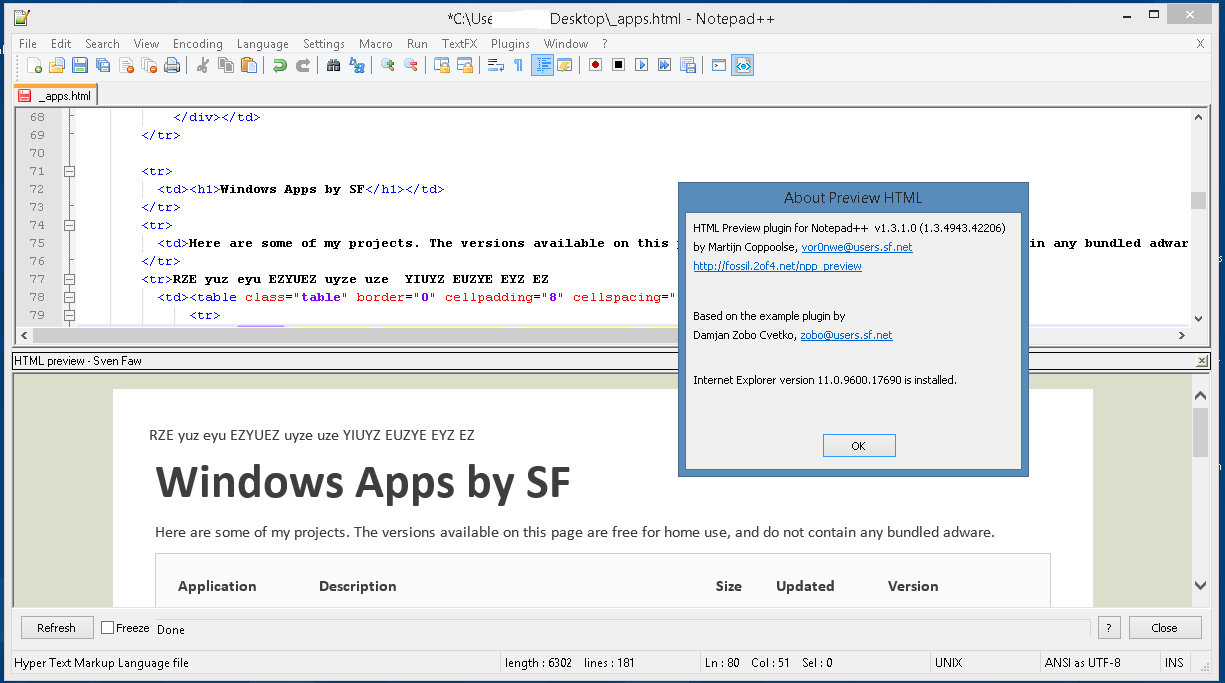
Nice thread! I actually also looked for something like that recently, and after a long search, I've been happy with... Notepad++! But wait, the secret trick was to add a little-known plugin called "Preview HTML". It might not have all the bells and whistles that other programs have, but it's auto-refreshing, stable, free, and I've been very happy with it. Here's a screenshot.

Untitled.png
« Last Edit: April 14, 2015, 07:10 PM by firace »

David.P

  • Ergonomics Junkie
  • Supporting Member
  • Joined in 2008
  • **
  • Posts: 208
Wow firace, that is a cool find :Thmbsup:

Amazing.

wraith808

  • Supporting Member
  • Joined in 2006
  • **
  • Posts: 11,205
    • Participated in NANY Challenge Fourteen Times
    • Coding Snacks
    • Writer
    • Hardware Hacker
Wow firace, that is a cool find :Thmbsup:

Amazing.

Agreed!  Very cool find!

Attronarch

  • Supporting Member
  • Joined in 2012
  • **
  • Posts: 148
I use Microsoft Expression Web 4 (Free Version) - link. So far I've built several web pages with it and was fairly satisfied.

Original address: https://www.donationcoder.com/forum/index.php?topic=22847.0