DonationCoder.com forum
 
Read-only archive. This is a static copy of the DonationCoder.com forum. Reading and searching work as before; logging in, posting and private messages do not.
Archive of 2026-10-21 · About this archive · Main site

Last post Author Topic: Do you know a free HTML editor with real time preview in adjacent pane?  (Read 104,922 times)

HankFriedman

  • A computer nerd whose also a psychic & astrologer
  • Supporting Member
  • Joined in 2006
  • **
  • Posts: 147
I have searched high and low for an HTML editor that has a real time preview pane so that I can see the changes I make as I type them in.

Do any of you know such an animal?

(Preferably freeware)

For Windows XP

thanks!

daddydave

  • test
  • Supporting Member
  • Joined in 2008
  • **
  • Posts: 867
    • Participated in NANY Challenge Once
HTML-Kit has a preview pane and is a pretty nice editor for actual HTML editing but it's been a while since I've used it so I can't remember if it was realtime.

PapyLuc

  • Participant
  • Joined in 2009
  • *
  • Posts: 2
For  "HTML-Kit" see :
HTML-Kit site
Bye.

HankFriedman

  • A computer nerd whose also a psychic & astrologer
  • Supporting Member
  • Joined in 2006
  • **
  • Posts: 147
Unfortunately, HTML Kit isn't free anymore and is a bit complex
« Reply #3 on: May 24, 2010, 06:46 PM »
Thanks you two for the suggestion.

I found HTML kit's interface a bit busy and confusing in the past, and on top of that, it's no longer a free program.

So while they have added live preview, it's just not a program I'd want to "live in".

Curt

  • Supporting Member
  • Joined in 2006
  • **
  • Posts: 7,565
http://www.beerwin.com/
http://www.beerwin.com/products/beerwin-s-plainhtml/features

HankFriedman

  • A computer nerd whose also a psychic & astrologer
  • Supporting Member
  • Joined in 2006
  • **
  • Posts: 147
Curt,

Beerwin has a pop up preview, like many HTML editors, but not an auto-refreshing side pane that syncs with the code lines.

thanks, tho'

sajman99

  • Supporting Member
  • Joined in 2006
  • **
  • Posts: 664
Perhaps try Free Beginners HTML Editor. Never used it personally so I can't comment on the auto-refresh.

http://www.html.gbr.me/

HankFriedman

  • A computer nerd whose also a psychic & astrologer
  • Supporting Member
  • Joined in 2006
  • **
  • Posts: 147
The Free Beginners HTML program has a preview in a separate tab, not viewable simultaneously with the HTML code display

Curt

  • Supporting Member
  • Joined in 2006
  • **
  • Posts: 7,565
surely you must already have tested *today's* giveaway: http://www.giveawayoftheday.com/ultima-website-17/

http://ultimawebsite.com/

Quote
This website editor is entirely in WYSIWYG mode, meaning 'what you see is what you get'. Therefore, there is no complicated coding required and anyone will now be able to design a website for themselves even with just a basic knowledge of computing. The website project is also stored on your computer in a single file.

edited: The program is written by Enplase Research, author of well respected registry and back up tools, etcetera.
« Last Edit: May 24, 2010, 09:41 PM by Curt »

HankFriedman

  • A computer nerd whose also a psychic & astrologer
  • Supporting Member
  • Joined in 2006
  • **
  • Posts: 147
Yes, that's what got me stirred up again about trying to find an HTML code editor with live preview, which, of course, Ultima is NOT

As their website says: This website editor is entirely in WYSIWYG mode

And I want a primarily HTML code program with a live preview pane

Curt

  • Supporting Member
  • Joined in 2006
  • **
  • Posts: 7,565
And I want a primarily HTML code program with a live preview pane

-sorry; I thought too little of this at first  because i didn't understand/look up 'adjacent'.

What you want is a cup of coffee... or more precisely a CoffeeCup The HTML Editor 2010

http://www.coffeecup.com/html-editor/

But no free meal, not even free coffee!

pricetag_usd_49.png

Quote
Even the most hardcore programmer can’t look at a page of code and instantly tell how it’s going to look in a Web browser. That’s why the HTML Editor gives you three different preview options:

1) Want to see your page in a browser? You can do that — in fact, you can open up to 10 different browsers from inside the HTML Editor.

2) Don’t want to open a whole new window? We hear that. That’s why we built a browser right in the program — all you have to do is switch to a different workspace view.

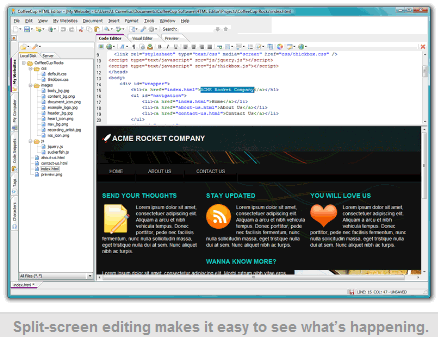
3) And for the user who wants even more convenience, we have the Split-Screen Preview. It’s your Webpage, in a built-in browser, right below your code. It couldn’t be handier.

edited for price-tag and screenshot

2010-05-25_011339-747.gif

« Last Edit: May 24, 2010, 11:18 PM by Curt »

HankFriedman

  • A computer nerd whose also a psychic & astrologer
  • Supporting Member
  • Joined in 2006
  • **
  • Posts: 147
Curt,

Thank you for the suggestion. the CoffeeCup program is definitely closer to what I'm looking for -- but not free :-(

and I prefer side-by-side viewing but more importantly, I studied the Help section and couldn't see any way to change the display font and it's WAY too tiny as is.

I found HTMLPad, which is pretty close to my ideal (and even less expensive than CoffeeCup) with lots of features, and I'm still very open to suggestions.

thank you all for your help with this.

lanux128

  • Global Moderator
  • Joined in 2005
  • *****
  • Posts: 6,277
    • Coding Snacks
    • Volunteers/Staff
    • Gathering Badge
    • Participated in NANY Challenge Once
    • Linux User
i haven't tried them before but these seems to have what you're looking for:

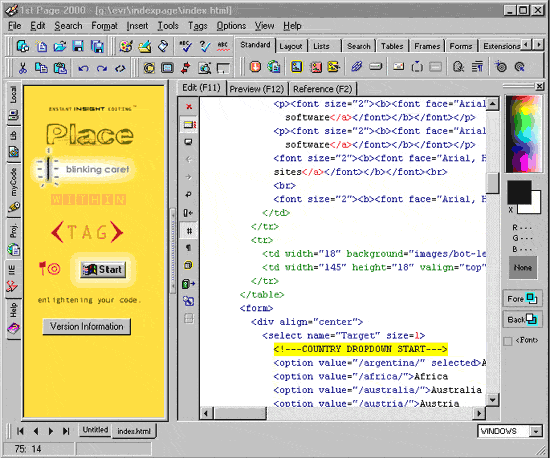
1st Page 2000
[attach=#]

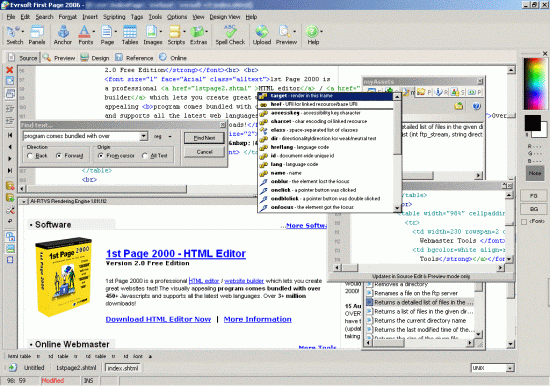
1st Page 2006
[attach=#]

HankFriedman

  • A computer nerd whose also a psychic & astrologer
  • Supporting Member
  • Joined in 2006
  • **
  • Posts: 147
Dear Lanux128,

I've been evaluating your recommendation and it is really quite good.

But like a lot of HTML editors, it places a thin vertical line for the margin and I can't seem to remove it.

I will call the company and see if they can address this question.

(Ironically, I went to their forum and I had asked that question of the forum back in July of last year, with no response.)

lanux128

  • Global Moderator
  • Joined in 2005
  • *****
  • Posts: 6,277
    • Coding Snacks
    • Volunteers/Staff
    • Gathering Badge
    • Participated in NANY Challenge Once
    • Linux User
yes, it doesn't seem to be an actively developed program. i remember that there was another GUI-based editor called Amaya, i wonder if it has such a feature? btw, i code my HTMLs in either PSPad or Notetab Light. :)

HankFriedman

  • A computer nerd whose also a psychic & astrologer
  • Supporting Member
  • Joined in 2006
  • **
  • Posts: 147
lanux128

I went to another review on donationcoder.com and people have indicated that the support is nonexistent

so it's back to the drawing board  :(

AbteriX

  • Member #520
  • Charter Honorary Member
  • Joined in 2005
  • ***
  • Posts: 1,150
Curt,

Thank you for the suggestion. the CoffeeCup program is definitely closer to what I'm looking for -- but not free :-(

and I prefer side-by-side viewing but more importantly, I studied the Help section and couldn't see any way to change the display font and it's WAY too tiny as is.


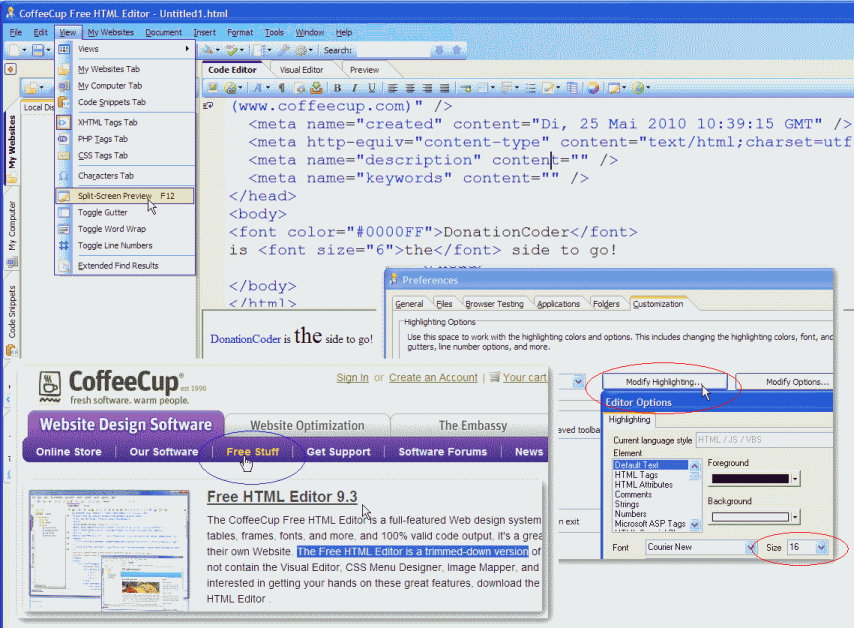
CoffeeCup free 9.3.png
http://www.coffeecup.com/free-editor/
Greetings, Stefan.

lanux128

  • Global Moderator
  • Joined in 2005
  • *****
  • Posts: 6,277
    • Coding Snacks
    • Volunteers/Staff
    • Gathering Badge
    • Participated in NANY Challenge Once
    • Linux User
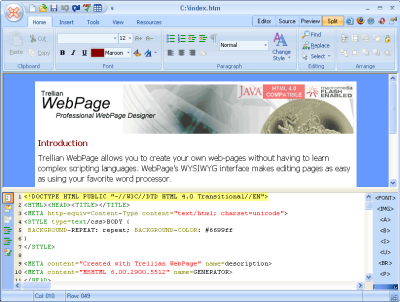
nice find, AbteriX.. i'd like to add another editor to this list which is Trellian WebPage.

[attach=#]

• http://www.trellian.com/webpage/

HankFriedman

  • A computer nerd whose also a psychic & astrologer
  • Supporting Member
  • Joined in 2006
  • **
  • Posts: 147
Thank you both for your continued efforts.

WOT (Web of Trust) doesn't like the Trellian Web Page link so I googled the program and downloaded it via Tucows.

I will test both programs and let you know how they compare.

I've tested about a dozen and a half programs already, and most just offer a preview window alternating with a code window

thank you all

Hank

HankFriedman

  • A computer nerd whose also a psychic & astrologer
  • Supporting Member
  • Joined in 2006
  • **
  • Posts: 147
CoffeeCup free doesn't show a preview at the same time as the code    :(

Trellian WebPage has a horizontal split showing code and preview but no synchronized scrolling.

I'll do more testing later.

Thanks again

AbteriX

  • Member #520
  • Charter Honorary Member
  • Joined in 2005
  • ***
  • Posts: 1,150
CoffeeCup free doesn't show a preview at the same time as the code    :(
Yes it does, see my picture (click on it)... it is not faked  :P
Try pressing the F12-key in CoffeeCup.
Greetings, Stefan.

HankFriedman

  • A computer nerd whose also a psychic & astrologer
  • Supporting Member
  • Joined in 2006
  • **
  • Posts: 147
Dear AbteriX,

Yup! You're right. I was rushed and didn't see that option.

I wish the two would sync (so that when I scrolled down in the code the display scrolled too) but this is a free program with amazing features.

Do you know how to make the font used to display the code any larger? I've been searching the menus but so far have come up blank.

HankFriedman

  • A computer nerd whose also a psychic & astrologer
  • Supporting Member
  • Joined in 2006
  • **
  • Posts: 147
I got it.

I went to Tools --> Document Display Properties --> Modify Highlighting (in the Customization tab) and there was the font and font size.

It looks like CoffeeCup is a real winner!

Thanks everyone.

lanux128

  • Global Moderator
  • Joined in 2005
  • *****
  • Posts: 6,277
    • Coding Snacks
    • Volunteers/Staff
    • Gathering Badge
    • Participated in NANY Challenge Once
    • Linux User
good to see that you've found an editor that suits your needs. got to bookmark CoffeeCup myself. :up: btw, i didn't know about Trellian's bad reputation, i wonder why it got flagged at WOT.

HankFriedman

  • A computer nerd whose also a psychic & astrologer
  • Supporting Member
  • Joined in 2006
  • **
  • Posts: 147
Dear Lanux128,

I've actually been quite successful so far in my search.

The following programs show split screens with previews:

Microsoft Office Sharepoint Designer (FREE) -- Horizontal display AND both sync

CoffeeCup Free HTML Editor -- Horizontal display (no sync)

HTML Pad (about $35) --Horizontal OR Vertical display (no sync)

Trellian WebPage (FREE) -- Horizontal (no sync)

EvrSoft First Page 2006 (FREE or Pay?) -- Horizontal with sync (but questions about support, registering, stability)

So the best ones, with sync that is, are:

Microsoft Office Sharepoint Designer (FREE)

and

EvrSoft First Page 2006 (FREE or Pay?)

and the only one with my preferred Vertical split (but no sync so far)  :(

is:

HTML Pad (about $35)

How about all that?

Original address: https://www.donationcoder.com/forum/index.php?topic=22847.0