Give this a test (source/binary included): File Punter
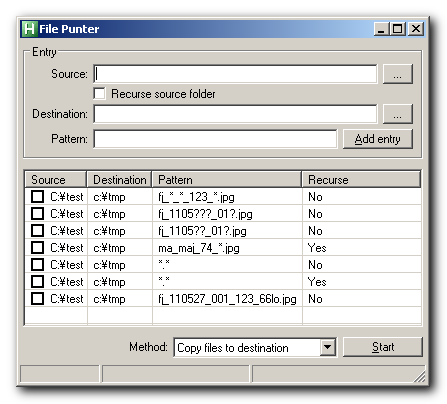
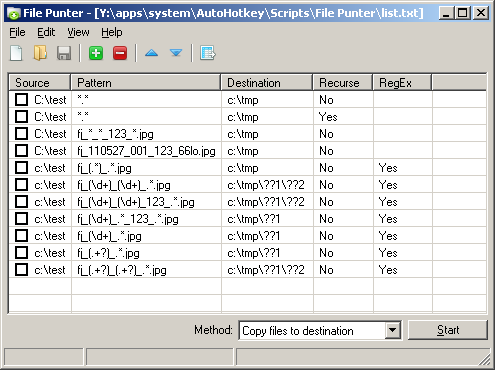
It's not fully feature complete as of yet but the core functionality is in there. It should be pretty intuitive.
1) Use the top section to create and add your match filters to the list.
2) Checkmark the rows you want to process.
3) Choose your method at the bottom and click Start. Progress and such is shown in the statusbar. You can cancel at any time.
4) All checked rows will be processed in order. You can move highlighted rows up and down through the list with ctrl-up and ctrl-down before clicking Start.
5) You can delete rows by highlighting and pressing delete.
6) The list is saved/loaded automatically when you close/launch the app. No other settings are saved at this point.
The three methods you can choose from are:
1) Copy files to destination. Self-explanatory.
2) Move files to destination. Self-explanatory.
3) Simulation only. This mode won't touch your files. It will just create a text report that will show which files matched your filters and their destinations. You can use it as a sort of "test run" mode. Keep in mind that if your filter matches a very large number of files, the resulting text file can get pretty large, too. Depending on path lengths involved, figure about a meg per 9000 lines/matches.
Put it through its paces and let me know how it works out for you. If it seems solid enough, I'll add in my usual Skwire Empire stuff and release it as a full-fledged app. Thanks and apologies for the delay in getting this to a release candidate.
It's not fully feature complete as of yet but the core functionality is in there. It should be pretty intuitive.
1) Use the top section to create and add your match filters to the list.
2) Checkmark the rows you want to process.
3) Choose your method at the bottom and click Start. Progress and such is shown in the statusbar. You can cancel at any time.
4) All checked rows will be processed in order. You can move highlighted rows up and down through the list with ctrl-up and ctrl-down before clicking Start.
5) You can delete rows by highlighting and pressing delete.
6) The list is saved/loaded automatically when you close/launch the app. No other settings are saved at this point.
The three methods you can choose from are:
1) Copy files to destination. Self-explanatory.
2) Move files to destination. Self-explanatory.
3) Simulation only. This mode won't touch your files. It will just create a text report that will show which files matched your filters and their destinations. You can use it as a sort of "test run" mode. Keep in mind that if your filter matches a very large number of files, the resulting text file can get pretty large, too. Depending on path lengths involved, figure about a meg per 9000 lines/matches.
Put it through its paces and let me know how it works out for you. If it seems solid enough, I'll add in my usual Skwire Empire stuff and release it as a full-fledged app. Thanks and apologies for the delay in getting this to a release candidate.