I'll guess you're not the same person? https://github.com/White-Tiger/T-Clock/issues/54
Sorry, but I didn't notice that report.
I'm a different person.
For me, it doesn't necessarily happen right after I log on..
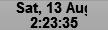
I rather suspect that T-Clock doesn't refresh itself properly when the date changes, but I'm not sure.
is it the primary or secondary clock?
I've only got one monitor.
Horizontal or Vertical taskbar?
Horizontal
Is the clock size larger or less than the Windows clock size?
Larger (Arial / 11 / Bold).
These are the same settings that I used with build 151, where the problem never occured.
What means "sometimes"?
Since I installed build 419 eight days ago, I've noticed it 3 or 4 times.
--
EDIT:After messing around with it a bit now, I've figured out where the problem lies..
T-Clock doesn't refresh itself properly when the taskbar is hidden (which mine usually is).