DonationCoder.com forum
 
Read-only archive. This is a static copy of the DonationCoder.com forum. Reading and searching work as before; logging in, posting and private messages do not.
Archive of 2026-10-21 · About this archive · Main site

Author Topic: Way to have FARR only scan (1) files in My Docs and (2) start menu apps?  (Read 8,267 times)

prr

  • Participant
  • Joined in 2010
  • *
  • Posts: 3
Is there a way to configure FARR to only provide (1) files in My Docs and (2) start menu apps in its results?

I already have Google Desktop Search for documents and am quite happy with it.

FARR is blazing fast but I hate having to pick through files that I don't want to open up.

tomos

  • Charter Member
  • Joined in 2006
  • ***
  • Posts: 11,970
    • Gathering Badge
    • Participated in NANY Challenge Once
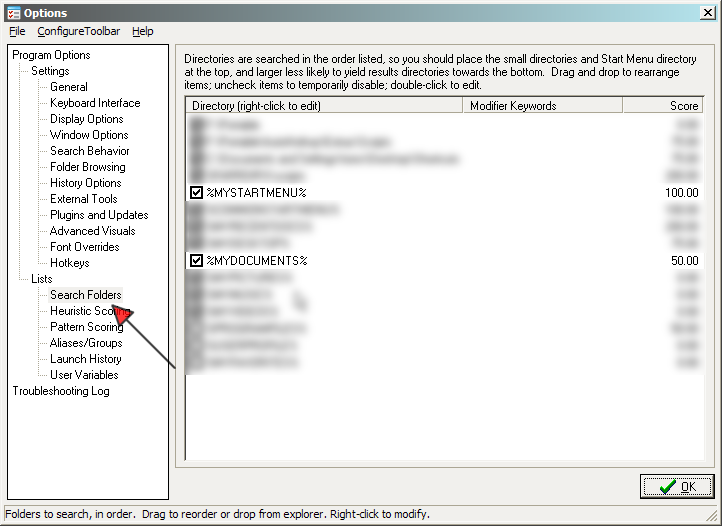
in options >> Search folders -  just select these two

[attachimg=#]
Tom

prr

  • Participant
  • Joined in 2010
  • *
  • Posts: 3
Appreciate your quick response, but it didn't work. I uninstalled it, rebooted, reinstalled but obviously the database didn't get removed, because even though I unchecked every option but the two you highlighted, the same problem remained--a search for a folder returned many files that had similar names.

How can I remove all traces of this program, and then reinstall? Or better, simply to have FARR reindex? I'm sure there is a button that allows this, but I did look through each of the options windows and didn't see a way.

ewemoa

  • Honorary Member
  • Joined in 2008
  • **
  • Posts: 2,922
    • Plugin Coding Medal
    • Participated in NANY Challenge Three Times
Sorry that I don't have a solution for your problem, but for reference, IIUC, FARR doesn't index -- I think there may be some plugins that one can install later that do, e.g.

 http://www.donationcoder.com/forum/index.php?topic=10501.0
 http://www.donationcoder.com/forum/index.php?topic=18724.0

I don't know how you've installed your FARR (I use mine in a portable set up so (I think) everything FARR-related lives in or under the directory that contains the FindAndRunRobot.exe), but perhaps the ConfigDir.ini file which lives in the same directory as FindAndRunRobot.exe may give some hints about removal as it seems to contain some information regarding where files get stored.

May be other folks have some better ideas or suggestions.
« Last Edit: February 22, 2010, 10:06 AM by ewemoa »

d4ni

  • Supporting Member
  • Joined in 2008
  • **
  • Posts: 129
tomos' solution should work. As ewemoa already points out, FARR does not use an index or 'database' as you call it. It does, however, by default adds launched items to a launchhistory, which can be cleared from the options.

tomos

  • Charter Member
  • Joined in 2006
  • ***
  • Posts: 11,970
    • Gathering Badge
    • Participated in NANY Challenge Once
It does, however, by default adds launched items to a launchhistory, which can be cleared from the options.

that's probably the solution
Tom

prr

  • Participant
  • Joined in 2010
  • *
  • Posts: 3
Clearing the launch history wouldn't have anything to do with this. All the items that I have launched (and are in the history), are in fact ones I want to appear. It is the ones I would never launch, that I'd like taken out of the results--specifically, documents (like I said I use Google Desktop search for that). I have never launched from FARR, a document, and yet my searches always end up with documents at the top, and I can't find even folders that I have launched in the past, in the results.

At any rate, in a year or so I'll come back to this and check out the release notes for subsequent versions. I have tried looking all over for alternatives to Launchy, and this is the only one that was faster than it, that did what Launchy does.
« Last Edit: February 27, 2010, 11:23 PM by prr »

mouser

  • First Author
  • Administrator
  • Joined in 2005
  • *****
  • Posts: 40,931
    • Gathering Badge
    • Plugin Coding Medal
    • Participated in NANY Challenge Seventeen Times
    • Cody Award
    • Coding Snacks
    • Volunteers/Staff
maybe if you show us some screenshots of your search folders dialog screen in farr options, then we can help more.
there is no reason you can't get farr to not show those items you dont want it too -- it sounds like there is something really simply going on that you don't like, which would be easy to fix if we had a better idea of where the results are coming from that you dont want.

maybe you want to join the chat channel (see CHAT! button above) when i am around and i can try to walk you through the problem.
« Last Edit: February 27, 2010, 11:36 PM by mouser »

Original address: https://www.donationcoder.com/forum/index.php?topic=21812.0