DonationCoder.com forum
 
Read-only archive. This is a static copy of the DonationCoder.com forum. Reading and searching work as before; logging in, posting and private messages do not.
Archive of 2026-10-21 · About this archive · Main site

Author Topic: Icons don't look so crisp.  (Read 12,300 times)

superboyac

  • Is your software in my list?
  • Charter Member
  • Joined in 2005
  • ***
  • Posts: 6,347
Icons don't look so crisp.
« on: February 17, 2010, 04:53 PM »
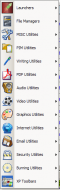
On my new work computer, I installed LBC and I noticed that the icons don't look so nice anymore.  Look at the screenshot:
screenshot_20100217085023.png
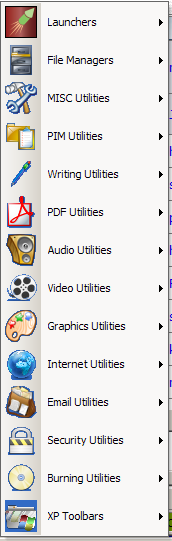
Especially the ones with non-square edges or perhaps they have transparent backgrounds.  I could have sworn they looked much nicer on my previous computer.  In fact, i just confirmed it.  see here
mouser

  • First Author
  • Administrator
  • Joined in 2005
  • *****
  • Posts: 40,931
    • Gathering Badge
    • Plugin Coding Medal
    • Participated in NANY Challenge Seventeen Times
    • Cody Award
    • Coding Snacks
    • Volunteers/Staff
Re: Icons don't look so crisp.
« Reply #1 on: February 17, 2010, 05:10 PM »
same version of LBC?

superboyac

  • Is your software in my list?
  • Charter Member
  • Joined in 2005
  • ***
  • Posts: 6,347
Re: Icons don't look so crisp.
« Reply #2 on: February 17, 2010, 05:20 PM »
It's the latest version as far as I know:
v1.110.01

I'm not sure what version I made the screenshot of in the other thread.

mouser

  • First Author
  • Administrator
  • Joined in 2005
  • *****
  • Posts: 40,931
    • Gathering Badge
    • Plugin Coding Medal
    • Participated in NANY Challenge Seventeen Times
    • Cody Award
    • Coding Snacks
    • Volunteers/Staff
Re: Icons don't look so crisp.
« Reply #3 on: February 17, 2010, 05:33 PM »
ok so we know your work problem is happening on latest version of LBC.
it would help me hugely if you could figure out if your other pc still is free of this problem and if so what version of LBC it is.

superboyac

  • Is your software in my list?
  • Charter Member
  • Joined in 2005
  • ***
  • Posts: 6,347
Re: Icons don't look so crisp.
« Reply #4 on: February 17, 2010, 05:45 PM »
Sorry, this is a new job for me, different location.

I can check on my home computer later.  I don't remember it having a problem there.  But I don't really use LBC at home.

superboyac

  • Is your software in my list?
  • Charter Member
  • Joined in 2005
  • ***
  • Posts: 6,347
Re: Icons don't look so crisp.
« Reply #5 on: February 17, 2010, 05:46 PM »
I made the screenshot in the other thread last year on July 19, so it was most likely a different version of LBC.  I don't know if that helps. 

lanux128

  • Global Moderator
  • Joined in 2005
  • *****
  • Posts: 6,277
    • Coding Snacks
    • Volunteers/Staff
    • Gathering Badge
    • Participated in NANY Challenge Once
    • Linux User
Re: Icons don't look so crisp.
« Reply #6 on: February 18, 2010, 01:48 AM »
different color depth in both computers?

[attach=#]

superboyac

  • Is your software in my list?
  • Charter Member
  • Joined in 2005
  • ***
  • Posts: 6,347
Re: Icons don't look so crisp.
« Reply #7 on: February 18, 2010, 02:36 PM »
If I remember correctly, my previous computer was 32-bit.  My current work computer is 32-bit.

Sorry, I didn't check my home computer last night, I got back late.

superboyac

  • Is your software in my list?
  • Charter Member
  • Joined in 2005
  • ***
  • Posts: 6,347
Re: Icons don't look so crisp.
« Reply #8 on: April 15, 2010, 08:03 PM »
I just tried the latest beta that you put out.  The icons still look the same (I don't know if you tried fixing it).  But I also want to confirm that I've seen it also on my home computer and other computers I've tried.  is it just me?  Is there something wrong with my icons or have they become corrupted?

mouser

  • First Author
  • Administrator
  • Joined in 2005
  • *****
  • Posts: 40,931
    • Gathering Badge
    • Plugin Coding Medal
    • Participated in NANY Challenge Seventeen Times
    • Cody Award
    • Coding Snacks
    • Volunteers/Staff
Re: Icons don't look so crisp.
« Reply #9 on: April 15, 2010, 08:07 PM »
Nothing has become corrupted, it's probably a change in LBC.

But I need some help identifying when the problem started.
As i understand it you are saying it happens on all your machines with the latest version of LBC.
When you are ready email me and i'll give you some older LBC versions and we can try to pinpoint what version it was where the problem started happening.

mouser

  • First Author
  • Administrator
  • Joined in 2005
  • *****
  • Posts: 40,931
    • Gathering Badge
    • Plugin Coding Medal
    • Participated in NANY Challenge Seventeen Times
    • Cody Award
    • Coding Snacks
    • Volunteers/Staff
Re: Icons don't look so crisp.
« Reply #10 on: April 16, 2010, 04:07 PM »
superboy, try this:

go to options, and select your launch bar, then look at the "Background Display" group, and see if you have something unusual set for the color.
mine is set to "clBtnFace" -- is yours?

Screenshot - 4_16_2010 , 11_05_39 AM.png

superboyac

  • Is your software in my list?
  • Charter Member
  • Joined in 2005
  • ***
  • Posts: 6,347
Re: Icons don't look so crisp.
« Reply #11 on: April 16, 2010, 04:37 PM »
Well!  That did it.  I changed that setting to what you showed, restarted LBC, and now everything looks very good.  Thanks.

mouser

  • First Author
  • Administrator
  • Joined in 2005
  • *****
  • Posts: 40,931
    • Gathering Badge
    • Plugin Coding Medal
    • Participated in NANY Challenge Seventeen Times
    • Cody Award
    • Coding Snacks
    • Volunteers/Staff
Re: Icons don't look so crisp.
« Reply #12 on: April 16, 2010, 04:39 PM »
nice to have that mystery solved.. now what was yours set to, and do you remember if you manually changed it?

superboyac

  • Is your software in my list?
  • Charter Member
  • Joined in 2005
  • ***
  • Posts: 6,347
Re: Icons don't look so crisp.
« Reply #13 on: April 16, 2010, 04:41 PM »
You know, I don't remember exactly at all.  it was a blue-ish color, but i don't think it was clBlue.  Sorry, i wasn't paying attention.

Original address: https://www.donationcoder.com/forum/index.php?topic=21776.0