
Congratulations to Joker and also to DC on another fine program! I cannot wait to try build 155 at school today.
Re: NANY 2010 Pre-Release: Page Countster
« Reply #50 on: December 14, 2009, 11:34 AM »


 Topic: NANY 2010 Release: Page Countster (Read 234,644 times)


Did anyone notice that Page Countster already got it's own writeup at ghacks:I did actually, and while I wasn't sure exactly what the implications of it being there were, I did (panic) jump on getting the Email Report feature rewritten yesterday before it turned into a fiasco.
http://www.ghacks.net/2009/12/13/printer-management-and-inventory-software-page-countster/
Nice app! What about adding the ability to scan multiple SNMP communities?The option is available at scan start to change the community name for the current scan. And I could add the option to save an alternate (default) community to the Config.ini fairly easily. But, are you looking for the ability to scan multiple communities simultaneously? That may take some time to figure out, as it would involve extensively modifying the core scanning engine code.
the last paragraph, I am not following what you mean. Does this mean when an error is showing on the control panel display, I could then see it from within your program?Basically, yes. Any of the standard textural message that show up on the printer's display (Ready, Tray X Empty/Open, Cartridge Door Open, & etc.) can be queried for by polling their message buffer(s). It's identical to the text output of the Printer Status program I posted earlier in this thread.
can you just add a "print screen" to your program? maybe that would save some time.Some printers have the ability to stream the display as a .gif which is a live screen shot of the printers graphical display...but I'm afraid that would take more time than I have.
I wouldn't worry too much about the print screen functionality at this point in time. It would be nice but probably not worth the effort. Unless some others would like it too. I can just use excel to print it.lol ... Okay, now I'm confused... Which are we "printing", the programs, or the printer's graphical display screen? The .gif thing I was talking about earlier was regarding the printer's graphical display (which I gave up on a year ago).
Since my users don't normally print a huge amount so being able read the display is a big deal for me. not yet anyway.Okay, it was just a thought...That had occurred to me when in the situation I was describing.
It's interesting how my Xerox DocuPrint N2125's page counts shows up under the Color Page Count column. It also doesn't report the serial number.Hm... Is that during the scan? Or when reopening the report? Xerox has a habit of piling a bunch of stuff into one field and then parsing it out later (I'm guessing the last part). The main reason that .tsv is a file save option is/was Xerox, and their inane habit of returning commas in the response string. It would work fine in the ListView control, but totally BorK a .csv file (for I'd gather rather obvious reasons).
But I would bet this is just how that model is programmed.

 Screenshot - 12_16_2009 , 5_46_13 AM.png
(88.3 KB, 1024x768 - viewed 1619 times.)
Screenshot - 12_16_2009 , 5_46_13 AM.png
(88.3 KB, 1024x768 - viewed 1619 times.) Screenshot - 12_16_2009 , 5_52_01 AM.png
(110.2 KB, 1024x768 - viewed 1602 times.)
Screenshot - 12_16_2009 , 5_52_01 AM.png
(110.2 KB, 1024x768 - viewed 1602 times.) Screenshot - 12_16_2009 , 5_52_31 AM.png
(103.6 KB, 1024x768 - viewed 1556 times.)
Screenshot - 12_16_2009 , 5_52_31 AM.png
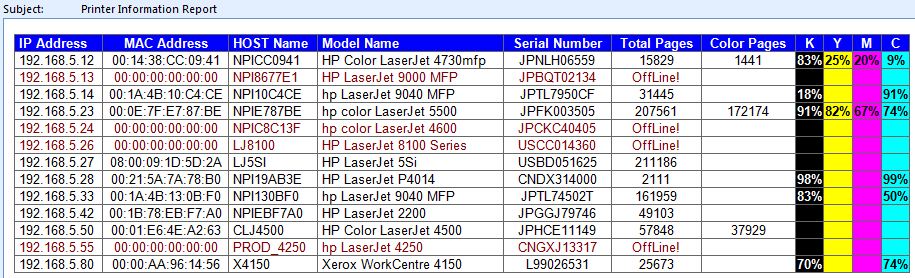
(103.6 KB, 1024x768 - viewed 1556 times.) If you are needing a program to scan your network for IP based printers and then give you a report showing the IP address, host name, serial number, pages printed, amount of toner left (in percent) and then he goes and add columns for color lasers toner amounts and pages printed.


Good job, SJ! As I have said, it is a great little program. In a couple of weeks, I will be adding another school to my list that I support. This will work good up there... let me see what models and what IP's are be used without having to physically go to each one. I do know that they are still on DHCP and they have had one grab another's IP address already. So they print to Printer A but it prints on Printer B.That does tend to be a problem when the only thing guaranteeing a network's configuration is a really long lease time. Given that static addressing is rather problematic on large networks, and printers have a habit of getting corrupt and needing to be (cold) reset (to factory settings), the best option I've found is to use the MAC address to create IP address reservations in DHCP. That way even if the printer "forgets" where it is supposed to be, the DHCP server will always assign it the correct (reserved) IP address.
Now I will just have to figure out which IP they are supposed to have so that I don't have to reinstall them on all the machines.Easy-est/Fastest method I've found is: Printer properties->Ports Tab->Port Configuration ... and then hope they all match (I've seen that one go both ways).
Original address: https://www.donationcoder.com/forum/index.php?topic=20903.0

