Hi, I got a slightly modded version of your code.
I used this before and thought I would sort my download-folder now, but it didn't work today (Windows 10).
Thought I would see if there was an update for it, and read that you lost it.
Also, I wanted only the year, so I put together a little bat script instead.

Used some bits from these 2 to get it working so it will not move any .bat:
http://stackoverflow.com/a/22222204 [Batch file to move file based on Month & Year on Date modified to folder with YYYY_MM]
http://stackoverflow.com/a/863627 [In a batch file, how do I delete all files NOT of a certain type]
@echo off
cls
choice /c yn /t 10 /d n /m "move all files divided by year?"
if errorlevel 2 goto stop
for %%f in ("%cd%\*") do if not %%~xf==.bat (
  for /f "tokens=1 delims=- " %%a in ("%%~tf") do (
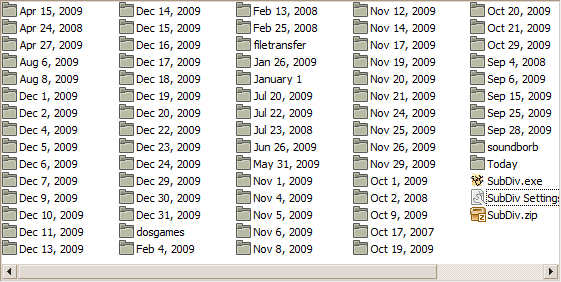
    if not exist "%cd%\%%a" mkdir "%cd%\%%a"
    move "%%~f" "%cd%\%%a"
  )
)
cls
echo all done!
timeout 10
:stop
exit
Here's the code for your script (modded for YYYY-MM)
/*
SubDiv
created by pyrohacker on the D.C. Forum
as a NANY 2010 Entry.
*/

#NoEnv
#SingleInstance Force
SendMode Input
SetWorkingDir %A_ScriptDir%
Menu, TRAY, Icon,,, 1

; Set up GUIs and variables

Setup:

Gui, Destroy
Gui, 2:Destroy
Gui, 3:Destroy

Separator=%SeparatorSelection%
Cleanup=%CleanupSetAt%

FormatTime, CurrentYear,, yyyy
FormatTime, CurrentMonth,, MM
FormatTime, CurrentDay,, dd

; Create the settings dialog
Gui, 3:Add, Text,, Creates folders: Year && Months`n:: Andreasvb 2012 mod ::
FormatTime, SmartDate,, yyyy - M - d
Gui, 3:Add, Text,, Please select a date separator:
Gui, 3:Add, Radio, Checked%UnderscoreOn% vSeparatorSelection, Underscore ( _ )
Gui, 3:Add, Radio, Checked%HyphenOn% y+0, Hyphen ( - )
Gui, 3:Add, Radio, y+15 Group Checked, Update Mode
Gui, 3:Add, Radio, y+0 Disabled, Monitor Mode
Gui, 3:Add, Checkbox, y+10 %Recursive% vRecurseSetAt, Recursive subfolders
Gui, 3:Add, Checkbox, y+5 %Cleanup% vCleanupSetAt, Delete empty folders
Gui, 3:Add, Button, y+20 x20 w70 gSendSettings, Apply
Gui, 3:Add, Button, x+15 w70 gActions, Cancel

Start:
Gui, 2:Destroy

; Create the Main Actions Dialog
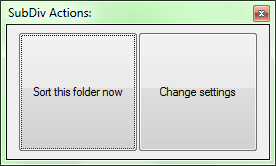
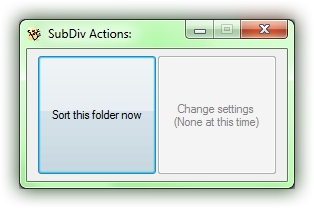
Gui, 2:Add, Button, vUpdate gSortNow h120 w120, Sort this folder now
Gui, 2:Add, Button, vSettings gShowSettings x+0 h120 w120, Change settings
Gui, 2:+ToolWindow
Gui, 2:Show, Center, SubDiv
Pause On

Actions:
Pause Off
Gui, 3:Hide
Gui, 2:Show, Center, SubDiv
Pause On

SortNow:
Pause Off
Loop %A_WorkingDir%\*, 0, %Recursive% ; Retrieve a list of files to be sorted
	NewFiles = %NewFiles%%A_LoopFileName%`n
UpdateFolders()
StringTrimRight, SortTime, %A_Now%, 6
if Separator = 1
	UnderscoreSort()
if Separator = 2
	HyphenSort()
if ErrorLevel = 0
	GoSub Problems
MsgBox Finished sorting %A_WorkingDir%!
GoSub EndProg

UpdateFolders()
{
global

If (Cleanup == 1) {

Loop, *, 2,
{
  Size = 0
  Loop, %A_LoopFileName%\*, 1, 1
  {
    Size += %A_LoopFileSize%
}
;MsgBox Size of %A_LoopFileName% is %A_LoopFileSize% bytes.
If (Size < 1) {
FileRecycle, %A_LoopFileName%
}

}


}
Return
}

HyphenSort()
{
global
Loop PARSE, NewFiles, `n
{
	FileGetTime DateCreated, %A_LoopField%, C
	FormatTime, YearCreated, %DateCreated%, yyyy
	NowTime := SortTime
	EnvSub, NowTime, %DateCreated%, Days
	IfInString, A_LoopField, SubDiv
		Continue

		FormatTime, FolderName, %DateCreated%, yyyy


	FileCreateDir %FolderName%
	FileMove %A_LoopField%, %FolderName%
	EverRun=1
}
Return
}

UnderscoreSort()
{
	global
	Loop PARSE, NewFiles, `n
	{
		FileGetTime DateCreated, %A_LoopField%, C
		FormatTime, YearCreated, %DateCreated%, yyyy
		NowTime := SortTime
		EnvSub, NowTime, %DateCreated%, Days
		IfInString, A_LoopField, SubDiv
			Continue

			FormatTime, FolderName, %DateCreated%, yyyy


		FileCreateDir %FolderName%
		FileMove %A_LoopField%, %FolderName%
		EverRun=1
	}
	Return
}


ShowSettings:
Pause Off
Gui, 3:Show, Center, Settings Dialog:
Pause On

SendSettings:
Gui, 3:Submit

Separator=%SeparatorSelection%
Cleanup=%CleanupSetAt%


if (RecurseSetAt = 1) and (RecurseWarning = 0)
{
	MsgBox, 4, Caution:, You have instructed SubDiv to sort all files in this folder, including files inside subfolders.`nDoing this will destroy the folder structures in the sorted directory.  Are you sure?
RecurseWarning=1
	IfMsgBox No
		GoSub ShowSettings
}


Recursive=%RecurseSetAt%

Gui, 3:Hide
Gosub Start

Problems:
MsgBox Unknown problems were encountered, but I can't say what...
ExitApp

3GuiClose:
Gui, 3:Cancel
return
EndProg:
GuiClose:
2GuiClose:
ExitApp