DonationCoder.com forum
 
Read-only archive. This is a static copy of the DonationCoder.com forum. Reading and searching work as before; logging in, posting and private messages do not.
Archive of 2026-10-21 · About this archive · Main site

Last post Author Topic: IDEA: Use AHK GUI to make translucent overlay over apps that are not skinnable  (Read 57,957 times)

dwilbank

  • Supporting Member
  • Joined in 2009
  • **
  • Posts: 86
Hi.
Not sure if this would be useful to anyone else, but I could really use a solution for individualizing my multiple VNC sessions at work. It's impossible to tell one remoted machine from another unless we squint at the frame of each VNC session. I have already made custom mouse cursors for each machine, but that only goes so far...

I would hope to have a different AHK script running on each machine, all of which have the identical gray video capture software interface. The script would allow the user to know in an instant which machine he/she was remoting, by tinting portions of each interface a slightly different color, and also placing a big "CAP6", "CAP7" or "CAP8" label in an unused part of the screen.

All these graphics would be "click-though", of course, so that the user wouldn't even know a script was running. He would just say, "Gee, this program looks different."

I know AHK GUI will do this, but I made a valiant try and discovered it would take months of study to understand just the instructions.

If I could get a pair of boxes created at about 30% transparency, with random color tints, and random text inserted in them I'm sure I could figure out how to modify the XY coordinates and the RGB values from there. If I could get two buttons that launched generic scripts, I could also figure out how to move the buttons (I hope) and create more to launch other scripts.

And I would have joy.

Thanks!

skwire

  • I eat Coding Snacks for breakfast...
  • Global Moderator
  • Joined in 2005
  • *****
  • Posts: 5,297
    • Participated in NANY Challenge Seventeen Times
    • Coding Snacks
    • Superboy Coder
    • Cody Award
    • Volunteers/Staff
    • Gathering Badge
Is simply renaming a titlebar out of the question?

dwilbank

  • Supporting Member
  • Joined in 2009
  • **
  • Posts: 86
yeh
these screens are shrunk down much of the time - multiple remote sessions all fitting on my one screen

skwire

  • I eat Coding Snacks for breakfast...
  • Global Moderator
  • Joined in 2005
  • *****
  • Posts: 5,297
    • Participated in NANY Challenge Seventeen Times
    • Coding Snacks
    • Superboy Coder
    • Cody Award
    • Volunteers/Staff
    • Gathering Badge
I meant renaming the VNC window itself, not the remote capture windows.  Or, did I misunderstand you?

dwilbank

  • Supporting Member
  • Joined in 2009
  • **
  • Posts: 86
Hmm
Sounds like I would still be looking at small text, and wouldn't have visible script buttons...

skwire

  • I eat Coding Snacks for breakfast...
  • Global Moderator
  • Joined in 2005
  • *****
  • Posts: 5,297
    • Participated in NANY Challenge Seventeen Times
    • Coding Snacks
    • Superboy Coder
    • Cody Award
    • Volunteers/Staff
    • Gathering Badge
Would you mind providing a screenshot of your desktop so we have a better perspective?

dwilbank

  • Supporting Member
  • Joined in 2009
  • **
  • Posts: 86
I'm away from work for the weekend, but the software interface is shown on page 9 of the manual here.
http://www.digital-rapids.com/downloads/docs/Stream3.1_Users_Guide.pdf
Just imagine that interface tiled four to six times on a widescreen monitor using TightVNC...

Most people use a raritan switcher to switch control and view to each machine one-at-a-time. My per-machine AHK GUI idea would also let them instantly know which machine they are using. Right now they have to switch away from the machine to see what the menu tells them, then switch back, before they are sure they are using the right machine.

Thx

skwire

  • I eat Coding Snacks for breakfast...
  • Global Moderator
  • Joined in 2005
  • *****
  • Posts: 5,297
    • Participated in NANY Challenge Seventeen Times
    • Coding Snacks
    • Superboy Coder
    • Cody Award
    • Volunteers/Staff
    • Gathering Badge
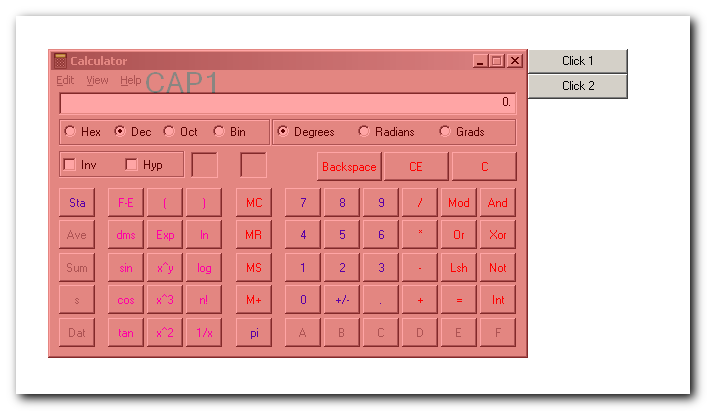
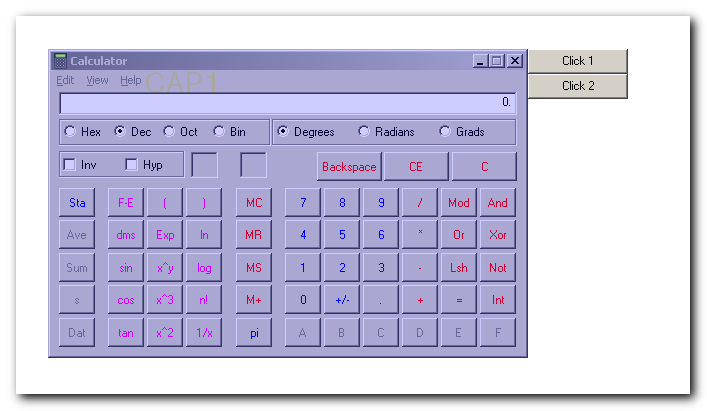
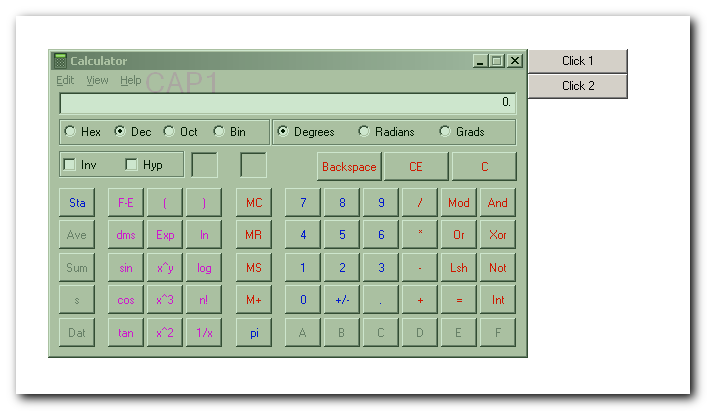
Here's something I came up with.  Caveat...the overlay does not move if you happen to move or resize the window it's overlaying.

thumb093.png
thumb094.png
thumb096.png
« Last Edit: September 12, 2009, 03:26 AM by skwire »

dwilbank

  • Supporting Member
  • Joined in 2009
  • **
  • Posts: 86
exactly!

and a non programmer like myself could change the dimensions of the box to fit our screens, or create another box, just by cutting and pasting code and changing x and y values?

skwire

  • I eat Coding Snacks for breakfast...
  • Global Moderator
  • Joined in 2005
  • *****
  • Posts: 5,297
    • Participated in NANY Challenge Seventeen Times
    • Coding Snacks
    • Superboy Coder
    • Cody Award
    • Volunteers/Staff
    • Gathering Badge
I currently have it set up with a hotkey so that it will do the following when fired:

1) Get the dimensions and position of the currently active window.
2) Create an overlay to match that window.  The "CAP" text position is modifiable in the code.
3) Create a second GUI for the buttons off to the upper right of the window.  The button position is, of course, modifiable.

skwire

  • I eat Coding Snacks for breakfast...
  • Global Moderator
  • Joined in 2005
  • *****
  • Posts: 5,297
    • Participated in NANY Challenge Seventeen Times
    • Coding Snacks
    • Superboy Coder
    • Cody Award
    • Volunteers/Staff
    • Gathering Badge
Here, have a play with this.  Save this out to an AHK file and run it.  Bring up any window and press F1.  You should see the overlay and buttons for that window.  You can keep pressing F1 over whatever window is active and the script will re-create the overlay for that window.  It's more of a proof of concept for now than, say, final code.  When you're done playing, exit the script from its tray icon.  Bedtime for me but I'll check back in in the morning.

Code
F1::
{
    Gui, 1: Destroy
    Gui, 2: Destroy

    ; Get stats for the active window.
    WinGetPos, X, Y, W, H, A

    ; Build out first GUI for the overlay.
    Gui, 1: +Toolwindow -Caption +Lastfound +AlwaysOnTop
    
    Gui, 1: Font, s22 ; Change the s# value to adjust font size.
    Gui, 1: Add, Text, xm+70 ym+5 w100 h25 0x200 vmyText, CAP1 ; Change the xm/ym values to position the text.
    Gui, 1: Font

    Gui, 1: Color, Green ; Change overlay colour here.

    Gui, 1: Show, % "x" . x . "y" . y . "w" . w . "h" . h, Overlay

    GUI_ID := WinExist()
    ; Set it transparent and make it click-through.
    WinSet, Transparent, 50         , % "ahk_id " . GUI_ID ; Change the numerical value for opaqueness amount.
    WinSet, ExStyle    , ^0x00000020, % "ahk_id " . GUI_ID ; Leave this value alone.

    ; Build out second GUI for the buttons.
    Gui, 2: Margin, 0, 0
    Gui, 2: +Toolwindow -Caption +Lastfound +AlwaysOnTop
    Gui, 2: Add, Button, x y w100 h25 vmyButton1 gonClick, Click 1
    Gui, 2: Add, Button, x y w100 h25 vmyButton2 gonClick, Click 2
    Gui, 2: Show, % "x" . ( x + w ) . " y" .  y
}
Return

onClick:
{
    Gui, 2: Submit, NoHide
    If ( A_GuiControl = "myButton1" )
    {
        ; Do stuff here.
        MsgBox, You clicked Button 1.
    }
    Else If ( A_GuiControl = "myButton2" )
    {
        ; Do other stuff here.
        MsgBox, You clicked Button 2.
    }
}
Return

dwilbank

  • Supporting Member
  • Joined in 2009
  • **
  • Posts: 86
Well sir. I'm going to have to go to work tomorrow just to play with this.
Thanks, and will have a report for you soon!

dwilbank

  • Supporting Member
  • Joined in 2009
  • **
  • Posts: 86
Cool.
I fooled with the color and font size and suspect I can change the font color too with a little research.
(What about the font itself? Or are we stuck with this Arial type font?)

The only thing left is to take out code, believe it or not.

All our machines run at the same screen resolution (1280x768), and our encoding app always runs full screen, so I don't need the overlays to be dynamically positioned at all.
Strict X and Y and W and H values which I can change by hand would be perfect. (I'll be spacing multiple colored boxes and up to 12 buttons all over the interface where there is unused space)

Will I be able to place buttons within the same space as the color overlay?

Can't wait to try v2!

Code
F1::
{
    Gui, 1: Destroy
    Gui, 2: Destroy

    ; Get stats for the active window.
    WinGetPos, X, Y, W, H, A

    ; Build out first GUI for the overlay.
    Gui, 1: +Toolwindow -Caption +Lastfound +AlwaysOnTop
    
    Gui, 1: Font, s60 ; Change the s# value to adjust font size.
    Gui, 1: Add, Text, xm+570 ym+125 w100 h25 0x200 vmyText, EVDCAP 6 ; Change the xm/ym 

values to position the text.
    Gui, 1: Font

    Gui, 1: Color, Red ; Change overlay colour here.

    Gui, 1: Show, % "x" . x . "y" . y . "w" . w . "h" . h, Overlay

    GUI_ID := WinExist()
    ; Set it transparent and make it click-through.
    WinSet, Transparent, 85         , % "ahk_id " . GUI_ID ; Change the numerical value for opaqueness 

amount.
    WinSet, ExStyle    , ^0x00000020, % "ahk_id " . GUI_ID ; Leave this value alone.

    ; Build out second GUI for the buttons.
    Gui, 2: Margin, 0, 0
    Gui, 2: +Toolwindow -Caption +Lastfound +AlwaysOnTop
    Gui, 2: Add, Button, x y w100 h25 vmyButton1 gonClick, Click 1
    Gui, 2: Add, Button, x y w100 h25 vmyButton2 gonClick, Click 2
    Gui, 2: Show, % "x" . ( x + w ) . " y" .  y
}
Return

onClick:
{
    Gui, 2: Submit, NoHide
    If ( A_GuiControl = "NTSC" )
    {
        ; Do stuff here.
        MsgBox, (code for switching to NTSC to be inserted later)
    }
    Else If ( A_GuiControl = "PAL" )
    {
        ; Do other stuff here.
        MsgBox, (code for switching to PAL to be inserted later)
    }
}
Return

skwire

  • I eat Coding Snacks for breakfast...
  • Global Moderator
  • Joined in 2005
  • *****
  • Posts: 5,297
    • Participated in NANY Challenge Seventeen Times
    • Coding Snacks
    • Superboy Coder
    • Cody Award
    • Volunteers/Staff
    • Gathering Badge
I fooled with the color and font size and suspect I can change the font color too with a little research.
(What about the font itself? Or are we stuck with this Arial type font?)

Yes, most everything about the font can be change e.g. colour, style, weight, etc.

All our machines run at the same screen resolution (1280x768), and our encoding app always runs full screen, so I don't need the overlays to be dynamically positioned at all.
Strict X and Y and W and H values which I can change by hand would be perfect. (I'll be spacing multiple colored boxes and up to 12 buttons all over the interface where there is unused space)

I figured as much about the resolution.  As for multiple boxes, you will need to create a Gui instance for each.  If you want me to do it, I will need a screenshot with information showing what you want where.

Will I be able to place buttons within the same space as the color overlay?

Yes.

dwilbank

  • Supporting Member
  • Joined in 2009
  • **
  • Posts: 86
I could send a screenshot monday if you want, but I think I might have to position and reposition the boxes myself (probably two wide boxes, one filling the top of the screen, and one filling the bottom, leaving the middle open) several times before all my coworkers are happy.

Just separating the box size and position from the WinGetPos part of the code would allow me to do that.
I looked at the line that said:

Gui, 1: Show, % "x" . x . "y" . y . "w" . w . "h" . h, Overlay

and I couldn't figure out where I could type in numeric values to give a custom size and shape to the box.

So...

The 2nd Box would become GUI 2,

and if I plan to make, say, 12 buttons to launch 12 different video encoding profiles, those would become GUI 3 through GUI 14?

skwire

  • I eat Coding Snacks for breakfast...
  • Global Moderator
  • Joined in 2005
  • *****
  • Posts: 5,297
    • Participated in NANY Challenge Seventeen Times
    • Coding Snacks
    • Superboy Coder
    • Cody Award
    • Volunteers/Staff
    • Gathering Badge
You would do something like this:

Code
x := 0
y := 0
w := 1280
h := 200
Gui, 1: Show, % "x" . x . "y" . y . "w" . w . "h" . h, Overlay

Or, you could do it like this:

Code
Gui, 1: Show, x+0 y+0 w1280 h200, Overlay


Your second coloured box would be Gui, 2.  As for the buttons, you could do them all in Gui, 3.  You position them like this:

Code
Gui, 3: Add, Button, xm+100 ym+100 w100 h25 vmyButton1 gonClick, Click 1
Gui, 3: Add, Button, xm+400 ym+600 w100 h25 vmyButton2 gonClick, Click 2
[...]

Does that clear things up?

dwilbank

  • Supporting Member
  • Joined in 2009
  • **
  • Posts: 86
I think it will!

Just have to paste in my scripts to each of the buttons and see what happens.

Thanks so far!

(if I use the little donate button by your name, does that give you $$$ that you can use however you want, or is it restricted to just this site?)

skwire

  • I eat Coding Snacks for breakfast...
  • Global Moderator
  • Joined in 2005
  • *****
  • Posts: 5,297
    • Participated in NANY Challenge Seventeen Times
    • Coding Snacks
    • Superboy Coder
    • Cody Award
    • Volunteers/Staff
    • Gathering Badge
I think it will!
Just have to paste in my scripts to each of the buttons and see what happens.
Thanks so far!

You're welcome.  I'm happy to help.  Let me know if you need anything further.

(if I use the little donate button by your name, does that give you $$$ that you can use however you want, or is it restricted to just this site?)

The credit system on DC is very cool.  We can cash out our credits for cash.  (Actually, it all funnels back to mouser so he can buy more whips and chains to keep our noses to the grindstone with.  Bahahaha.  :P :P :P)

dwilbank

  • Supporting Member
  • Joined in 2009
  • **
  • Posts: 86
Oops.
Turns out the safest bet is to have no overlayed boxes at all, and just one positionable, semi-transparent text overlay.

Problem is, I can't seem to separate the code for the text from the code for the boxes. When I try, I get no text...

Without the boxes, I'll also have to figure out how to space the buttons around using just XY coordinates.

Will plug away at it till I hear back.

Thx

skwire

  • I eat Coding Snacks for breakfast...
  • Global Moderator
  • Joined in 2005
  • *****
  • Posts: 5,297
    • Participated in NANY Challenge Seventeen Times
    • Coding Snacks
    • Superboy Coder
    • Cody Award
    • Volunteers/Staff
    • Gathering Badge
Turns out the safest bet is to have no overlayed boxes at all, and just one positionable, semi-transparent text overlay.
Problem is, I can't seem to separate the code for the text from the code for the boxes. When I try, I get no text...

Code for which text?  The 'CAP#' stuff?  Are you able to take a screenshot and just draw what you want where on it for me (using Paint, etc.)?

Without the boxes, I'll also have to figure out how to space the buttons around using just XY coordinates.

If they're going to be all over your screen, you'd be better off putting each one in its own Gui, # block.

dwilbank

  • Supporting Member
  • Joined in 2009
  • **
  • Posts: 86
ah - I forgot about the screenshot idea.

Will grab one right now and paint it up with photoshop!

Thanks.

dwilbank

  • Supporting Member
  • Joined in 2009
  • **
  • Posts: 86
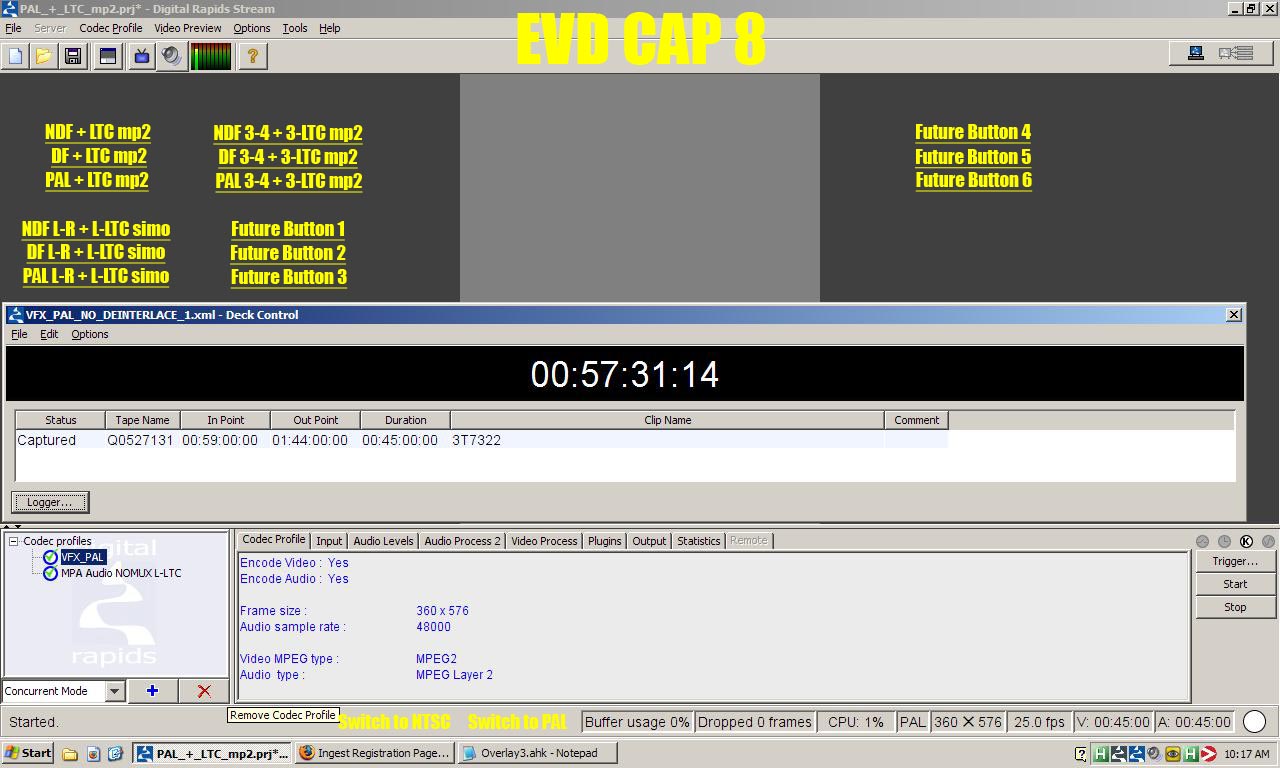
I made a mockup of the screen but...

can't attach files with this page here...
?

jgpaiva

  • Artificial Idiocy
  • Global Moderator
  • Joined in 2006
  • *****
  • Posts: 4,727
    • Cody Award
    • Participated in NANY Challenge Once
    • Coding Snacks
    • Portugal Inhabitant
    • Linux User
dwkkbank: See details here about how to attach files to posts on the forum ;)

dwilbank

  • Supporting Member
  • Joined in 2009
  • **
  • Posts: 86
interface with buttons.jpg

OK. Here it is.
Stationary text at the top, and 17 buttons beneath.
I know the yellow text would be black text on white buttons. I can fool with the color later.

dwilbank

  • Supporting Member
  • Joined in 2009
  • **
  • Posts: 86
thx mr paiva.

Original address: https://www.donationcoder.com/forum/index.php?topic=19896.0