DonationCoder.com forum
 
Read-only archive. This is a static copy of the DonationCoder.com forum. Reading and searching work as before; logging in, posting and private messages do not.
Archive of 2026-10-21 · About this archive · Main site

Author Topic: Converting the middle/wheel click to drag-n-drop  (Read 8,189 times)

Solving_Prob

  • Participant
  • Joined in 2009
  • *
  • Posts: 3
Converting the middle/wheel click to drag-n-drop
« on: May 06, 2009, 08:46 PM »
Hi all,

I am working on a project for elderly and people with disability. The project is on "re-adjusting" a normal computer mouse. Some of these folks can not double-click, nor hold the left-click down for dragging files/folders. I found the following codes for changing the middle-click to left-double-click. One is written in C# the other in CPP.

http://www.codeproject.com/KB/cs/MBtn2DblClick.aspx

http://www.codeproject.com/KB/cpp/MBtn2DblClickVC.aspx

This program would be very handy for them.

Regarding the 2nd part, what I am looking for, should work like the following:

1. Move the pointer on a file/folder
2. Press and release the Middle/Wheel Click
3. Move the pointer and it moves/drags the file/folder.
4. Press and release the click again and the pointer releases the file/ folder

This should work for the Windows environment. Does the description make sense?

Does anybody know if such a code has been written?

Thanks,

-Farzad

mouser

  • First Author
  • Administrator
  • Joined in 2005
  • *****
  • Posts: 40,931
    • Gathering Badge
    • Plugin Coding Medal
    • Participated in NANY Challenge Seventeen Times
    • Cody Award
    • Coding Snacks
    • Volunteers/Staff
Re: Converting the middle/wheel click to drag-n-drop
« Reply #1 on: May 07, 2009, 06:48 AM »
its an interesting idea.. so the middle click button would be like a TOGGLE -- click one to simulate left click and hold, and again to simulate release.

Solving_Prob

  • Participant
  • Joined in 2009
  • *
  • Posts: 3
Re: Converting the middle/wheel click to drag-n-drop
« Reply #2 on: May 07, 2009, 01:40 PM »
Exactly. This would be very useful for elderly and people with disability as some of them can not hold the left click down. If you have any ideas please let me know.

cmpm

  • Charter Member
  • Joined in 2006
  • ***
  • Posts: 2,026
Re: Converting the middle/wheel click to drag-n-drop
« Reply #3 on: May 07, 2009, 03:54 PM »
Maybe this can be set to do it.
If drag and drop = copy and paste.
It looks like it can do more as well.

http://lifehacker.com/software/featured-windows-download/copy-and-paste-quicker-using-your-mouse-with-true-x+mouse-gizmo-294701.php

http://fy.chalmers.se/~appro/nt/TXMouse/

Solving_Prob

  • Participant
  • Joined in 2009
  • *
  • Posts: 3
Re: Converting the middle/wheel click to drag-n-drop
« Reply #4 on: May 07, 2009, 11:43 PM »
Ahhh.. TXMouse only works for copy and paste of text in the clipboard.

I tried copying (ctrl-c) a file and using TXMouse to paste it, but it didn't work.

4wd

  • Pedantic Old Bastard
  • Supporting Member
  • Joined in 2006
  • **
  • Posts: 5,652
    • Coding Snacks
Re: Converting the middle/wheel click to drag-n-drop
« Reply #5 on: May 08, 2009, 04:27 AM »
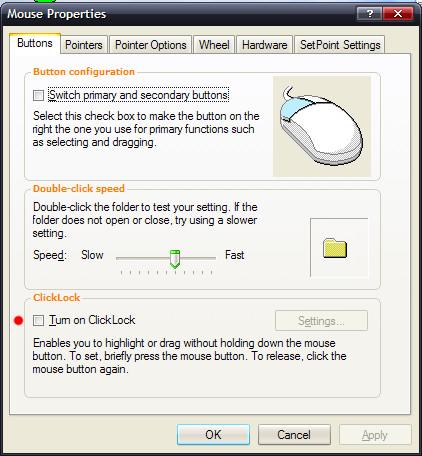
In the Mouse control panel you can turn on ClickLock which will take care of having to hold down the LMB to drag'n'drop.

capture_05082009_141905.jpg

That will leave only leave DBLCLK to take care of.

For which they could:
a) just single click on an icon to highlight, then hit Enter, or
b) turn on MouseKeys in Accessibilty which will then simulate a DBLCLK by pushing the '+' on the numpad, or
c) turn on 'Single click to open an item' under Folder Options.
"I will not follow where the path may lead, but I will go where there is no path, and I will leave a trail." - Muriel Strode, 1903

skwire

  • I eat Coding Snacks for breakfast...
  • Global Moderator
  • Joined in 2005
  • *****
  • Posts: 5,297
    • Participated in NANY Challenge Seventeen Times
    • Coding Snacks
    • Superboy Coder
    • Cody Award
    • Volunteers/Staff
    • Gathering Badge
Re: Converting the middle/wheel click to drag-n-drop
« Reply #6 on: May 08, 2009, 04:43 AM »
Here's some AHK code to do what you want:

Code
Mbutton::
{
    Toggle := !Toggle
    If ( Toggle )
    {
        Click, Left, Down
    }
    Else
    {
        Click, Left, Up
    }
}

yksyks

  • Supporting Member
  • Joined in 2006
  • **
  • Posts: 476
Re: Converting the middle/wheel click to drag-n-drop
« Reply #7 on: May 08, 2009, 11:33 AM »
You can use the free HotkeyP to easily accomplish this and many more.

Original address: https://www.donationcoder.com/forum/index.php?topic=18213.0