DonationCoder.com forum
 
Read-only archive. This is a static copy of the DonationCoder.com forum. Reading and searching work as before; logging in, posting and private messages do not.
Archive of 2026-10-21 · About this archive · Main site

Author Topic: character encoding keeps changing to Cyrillic in WinXP  (Read 10,910 times)

lanux128

  • Global Moderator
  • Joined in 2005
  • *****
  • Posts: 6,277
    • Coding Snacks
    • Volunteers/Staff
    • Gathering Badge
    • Participated in NANY Challenge Once
    • Linux User
i noticed recently that i can't type certain characters without them being turned into Russian chars. i checked the regional settings then i looked at the character encoding on my browser and email programs and also my office programs but they all show as 'English - United States' or its equivalent (Western ISO 8859).

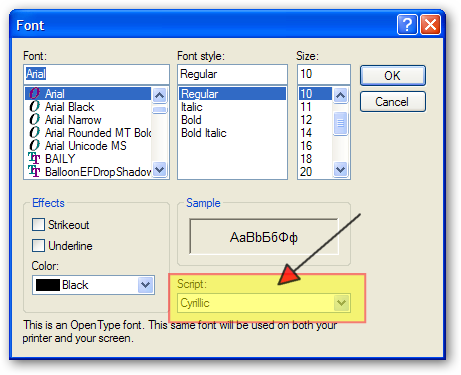
later while fiddling with the font settings, i found out that all the fonts' script has been changed to 'Cyrillic' instead of 'Western' (see pic). changing them back is now an issue because once i closed the dialog, it's reverted to Cyrillic encoding. so can someone help me with this problem?

[attach=#]
muntealb

  • Member
  • Joined in 2007
  • **
  • Posts: 90
Re: character encoding keeps changing to Cyrillic in WinXP
« Reply #1 on: May 05, 2009, 03:44 PM »
Did you also check the language options ?

Regional and Language Options>Languages>Text Services>Details>Default input language

Regional and Language Options>Advanced>Language for non-Unicode programs

lanux128

  • Global Moderator
  • Joined in 2005
  • *****
  • Posts: 6,277
    • Coding Snacks
    • Volunteers/Staff
    • Gathering Badge
    • Participated in NANY Challenge Once
    • Linux User
Re: character encoding keeps changing to Cyrillic in WinXP
« Reply #2 on: May 06, 2009, 01:35 AM »
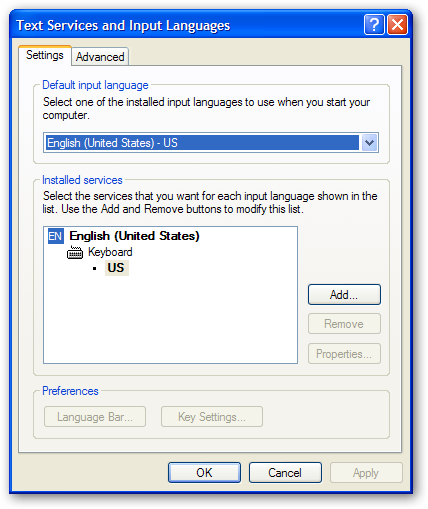
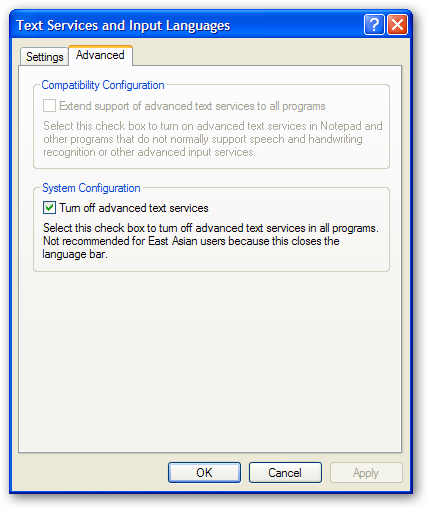
yes i did but i couldn't find the 2nd item: "Language for non-Unicode programs". here are the screenshots from PC.

[attachthumb=#][attachthumb=#]


fenixproductions

  • Honorary Member
  • Joined in 2006
  • **
  • Posts: 1,186
    • Participated in NANY Challenge Four Times
Re: character encoding keeps changing to Cyrillic in WinXP
« Reply #3 on: May 06, 2009, 02:48 AM »
Just guessing...

1. Try to delete fonts cache file (C:\WINDOWS\system32\FNTCACHE.DAT) and restart your PC.

2. remove all non-english localisation settings (like Cyrillic support) and install again after restart,

3. export two registry keys and compare them with ones from correctly working Windows:
HKEY_LOCAL_MACHINE\SOFTWARE\Microsoft\Windows NT\CurrentVersion\FontSubstitutes
HKEY_LOCAL_MACHINE\SOFTWARE\Microsoft\Windows NT\CurrentVersion\Font

4. there is possibility that system fonts (System, Fixedsys, Small Fonts, MS Serif, MS Sans Serif, Courier, Arial CE, Courier New CE, Times New Roman CE, Helv, Tms Rmn) are corrupted, so you can always take them from other PC and install again,
Надо было учиться, а не камни в школу бросать...
--
f0dder is my personal hero :)

lanux128

  • Global Moderator
  • Joined in 2005
  • *****
  • Posts: 6,277
    • Coding Snacks
    • Volunteers/Staff
    • Gathering Badge
    • Participated in NANY Challenge Once
    • Linux User
Re: character encoding keeps changing to Cyrillic in WinXP
« Reply #4 on: May 06, 2009, 03:31 AM »
thanks fenix, will try out the suggestions..

muntealb

  • Member
  • Joined in 2007
  • **
  • Posts: 90
Re: character encoding keeps changing to Cyrillic in WinXP
« Reply #5 on: May 06, 2009, 04:55 AM »
yes i did but i couldn't find the 2nd item: "Language for non-Unicode programs". here are the screenshots from PC.

It's easy to find it. There are 3 tabs in the main window (Regional and Language Options) :

Regional Options
Languages
Advanced

The setting for non-Unicode programs is in the Advanced tab.

lanux128

  • Global Moderator
  • Joined in 2005
  • *****
  • Posts: 6,277
    • Coding Snacks
    • Volunteers/Staff
    • Gathering Badge
    • Participated in NANY Challenge Once
    • Linux User
Re: character encoding keeps changing to Cyrillic in WinXP
« Reply #6 on: May 06, 2009, 05:20 AM »
It's easy to find it. There are 3 tabs in the main window (Regional and Language Options) :

Regional Options
Languages
Advanced

The setting for non-Unicode programs is in the Advanced tab.

thanks i found it but the setting is the same as yours..

lanux128

  • Global Moderator
  • Joined in 2005
  • *****
  • Posts: 6,277
    • Coding Snacks
    • Volunteers/Staff
    • Gathering Badge
    • Participated in NANY Challenge Once
    • Linux User
Re: character encoding keeps changing to Cyrillic in WinXP
« Reply #7 on: May 06, 2009, 05:24 AM »
Just guessing...

1. Try to delete fonts cache file (C:\WINDOWS\system32\FNTCACHE.DAT) and restart your PC.

no, it didn't work..


2. remove all non-english localisation settings (like Cyrillic support) and install again after restart,

i don't how to do this.. :(


3. export two registry keys and compare them with ones from correctly working Windows:
HKEY_LOCAL_MACHINE\SOFTWARE\Microsoft\Windows NT\CurrentVersion\FontSubstitutes
HKEY_LOCAL_MACHINE\SOFTWARE\Microsoft\Windows NT\CurrentVersion\Font

i compared with another PC and they were almost the same except for some app-installed fonts.


4. there is possibility that system fonts (System, Fixedsys, Small Fonts, MS Serif, MS Sans Serif, Courier, Arial CE, Courier New CE, Times New Roman CE, Helv, Tms Rmn) are corrupted, so you can always take them from other PC and install again,

haven't got down to this yet, maybe i should have the repair CD on the standby..

lanux128

  • Global Moderator
  • Joined in 2005
  • *****
  • Posts: 6,277
    • Coding Snacks
    • Volunteers/Staff
    • Gathering Badge
    • Participated in NANY Challenge Once
    • Linux User
Re: character encoding keeps changing to Cyrillic in WinXP
« Reply #8 on: May 08, 2009, 06:26 AM »
4. there is possibility that system fonts (System, Fixedsys, Small Fonts, MS Serif, MS Sans Serif, Courier, Arial CE, Courier New CE, Times New Roman CE, Helv, Tms Rmn) are corrupted, so you can always take them from other PC and install again,

haven't got down to this yet, maybe i should have the repair CD on the standby..

ok, i've also done this. i extracted the system fonts from the WinXP CD and installed them again but no avail. i did a full-system scan for malware but again came to nought. i'd been thinking of reinstalling windows if there can't be any other solution. :(

Original address: https://www.donationcoder.com/forum/index.php?topic=18184.0