DonationCoder.com forum
 
Read-only archive. This is a static copy of the DonationCoder.com forum. Reading and searching work as before; logging in, posting and private messages do not.
Archive of 2026-10-21 · About this archive · Main site

Last post Author Topic: Firefox Extensions: Your favorite or most useful  (Read 1,118,434 times)

nosh

  • Supporting Member
  • Joined in 2007
  • **
  • Posts: 1,441
Re: Firefox Extensions: Your favorite or most useful
« Reply #450 on: May 05, 2012, 06:40 PM »
So I finally realized the feed auto-discovery button has gone missing in Firefox.

The feature can be brought back by customizing the toolbar and adding the insipid "Subscribe" button.

Enabled: [attachimg=#] Disabled: [attachimg=#]

Or via the addon RSS Icon In Awesombar [attachimg=#]


Tuxman

  • OMG not him again!
  • Supporting Member
  • Joined in 2006
  • **
  • Posts: 2,522
    • Participated in NANY Challenge Seven Times
Re: Firefox Extensions: Your favorite or most useful
« Reply #451 on: May 05, 2012, 06:42 PM »
Yep, been using the latter for months. A pity Firefox follows the Chrome design guidelines and Mozilla removes more and more essential features. Good thing there are extensions.
I bet when Cheetahs race and one of them cheats, the other one goes "Man, you're such a Cheetah!" and they laugh & eat a zebra or whatever.

IainB

  • @Slartibartfarst
  • Supporting Member
  • Joined in 2008
  • **
  • Posts: 7,544
Re: Firefox Extensions: Your favorite or most useful
« Reply #452 on: May 06, 2012, 09:21 AM »
Are there still any users of Mr Tech Toolkit?
...
-------------
The latest version is marked October 18, 2011, but may be much older. It is not on Mozilla:  (see attachment in previous post)
I had Mr Tech Toolkit for years, and managed my add-ons through it, but I removed disabled it as it seemed to be not keeping up with the FF updates and started causing FF to crash in peculiar ways. I was sad to see it go.    :(
« Last Edit: May 06, 2012, 12:33 PM by IainB »

Curt

  • Supporting Member
  • Joined in 2006
  • **
  • Posts: 7,565
Re: Firefox Extensions: Your favorite or most useful
« Reply #453 on: May 06, 2012, 11:40 AM »
After two weeks with Waterfox I am pleased with this setup:
(...)

EDITED: File removed due to serious bug!
« Last Edit: May 08, 2012, 06:23 AM by Curt »

IainB

  • @Slartibartfarst
  • Supporting Member
  • Joined in 2008
  • **
  • Posts: 7,544
Re: Firefox Extensions: Your favorite or most useful
« Reply #454 on: May 06, 2012, 12:36 PM »
@Curt: Yes, thanks. That was the version I had/have. I disabled it (corrected my post above), as it didn't work and is incompatible with FF - and I have v13 now.

Curt

  • Supporting Member
  • Joined in 2006
  • **
  • Posts: 7,565
Re: Firefox Extensions: Your favorite or most useful
« Reply #455 on: May 06, 2012, 03:48 PM »
-oh. I posted my quote because I am using Waterfox (a 64-bit Firefox clone) version 11, and Mr Tech is doing okay.

Tuxman

  • OMG not him again!
  • Supporting Member
  • Joined in 2006
  • **
  • Posts: 2,522
    • Participated in NANY Challenge Seven Times
Re: Firefox Extensions: Your favorite or most useful
« Reply #456 on: May 06, 2012, 03:50 PM »
You're still on v11?  ;D :D :P
I bet when Cheetahs race and one of them cheats, the other one goes "Man, you're such a Cheetah!" and they laugh & eat a zebra or whatever.

Curt

  • Supporting Member
  • Joined in 2006
  • **
  • Posts: 7,565
Re: Firefox Extensions: Your favorite or most useful
« Reply #457 on: May 06, 2012, 03:59 PM »
Quote from: About Waterfox
"Waterfox 11 is up to date"
To my understanding there is no 64-bit Firefox 11, 12, or 13?

« Last Edit: May 06, 2012, 04:18 PM by Curt »

Tuxman

  • OMG not him again!
  • Supporting Member
  • Joined in 2006
  • **
  • Posts: 2,522
    • Participated in NANY Challenge Seven Times
Re: Firefox Extensions: Your favorite or most useful
« Reply #458 on: May 06, 2012, 04:06 PM »
Linux has been having a 64 bit build for years. Win64 builds are available in the "comm-central" branch, Firefox 15 "alpha". :)
I bet when Cheetahs race and one of them cheats, the other one goes "Man, you're such a Cheetah!" and they laugh & eat a zebra or whatever.

Curt

  • Supporting Member
  • Joined in 2006
  • **
  • Posts: 7,565
Re: Firefox Extensions: Your favorite or most useful
« Reply #459 on: May 06, 2012, 04:20 PM »
-yes, I saw the Linux version was updated four days ago. Good for you.

Both the Waterfox homepage and the Waterfox Beta-channel update are crap!
I am now running Waterfox 12. Thanks for the hint, Tuxman  :up:

--------------
The place to go: http://www.firefox64bit.com/

Tuxman

  • OMG not him again!
  • Supporting Member
  • Joined in 2006
  • **
  • Posts: 2,522
    • Participated in NANY Challenge Seven Times
Re: Firefox Extensions: Your favorite or most useful
« Reply #460 on: May 06, 2012, 04:23 PM »
Waterfox' homepage is pretty much useless, all I need is this.  :P

(I would never trust a website like firefox64bit.com! No real "contact", no author information, ...)
I bet when Cheetahs race and one of them cheats, the other one goes "Man, you're such a Cheetah!" and they laugh & eat a zebra or whatever.

Curt

  • Supporting Member
  • Joined in 2006
  • **
  • Posts: 7,565
Re: Firefox Extensions: Your favorite or most useful
« Reply #461 on: May 06, 2012, 09:28 PM »
After two weeks with Waterfox I am pleased with this setup:
(...)  (see attachment in previous post)
@Curt: Yes, thanks. That was the version I had/have.

-no, IainB, your Extension List Dumper reports version 6.0.4, but mine is 6.0.4.9000. But of course my Waterfox is merely version 12, not 13. Furthermore I don't remember if my Mr Tech came from the homepage or where-ever.

Here it is:  - not the same as the homepage version.
EDITED: File removed due to serious bug!
« Last Edit: May 08, 2012, 06:24 AM by Curt »

IainB

  • @Slartibartfarst
  • Supporting Member
  • Joined in 2008
  • **
  • Posts: 7,544
Re: Firefox Extensions: Your favorite or most useful
« Reply #462 on: May 07, 2012, 02:16 AM »
...
-no, IainB, your Extension List Dumper reports version 6.0.4, but mine is 6.0.4.9000.
...
Edited:
Here it is: http://mrte.ch/toolkit - not the same as the homepage version.
Thanks @Curt!
I had noticed the difference but had thought the .9000 was probably a minor version that I had already played with (though I had forgotten which versions I had tried, and I had no audit trail).
I must apologise for thinking of trying it out but being disinclined to do so as I had already invested more than enough time in fruitless mucking-about with different Mr Tech installs quite some time back.
Anyway, I followed that link - http://mrte.ch/toolkit and am delighted to report that it seems to work a treat - so far on my setup (Win 7-64 Home Premium, FF v13.0).    :Thmbsup:

Thanks again!

PS: What do we know about the soure of that .9000 install? It came rather anonymously from a shortened link.
By the way, the link shortener is http://mrte.ch/ and comes from "Mr Tech", but I don't know any more than that.
« Last Edit: May 07, 2012, 02:52 AM by IainB »

Curt

  • Supporting Member
  • Joined in 2006
  • **
  • Posts: 7,565
Re: Firefox Extensions: Your favorite or most useful
« Reply #463 on: May 07, 2012, 07:45 AM »
https://addons.mozilla.org/en-US/firefox/addon/mr-tech-toolkit/reviews/
scroll one third down:
EDITED: serious bug!

[attachimg=#]


Some Asian guy, SnakeDoctor4509, no further details.

« Last Edit: May 08, 2012, 06:25 AM by Curt »

IainB

  • @Slartibartfarst
  • Supporting Member
  • Joined in 2008
  • **
  • Posts: 7,544
Re: Firefox Extensions: Your favorite or most useful
« Reply #464 on: May 07, 2012, 10:06 PM »
WARNING re MrTech Toolkit v6.0.4.9000 differences.
I had a minor panic today when I went to check through my Greasemonkey scripts - they weren't there any more!    :o
Actually, they were still there, but you just couldn't see/touch them whilst MrTech was enabled. (Phew!)

Otherwise when enabled, this add-on seems to work well so far, with these noticeable differences in FF to when it is disabled/enabled:
Disabled:
  • FF has the standard grey jigsaw-piece Manage Add-ons button, which brings up the Add-ons page in a tab (which is what I want and how I have things set).
  • The Add-ons page shows:
Quote
  • 1. Get Add-ons
  • 2. Extensions
  • 3. Appearane
  • 4. Plugins
  • 5. User Scripts
Enabled:
  • FF has the standard grey jigsaw-piece Manage Add-ons button, which brings up the Add-ons in a separate pseudo-Firefox window, with some additional buttons. It has a good UI, but it overrides how I had things set up - I want the Add-ons page brought up in a tab.
  • Has a green green jigsaw-piece Manage Add-ons button which conveniently lists all the add-ons by icon and name in a small popup menu, so you can just select the one you want to examine.
  • The Add-ons page shows:
Quote
  • 1. Get Add-ons
  • 2. Extensions
  • 3. Appearane
  • 4. Plugins

I have MrTech disabled now, and will enable it as and when I need it.
A lot of the MrTech functionality seems to have been implemented in FF now anyway, but MrTech sometimes seems to do what it does in a nicer and more informative UI.

Curt

  • Supporting Member
  • Joined in 2006
  • **
  • Posts: 7,565
Re: Firefox Extensions: Your favorite or most useful
« Reply #465 on: May 08, 2012, 06:32 AM »
oh, this is awful bad! I am so sorry!  :-[

It gets even worse: Do not try to let Mr Tech handle the addon manager by itself, or you will completely lose access to the addons!!! I just did that, and because I cannot find any way to access my addons, I am also unable to disable Mr Tech!!

Please post the proper solution to this nightmare!

-------  :tellme:

I am so sorry for having caused this kind of problems to others!  :hanged:

Curt

  • Supporting Member
  • Joined in 2006
  • **
  • Posts: 7,565
Re: Firefox Extensions: Your favorite or most useful
« Reply #466 on: May 08, 2012, 06:47 AM »
can I simply delete C:\Users\username\AppData\Roaming\Mozilla\Firefox\Profiles\13kfheeu.default\extensions\{9669CC8F-B388-42FE-86F4-CB5E7F5A8BDC}.xpi , or will that just cause more troubles?

Edited:
Yes, I could merely delete it. My Waterfox is doing okay now, without Mr Tech.
« Last Edit: May 08, 2012, 07:16 AM by Curt »

IainB

  • @Slartibartfarst
  • Supporting Member
  • Joined in 2008
  • **
  • Posts: 7,544
Re: Firefox Extensions: Your favorite or most useful
« Reply #467 on: May 08, 2012, 09:30 AM »
@Curt:
I know that feeling of panic!
Good job you had the Extension List Dumper report!
Don't worry, you didn't cause any problems for others - well, not for me, at any rate.
I knew to be cautious with an unknown source for MrTech. It's probably a ß version - a work in progress.

For future reference: If you bring up FF with SHIFT-Click on the shortcut, then I think it should load with NO add-ons running, and you can then make changes from there. I had to do that with a couple of add-ons before when I was updating FF. Maybe one of them was the older version of MrTech, I'm not sure.

Curt

  • Supporting Member
  • Joined in 2006
  • **
  • Posts: 7,565
Re: Firefox Extensions: Your favorite or most useful
« Reply #468 on: May 08, 2012, 01:29 PM »
Good job you had the Extension List Dumper report!

-yes, that was one situation that "forever" will justify this add-on  :up:

Thank you for reminding me of Shift+Click. I really had forgotten!

kyrathaba

  • N.A.N.Y. Organizer
  • Honorary Member
  • Joined in 2006
  • **
  • Posts: 3,200
    • Participated in NANY Challenge Eight Times
    • Programming School - Deluxe Bonus Medal
    • Programming School - Stage 1 Medal
    • Coding Snacks
    • Military Service Badge - US Army
    • Writer
Re: Firefox Extensions: Your favorite or most useful
« Reply #469 on: August 02, 2012, 12:21 AM »
Has anyone used the Mozilla Archive Format, as discussed in the description of the following FF extension?

https://addons.mozilla.org/en-US/firefox/addon/mozilla-archive-format/?src=cb-dl-featured
Win 10 Pro running on a 3.2 GHz CPU and 12 Gb RAM
__________________________________________

Proofreading Service: http://williammillerservices.com/proofreading

TaoPhoenix

  • 0 - 60 ... then back to 0 again!
  • Supporting Member
  • Joined in 2011
  • **
  • Posts: 4,642
    • Participated in NANY Challenge Three Times
Re: Firefox Extensions: Your favorite or most useful
« Reply #470 on: August 02, 2012, 12:39 AM »
Has anyone used the Mozilla Archive Format, as discussed in the description of the following FF extension?

https://addons.mozilla.org/en-US/firefox/addon/mozilla-archive-format/?src=cb-dl-featured

That looks fascinating, but I won't try it just now, I'm distractible these days and this looks like it could chew up an entire day!
Use attachthumb=# to show an attached image as an expandable thumbnail, or attach=# to show full size. (With Brackets)

IainB

  • @Slartibartfarst
  • Supporting Member
  • Joined in 2008
  • **
  • Posts: 7,544
Re: Firefox Extensions: Your favorite or most useful
« Reply #471 on: August 02, 2012, 01:52 AM »
Has anyone used the Mozilla Archive Format, as discussed in the description of the following FF extension?
https://addons.mozilla.org/en-US/firefox/addon/mozilla-archive-format/?src=cb-dl-featured
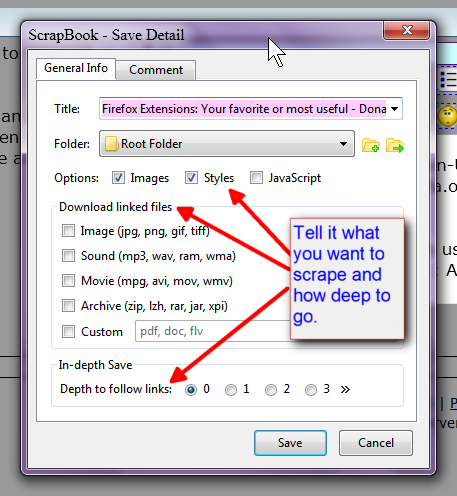
No I haven't tried it, but I already use ScrapBook :: Add -ons for Firefox - Mozilla, which does the same except not compress. It also does more:
[attach]

Curt

  • Supporting Member
  • Joined in 2006
  • **
  • Posts: 7,565
Re: Firefox Extensions: Your favorite or most useful
« Reply #472 on: August 02, 2012, 09:46 PM »
What must I do to force Firefox / Waterfox to install an addon / extension?  :tellme:

Nightly Tester Tools :: Add-ons for Firefox will force add-on compatibility  :up:

IainB

  • @Slartibartfarst
  • Supporting Member
  • Joined in 2008
  • **
  • Posts: 7,544
Re: Firefox Extensions: Your favorite or most useful
« Reply #473 on: November 25, 2012, 04:05 AM »
Not sure if this is the right place to put this, but:
If you, like me, are running FF v17.0, and are being driven crazy because you think things are looking a little fuzzy on the screen, it's probably because they are fuzzy - not necessarily because of your fading eyesight, but due to a bug.
Fix-it notes here: Firefox 17.0.1 to fix blurry font issue in the browser

Basically:
1. about:config
2. find: gfx.content.azure.enabled (It's probably set to "True".)
3. Double click it to set it to "False".
4 Restart FF.

It worked for me. So simple.

TaoPhoenix

  • 0 - 60 ... then back to 0 again!
  • Supporting Member
  • Joined in 2011
  • **
  • Posts: 4,642
    • Participated in NANY Challenge Three Times
Re: Firefox Extensions: Your favorite or most useful
« Reply #474 on: November 25, 2012, 04:39 AM »
In some ways my best "extensions" (quotes needed!) are the couple of widgets I got from here. They don't officially hook per se, but they're browser-use based.
Use attachthumb=# to show an attached image as an expandable thumbnail, or attach=# to show full size. (With Brackets)

Original address: https://www.donationcoder.com/forum/index.php?topic=1685.0