7. Wired Marker - I only use it to Right-Click and highlight words with one of my saved colours. It's great because it's permanent.Nice one! I've for a long time wanted something exactly like that but for pdf files not html.
Just found this - it's great!
https://addons.mozilla.org/en-US/firefox/addons/policy/0/12059/54100

Our primary revenue source is our search partners, Yahoo! and Ask, so please give them a try. Brand Thunder includes Yahoo! Search as the default search engine and the popular search-enhancement extension from Surf Canyon. By clicking Accept & Install, you are accepting the Brand Thunder License Agreement.


My current top3 FF plugins are:
Secure Login - like Opera Wand login feature
Taboo - brilliant bookmark fceature
Fast Dial - similar to Operas Speed Dial feature
![]()
![]()


My current top3 FF plugins are:
Secure Login - like Opera Wand login feature
Taboo - brilliant bookmark fceature
Fast Dial - similar to Operas Speed Dial feature
![]()
![]()
I searched for Taboo under Bookmarks - nothing?
@CleverCat: give Session Manager a try as well.. Session Manager also dovetails well with TabMix Plus.
1. It might be a overkill, but I just found a extension that mimic vim's behavior in firefox. While it seems intimidating at first glance,it's actually quite good at saving screen estate and minimizing hand movement.
Only for the hardcore fans tho
http://vimperator.mozdev.org/
It is quite well documented (commands are mainly in the "various" category of the documentation) and there is a wiki too http://vimperator.cutup.org/index.php?title=Configuration
2. Another one I like is the secure login extension. The default password manager shipped with firefox always leave me unsatisfied. It feels somewhat awkward and insecure. The secure login extension prevents prefilling the form and can also temporally disable javascript to prevent cross-site scripting. Best of its feature, imho, is that it is much easier and snappy to use. It automatically highlight the form. You press Alt-N and it not only automatically fills it but also presses enter for you. If you have two accounts, it offers a box to select one and off you go. Very Handy!
https://addons.mozilla.org/en-US/firefox/addon/4429
Well, there are many. Acrobat is the expensive, but best solution.7. Wired Marker - I only use it to Right-Click and highlight words with one of my saved colours. It's great because it's permanent.Nice one! I've for a long time wanted something exactly like that but for pdf files not html.


I made a collection here -
https://addons.mozilla.org/en-US/firefox/collection/f2b87cb7-9a00-1c0d-64d0-0911e73407cd
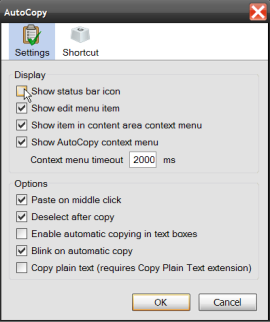
Oh yes, I did just go there. Hands-down, without a skerrick of doubt, AutoCopy is the best Firefox extension. It may also be the best Firefox extension you've never heard of. Here's what it does, and then I'll tell you what makes it so great.
Developed at Mozilla, AutoCopy is a lightweight, single-feature add-on that copies any text you highlight to your clipboard. No more hitting CTRL+C, or using the context menu. That in and of itself is not so revolutionary. The feature has been around for a while in other programs. What makes it the must-have extension is that there's practically no other reason to highlight text on a Web page except to copy it to your clipboard.
What makes it the must-have extension is that there's practically no other reason to highlight text on a Web page except to copy it to your clipboard.
The fact that you need an extension for such a thing is really silly... Original address: https://www.donationcoder.com/forum/index.php?topic=1685.0