Re: NANY 2009 Release: Trout (audio player)
« Reply #775 on: November 01, 2011, 11:01 PM »


 Topic: NANY 2009 Release: Trout (audio player) (Read 1,051,251 times)




any idea???
Try this build, please:
Website | Installer | Portable
v1.0.6 build 41 - 2011-11-01
! Album art from tags didn't always update properly. (Thanks, IQLover)
 this is it
  Works perfectly; Thank you.
Yep
2 more questions: Is it possible to rip CDs with Trout?
Can you recommend any good SW to make FLAC-files from my CDs?

[Columns]
View_Col_#=1
View_Col_Artist=1
View_Col_Album=1
View_Col_Title=1
View_Col_Year=1
View_Col_Genre=1
View_Col_Time=1
View_Col_Bitrate=1
View_Col_Size=0
View_Col_Ext=0
View_Col_Path=0
View_Col_Filename=1
Width_Col_#=39
Width_Col_Artist=193
Width_Col_Album=147
Width_Col_Title=222
Width_Col_Year=38
Width_Col_Genre=89
Width_Col_Time=54
Width_Col_Bitrate=38
Width_Col_Size=0
Width_Col_Ext=0
Width_Col_Path=0
Width_Col_Filename=380
Column_Order=1,2,3,4,6,9,10,5,7,8,11,12,13,14,15,16,17
View_Col_Composer=1
View_Col_Comment=1
View_Col_Sample=1
Width_Col_Composer=0
Width_Col_Comment=0
Width_Col_Sample=0

[Settings]
Play_Mode=1
Always_Show_In_Tray=1
Minimize_To_Tray=1
Minimize_To_Tray_On_Close=0
Seekbar_Themed=1
Volume_Themed=1
LastFM_Username=
LastFM_Password=
LastFM_Enable=0
Tags_Missing_String=-
Minimize_On_Start=0
Toaster_Popup=1
Prev_Selected_Folder=<irrelevant>
Show_MiniBar_V_Mode=0
Show_MiniBar_H_Mode=1
Vol_Level=4
Remember_Playback_Data=0|246|0
MiniBar_AOT=1
Allow_Internet=0
GTalk_Support=0
Invert_Volume=0
Remember_Playback_Pos=0
Auto_Justify_Columns=0
Title_Text_Font=Arial Unicode MS
Title_Text_Color=0x800080
Title_Text_Style=bold s9
Title_Text_BG_Color=0xffffff
Listview_Font=Arial Unicode MS
Listview_Style=s8
Listview_Color=0x800080
Listview_BG_Color=0xfff2ff
File_Manager=
Seek_Interval=1
Playlist_Clear=1
Tags_Preserve_Mod_Times=0
Track_Between_Tracks_Type=1
Track_Between_Tracks_File=
Enable_Media_Keys=0
LastFM_Love_Track=0
Tray_Click_Num=1
Rewind_On_Resume=0
Pause_On_Idle=0
Track_Between_Tracks_TTS=Now playing track $index_c of $index_t
Prev_Selected_File=<irrelevant>
Last_Played_Row=37
LibreFM_Enable=0
LibreFM_Username=
LibreFM_Password=
Path_Music=
Path_Playlists=
Balloon_Tip_Timeout=4
Playlist_Clear_2=
Remember_Playlist_Pos=0
Remove_Dead_Entries=0
Album_Art_Disable=0
Level_Meter_Disable=0

[Hotkeys]
Hotkeys=+Up?Volume_up?Volume up?Shift-Up?Local|+Down?Volume_down?Volume down?Shift-Down?Local

[Formatting]
Seekbar=$artist§©-§©$title
Titlebar=$artist - $title
Tray_Icon=$artist - $title
Clipboard=$artist - $title, $album ($year), $time_t, $bitrate kB/s
Balloon=$artist - $title
Seekbar_Format_Style=1
Style=1

[Toaster]
L1_Format=$artist
L2_Format=$title
L3_Format=$year, $album
L4_Format=$time_t ($ext $bitrate kB/s), $genre
Stay_Time=7000
In_Speed=8
Out_Speed=8
In_Effect=Slide up
Out_Effect=Collapse to center
Border=Simple
BG_Color=0xffd2ff
L3_Color=0x0080c0
L3_Style=s1
L3_Font=MS Sans Serif
L1_Color=0x800080
L1_Style=s8
L1_Font=MS Sans Serif
No_Active_Show=0
Show_On_Resume=1
On_Click=1

[Position]
MiniBar_H_X=513
MiniBar_H_Y=20
pos_x=7
pos_y=15
pos_w=1257
pos_h=999Did this just start recently?
Did this just start recently?i installed the portable version from the zip file. Just now I installed a second copy from zip and tested and the same problem occurs. All I have are guesses. Perhaps the Add URL function or the hotkeys option might be the source of the problem.
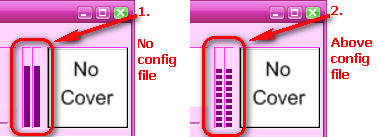
One other oddity - unless I'm missing the obvious - is that upon a clean install of Trout, the VU-meter will display solid bars following the audio level; using the above configuration file, the bars are segmented as if the theme were enabled under XP (but we're still talking about Win98SE).
Perhaps the Add URL function or the hotkeys option might be the source of the problem.
I'm at a loss as to why it's doing as it doesn't exhibit the issue under XP and Win7. Trout sets very few hotkeys by default and none of them are Ctrl+C.
 The interesting thing is why it didn't affect Win2000 and above in the same manner.
 Anyway, try this latest build and see if it solves the Ctrl+C problem. You're immortalised in the changelog forever now.
Now, as to the other hotkey issue, that is something I can look into. As you can imagine, Win98 testing for Trout has been extremely minimal on my part but Drugwash has kept me honest over the years.
Whew!! That was quick. Works fine. TYVM. I'll keep an eye out for the other issue and thanks again.
Did you copy this config.ini from an XP/7 box?Come to think about it, I may have moved the entire folder around, between machines with different operating systems, for testing purposes, some time ago. Used to be serious about testing but in the mean time, life happened. *sigh*


EXCELENT!!!.. I really like Trout player... its very simple, light, and I can use NUMPAD buttons for navigating... etc etc.. 10/10


I joined the website just to thank you for this audio player.
THANKS! This is the first player in Windows that is really comfortable in a long time!!
And just a small note: With the latest build there are some missing covers yet (Yes I've checked and I can see them with another players).
Sent you a PM with the link
Original address: https://www.donationcoder.com/forum/index.php?topic=16157.0