


NANY 2009 Entry Information
| Application Name | JustCloseSomeTasks |
| Version | 1.21 [July 08, 2009] |
| Short Description | An utility to let you easily close inactive tasks. |
| Supported OSes | Windows XP/Vista |
| Download Link | * NANY Release - See end of post * Latest Version * or inside the program Help >check for updates |
| Author | Link to Author's Profile page Donate |
Description
JustCloseSomeTasks is an utility to let you easily close inactive tasks. It saves taskbar space by offering you to close the stuff you've not used for a while. Tasks are automatically marked for closing when they're not used for a certain time period (expiry time). The program will learn your behaviour and adjust this expiry time.
I use a lot of programs, and many at the same time. Because of this when a lot of windows are open the taskbar becomes cluttered and I lose the overview required. JustCloseSomeTasks knows which programs I've not used and helps me manage.
Screenshots
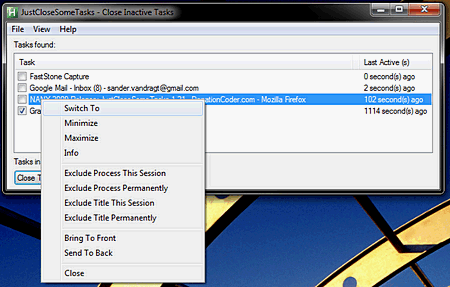
Usage
Installation
Portable installation, DcUpdater support via help menu
Using the Application
Press the hotkey button (Ctrl-[ by default - change via system tray -> preferences) and all windows are listed with the ones older than 120 seconds checked. press the close button to close these tasks. The program will learn and adjust the auto-marking period based on your usage.
Known Issues
* If installing under windows vista to the Program Files folder, please be aware that the program might not be able to read it settings file. Run it once as an administrator to have the settings.ini created.
* Applications that don't communicate their window title or ID are hidden from the list for safety reasons. If you know any please let me know as I'd like to add support for the most vocal missing ones.
Download Page
 JustCloseSomeTasks.zip
 VanDragt.com


 Please don't be discouraged when the list clears but if you can help me find out when it clears that would help a great deal.
 great work Perry
 I've not really programmed in AutoHotKey, I'm more used to AutoIt3, but that function was the only area I could see that things could go wrong, so I added a check for when the active window was skipped over (removed from the list).
 I also appreciate the feedback for the doubleClicks!
 Cool: can't wait to have a look...


