DonationCoder.com forum
 
Read-only archive. This is a static copy of the DonationCoder.com forum. Reading and searching work as before; logging in, posting and private messages do not.
Archive of 2026-10-21 · About this archive · Main site

Last post Author Topic: CLIPBOARD HELP+SPELL LATEST VERSION INFO THREAD - v2.46.0 - Dec 30, 2019  (Read 670,113 times)

mouser

  • First Author
  • Administrator
  • Joined in 2005
  • *****
  • Posts: 40,931
    • Gathering Badge
    • Plugin Coding Medal
    • Participated in NANY Challenge Seventeen Times
    • Cody Award
    • Coding Snacks
    • Volunteers/Staff
I'd love to have some reports about whether the beta version is stable for everyone after a couple of days of use.

JeremyWW

  • Participant
  • Joined in 2012
  • *
  • Posts: 50
Next version will have an improvement and option for this, where you can change the maximum excerpt size to 255 (see Tweak tab of options), and hint on clip hover will now show full excerpt size with newlines preserved.

Ok, it seems I can alter the size of the preview between captures, i.e. older clips with the excerpt set to a smaller size will not show at an 'increased size' after changing the setting - you need to 'capture' the same clip again. Also, I never get a full size excerpt and new lines are not being preserved.

mouser

  • First Author
  • Administrator
  • Joined in 2005
  • *****
  • Posts: 40,931
    • Gathering Badge
    • Plugin Coding Medal
    • Participated in NANY Challenge Seventeen Times
    • Cody Award
    • Coding Snacks
    • Volunteers/Staff
I'm a little unclear about what you are saying -- you say you can alter the size but you can't?  And we're talking about the Quick Paste popup menu right? (Ctrl+Alt+Q hotkey by default).

JeremyWW

  • Participant
  • Joined in 2012
  • *
  • Posts: 50
I'm a little unclear about what you are saying -- you say you can alter the size but you can't?

I'm confused because your original words were '...full excerpt size with new lines preserved'. By that I thought you meant that if I have two lengthy clips with slight differences, say a few lines in, I would be able to tell them apart using the preview on clip hover. I didn't realise that the excerpt was actually still limited. Is it possible to set it to 'unlimited' if desired? Also, new lines are not preserved. The preview on hover is a continuous line of text.

EDIT: Also, could we have the preview stay visible until the mouse is moved, rather than timing out?

mouser

  • First Author
  • Administrator
  • Joined in 2005
  • *****
  • Posts: 40,931
    • Gathering Badge
    • Plugin Coding Medal
    • Participated in NANY Challenge Seventeen Times
    • Cody Award
    • Coding Snacks
    • Volunteers/Staff
It's not possible in current version, but I'll probably add it later.  Newlines should be preserved -- if the original is one large line, that's what you'll see.

JeremyWW

  • Participant
  • Joined in 2012
  • *
  • Posts: 50
NEW BUG (APPARENTLY):

In 'Notes' 'copy clip to clipboard' (toolbar icon) does not appear to work.

JeremyWW

  • Participant
  • Joined in 2012
  • *
  • Posts: 50
It's not possible in current version, but I'll probably add it later.  Newlines should be preserved -- if the original is one large line, that's what you'll see.

I'm totally confused. I have a brief 8 line letter in Word. I copy the text and it pastes correctly but the preview from the quick paste pop-up is a line of text that wraps when it gets to the screen edge.

mouser

  • First Author
  • Administrator
  • Joined in 2005
  • *****
  • Posts: 40,931
    • Gathering Badge
    • Plugin Coding Medal
    • Participated in NANY Challenge Seventeen Times
    • Cody Award
    • Coding Snacks
    • Volunteers/Staff
Quote
a brief 8 line letter in Word.
are you sure the 8 lines aren't one "word-wrapped" paragraph?

try this, make a new word document with contents like:
"one
two
three"

and copy that and see if it shows up as multiple lines in the CHS hover hint.

JeremyWW

  • Participant
  • Joined in 2012
  • *
  • Posts: 50
Quote
a brief 8 line letter in Word.
are you sure the 8 lines aren't one "word-wrapped" paragraph?

try this, make a new word document with contents like:
"one
two
three"

and copy that and see if it shows up as multiple lines in the CHS hover hint.

You're right... and I'd figured it out in the mean time :)

Did you see my post above though about 'copy clip to clipboard'?

mouser

  • First Author
  • Administrator
  • Joined in 2005
  • *****
  • Posts: 40,931
    • Gathering Badge
    • Plugin Coding Medal
    • Participated in NANY Challenge Seventeen Times
    • Cody Award
    • Coding Snacks
    • Volunteers/Staff
New beta up, just bugfixes.

IainB

  • @Slartibartfarst
  • Supporting Member
  • Joined in 2008
  • **
  • Posts: 7,544
Just checking: this is now v2.16.02 ß, I guess - right?
https://www.donationcoder...oardHelpAndSpellSetup.exe

JeremyWW

  • Participant
  • Joined in 2012
  • *
  • Posts: 50
NEW BUG (APPARENTLY):

In 'Notes' 'copy clip to clipboard' (toolbar icon) does not appear to work.

Very good, except the above still doesn't function.

mouser

  • First Author
  • Administrator
  • Joined in 2005
  • *****
  • Posts: 40,931
    • Gathering Badge
    • Plugin Coding Medal
    • Participated in NANY Challenge Seventeen Times
    • Cody Award
    • Coding Snacks
    • Volunteers/Staff
Update:

v2.16.02 - October 22, 2012
  • [Feature] Added new quick template, paste template menu, print template, and quick-template hotkey; all let you configure more elaborate text templates to be used when pasting or printing clips to add additional information and formatting.  See "Paste Template" tab in options.
  • [Improvement] When manually adding new clip via NewClip button, it will automatically be selected regardless of grid sorting.
  • [BugFix] When CHS was set to StayOnTop, options form was showing behind main form.
  • [BugFix] Attempt to fix bug with Ctrl+Alt+C forced Ctrl+C sending (capture beep sound should no longer play if a new clip was not captured).
  • [Feature] Added new quickpaste popup menu item to show additional actions menu (shift+click menu) for first clip.
  • [Feature] Added paste-as-file action in quick paste shift clip menu; see Paste As File option tab for default filename templates.  This idea was copied from a cool utility by DC member c.gingerich called "Paste As File" (see http://starpunch.net/?page=8).
  • [Feature] Maximum excerpt size in database now increased to 255; new option on Tweak tab to change max size of excerpt actually captured.
  • [Feature] New clip hint on quick-paste menu shows maximum excerpt size, and with newlines preserved in hint.
  • [Feature] Added new column for each clip record to store the active window title (WindowTitle).

cranioscopical

  • Friend of the Site
  • Supporting Member
  • Joined in 2006
  • **
  • Posts: 4,776
    • Cody Award
    • Official Forum Clown
    • rotten turkey sandwich - Rotten Turkey Sandwich
v2.16.02 - October 22, 2012

Running this give mes — Error EX11: TableClips: Field 'Window Title' not found.

So, I turned on display of the Window Title column…
and I can see the Window Title in "information about the last active window" (%windowtitle% = Post reply - DonationCoder.com - Aurora).

Where's the switch that will fix this for me, please?
Chris
« Last Edit: October 23, 2012, 06:07 PM by cranioscopical »

mouser

  • First Author
  • Administrator
  • Joined in 2005
  • *****
  • Posts: 40,931
    • Gathering Badge
    • Plugin Coding Medal
    • Participated in NANY Challenge Seventeen Times
    • Cody Award
    • Coding Snacks
    • Volunteers/Staff
Based on the date of this post I'm guessing you downloaded the latest version but can you make sure you have the latest download -- the problem you are describing was in the previous upload to the best of my knowledge and has been fixed before this latest release.

If you're still getting it, it means I must have not uploaded the latest version..

mouser

  • First Author
  • Administrator
  • Joined in 2005
  • *****
  • Posts: 40,931
    • Gathering Badge
    • Plugin Coding Medal
    • Participated in NANY Challenge Seventeen Times
    • Cody Award
    • Coding Snacks
    • Volunteers/Staff
Oh and can you tell me *when* you get that error.. on startup or?

cranioscopical

  • Friend of the Site
  • Supporting Member
  • Joined in 2006
  • **
  • Posts: 4,776
    • Cody Award
    • Official Forum Clown
    • rotten turkey sandwich - Rotten Turkey Sandwich
Oh and can you tell me *when* you get that error.. on startup or?
Not on startup, on copying a clip (any clip I've  tried so far).
I d/l'd last night but didn't start using it until today.

Clipboard Help+Spell
v2.16.02, October 22, 2012

To my embarrassment, it's not happening now.
Good news, and I hope it stays this way…  sorry  :-[
The only reason for the change that occurs to me is that I didn't restart CH+S after putting the Window Title column on view.
Chris

mouser

  • First Author
  • Administrator
  • Joined in 2005
  • *****
  • Posts: 40,931
    • Gathering Badge
    • Plugin Coding Medal
    • Participated in NANY Challenge Seventeen Times
    • Cody Award
    • Coding Snacks
    • Volunteers/Staff
I think it was just an older download.. You are describing a bug I encountered and fixed with the latest upload.. It may be that I'm misremembering when I uploaded the fix, or that a cache effect was giving you an older version.

Anyway, I'm sure I'll hear about it if other people experience it :)

rjbull

  • Charter Member
  • Joined in 2005
  • ***
  • Posts: 3,217
mouser,

I've just started trying the new Paste Template feature.  I made a new template thus:

@Paste MemPad note style
%ExcerptText%

URL: %Notes%
[ Web site visited %CreationDateTime% ]

%ClipText%

I clipped some text from the Web.  In its raw form, but cropped to the relevant part, this:
Quote
Justin Webb and Frances Fyfield

Availability:
    over a year left to listen

When I used the new template to paste, the result came out thus:

Justin Webb and Frances Fyfield\n\nAvailability:\n    over a year left to listen\n\nDuration:\n

URL: http://www.bbc.co.uk/programmes/b01ng831
[ Web site visited 2012-10-23 ]

Justin Webb and Frances Fyfield

Availability:
    over a year left to listen

The red "\n" are my emphasis.  At pasting time, shouldn't these be translated to literal newlines?

mouser

  • First Author
  • Administrator
  • Joined in 2005
  • *****
  • Posts: 40,931
    • Gathering Badge
    • Plugin Coding Medal
    • Participated in NANY Challenge Seventeen Times
    • Cody Award
    • Coding Snacks
    • Volunteers/Staff
I can fix that.

IainB

  • @Slartibartfarst
  • Supporting Member
  • Joined in 2008
  • **
  • Posts: 7,544
Paste template: Works fine.
This seems to be working fine for me. I have not been able to repeat/capture the occasional odd behaviour on paste that I reported (in another thread) with it in OneNote. Very nice. Thanks.    :Thmbsup:

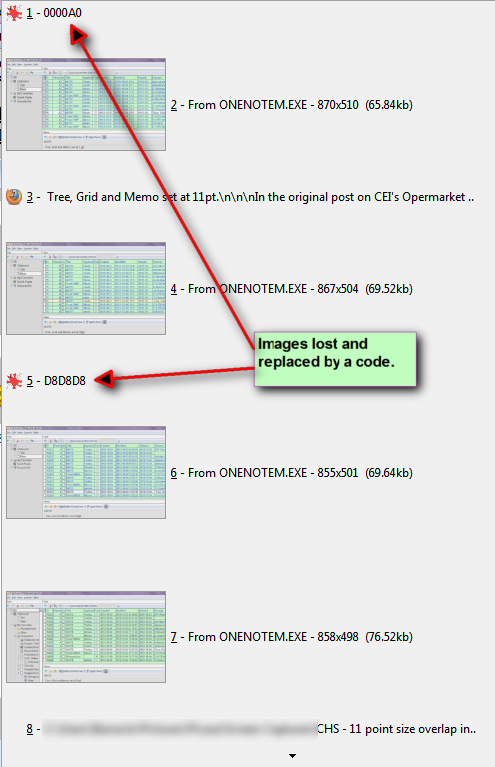
OneNote image clips are lost and replaced by a code: (Intermittent.) Database error?
Occasionally, image clips taken by OneNote are lost and just an obscure code remains in the database.
In the example below, all the images you see were OneNote clips, and two of them have disappeared. I have seen this as an intermittent error before, but had not come across 2 in close succession, so thought this might be worthwhile capturing. It's not easily repeatable.

[attach]
« Last Edit: October 24, 2012, 02:12 AM by IainB »

mouser

  • First Author
  • Administrator
  • Joined in 2005
  • *****
  • Posts: 40,931
    • Gathering Badge
    • Plugin Coding Medal
    • Participated in NANY Challenge Seventeen Times
    • Cody Award
    • Coding Snacks
    • Volunteers/Staff
Quote
Occasionally, image clips taken by OneNote are lost and just an obscure code remains in the database.

Can you elaborate?  Are you saying that CHS successfully grabs and stores the image and you can see the image in CHS, but then the image gets removed and replaced with a text clip, or is that CHS should be capturing an image clip but is capturing text instead, or is something else happening.. I can't tell from the screenshots..  How do these clips get listed in the clip grid?  If you manually go view the image file folder, do you see the image clips there even though they aren't in the grid?

mouser

  • First Author
  • Administrator
  • Joined in 2005
  • *****
  • Posts: 40,931
    • Gathering Badge
    • Plugin Coding Medal
    • Participated in NANY Challenge Seventeen Times
    • Cody Award
    • Coding Snacks
    • Volunteers/Staff
Also, is this a new thing happening only with the new version or was it happening before too?

IainB

  • @Slartibartfarst
  • Supporting Member
  • Joined in 2008
  • **
  • Posts: 7,544
Quote
Occasionally, image clips taken by OneNote are lost and just an obscure code remains in the database.
Can you elaborate?
OK, sorry for the delay. I was wrong - or not entirely correct - about what was happening, and it is not a new thing. I have seen it occasionally before, but I think I had not noticed two instances in close succession before. This is the first time I have made some effort to study what is going on.

It took some time to do an investigation of the images and the "code" records in the CHS database. It was a bit confusing as I have been taking a lot of successive image clips with the OneNote clipping tool, but I have made some discovery, and the good news is that:
  • (a) every such clip has been saved correctly in the OneNote Unfiled Notes section (so there is an auditable trail).
  • (b) after comparing each image in OneNote with each image in the CHS database (that was tedious!), I have verified that every such clip has been saved correctly in the CHS database.
  • (c) the CHS database has had nothing deleted, but has some extra records though (obscure n-digit codes).

After some investigation, what seems to have been happening is this:
  • Step 1: Take an image clip with the OneNote clipping tool.
  • Step 2: CHS makes a capture "ping".
  • Step 3: A OneNote message pops up from the systray confirming that a clip capture has been made.
  • Step 4: The image is saved correctly in two places: one in the OneNote Unfiled Notes section and the other in the CHS database.
  • Step 5: After taking the clip, and before taking any other clips, I go to an existing .png file in my usual Screenshots folder, open it in irfanview.
  • Step 6: I paste the image (from the Clipboard) into the file, overwriting the image in RAM.
  • Step 7: Sometimes I adjust the file in irfanview.
  • Step 8: The image in irfanview is then saved as a new file name which is similar to the opened file name, in the Screenshots folder.

Usually, this works just fine.
Sometimes, something different happens in step 6: when the paste is made, the paste occurs OK, but a CHS capture "ping" occurs as the paste is made.
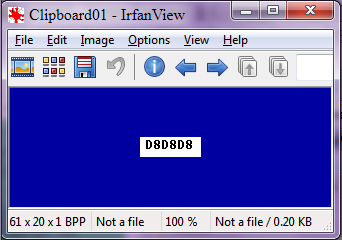
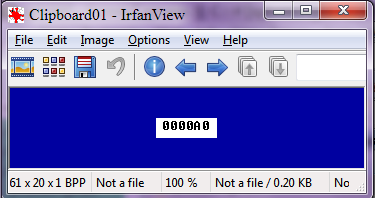
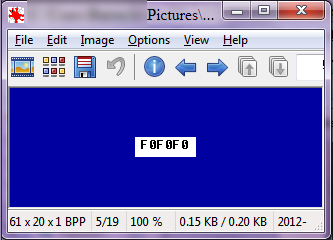
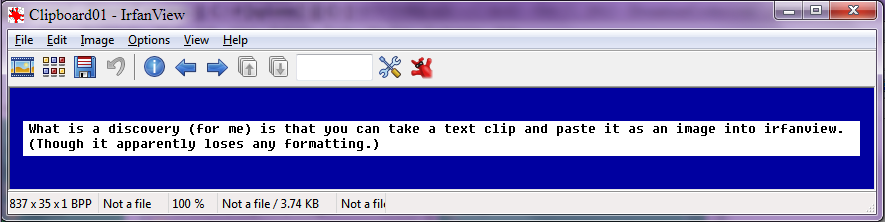
If I then (say) paste the contents of the Clipboard again into the image in Irfanview, overwriting the image last pasted, a strange n-digit code is pasted, as for example: (is this hex?)

[attach]
« Last Edit: October 24, 2012, 09:16 AM by IainB »

mouser

  • First Author
  • Administrator
  • Joined in 2005
  • *****
  • Posts: 40,931
    • Gathering Badge
    • Plugin Coding Medal
    • Participated in NANY Challenge Seventeen Times
    • Cody Award
    • Coding Snacks
    • Volunteers/Staff
Ok so I don't have an answer but I may have another clue.
I'm guessing that that "code" is in fact a hex COLOR number.

My guess is that something (a hotkey) is causing an application (CHS suggests the culprit is irfanview?) to copy a pixel color hex code to the clipboard.

Original address: https://www.donationcoder.com/forum/index.php?topic=1514.0