DonationCoder.com forum
 
Read-only archive. This is a static copy of the DonationCoder.com forum. Reading and searching work as before; logging in, posting and private messages do not.
Archive of 2026-10-21 · About this archive · Main site

Last post Author Topic: CLIPBOARD HELP+SPELL LATEST VERSION INFO THREAD - v2.46.0 - Dec 30, 2019  (Read 670,113 times)

IainB

  • @Slartibartfarst
  • Supporting Member
  • Joined in 2008
  • **
  • Posts: 7,544
@cranioscopical:
...For a recent beta I'd expunged existing copies of CH+S and hadn't properly restored the settings when I installed the new version.
_______________________
Not trying to teach my grandmother to suck eggs, but if one keeps regularly making dated backup copies of:
  • The file ClipboardHelpAndSpell.ini
  • The folder PresetViews
- then one can restore these old settings files after an update, which will restore the old user settings where they had just been overwritten by the update.

I find that it also helps to backup/restore ConfigDir.ini, having set it to make CHS "portable", thus:
Code
// IMPORTANT NOTE: Lines starting with // are COMMENTS; you need to remove // to make a line active

PORTABLE=TRUE
CONFIGDIR = .
...etc.

- all these being kept in the CHS app. folder as the "root" for config settings, which folder is not contained within a Program Files folder.
However, being "portable" like this stops the user settings being proliferated amongst the User-named folders - which suits me fine, though it might not suit everyone's needs.

Before I settled on the above approach, I would tend to get things confused after every CHS update and would end up manually restoring the settings from within CHS - a tedious exercise.

Hope this helps or is of use.
« Last Edit: August 18, 2017, 06:53 PM by IainB »

IainB

  • @Slartibartfarst
  • Supporting Member
  • Joined in 2008
  • **
  • Posts: 7,544
Well I'm glad to hear it's not a CHS bug.  I'll make the latest beta official soon.

Eh? Sorry, I is confuzzled by all these Betas... I thought the thing in the OP (as v2.42.0 - Apr 21, 2017) is/was the latest version (not sure whether it's a Beta though) - is that not so?
Thinking it was, I today downloaded and installed the relevant files from there, for the portable version, because the ChangeLog seemed to indicate all those changes that you had made and that we had been testing, and I saw the .exe file was a different hash to my (Beta) version - which file had the same version number (but slightly earlier date).

What/where is the definitive latest version/Beta? Did I just step backwards, or sideways, or something? Oops.    :-[

Whichever version I have from the OP, it's working very nicely anyway and I am now enjoying making good use of the now fixed-up Virtual Folder SQL field (for which fix, thankyou very much), as it enables the full potential of the nifty VF functionality.    :Thmbsup:

mouser

  • First Author
  • Administrator
  • Joined in 2005
  • *****
  • Posts: 40,931
    • Gathering Badge
    • Plugin Coding Medal
    • Participated in NANY Challenge Seventeen Times
    • Cody Award
    • Coding Snacks
    • Volunteers/Staff
You are using the latest version.

What I was saying is that since you guys haven't found any problems in the latest beta, I'll soon do what I always do at this point, which is upload a new official version soon (which will just be the last beta that you have already been using).  The official versions go out to everyone.

IainB

  • @Slartibartfarst
  • Supporting Member
  • Joined in 2008
  • **
  • Posts: 7,544
^^ Ah, I see. Thanks.

mouser

  • First Author
  • Administrator
  • Joined in 2005
  • *****
  • Posts: 40,931
    • Gathering Badge
    • Plugin Coding Medal
    • Participated in NANY Challenge Seventeen Times
    • Cody Award
    • Coding Snacks
    • Volunteers/Staff
I've promoted v2.42 beta to an official release.

v2.42.0 - April 25, 2017
  • [Improvement] Deleting clip(s) keeps the selection where it was, does not move the list of clips to top or bottom; other situations where clip list position was lost are now fixed as well.
  • [BugFix] Custom group filter sql expressions were being capped at 500 character length.
  • [Improvement] Statusbar now shows linecount of each clip.
  • [BugFix] When StayOnTop option is set (View menu), some dialogs were showing behind the main form.
  • [Feature] New (customizable) hotkey to quickly toggle clipboard monitoring on and off.
  • [Improvement] The hotkey that used to be used to trigger a copy even when CHS monitoring is disabled now does double duty, and can be used to tell CHS to trigger a copy and *NOT* store the clip if CHS monitoring is enabled.

cranioscopical

  • Friend of the Site
  • Supporting Member
  • Joined in 2006
  • **
  • Posts: 4,776
    • Cody Award
    • Official Forum Clown
    • rotten turkey sandwich - Rotten Turkey Sandwich
Not trying to teach my grandmother to suck eggs, but if one keeps regularly making dated backup copies of:

    The file ClipboardHelpAndSpell.ini
    The folder PresetViews

- then one can restore these old settings files after an update, which will restore the old user settings where they had just been overwritten by the update.
Thanks for taking the time IainB,

CH+S runs so well that it's a long time since I had to look into this stuff. I have most of this kind of thing automated but, while recently replacing 3 machines with new ones and significantly updating the remainder, some stuff fell through the cracks. Eggs are cracked, eggs are scrambled, grandma's lost it.

Chris

kunkel321

  • Supporting Member
  • Joined in 2009
  • **
  • Posts: 626
    • Participated in NANY Challenge Once
... or you can disable the differential coloring option which is on the bottom of the "Spellcheck and Display tab" and labeled as "Color Rows Based on Group Owner".
Ah yes.  This prevents the grey.  Actually, the grey was only appearing if the parent folder "Clipboard" was selected.  If "Old" or "New" was selected, then the font was black.  If a Virtual Folder was selected, blue. 

Thanks Fellas.

IainB

  • @Slartibartfarst
  • Supporting Member
  • Joined in 2008
  • **
  • Posts: 7,544
Re: CHS latest version thread - feature re table capture/paste (Part 1 of 3).
« Reply #357 on: September 16, 2017, 03:13 PM »
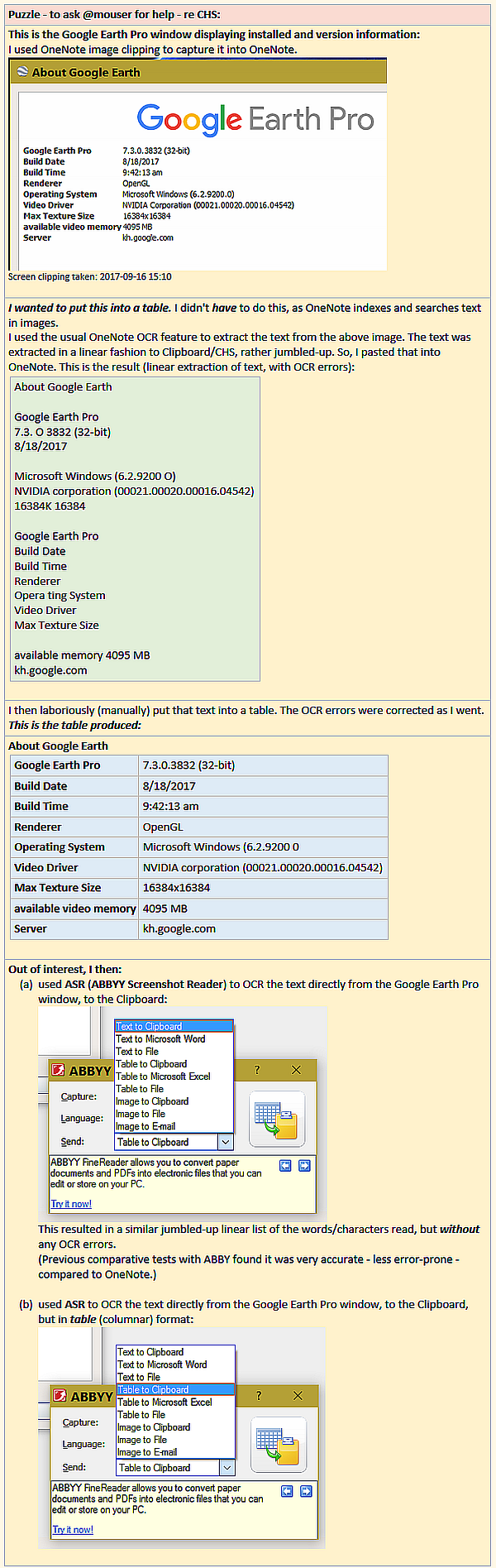
@mouser: wondering whether you can help with a feature requirement here:
(Text is in the spoiler below the last image posted re this.)
17_314x484_2C507334.png

(Continued in next comment...)

IainB

  • @Slartibartfarst
  • Supporting Member
  • Joined in 2008
  • **
  • Posts: 7,544
Re: CHS latest version thread - feature re table capture/paste (Part 2 of 3).
« Reply #358 on: September 16, 2017, 03:14 PM »
(...continued from Part 1)

17_409x325_8AB02022.png

(Continued in next comment...)

IainB

  • @Slartibartfarst
  • Supporting Member
  • Joined in 2008
  • **
  • Posts: 7,544
Re: CHS latest version thread - feature re table capture/paste (Part 3 of 3).
« Reply #359 on: September 16, 2017, 03:14 PM »
(...continued from Part 2)

17_360x362_4AF7DECF.png

Spoiler (click to show/hide)
Puzzle - to ask @mouser for help - re CHS:
This is the Google Earth Pro window displaying installed and version information: I used OneNote image clipping to capture it into OneNote.

Screen clipping taken: 2017-09-16 15:10
I wanted to put this into a table. I didn't have to do this, as OneNote indexes and searches text in images.
I used the usual OneNote OCR feature to extract the text from the above image. The text was extracted in a linear fashion to Clipboard/CHS, rather jumbled-up. So, I pasted that into OneNote. This is the result (linear extraction of text, with OCR errors):
About Google Earth

Google Earth Pro
7.3. O 3832 (32-bit)
8/18/2017

Microsoft Windows (6.2.9200 O)
NVIDIA corporation (00021.00020.00016.04542)
16384K 16384

Google Earth Pro
Build Date
Build Time
Renderer
Opera ting System
Video Driver
Max Texture Size

available memory 4095 MB
kh.google.com

I then laboriously (manually) put that text into a table. The OCR errors were corrected as I went. This is the table produced:
About Google Earth
Google Earth Pro
7.3.0.3832 (32-bit)
Build Date
8/18/2017
Build Time
9:42:13 am
Renderer
OpenGL
Operating System
Microsoft Windows (6.2.9200 0
Video Driver
NVIDIA corporation (00021.00020.00016.04542)
Max Texture Size
16384x16384
available video memory
4095 MB
Server
kh.google.com

Out of interest, I then:
        (a) used ASR (ABBYY Screenshot Reader) to OCR the text directly from the Google Earth Pro window, to the Clipboard:
       
        This resulted in a similar jumbled-up linear list of the words/characters read, but without any OCR errors. (Previous comparative tests with ABBY found it was very accurate - less error-prone - compared to OneNote.)
        (b) used ASR to OCR the text directly from the Google Earth Pro window, to the Clipboard, but in table (columnar) format:
       

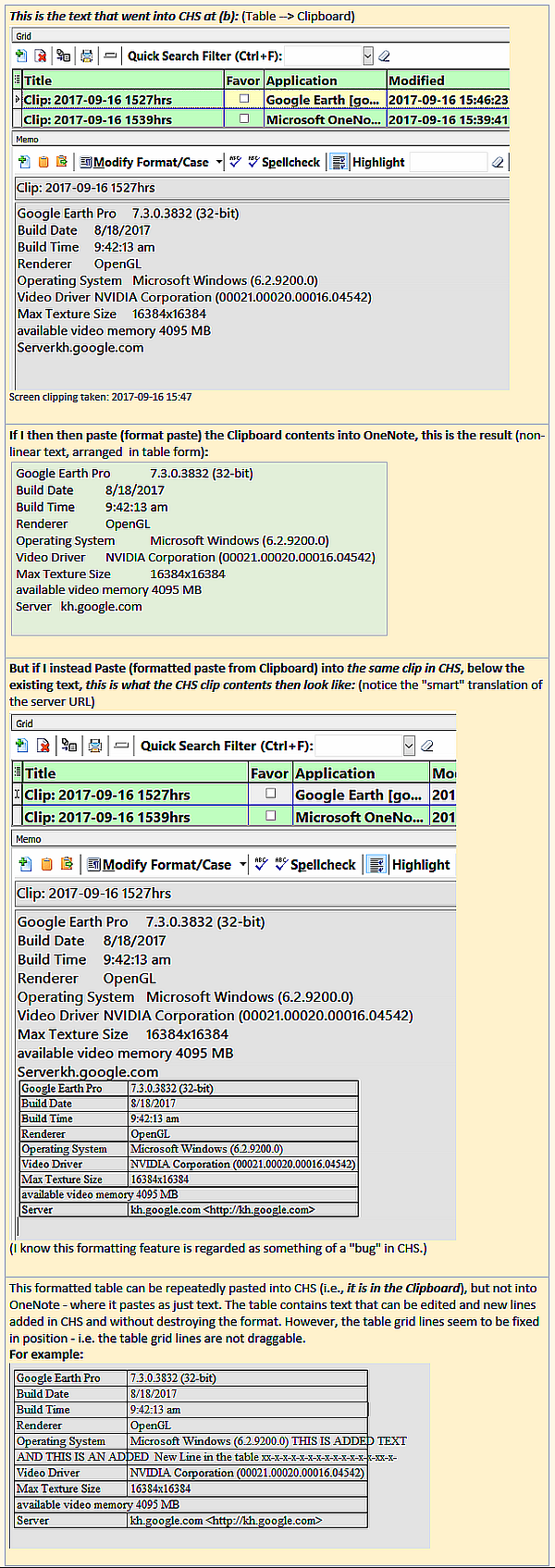
This is the text that went into CHS at (b): (Table --> Clipboard)

Screen clipping taken: 2017-09-16 15:47

If I then then paste (format paste) the Clipboard contents into OneNote, this is the result (non-linear text, arranged  in table form):
Google Earth Pro 7.3.0.3832 (32-bit)
Build Date 8/18/2017
Build Time 9:42:13 am
Renderer OpenGL
Operating System Microsoft Windows (6.2.9200.0)
Video Driver NVIDIA Corporation (00021.00020.00016.04542)
Max Texture Size 16384x16384
available video memory 4095 MB
Server kh.google.com

But if I instead Paste (formatted paste from Clipboard) into the same clip in CHS, below the existing text, this is what the CHS clip contents then look like: (notice the "smart" translation of the server URL)

(I know this formatting feature is regarded as something of a "bug" in CHS.)
This formatted table can be repeatedly pasted into CHS (i.e., it is in the Clipboard), but not into OneNote - where it pastes as just text. The table contains text that can be edited and new lines added in CHS and without destroying the format. However, the table grid lines seem to be fixed in position - i.e. the table grid lines are not draggable.
For example:


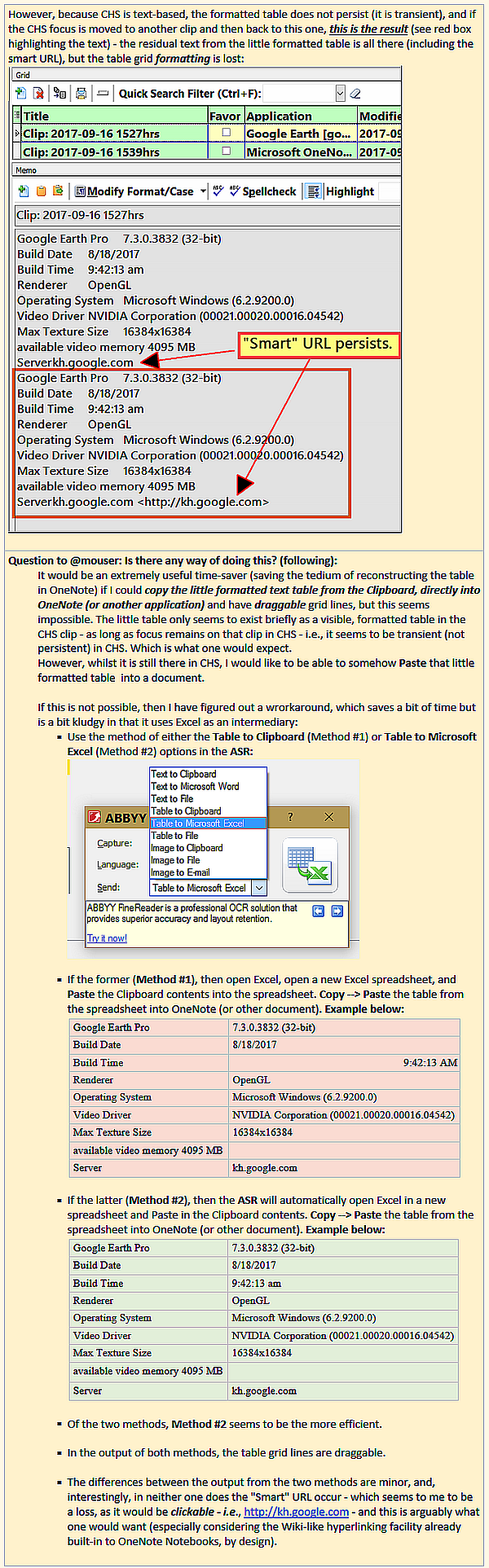
However, because CHS is text-based, the formatted table does not persist (it is transient), and if the CHS focus is moved to another clip and then back to this one, this is the result (see red box highlighting the text) - the residual text from the little formatted table is all there (including the smart URL), but the table grid formatting is lost:


Question to @mouser: Is there any way of doing this? (following):
        It would be an extremely useful time-saver (saving the tedium of reconstructing the table in OneNote) if I could copy the little formatted text table from the Clipboard, directly into OneNote (or another application) and have draggable grid lines, but this seems impossible. The little table only seems to exist briefly as a visible, formatted table in the CHS clip - as long as focus remains on that clip in CHS - i.e., it seems to be transient (not persistent) in CHS. Which is what one would expect.
        However, whilst it is still there in CHS, I would like to be able to somehow Paste that little formatted table  into a document.
       
        If this is not possible, then I have figured out a wrorkaround, which saves a bit of time but is a bit kludgy in that it uses Excel as an intermediary:
                § Use the method of either the Table to Clipboard (Method #1) or Table to Microsoft Excel (Method #2) options in the ASR:
               
       
                § If the former (Method #1), then open Excel, open a new Excel spreadsheet, and Paste the Clipboard contents into the spreadsheet. Copy --> Paste the table from the spreadsheet into OneNote (or other document). Example below:
                Google Earth Pro
                7.3.0.3832 (32-bit)
                Build Date
                8/18/2017
                Build Time
                9:42:13 AM
                Renderer
                OpenGL
                Operating System
                Microsoft Windows (6.2.9200.0)
                Video Driver
                NVIDIA Corporation (00021.00020.00016.04542)
                Max Texture Size
                16384x16384
                available video memory 4095 MB
               
                Server
                kh.google.com
               
                § If the latter (Method #2), then the ASR will automatically open Excel in a new spreadsheet and Paste in the Clipboard contents. Copy --> Paste the table from the spreadsheet into OneNote (or other document). Example below:
                Google Earth Pro
                7.3.0.3832 (32-bit)
                Build Date
                8/18/2017
                Build Time
                9:42:13 am
                Renderer
                OpenGL
                Operating System
                Microsoft Windows (6.2.9200.0)
                Video Driver
                NVIDIA Corporation (00021.00020.00016.04542)
                Max Texture Size
                16384x16384
                available video memory 4095 MB
               
                Server
                kh.google.com
               
                § Of the two methods, Method #2 seems to be the more efficient.
                § In the output of both methods, the table grid lines are draggable.
                § The differences between the output from the two methods are minor, and, interestingly, in neither one does the "Smart" URL occur - which seems to me to be a loss, as it would be clickable - i.e., http://kh.google.com - and this is arguably what one would want (especially considering the Wiki-like hyperlinking facility already built-in to OneNote Notebooks, by design).

(This is the end of the 3 related comments.)
« Last Edit: September 16, 2017, 03:24 PM by IainB »

IainB

  • @Slartibartfarst
  • Supporting Member
  • Joined in 2008
  • **
  • Posts: 7,544
@mouser: I was playing around with some VFs (Virtual Folders) in CHS today, and I noticed in the "All" clips Grid display (which been sorted on "Modified" date/time) that 3 clips had had their "Modified" date/time field updated to the immediate past, though, as far as I was aware, I had not updated/changed the contents of these 3 clips in any way.
The 3 clips were 2x text clips and 1x image clip, from different years.

I am using CHS v2.42.0
Are you able to define what are all the conditions under which the "Modified" date/time will be updated?
I would like to understand this behaviour, as it changes the metadata of the clips.
TIA.

mouser

  • First Author
  • Administrator
  • Joined in 2005
  • *****
  • Posts: 40,931
    • Gathering Badge
    • Plugin Coding Medal
    • Participated in NANY Challenge Seventeen Times
    • Cody Award
    • Coding Snacks
    • Volunteers/Staff
Quote
Are you able to define what are all the conditions under which the "Modified" date/time will be updated?
After I finish updating the server and catch my breath I'll go through the source code and see if I can find out what events cause the modification time to be updated -- just remind me this week if I don't report back sooner.

IainB

  • @Slartibartfarst
  • Supporting Member
  • Joined in 2008
  • **
  • Posts: 7,544
@mouser: Just reminding you of 2 outstanding queries, some months later:
Re: CHS latest version thread - feature re table capture/paste (Part 3 of 3).
https://www.donationcoder.com/forum/index.php?topic=1514.msg412816#msg412816
..."Is there any way ... to be able to somehow Paste that little formatted table into a document"?

I am using CHS v2.42.0
...Are you able to define what are all the conditions under which the "Modified" date/time will be updated?
I would like to understand this behaviour, as it changes the metadata of the clips.
TIA.

If it's too much trouble to dig up answers to these, then I'd quite understand.
They're not showstoppers for me.

mouser

  • First Author
  • Administrator
  • Joined in 2005
  • *****
  • Posts: 40,931
    • Gathering Badge
    • Plugin Coding Medal
    • Participated in NANY Challenge Seventeen Times
    • Cody Award
    • Coding Snacks
    • Volunteers/Staff
Beta v2.45 Apr 28, 2019

Download:

v2.45.1 - Apr 27, 2019
  • [MinorImprovement] Excerpt of last clip is now shown in print menu item caption
  • [BugFix] Crash could occur if manually editing a clip field and then typing something in search bar
  • [Feature] You can now specify a list of applications to monitor the keyboard from, with all others being ignored.
  • [MinorImprovement] Minor optimizations/improvements to last active window information.
  • [Feature] You can now set a hotkey to copy the text under the cursor (by triggering a Ctrl+C) and then APPENDING it to last clip.  Useful for building up clips.
  • [BugFix] Sometimes the text put on the clipboard from an ignored application could be stored after switching to another application.
  • [MinorImprovement] Clarified instructions on Capture Options about last active window.

IainB

  • @Slartibartfarst
  • Supporting Member
  • Joined in 2008
  • **
  • Posts: 7,544
Thanks! I am now running CHS Beta v2.45 portable.

mouser

  • First Author
  • Administrator
  • Joined in 2005
  • *****
  • Posts: 40,931
    • Gathering Badge
    • Plugin Coding Medal
    • Participated in NANY Challenge Seventeen Times
    • Cody Award
    • Coding Snacks
    • Volunteers/Staff
:up:
and remind me if you have any pending feature requests...

mouser

  • First Author
  • Administrator
  • Joined in 2005
  • *****
  • Posts: 40,931
    • Gathering Badge
    • Plugin Coding Medal
    • Participated in NANY Challenge Seventeen Times
    • Cody Award
    • Coding Snacks
    • Volunteers/Staff
I've promoted the last beta release (2.45.01) to a normal release.

chashnniel

  • Member
  • Joined in 2018
  • **
  • Posts: 127
The latest changelog said:
You can now set a hotkey to copy the text under the cursor :-\ (by triggering a Ctrl+C) and then APPENDING it to last clip.  Useful for building up clips.

I guess it refers to the option in hotkey -- copy and append

I tried to set it to ctrl + shift + L
And first I copyed 111 with ctrl + c, then I selected 222 and clicked CS+L. Then I clicked ctrl + v but I still get 222 (I thought it should be 111222)
Am I missing something?
Thx

mouser

  • First Author
  • Administrator
  • Joined in 2005
  • *****
  • Posts: 40,931
    • Gathering Badge
    • Plugin Coding Medal
    • Participated in NANY Challenge Seventeen Times
    • Cody Award
    • Coding Snacks
    • Volunteers/Staff
Quote
Then I clicked ctrl + v but I still get 222 (I thought it should be 111222

Ah i see the confusion.
Ok what CHS is doing is appending the new item (222) to the LAST STORED CLIP in its database.  (can you check that that is the case?).

But it's not actually modifying the contents of your clipboard to be the appended complete text.

So it's useful for building up an appended clip but its not available automatically when you ctrl+V, you'd have to access the built up clip from the main CHS window.

I suppose I should fix that so that it ALSO modifies the clipboard with the full appended text.. Stay tuned.
« Last Edit: May 06, 2019, 09:41 PM by mouser »

mouser

  • First Author
  • Administrator
  • Joined in 2005
  • *****
  • Posts: 40,931
    • Gathering Badge
    • Plugin Coding Medal
    • Participated in NANY Challenge Seventeen Times
    • Cody Award
    • Coding Snacks
    • Volunteers/Staff

Curt

  • Supporting Member
  • Joined in 2006
  • **
  • Posts: 7,565
CHS has a link to the now former Tiny Spell homepage, but today that page is something unwanted else.
CHS > Help > Content > Extra Information > Spelling Tools > http://www.megspace.com/computers/tinyspell/
should probably be deleted.
« Last Edit: May 22, 2019, 08:09 AM by Curt »

IainB

  • @Slartibartfarst
  • Supporting Member
  • Joined in 2008
  • **
  • Posts: 7,544
@mouser:
I have installed CHS v2.45.1. Beta (from the .ZIP file, per link above).
Seems to work just fine for me, though I haven't tested it for the issue that @chashnniel raises.

Have you incorporated a fix for the RAM-drive "allergy" that CHS seems to have (per separate discussion)? I'd like to force it to use TEMP in RAM drive again.
Thanks.

mouser

  • First Author
  • Administrator
  • Joined in 2005
  • *****
  • Posts: 40,931
    • Gathering Badge
    • Plugin Coding Medal
    • Participated in NANY Challenge Seventeen Times
    • Cody Award
    • Coding Snacks
    • Volunteers/Staff
Iain can you point me to the thread about that so I can refresh my memory?

Original address: https://www.donationcoder.com/forum/index.php?topic=1514.0