DonationCoder.com forum
 
Read-only archive. This is a static copy of the DonationCoder.com forum. Reading and searching work as before; logging in, posting and private messages do not.
Archive of 2026-10-21 · About this archive · Main site

Last post Author Topic: CLIPBOARD HELP+SPELL LATEST VERSION INFO THREAD - v2.46.0 - Dec 30, 2019  (Read 670,113 times)

mouser

  • First Author
  • Administrator
  • Joined in 2005
  • *****
  • Posts: 40,931
    • Gathering Badge
    • Plugin Coding Medal
    • Participated in NANY Challenge Seventeen Times
    • Cody Award
    • Coding Snacks
    • Volunteers/Staff
Quote
the sql generated by CHS is truncated for some reason (hence the error report).

ah ok, let me look into that.

So you are saying that when you choose the menu item to create the new group based on sql of search string, you get the truncated incomplete result that you pasted in your post?
That you see that truncated expression when the dialog first pops up after choosing the command from the edit menu?

Or is the expression correct when it's first shown and then somehow gets truncated later?

mouser

  • First Author
  • Administrator
  • Joined in 2005
  • *****
  • Posts: 40,931
    • Gathering Badge
    • Plugin Coding Medal
    • Participated in NANY Challenge Seventeen Times
    • Cody Award
    • Coding Snacks
    • Volunteers/Staff
I can see from the code that there is a limit to the size of the virtual sql stored for a group at 500 bytes, so that's surely the problem you are hitting...
Easy for me to extend that for new databases.. now let me see how to fix this for existing databases..

cranioscopical

  • Friend of the Site
  • Supporting Member
  • Joined in 2006
  • **
  • Posts: 4,776
    • Cody Award
    • Official Forum Clown
    • rotten turkey sandwich - Rotten Turkey Sandwich
v2.41.0 Beta - Mar 15, 2017
Looks a lot nicer on 3000x2000
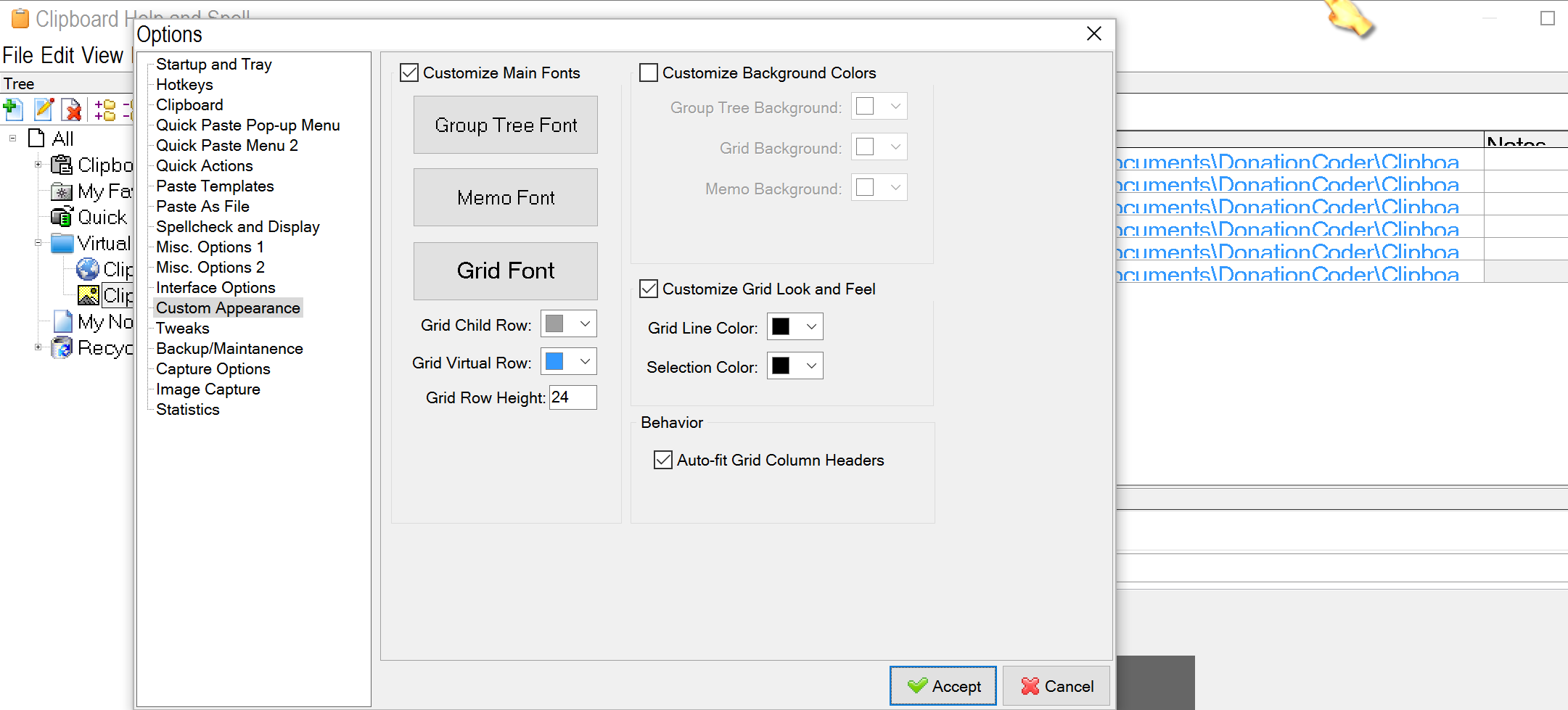
Under "Custom Appearance" I need to set the grid font higher than the standard to, say, 12 but I can't get grid row height to adapt to that. I get text that's 'chopped off' at the bottom. In the previous versions I had grid font at 12 and row height at 24. Any chance of a fix for that?
Chris

mouser

  • First Author
  • Administrator
  • Joined in 2005
  • *****
  • Posts: 40,931
    • Gathering Badge
    • Plugin Coding Medal
    • Participated in NANY Challenge Seventeen Times
    • Cody Award
    • Coding Snacks
    • Volunteers/Staff
Can I confirm something?

Testing it here I see that the grid row size is too small when the "Grid Row Height" number is set to 0 as it is by default, and I will try to fix that.
But I am able to manually set a custom "Grid Row Height" that seems to make the grid look correct with whatever font size I choose.

Can you confirm that, or take a screenshot to show me what the problem is?

cranioscopical

  • Friend of the Site
  • Supporting Member
  • Joined in 2006
  • **
  • Posts: 4,776
    • Cody Award
    • Official Forum Clown
    • rotten turkey sandwich - Rotten Turkey Sandwich
Can I confirm something?

Testing it here I see that the grid row size is too small when the "Grid Row Height" number is set to 0 as it is by default, and I will try to fix that.
But I am able to manually set a custom "Grid Row Height" that seems to make the grid look correct with whatever font size I choose.

Can you confirm that, or take a screenshot to show me what the problem is?

GridFont set to 12.PNG

Grid font size set to 12, Row height set to 24, font she no fit in grid.

If it's okay in your version I've doubtless failed to grasp a concept....?
Chris

mouser

  • First Author
  • Administrator
  • Joined in 2005
  • *****
  • Posts: 40,931
    • Gathering Badge
    • Plugin Coding Medal
    • Participated in NANY Challenge Seventeen Times
    • Cody Award
    • Coding Snacks
    • Volunteers/Staff
And what does it look like if you increase row height to say 48?

cranioscopical

  • Friend of the Site
  • Supporting Member
  • Joined in 2006
  • **
  • Posts: 4,776
    • Cody Award
    • Official Forum Clown
    • rotten turkey sandwich - Rotten Turkey Sandwich
As you were posting that, the light bulb came on, albeit flickering dimly, and I tried 48, which is just fine.  :-[
Chris

IainB

  • @Slartibartfarst
  • Supporting Member
  • Joined in 2008
  • **
  • Posts: 7,544
Re: CHS v2.41.0 - odd episodic error on paste inside a clip.
« Reply #332 on: March 18, 2017, 10:50 AM »
Not seen this particular CHS behaviour before - looks like an odd episodic non-fatal bug or something.
I was editing several separate clips today, when I kicked myself for making a mistake: I had just pasted a text string, replacing the existing text, into the beginning of a clip's Title field in the Menu pane, and then started typing some more text after that, and then noticed that, instead of typing the new text after the end of the string I had just pasted, I was actually typing it in immediately before the beginning of that string.
The cursor was a blue colour (normally is black).

After correcting the situation, I thought "How did I make that silly mistake?"
So I repeated what I had just done:
  1. COPY some text from within a clip.
  2. Mouse select the text in that same clip's Title field that I wanted to replace.
  3. PASTE.
- at which point, I noticed that the cursor - which should have been black and at the end of the string just pasted - was in fact now blue and positioned immediately before the first character of the string I had just pasted..

I repeated this with three other clips, and it was consistently repeatable for each.
However, after re-sorting and working with CHS (was busy saving clips) for about half an hour (without any intervening restart), it was no longer repeatable, and the colour of the cursor was restored to its usual black (not blue). I had not noticed the point at which it changed.

EDIT 2017-03-19 0008hrs: As an afterthought, I wondered whether this might have something to do with the cursor in CHS being different (thicker) when editing inside the Title field in the Memo pane, whereas it is a thin line when editing inside the clip text.
« Last Edit: March 18, 2017, 11:18 AM by IainB »

IainB

  • @Slartibartfarst
  • Supporting Member
  • Joined in 2008
  • **
  • Posts: 7,544
Re: CHS v2.41.0 - auto-merge a text clip with an existing Image?
« Reply #333 on: March 23, 2017, 08:44 PM »
@mouser: You know how when you make an image clip, it saves to the database as a 2-part clip - one has a Clip Text tab, the other has a Clip Image tab?

Would it be possible to have a facility to somehow auto-merge a text clip with an existing Image that doesn't yet have any text (apart from the image file path/name)?
The way I do this at present is manual, tedious, and error prone - I just copy and paste stuff into that Image's text tab.

mouser

  • First Author
  • Administrator
  • Joined in 2005
  • *****
  • Posts: 40,931
    • Gathering Badge
    • Plugin Coding Medal
    • Participated in NANY Challenge Seventeen Times
    • Cody Award
    • Coding Snacks
    • Volunteers/Staff
v2.41.0 - Mar 24, 2017
  • [MajorFeature] First High-dpi compatible version beta.
  • [BugFix] Newlines could be pasted in clip title edit, making it seem empy [thx IainB].

mouser

  • First Author
  • Administrator
  • Joined in 2005
  • *****
  • Posts: 40,931
    • Gathering Badge
    • Plugin Coding Medal
    • Participated in NANY Challenge Seventeen Times
    • Cody Award
    • Coding Snacks
    • Volunteers/Staff
I've just uploaded a new beta which should fix the sql filter size limit that was creating your bug, IainB.

IainB

  • @Slartibartfarst
  • Supporting Member
  • Joined in 2008
  • **
  • Posts: 7,544
Re: CHS v2.42.0 April 20, 2017 (Beta) portable
« Reply #336 on: April 20, 2017, 04:19 AM »
@mouser: Thanks. I have downloaded it - CHS v2.42.0 April 20, 2017 (Beta) portable - and the SQL generation for the Virtual Folder works just fine now you have increased the field's max size limit. (What is the limit now, by the way?)
I saw there were only two files you had changed - the .EXE and the Help file.
« Last Edit: April 20, 2017, 04:28 AM by IainB »

mouser

  • First Author
  • Administrator
  • Joined in 2005
  • *****
  • Posts: 40,931
    • Gathering Badge
    • Plugin Coding Medal
    • Participated in NANY Challenge Seventeen Times
    • Cody Award
    • Coding Snacks
    • Volunteers/Staff
Quote
What is the limit now, by the way?
It should be essentially unlimited now.

mouser

  • First Author
  • Administrator
  • Joined in 2005
  • *****
  • Posts: 40,931
    • Gathering Badge
    • Plugin Coding Medal
    • Participated in NANY Challenge Seventeen Times
    • Cody Award
    • Coding Snacks
    • Volunteers/Staff
v2.42.0 beta - April 21, 2017
  • [Improvement] Deleting clip(s) keeps the selection where it was, does not move the list of clips to top or bottom; other situations where clip list position was lost are now fixed as well.
  • [BugFix] Custom group filter sql expressions were being capped at 500 character length.
  • [Improvement] Statusbar now shows linecount of each clip.
  • [BugFix] When StayOnTop option is set (View menu), some dialogs were showing behind the main form.
  • [Feature] New (customizable) hotkey to quickly toggle clipboard monitoring on and off.
  • [Improvement] The hotkey that used to be used to trigger a copy even when CHS monitoring is disabled now does double duty, and can be used to tell CHS to trigger a copy and *NOT* store the clip if CHS monitoring is enabled.

cranioscopical

  • Friend of the Site
  • Supporting Member
  • Joined in 2006
  • **
  • Posts: 4,776
    • Cody Award
    • Official Forum Clown
    • rotten turkey sandwich - Rotten Turkey Sandwich
@mouser

Thanks for the continual improvements to your software!

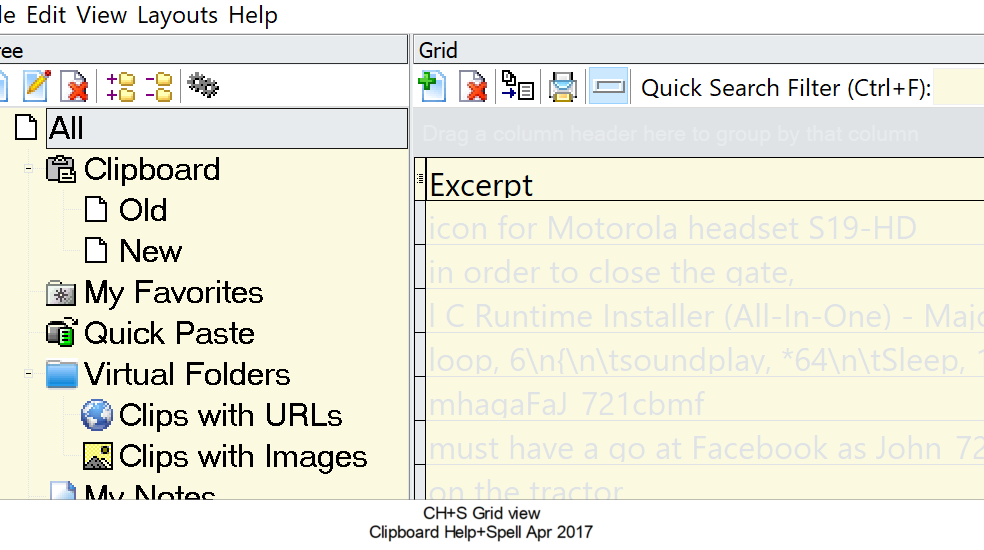
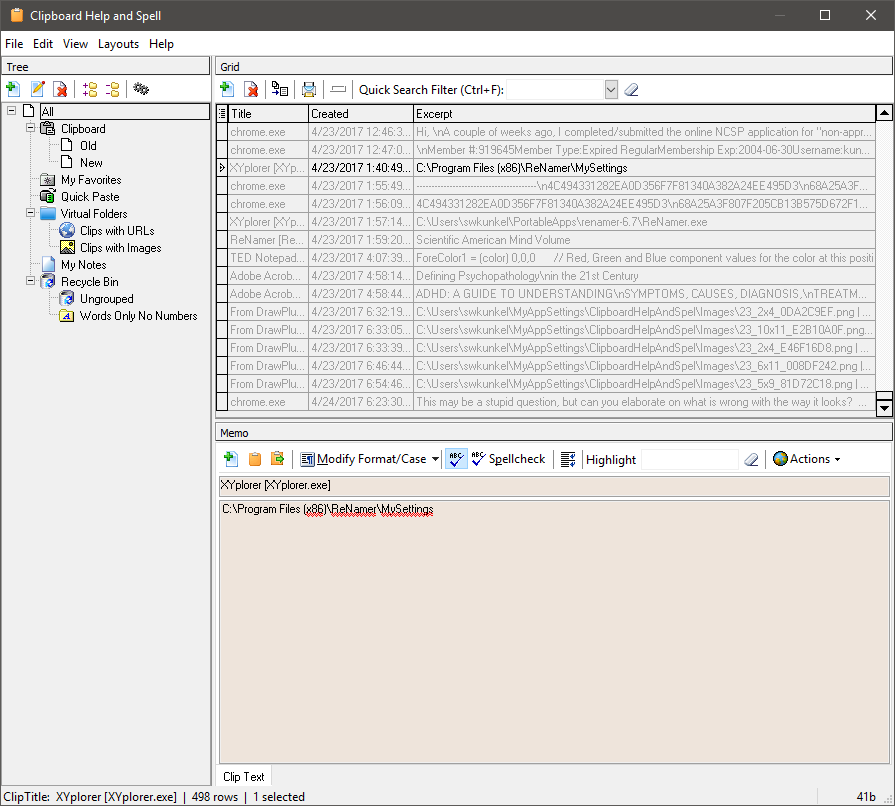
Over the past couple of weeks CH+S has begun to appear like this in grid view (on several different machines).

CH+S Grid view  - Clipboard Help+Spell  Apr 2017.png

Any clues as to how I can fix it? Playing with options/custom appearance can mitigate the effect but the appearance of CH+S reverts to this on reboot.

Chris

mouser

  • First Author
  • Administrator
  • Joined in 2005
  • *****
  • Posts: 40,931
    • Gathering Badge
    • Plugin Coding Medal
    • Participated in NANY Challenge Seventeen Times
    • Cody Award
    • Coding Snacks
    • Volunteers/Staff
This may be a stupid question, but can you elaborate on what is wrong with the way it looks?  And can you give me a screenshot of your Custom Appearance tab?

cranioscopical

  • Friend of the Site
  • Supporting Member
  • Joined in 2006
  • **
  • Posts: 4,776
    • Cody Award
    • Official Forum Clown
    • rotten turkey sandwich - Rotten Turkey Sandwich
This may be a stupid question, but can you elaborate on what is wrong with the way it looks?
 
The 'Excerpt' data is all but illegible.


Quote
And can you give me a screenshot of your Custom Appearance tab?

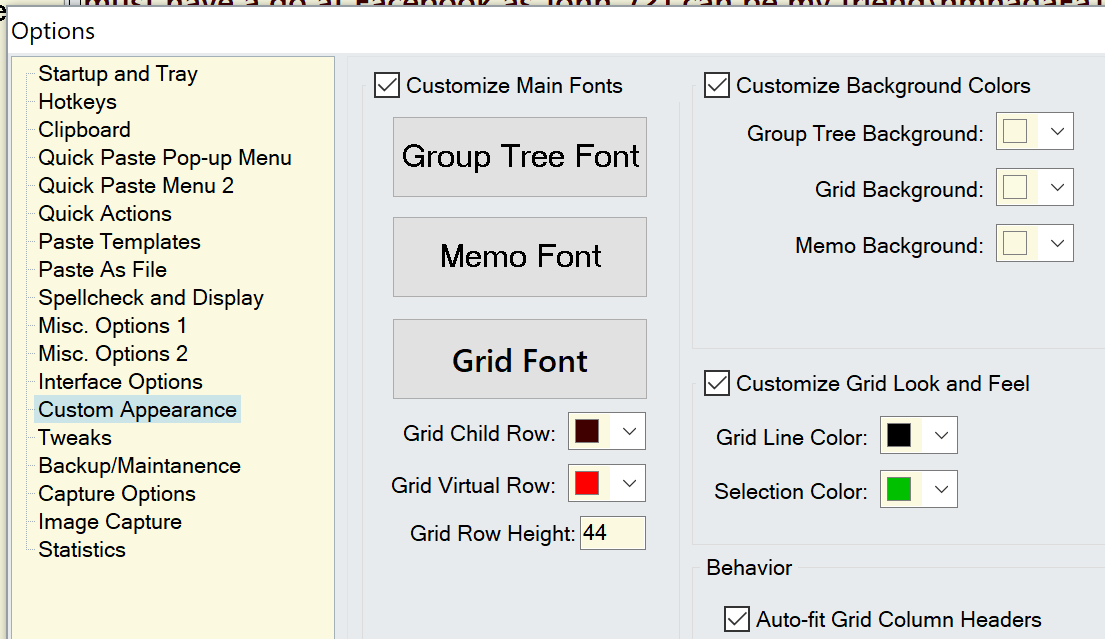
Here's the custom appearance tab as of now.
DTA - Apr 2017.png

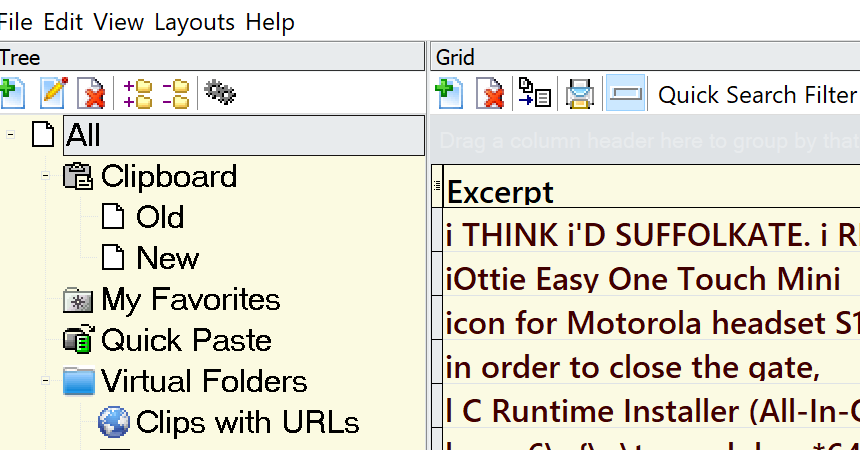
Also, here's the 'Excerpt' panel today (which looks fine). My problem is that the panel periodically reverts to the faded-blue look, and on several different computers.
When it looks okay - Clipboard Help+Spell  Apr 2017.png

Chris

mouser

  • First Author
  • Administrator
  • Joined in 2005
  • *****
  • Posts: 40,931
    • Gathering Badge
    • Plugin Coding Medal
    • Participated in NANY Challenge Seventeen Times
    • Cody Award
    • Coding Snacks
    • Volunteers/Staff
Ok so there are a couple of things to nail down.

The "faded" dim look is, I think, the *normal* way CHS looks if you have selected the ALL group.  It's shows the grid rows as dimmed when the items are not within the group itself but instead in a child group.

Can you confirm that by unchecking the customize checkboxes on the Custom Appearance tab?

If so, do I then understand that your problem is that sometimes CHS is ignoring your Custom Appearance options?

When this happens is it ignoring ALL of your custom appearance options? Or only the one that effects "dimming"?

Does the problem only manifest itself on startup? or randomly in the middle of using it?

cranioscopical

  • Friend of the Site
  • Supporting Member
  • Joined in 2006
  • **
  • Posts: 4,776
    • Cody Award
    • Official Forum Clown
    • rotten turkey sandwich - Rotten Turkey Sandwich
You are absolutely right (of course) about the default dimmed view, I had forgotten that. Now that I have understood, I have mine set so that everything is visible under ALL.

Before taking this further let me confirm that, as usual, I am the problem. Perhaps I am performing some action out of habit. If so, I'll blame it on my unconscious  self-conscious  subconscious.

Thanks for the input.
Chris

mouser

  • First Author
  • Administrator
  • Joined in 2005
  • *****
  • Posts: 40,931
    • Gathering Badge
    • Plugin Coding Medal
    • Participated in NANY Challenge Seventeen Times
    • Cody Award
    • Coding Snacks
    • Volunteers/Staff
Quote
Before taking this further let me confirm that, as usual, I am the problem.

Based on your description of the symptoms, I'm not sure yet.  Let me know if you think it might be something CHS is doing wrong.  It may still be that CHS is not applying reliably your settings when it starts?

kunkel321

  • Supporting Member
  • Joined in 2009
  • **
  • Posts: 626
    • Participated in NANY Challenge Once
Mine is also like this....  Mostly.  Did I never notice before?  I dunno. 
EIDT:  This is 2.39.0 on Win 10 x64

mouser

  • First Author
  • Administrator
  • Joined in 2005
  • *****
  • Posts: 40,931
    • Gathering Badge
    • Plugin Coding Medal
    • Participated in NANY Challenge Seventeen Times
    • Cody Award
    • Coding Snacks
    • Volunteers/Staff
Quote
Mine is also like this....  Mostly. 

As I said before, it's by design that clips are dimmed when they are in a child group of the one you have selected.
If you don't like this behavior you have two choices, you can either disable the displaying of child group contents when viewing a group, or you can disable the differential coloring option which is on the bottom of the "Spellcheck and Display tab" and labeled as "Color Rows Based on Group Owner".

IainB

  • @Slartibartfarst
  • Supporting Member
  • Joined in 2008
  • **
  • Posts: 7,544
The "faded" dim look is, I think, the *normal* way CHS looks if you have selected the ALL group.  It's shows the grid rows as dimmed when the items are not within the group itself but instead in a child group.

Can you confirm that by unchecking the customize checkboxes on the Custom Appearance tab?

Yes, that has always been true for CHS, I think.
The "dimmed" rows seem to be just default colours, where the user can change them to be some other colour.
I usually set "Grid child row" to black, as that makes them more easily discernible (perceived more clearly) to my eyes, in the Grid pane. That simple change can make a big difference for ergonomic perception. It's worth playing around with, if the user wants to get things right for their peculiar eyesight.

cranioscopical

  • Friend of the Site
  • Supporting Member
  • Joined in 2006
  • **
  • Posts: 4,776
    • Cody Award
    • Official Forum Clown
    • rotten turkey sandwich - Rotten Turkey Sandwich
Let me know if you think it might be something CHS is doing wrong.
Nope, it's all down to me - again :-[

For a recent beta I'd expunged existing copies of CH+S and hadn't properly restored the settings when I installed the new version.
Chris

mouser

  • First Author
  • Administrator
  • Joined in 2005
  • *****
  • Posts: 40,931
    • Gathering Badge
    • Plugin Coding Medal
    • Participated in NANY Challenge Seventeen Times
    • Cody Award
    • Coding Snacks
    • Volunteers/Staff
Well I'm glad to hear it's not a CHS bug.  I'll make the latest beta official soon.

Original address: https://www.donationcoder.com/forum/index.php?topic=1514.0