DonationCoder.com forum
 
Read-only archive. This is a static copy of the DonationCoder.com forum. Reading and searching work as before; logging in, posting and private messages do not.
Archive of 2026-10-21 · About this archive · Main site

Author Topic: WipeOut... Useful tiny app.  (Read 12,661 times)

scancode

  • I will eat Cody someday.
  • Honorary Member
  • Joined in 2007
  • **
  • Posts: 641
    • Cody Award
    • Participated in NANY Challenge Twice
    • Coding Snacks
    • Furry Fandom Badge - Furry Fandom
    • DJ Badge - DJ
WipeOut... Useful tiny app.
« on: September 20, 2008, 12:38 PM »
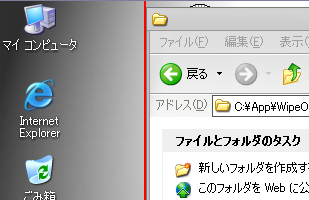
WipeOut is an application which moves obstructive windows to show you your desktop.
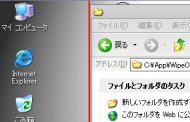
WipeOut.png

Author's site and download.

(my favourite settings are: colour:black width:1 alpha:50 top/left/right/bottom w/o margin)
mouser

  • First Author
  • Administrator
  • Joined in 2005
  • *****
  • Posts: 40,931
    • Gathering Badge
    • Plugin Coding Medal
    • Participated in NANY Challenge Seventeen Times
    • Cody Award
    • Coding Snacks
    • Volunteers/Staff
Re: WipeOut... Useful tiny app.
« Reply #1 on: September 20, 2008, 12:48 PM »
wipeout is mentioned in this thread about programs similar to my own DesktopCoral (see also Hawkeye ShellInit):
http://www.donationcoder.com/forum/index.php?topic=234.0

scancode

  • I will eat Cody someday.
  • Honorary Member
  • Joined in 2007
  • **
  • Posts: 641
    • Cody Award
    • Participated in NANY Challenge Twice
    • Coding Snacks
    • Furry Fandom Badge - Furry Fandom
    • DJ Badge - DJ
Re: WipeOut... Useful tiny app.
« Reply #2 on: September 20, 2008, 12:58 PM »
BART.gif

4wd

  • Pedantic Old Bastard
  • Supporting Member
  • Joined in 2006
  • **
  • Posts: 5,652
    • Coding Snacks
Re: WipeOut... Useful tiny app.
« Reply #3 on: September 20, 2008, 12:59 PM »
WipeOut is an application which moves obstructive windows to show you your desktop.

Good find!

Just one problem, it defaults to left side which is a bit annoying if that is where your taskbar is, (where mine is in other words).  Means you have to move the taskbar before you can configure WipeOut.

OK, two problems, doesn't seem to work on maximised windows either, (well, it's not doing anything here to Firefox other than putting a line where the window should've been moved to.
"I will not follow where the path may lead, but I will go where there is no path, and I will leave a trail." - Muriel Strode, 1903

scancode

  • I will eat Cody someday.
  • Honorary Member
  • Joined in 2007
  • **
  • Posts: 641
    • Cody Award
    • Participated in NANY Challenge Twice
    • Coding Snacks
    • Furry Fandom Badge - Furry Fandom
    • DJ Badge - DJ
Re: WipeOut... Useful tiny app.
« Reply #4 on: September 20, 2008, 01:04 PM »
WipeOut is an application which moves obstructive windows to show you your desktop.

Good find!

Just one problem, it defaults to left side which is a bit annoying if that is where your taskbar is, (where mine is in other words).  Means you have to move the taskbar before you can configure WipeOut.

OK, two problems, doesn't seem to work on maximised windows either, (well, it's not doing anything here to Firefox other than putting a line where the window should've been moved to.
Weird. Works fine w/ maximized firefox here (winxpsp2 spanish)

4wd

  • Pedantic Old Bastard
  • Supporting Member
  • Joined in 2006
  • **
  • Posts: 5,652
    • Coding Snacks
Re: WipeOut... Useful tiny app.
« Reply #5 on: September 20, 2008, 01:14 PM »
OK, two problems, doesn't seem to work on maximised windows either, (well, it's not doing anything here to Firefox other than putting a line where the window should've been moved to.
Weird. Works fine w/ maximized firefox here (winxpsp2 spanish)

XP SP3  and it's seems to be any maximised window it won't move, (DOpus, Firefox, Notepad2, etc).

mmm....must be running something that interferes with it.

Interesting, works if it's at the top but not right or bottom.
"I will not follow where the path may lead, but I will go where there is no path, and I will leave a trail." - Muriel Strode, 1903
« Last Edit: September 20, 2008, 01:21 PM by 4wd »

Deozaan

  • Charter Member
  • Joined in 2006
  • ***
  • Posts: 9,827
    • Participated in NANY Challenge Eight Times
    • Cody Award
Re: WipeOut... Useful tiny app.
« Reply #6 on: September 20, 2008, 09:34 PM »
I don't get it. Why not just press Win+M to minimize or Win+D to show your desktop?

lanux128

  • Global Moderator
  • Joined in 2005
  • *****
  • Posts: 6,277
    • Coding Snacks
    • Volunteers/Staff
    • Gathering Badge
    • Participated in NANY Challenge Once
    • Linux User
Re: WipeOut... Useful tiny app.
« Reply #7 on: September 20, 2008, 11:32 PM »
i used to use WipeOut but then i found out about Reveal Desktop which is an AHK script that does almost the same. very handy when in 'click' mode. :)

Quote
Hold down the Right Mouse Button while clicking the Left Button to slide open, visible windows off either side of the screen until the next Left Click, which will bring them back. A sliding/transition effect.  Allows you to click something onthe desktop when the screen is cluttered.

• http://www.autohotkey.com/forum/viewtopic.php?t=5485

Stoic Joker

  • Honorary Member
  • Joined in 2008
  • **
  • Posts: 6,652
    • Cody Award
    • Participated in NANY Challenge Five Times
Re: WipeOut... Useful tiny app.
« Reply #8 on: September 20, 2008, 11:53 PM »
I don't get it. Why not just press Win+M to minimize or Win+D to show your desktop?
(My thoughts exactly) It's to easy...?

lanux128

  • Global Moderator
  • Joined in 2005
  • *****
  • Posts: 6,277
    • Coding Snacks
    • Volunteers/Staff
    • Gathering Badge
    • Participated in NANY Challenge Once
    • Linux User
Re: WipeOut... Useful tiny app.
« Reply #9 on: September 21, 2008, 02:59 AM »
maybe it's because Win+M doesn't toggle while Win+D loses the z-order of the windows before it was minimized. another cool method is to set the Desktop folder in Launchbar Commander or use something like DESKonTOP.

Dirhael

  • Supporting Member
  • Joined in 2006
  • **
  • Posts: 387
Re: WipeOut... Useful tiny app.
« Reply #10 on: September 21, 2008, 11:56 AM »
maybe it's because Win+M doesn't toggle...

I'm sure you known this, but you can use Win+M to minimize, then Win+Shift+M to restore.
Registered nurse by day, hobby programmer by night.

J-Mac

  • Supporting Member
  • Joined in 2007
  • **
  • Posts: 2,918
Re: WipeOut... Useful tiny app.
« Reply #11 on: September 21, 2008, 04:57 PM »
i used to use WipeOut but then i found out about Reveal Desktop which is an AHK script that does almost the same. very handy when in 'click' mode. :)

Quote
Hold down the Right Mouse Button while clicking the Left Button to slide open, visible windows off either side of the screen until the next Left Click, which will bring them back. A sliding/transition effect.  Allows you to click something onthe desktop when the screen is cluttered.

The Reveal Desktop link brings me to a parked, unused GoDaddy domain page.

Jim
• http://www.autohotkey.com/forum/viewtopic.php?t=5485
"I am getting so tired of slitting the throats of people who say that I am a violent psychopath."

lanux128

  • Global Moderator
  • Joined in 2005
  • *****
  • Posts: 6,277
    • Coding Snacks
    • Volunteers/Staff
    • Gathering Badge
    • Participated in NANY Challenge Once
    • Linux User
Re: WipeOut... Useful tiny app.
« Reply #12 on: September 22, 2008, 01:44 AM »
@Dirhael: yes i do.. hence the 'click' mode disclaimer for times when your hand is sort of glued to the mouse. :)

@J-Mac: you can copy-paste the ahk script from that thread but i'll check if i had downloaded the zip file. then i'll put it up here provided there is no restriction.

J-Mac

  • Supporting Member
  • Joined in 2007
  • **
  • Posts: 2,918
Re: WipeOut... Useful tiny app.
« Reply #13 on: September 22, 2008, 02:15 AM »
Already did! Just though I would mention the dead link.

Thanks!

Jim
"I am getting so tired of slitting the throats of people who say that I am a violent psychopath."

Original address: https://www.donationcoder.com/forum/index.php?topic=15044.0