DonationCoder.com forum
 
Read-only archive. This is a static copy of the DonationCoder.com forum. Reading and searching work as before; logging in, posting and private messages do not.
Archive of 2026-10-21 · About this archive · Main site

Author Topic: "Open With" alternative for Windows  (Read 9,861 times)

superboyac

  • Is your software in my list?
  • Charter Member
  • Joined in 2005
  • ***
  • Posts: 6,347
"Open With" alternative for Windows
« on: September 01, 2008, 07:06 AM »
I was wondering if there existing such a thing as an "Open With" alternative software for Windows?  I bet there is one (there's an alternative to everything else, why not this?).

I have no idea how the open with option in the right-click context menu in Windows gets its choices from, but often they are stupid choices or illogical ones.  And there's no way for me to configure them.  Is there something out there that offers the user a little more flexibility or customizeability?

lanux128

  • Global Moderator
  • Joined in 2005
  • *****
  • Posts: 6,277
    • Coding Snacks
    • Volunteers/Staff
    • Gathering Badge
    • Participated in NANY Challenge Once
    • Linux User
Re: "Open With" alternative for Windows
« Reply #1 on: September 01, 2008, 07:22 AM »
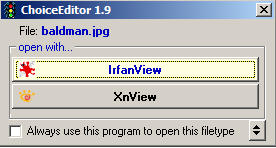
there was a similar thread about this previously and [user]TucknDar[/user] suggested ChoiceEditor and Open File Shell, from which ChoiceEditor was quite well-received. :)


• IDEA: Replacement for Windows 'Open With...' dialogue

tomos

  • Charter Member
  • Joined in 2006
  • ***
  • Posts: 11,970
    • Gathering Badge
    • Participated in NANY Challenge Once
Re: "Open With" alternative for Windows
« Reply #2 on: September 01, 2008, 12:25 PM »
there was a similar thread about this previously and [user]TucknDar[/user] suggested ChoiceEditor and Open File Shell, from which ChoiceEditor was quite well-received. :)


• IDEA: Replacement for Windows 'Open With...' dialogue

unfortunately that never worked properly for me - but it may depend on your file manager and the programmes you trying to open file in - I think my problem was with Dopus and/or some viewer but not sure anymore.. - easy enough to try out though

Do you use XYPlorer ?
dont think so ... but it has an "open with" option that looks very good
The POM! You are missing one of the best features if you never tried this... check out: http://www.xyplorer.com/tour/index.php?page=pom


Tom

mwfuss

  • Charter Member
  • Joined in 2005
  • ***
  • Posts: 39
Re: "Open With" alternative for Windows
« Reply #3 on: September 01, 2008, 01:03 PM »
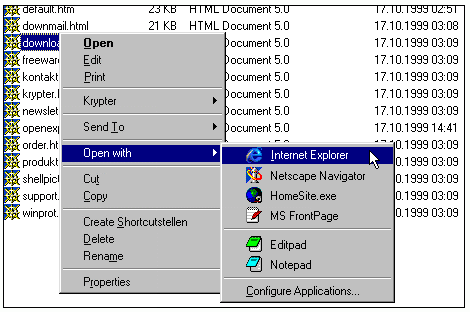
I have used OpenExpert in the past for this purpose.

[attach]
« Last Edit: September 01, 2008, 01:16 PM by mwfuss »

Target

  • Honorary Member
  • Joined in 2006
  • **
  • Posts: 1,840
    • Coding Snacks
Re: "Open With" alternative for Windows
« Reply #4 on: September 01, 2008, 11:15 PM »
and I'll second the open expert option - this is a neat tool

if you want to do it by hand go to the file types dialog (in explorer select TOOLS | FOLDER OPTIONS, then go to the file Types tab) - select the extension you want to work with (or add one if its not already there) and click on edit (or add, or delete, as required).  You can add multiple entries (just make sure they have different titles)
Alcohol is photoshop, bottled
Askhole - someone who ask for advice, then ignores it
"Look wise, say nothing, and grunt. Speech was given to conceal thought" - Sir William Osler

superboyac

  • Is your software in my list?
  • Charter Member
  • Joined in 2005
  • ***
  • Posts: 6,347
Re: "Open With" alternative for Windows
« Reply #5 on: September 03, 2008, 12:21 AM »
Thanks for OpenExpert!  That is perfect.

Original address: https://www.donationcoder.com/forum/index.php?topic=14655.0