DonationCoder.com forum
 
Read-only archive. This is a static copy of the DonationCoder.com forum. Reading and searching work as before; logging in, posting and private messages do not.
Archive of 2026-10-21 · About this archive · Main site

Author Topic: IDEA: Replacement for Windows 'Open With...' dialogue  (Read 12,391 times)

megomaster

  • Participant
  • Joined in 2007
  • *
  • Posts: 3
Hello,
i am searching for a program that i can associate with any filetype e.g. *.jpg .
After doubleclicking on image.jpg the program should offer a window to choose diffrent applications from, that i can configure in a .ini file.

So the content of the .ini file should be something like the following:
jpg=ACDSEE(c:\program files\acd\acdsee.exe), Maxview(c:\program files\faststone\maxvie.exe),Edit(c:\prog\pf\pf.exe)
zip=Winrar(c:\prog\wr\winrar.exe), Winzip(c:\program files\winzip\winzip.exe),JPG-View(c:\prog\cr\comicrack.exe)
...
If i doubleclick now on a image.jpg , that i already associated with newprog.exe i want to have the following choices displayed:
What do you want to do?
ACDSEE
Maxview
Edit

and then choose by mouse or cursor what app should be started with the image.jpg.

This would be really great if you could do something like that, or if anybody can give me a link to a program.
Pretty much thanks.
Dirk

nudone

  • Cody's Creator
  • Columnist
  • Joined in 2005
  • ***
  • Posts: 4,119
    • Cody Award
Re: IDEA: Replacement for Windows 'Open With...' dialogue
« Reply #1 on: May 09, 2007, 07:56 PM »
quickassociation will do this and more. but it's not free. i bought it because i believe it to be the best for what it does. find it at http://www.pcmag.com/article2/0,1895,1654639,00.asp

TucknDar

  • Advanced coder of Nowt
  • Charter Member
  • Joined in 2005
  • ***
  • Posts: 1,133
Re: IDEA: Replacement for Windows 'Open With...' dialogue
« Reply #2 on: May 09, 2007, 08:44 PM »
There's a couple of tools made for file manager Total Commander made for this purpose:

ChoiceEditor: http://www.totalcmd.net/plugring/ChoiceEditor_patched.html

Open File Shell for TC: http://www.totalcmd.net/plugring/OpenFileTC.html

I haven't tried them from outside Total Commander, but I'm pretty sure they'd work the way you want them to.

cthorpe

  • Discount Coordinator
  • Supporting Member
  • Joined in 2006
  • **
  • Posts: 738
Re: IDEA: Replacement for Windows 'Open With...' dialogue
« Reply #3 on: May 09, 2007, 10:14 PM »
Ok, so I have no idea how to code this, but a thought:

Make an AutoHotkey script that accepts two parameters when it is run.  One would be the filename, and one would be the type (image, audio, text, etc).

The script would then get the menu info for that particular file from an ini file (you might need more than one ini: one for each type) and present it to you.

When you select the program you want, the script calls the specified program and passes the filename parameter.


ChoiceEditor works great for this!  I don't have TC, and it works.  Thanks TucknDar!!!!

For example, I have the following ini file:
Code
[Options]
Language=0
CheckCursor=1
CheckKey=27
AlwaysChecked=1
[General]
DisplayName0=IrfanView
Editor0=C:\Program Files\IrfanView\i_view32.exe
Ext0=JPG,png,gif
DisplayName1=XnView
Editor1=D:\Applications\XnView\xnview.exe
Ext1=JPG,png,gif

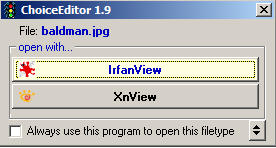
I then associated jpg, png, and gif with ChoiceEditor, and a double click brings up this menu:
choice1.png

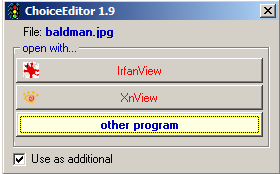
Clicking the double arrow in the lower right lets you add another program:
choice2.png

After you add the first program for an extension, you need to open the ini file and add a second program entry for the same extension to get the menu to show up.
« Last Edit: May 09, 2007, 10:26 PM by cthorpe »

lanux128

  • Global Moderator
  • Joined in 2005
  • *****
  • Posts: 6,277
    • Coding Snacks
    • Volunteers/Staff
    • Gathering Badge
    • Participated in NANY Challenge Once
    • Linux User
Re: IDEA: Replacement for Windows 'Open With...' dialogue
« Reply #4 on: May 10, 2007, 02:28 AM »
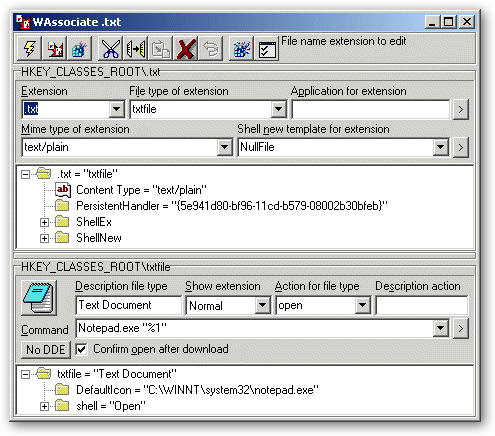
i personally use WAssociate, a freeware that manages the associations between file name extensions and file types stored in the Windows registry. it works with Windows 95, 98, ME, NT, 200 and XP. there is another thread about this subject here..

[attach=#]
http://www.xs4all.nl/~wstudios/Associate/

megomaster

  • Participant
  • Joined in 2007
  • *
  • Posts: 3
Re: IDEA: Replacement for Windows 'Open With...' dialogue
« Reply #5 on: May 12, 2007, 09:27 AM »
Thanks to all who replied to my idea.

ChooseEditor is exactly, really exactly what i was searching for. You helped me to reach the goal. I must confess, i would have never searched for a TotalCommander plugin.

So great Thanks again to all the people here and also to the admins of this portal. Great job!

Thanks Dirk

Original address: https://www.donationcoder.com/forum/index.php?topic=8455.0