@ vixay - regarding Synergy: Can you disable / modify the common screensaver start/stop feature, so you have one or more screensavers running while you are working on one of the other screens at the same time?
40Hz: is LilyPond, by any chance, built ontop of TeX?


. Does this mean that the program installs as many weird-ish programs "all over the place" and that it's pretty big? Or have they managed to condense and "self-contain" it? (I've used miktex on windows, and that felt... alien. Kinda like a unix program backported to windows
).Nice output quality yeah, but it was the syntax that tipped me off. Does this mean that the program installs as many weird-ish programs "all over the place" and that it's pretty big? Or have they managed to condense and "self-contain" it? (I've used miktex on windows, and that felt... alien. Kinda like a unix program backported to windows
![]()
![]()
).


Tom Rokicki's AmigaTeX was a nice implementation. I wish I could find something as nice for Windows. MiKTeX didn't seem as smooth but I did pour a lot of stuff through it. The commercial versions of TeX (at least those at which I've looked) seem to be a bit expensive. For most TeX stuff I've always found myself resorting to a lazy configuration of LaTeX, driven by a handful of external macros (which were a breeze to set up on the Amiga, using ARexx).

LyX is a document processor that encourages an approach to writing based on the structure of your documents (WYSIWYM), and not simply their appearance (WYSIWYG).
LyX combines the power and flexibility of TeX/LaTeX with the ease of use of a graphical interface. This results in world-class support for creation of mathematical content (via a fully integrated equation editor) and structured documents like academic articles, theses, and books. In addition, staples of scientific authoring such as reference list and index creation come standard. But you can also use LyX to create a letter or a novel or a theatre play or film script. A broad array of ready, well-designed document layouts are built in.
LyX is for people who want their writing to look great, right out of the box. No more endless tinkering with formatting details, “finger painting” font attributes or futzing around with page boundaries. You just write. On screen, LyX looks like any word processor; its printed output — or richly cross-referenced PDF, just as readily produced — looks like nothing else.
LyX is released under a Free Software / Open Source license, runs on Linux/Unix, Windows, and Mac OS X, and is available in several languages.
You might try looking at LyX: http://www.lyx.org/Home :Thanks. Tried it once, had some issue that I can't now recall and drifted back away into never-never land. I'll look again.
LED is the best LaTeX editor I've ever used.2cranioscopical
Try maybe this one:
http://www.latexeditor.org/
It was REAL easy to figure out which were my SPECIAL apps - ... FileMappBB, ...

2cranioscopical
Try maybe this one:
http://www.latexeditor.org/
It requires some "coding" but it was real pleasure to learn the syntax with it. I remember how I was pissed that I found this little guy AFTER I wrote my thesis using "Win-something" sharewareLED is the best LaTeX editor I've ever used.

... but it's nothing like LyX if that's what your worried about.that sounds negative ...
You might try looking at LyX: http://www.lyx.org/Home : :Thmbsupthat sounds positive
??2cranioscopicalwhen you say "coding", do you think a non-coder could manage without staying up all night or something?!!! :-)
Try maybe this one:
http://www.latexeditor.org/
It requires some "coding" but it was real pleasure to learn the syntax with it. I remember how I was pissed that I found this little guy AFTER I wrote my thesis using "Win-something" sharewareLED is the best LaTeX editor I've ever used.
)when you say "coding", do you think a non-coder could manage without staying up all night or something?!!! :-)

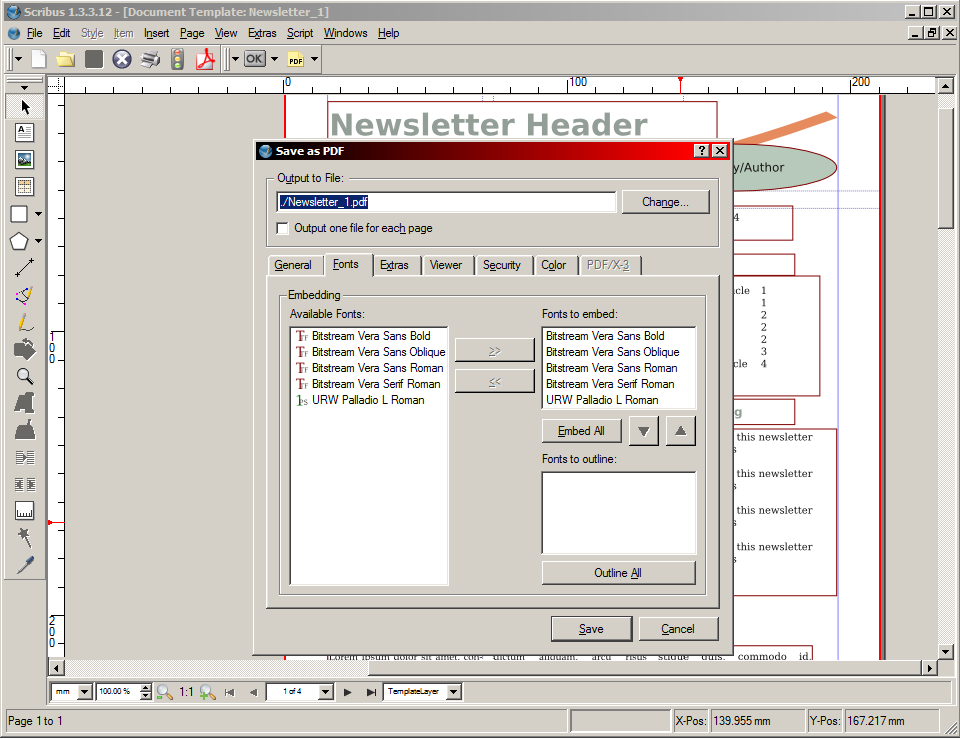
to clarify, I'm looking for a programme that can produce a pdf with embedded fonts (whether opentype or TrueType, document mainly type -layout important- and possibly with some illustrations) and without huge learning curve. I've heard and read about Tex, but you know the way, just reading doesnt really help sometimes ...
2tomos- I'm presuming that means I'd have to stay up all nightQuote from: tomoswhen you say "coding", do you think a non-coder could manage without staying up all night or something?!!! :-)
Sorry for measuring people by my own scale

Quote from: tomosto clarify, I'm looking for a programme that can produce a pdf with embedded fonts (whether opentype or TrueType, document mainly type -layout important- and possibly with some illustrations) and without huge learning curve. I've heard and read about Tex, but you know the way, just reading doesnt really help sometimes ...
Maybe use DTP tool (such like Scribus) then?
(see attachment in previous post)

... but it's nothing like LyX if that's what your worried about.that sounds negative ...


.... Also not wanting to take the thread off-topic![]()

2cranioscopical
Try maybe this one:
http://www.latexeditor.org/
It requires some "coding" but it was real pleasure to learn the syntax with it. I remember how I was pissed that I found this little guy AFTER I wrote my thesis using "Win-something" sharewareLED is the best LaTeX editor I've ever used.
I downloaded latexeditor after I read your post. I'm just beginning to explore it and already I'm impressed.
Excellent find. Thanks for sharing it!

@ vixay - regarding Synergy: Can you disable / modify the common screensaver start/stop feature, so you have one or more screensavers running while you are working on one of the other screens at the same time?
As an example, and as the first post:
I have recently taken interest in HDR images from Flickr, so at the moment I use Bulk Image Downloader every day. It was merely $17.95, but makes it so easy for me to download all original sized photos by any photographer at Flickr's (and of course many other sites), in just a couple of clicks.
Some of the photographers at Flickr don't care to give their visitors the large dimensioned files, but merely uploads big thumbnails... (in my opinion, 500x375 pixels is not an image, but a thumbnail, if you know what I mean). For this reason I also use Image Compressor 2008 Pro - obviously not for compressing, but for enlarging. It gives a very fine quality, but if I hadn't received it from Giveawayoftheday, I wouldn't know about it, because the listed asking price is $99 - so I cannot afford to update...
Reshade Image Enlarger
- Resize Images Without Quality Loss
Deal Available: Friday 27 March, 2009
Reshade Image Enlarger provides accurate, high quality, and realistic enlargements at any zoom factor. Enlarge up to 2000% without appreciable quality loss!
Deal Price: $74.50
List Price: $149.00
You Save: 50%
Full Details

Original address: https://www.donationcoder.com/forum/index.php?topic=14277.0