DonationCoder.com forum
 
Read-only archive. This is a static copy of the DonationCoder.com forum. Reading and searching work as before; logging in, posting and private messages do not.
Archive of 2026-10-21 · About this archive · Main site

Last post Author Topic: Your most used SPECIAL programs  (Read 221,860 times)

1101doc

  • Participant
  • Joined in 2006
  • *
  • Posts: 8
Re: Your most used SPECIAL programs
« Reply #25 on: August 15, 2008, 05:27 PM »
A truly special little app which I use almost every day is USB Disk Ejector from Quick and Easy: http://quick.mixnmojo.com/

With the program's shortcut in my Quick Launch, it's one click to open and a double click on the drive to remove.  Works instantly without balloon message.

kartal

  • Supporting Member
  • Joined in 2008
  • **
  • Posts: 1,529
Re: Your most used SPECIAL programs
« Reply #26 on: August 15, 2008, 06:13 PM »
My special app is http://www.inputdirector.com/

"Input Director is a Windows application that lets you control multiple Windows systems using the keyboard/mouse attached to one computer. It is designed for folks who have two (or more) computers set up at home and find themselves regularly sliding from one system to the other (and wearing out the carpet in the process!)."

siouxdax

  • Lather. Rinse. Repeat.
  • Supporting Member
  • Joined in 2006
  • **
  • Posts: 247
Re: Your most used SPECIAL programs
« Reply #27 on: August 15, 2008, 07:14 PM »
Hope I'm not off-topic, but I saw at the top the mention of Bulk Image Downloader. Does anyone know of a freeware version that is similar? I already use FastStone Image Viewer which does everything BUT bulk image downloading.

Regards,
Daniel in Tulsa
aka siouxdax
Kind Regards,
Daniel in Tulsa
AKA siouxdax

Visit my tumblog!

TPReal

  • Honorary Member
  • Joined in 2006
  • **
  • Posts: 130
    • Participated in NANY Challenge Five Times
Re: Your most used SPECIAL programs
« Reply #28 on: August 15, 2008, 07:17 PM »
My special programs:
Google Desktop - for keeping things, notes, calendar, ... in an accessible place.
Vidalia and Friends - for tampering in suspicious areas. See what I found last week: http://modelarz.com.pl/. Yummy (I could get some e-mails from their database using benchmark SQL injection), but it's better to be safe than sorry.
DOSBox - for my favourite games, like Prince of Persia 1 and 2.

And finally the most important tool I use all the time:
Ruby - I use it several times a day at least, for writing short programs to automate things I do, or just to do some calculations in irb (I don't use Windows' calc anymore). I can't believe I could live without it :)

I must have a look at the Input Director, sounds very interesting. And they say it has the shared clipboard option - I hate the frustration when you want to simply copy a line from one PC to another, and constantly bump into the idea of using the clipboard.

TPR.

kartal

  • Supporting Member
  • Joined in 2008
  • **
  • Posts: 1,529
Re: Your most used SPECIAL programs
« Reply #29 on: August 15, 2008, 08:12 PM »
InputDirector is amazing. It has seamless integration, copy pasting of files-clipboard is well supported! Make sure that you have shared directories enabled.


I must have a look at the Input Director, sounds very interesting. And they say it has the shared clipboard option - I hate the frustration when you want to simply copy a line from one PC to another, and constantly bump into the idea of using the clipboard.

TPR.

siouxdax

  • Lather. Rinse. Repeat.
  • Supporting Member
  • Joined in 2006
  • **
  • Posts: 247
Re: Your most used SPECIAL programs
« Reply #30 on: August 15, 2008, 08:17 PM »
InputDirector is amazing. It has seamless integration, copy pasting of files-clipboard is well supported! Make sure that you have shared directories enabled.


I must have a look at the Input Director, sounds very interesting. And they say it has the shared clipboard option - I hate the frustration when you want to simply copy a line from one PC to another, and constantly bump into the idea of using the clipboard.

TPR.


Thanks, I'll try that.

Regards
siouxdax
Kind Regards,
Daniel in Tulsa
AKA siouxdax

Visit my tumblog!
« Last Edit: August 15, 2008, 08:21 PM by siouxdax »

Darwin

  • Charter Member
  • Joined in 2005
  • ***
  • Posts: 6,985
    • Gathering Badge
Re: Your most used SPECIAL programs
« Reply #31 on: August 15, 2008, 08:18 PM »
Input Director looks cool... : have to admit that I've always been completely mystified by how these types of applications work - do you need some sort of a physical switch? Does this simply work across a network? Now I see from the FAQ on the Input Director site (can't think why I didn't bother following up on these questions long ago) that it works over a network. Definitely cool, and I'll definitely be giving it a whirl.

Thanks TPReal  :Thmbsup:
"Some people have a way with words, other people,... oh... have not way" - Steve Martin

Grorgy

  • Supporting Member
  • Joined in 2007
  • **
  • Posts: 821
Re: Your most used SPECIAL programs
« Reply #32 on: August 15, 2008, 08:24 PM »
I've been using Stardock's multiplicity for quite a while for what input director does, it isn't free but from all the reviews I read about it it is perhaps the easiest to set up and use.  I've only changed the setup once in 12 months or so, I keep my laptop on a different side now  :)

kartal

  • Supporting Member
  • Joined in 2008
  • **
  • Posts: 1,529
Re: Your most used SPECIAL programs
« Reply #33 on: August 15, 2008, 08:33 PM »
What is interesting about InputDirector is that most of my usb units work on other computer like external usb volume dial and my wacom tablet.

Darwin

  • Charter Member
  • Joined in 2005
  • ***
  • Posts: 6,985
    • Gathering Badge
Re: Your most used SPECIAL programs
« Reply #34 on: August 15, 2008, 09:20 PM »
What is interesting about InputDirector is that most of my usb units work on other computer like external usb volume dial and my wacom tablet.

Ooh, aah! Now I can't wait to get home to try it out (if family committments don't get in the way - we're going camping tomorrow morning)...
"Some people have a way with words, other people,... oh... have not way" - Steve Martin

Curt

  • Supporting Member
  • Joined in 2006
  • **
  • Posts: 7,565
Re: Your most used SPECIAL programs
« Reply #35 on: August 15, 2008, 10:49 PM »
... the mention of Bulk Image Downloader. Does anyone know of a freeware version that is similar?

I have not heard of anything similar, but I don't *know*. Edited2: (Sure there are other image downloaders (Google!), but B.I.D. is the only one dedicated to certain "encrypted" (?) sites).  However, B.I.D. is ALMOST freeware...
Edited1: But you may use B.I.D as freeware if you insist:
>>Limitations in unregistered version: Max 200 images per batch (60 for imagefap), max 2 instances, max 2 simultaneous downloads, max 2 queued downloads (Queue Manager)<<

B.I.D. is really good at it's primary job, find & download images, but I will have to say that it is disappointing for me to see file names transcribed into Kuşadası.jpg or Laxárstöð.jpg (actual examples) just because the author doesn't think there is a world outside of usa, or maybe doesn't know how to support Unicode.
« Last Edit: August 23, 2008, 04:47 PM by Curt »

wyrwolf

  • It is what it is.
  • Supporting Member
  • Joined in 2006
  • **
  • Posts: 38
Re: Your most used SPECIAL programs
« Reply #36 on: August 16, 2008, 01:23 AM »
It was REAL easy to figure out which were my SPECIAL apps - they're all under the User tabs in StartupCPL (oops, there's another) - Background Boss, BrowserTraySwitch, FileMappBB, NotesHolder, Mmm, AudioSliders, ExtraSubst, and DaemonTools. Plus, I'd also like to mention BC Wipe and TeraCopy.
I may not use them all every day, but I want them there ready to go all the time.
It is what it is.

awraynor

  • Supporting Member
  • Joined in 2008
  • **
  • Posts: 16
Re: Your most used SPECIAL programs
« Reply #37 on: August 16, 2008, 01:29 AM »
Directory Opus just gets more useful all the time.

Deozaan

  • Charter Member
  • Joined in 2006
  • ***
  • Posts: 9,827
    • Participated in NANY Challenge Eight Times
    • Cody Award
Re: Your most used SPECIAL programs
« Reply #38 on: August 16, 2008, 02:18 AM »
Alright, I finally thought of one of my most frequently used and underappreciated applications. This is one of the first things to go on my PC after a fresh install and I seriously hate using other computers when I need this and it's not there.

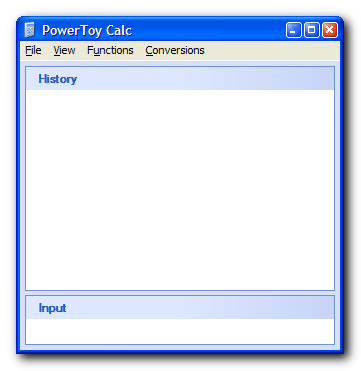
PowerToy Calculator
PowerCalc.png

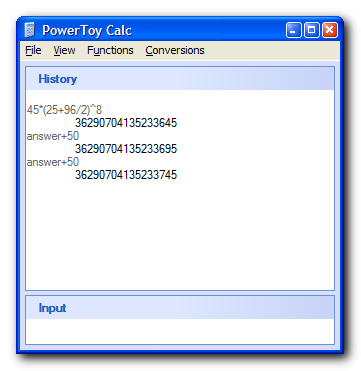
I use it primarily because it's smart enough to follow order of operations, it can track variables, and it has a history so you know what numbers you were typing in, what answers you had, etc. It knows the values of specific mathematical constants, such as pi and e, can perform powers and roots, etc. It's also smart enough that you can type in an equation and just keep pressing enter for it to keep calculating the values.

It even has advanced graphing abilities that I never use (Graphmatica or a real Graphing Calculator work best for graphs) and probably lots of other powerful features I never use.

But nothing beats being able to quickly finger my way across the NumPad, looking at the screen to be able to see mistakes and changes and edit or view previous solutions. It's such a vast improvement over the standard Windows Calculator that I actually replace the exe file in my system32 directory with the PowerToy Calculator.

I could go on and on. It's impressive and very useful!

PowerCalc Calcs.png Screenshot - 8_15_2008 , 8_17_10 PM.png
Screenshot - 8_15_2008 , 8_18_15 PM.png Screenshot - 8_15_2008 , 8_17_20 PM.png

CleverCat

  • Cat's Are Fun!
  • Supporting Member
  • Joined in 2006
  • **
  • Posts: 1,164
Re: Your most used SPECIAL programs
« Reply #39 on: August 16, 2008, 06:39 AM »
I pull out Folder Tweaker very seldom, but it's fantastic for putting backgrounds in your folders!
If you need help - JUST ASK!

mini_teh

  • Participant
  • Joined in 2008
  • *
  • Posts: 1
Re: Your most used SPECIAL programs
« Reply #40 on: August 17, 2008, 04:04 PM »
I like <a href="http://www.freewebs.com/nerdcave/taskbarshuffle.htm">Taskbar Shuffle</a>.
It's great since I like to open many programs and find them too messy on my taskbar. It rearrange them simply as we like just by using drag-and-drop. A very great one.

TucknDar

  • Advanced coder of Nowt
  • Charter Member
  • Joined in 2005
  • ***
  • Posts: 1,133
Re: Your most used SPECIAL programs
« Reply #41 on: August 17, 2008, 05:01 PM »
Interesting topic, but not sure I know which apps to include... maybe I didn't understand the concept :-[

A couple that maybe fits in the "useful but not used all the time"-category (based on recently launched in FARR and my faulty memory...):
Beyond Compare - "Beyond Compare 3 is the ideal tool for comparing files and folders on your Windows or Linux system."
asterwin - "This utility reveals the passwords stored behind the asterisks ('***') in standard password text-boxes"
System Explorer - "Detailed informations about Tasks, Processes, Startups, IE Addons, Uninstallers, Windows, Services, Drivers, Connections and Opened Files" Task Manager replacement

Tons more, which I'll post eventually

Edit: More:
Mp3tag - "the universal Tag Editor and more ..." Only mp3 tagging tool you'll ever need! Free, but very donationworthy!
« Last Edit: August 17, 2008, 06:50 PM by TucknDar »

4wd

  • Pedantic Old Bastard
  • Supporting Member
  • Joined in 2006
  • **
  • Posts: 5,652
    • Coding Snacks
Re: Your most used SPECIAL programs
« Reply #42 on: August 18, 2008, 12:16 AM »
Hope I'm not off-topic, but I saw at the top the mention of Bulk Image Downloader. Does anyone know of a freeware version that is similar? I already use FastStone Image Viewer which does everything BUT bulk image downloading.

If you use FireFox you could give BatchDownload a try.
"I will not follow where the path may lead, but I will go where there is no path, and I will leave a trail." - Muriel Strode, 1903

40hz

  • Supporting Member
  • Joined in 2007
  • **
  • Posts: 11,861
Re: Your most used SPECIAL programs
« Reply #43 on: August 20, 2008, 08:15 PM »
Here's something I find myself using more and more lately.

Not too long ago I got really frustrated with the music notation software I was using and decided to look for something better. I run multiple operating systems, so an application that ran on the major three was something I really wanted if at all possible. A musical friend suggested I try something called LilyPond ( http://lilypond.org/web/index ). I'm glad I did.

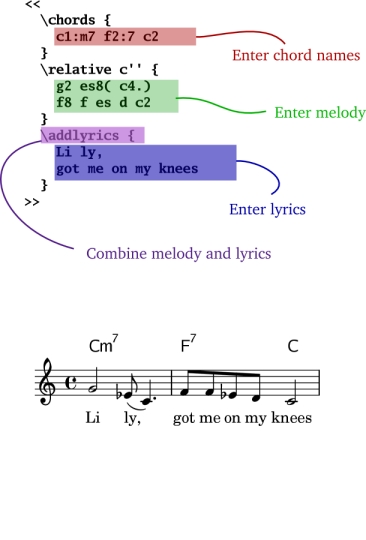
LilyPond is pure music notation software. It does not arrange music, record it, or do anything else. It just produces very professional scores. But it works differently from just about anything else in that it does not have a GUI. LilyPond uses an ASCII notational scheme that you use to create a textfile with a ".ly" extension. This textfile is then processed - and a very professional musical score is generated.

The notational system is easily mastered if you know anything about music. I found once I got used to it, I sometimes quick scored a composition I was working on using this method rather than going with traditional notation. This notational scheme is great tool in itself. Perfect for those times when inspiration strikes and all you have is a pen and a regular piece of paper handy. No more quickly scrawling a 5-line staff just to get an idea or phrase down.

The website also has links to 3rd-party apps and utilities that work with LilyPond along with a list of software that can export to directly LilyPond's format.

Here's a quick example of what the text notation looks like along with the score it produces:

[attach]
« Last Edit: October 11, 2011, 06:49 PM by 40hz »

Curt

  • Supporting Member
  • Joined in 2006
  • **
  • Posts: 7,565
Re: Your most used SPECIAL programs
« Reply #44 on: August 21, 2008, 01:44 AM »
Wow, 40Hz, that was really something!
Thanks for sharing!  :up:


- and where can we go to listen to some of your music?

40hz

  • Supporting Member
  • Joined in 2007
  • **
  • Posts: 11,861
Re: Your most used SPECIAL programs
« Reply #45 on: August 21, 2008, 02:10 AM »
- and where can we go to listen to some of your music?

Thanks for the interest. I'm currently in the process of putting together a new musical project. I'll be sure to let you know when and where, as soon as it's ready. :)

mouser

  • First Author
  • Administrator
  • Joined in 2005
  • *****
  • Posts: 40,931
    • Gathering Badge
    • Plugin Coding Medal
    • Participated in NANY Challenge Seventeen Times
    • Cody Award
    • Coding Snacks
    • Volunteers/Staff
Re: Your most used SPECIAL programs
« Reply #46 on: August 21, 2008, 02:22 AM »
very cool find 40hz; here's a link to the essay if anyone is interested:
http://lilypond.org/web/about/automated-engraving/

kartal

  • Supporting Member
  • Joined in 2008
  • **
  • Posts: 1,529
Re: Your most used SPECIAL programs
« Reply #47 on: August 21, 2008, 02:26 AM »
My other most special apps

-Powerpro
http://powerpro.webeddie.com/
PowerPro lets you take control of how you use Windows 95/98/NT/2000/XP. Run commands and configure your system any way you want.

-Frink, advanced calculator
http://futureboy.homeip.net/frinkdocs/

Deozaan

  • Charter Member
  • Joined in 2006
  • ***
  • Posts: 9,827
    • Participated in NANY Challenge Eight Times
    • Cody Award
Re: Your most used SPECIAL programs
« Reply #48 on: August 21, 2008, 07:40 AM »
Wow, that LilyPond looks like you're programming music with a scripting language!

vixay

  • ViXaY
  • Supporting Member
  • Joined in 2006
  • **
  • Posts: 140
    • Coding Snacks
Re: Your most used SPECIAL programs
« Reply #49 on: August 21, 2008, 09:53 AM »
Alright, I finally thought of one of my most frequently used and underappreciated applications. This is one of the first things to go on my PC after a fresh install and I seriously hate using other computers when I need this and it's not there.

I use tabbyCalc2 http://www.tabbyware.com/ ... which has similar features.
but i like that someone uses ruby as their calculator! That's cool. It hadn't occured to me.
I did check out frink and it looks great as well, though the syntax requires a bit of getting used to


My fav 3 special apps, I don't know if Locate32 is allowed to be in the list but that would be one, Autohotkey would be next (again i don't know if that's in the excluded list).

And seeing the talk on input director, I didn't even realize it was in a special category, i use Synergy everyday and i'd forgotten that i even use it! :). So for an alternative to multiplicity, & input director, try Synergy, its great :). A bit technical to implement but works well and has clipboard sync as well.

"Drunk on the Nectar of Life!" -me

Original address: https://www.donationcoder.com/forum/index.php?topic=14277.0