


I was going to post a new version of SwitchToTask here until Vitalyb's excellent FARRAltTab was released. So instead this post is about 'how to expose information to FARR using plain text files and aliases'. I still think the process I used could be beneficial to others, especially Autohotkey coders wanting to use write for FARR. 
All source files are enclosed at the end of the post.
THE TECHNIQUE
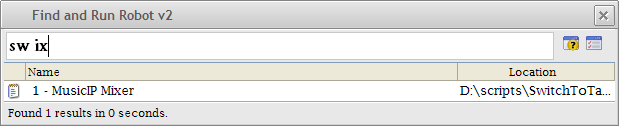
As FARR can show a list of results for certain files in a folder, it was a logical experiment to see if I could write out information to text files. By using aliases I can then create a command only to query those text files. The result can be passed on to a helper program to process the information.
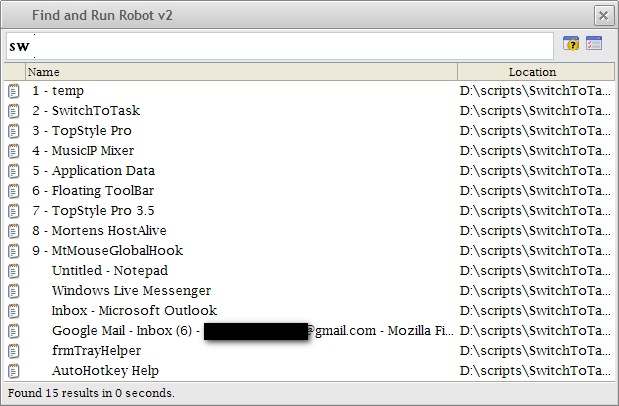
It turns out this works and I used the technique in a SwitchToTask implementation. Using an autohotkey script when indexing it writes all windowtitles to textfiles in its folder. We can then query the windowtitles using farr and send the result to another helper script that switches to the window chosen.
INDEXING WINDOW TITLES
We use a simple script to index window titles. First we setup the program and remove all previous window titles before indexing.
QUERING THE TEXTFILES
To query the textfiles I created 3 aliases. We issue 'IndexWindows' whenever we want up to date information. We issue 'sw <part of windowtitle>' to query window titles. IndexWindows is created just for ease of use: it simple calls the indexing script we created:
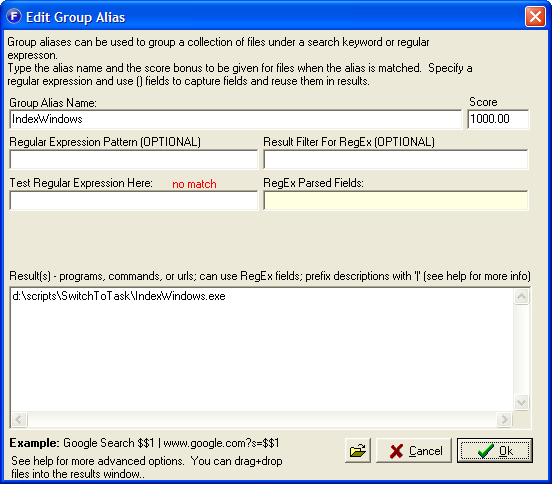
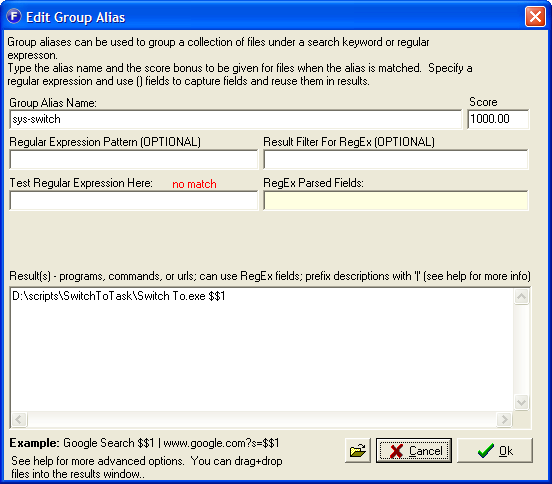
The 'sys-switch' alias is a system alias (the user never has to know about it) that runs a query as a parameter to the switching script we're creating later on:
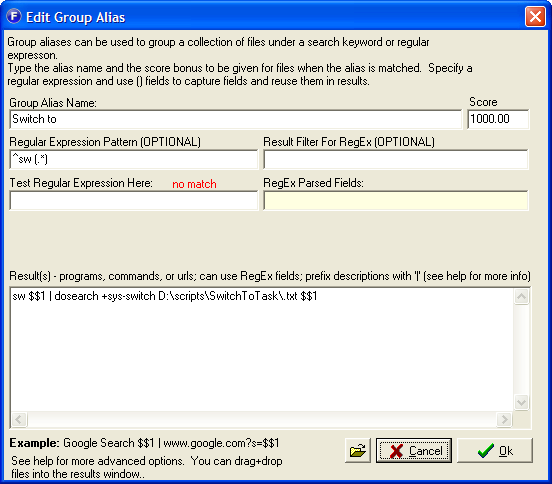
The third and last alias is a bit more complex. (Thanks to mouser for helping me with this) It does a new search with the sys-switch alias for any textfile in the Storage directory:
PROCESSING RESULTS
That leaves us with the Switch To script. This script takes one parameter - the textfile launched by FARR. It then takes off the extension and switches to the window specified.
SOURCE & FINAL THOUGHTS
I was still polishing these scripts when FARRAltTab was released so at the moment it has some problems with window titles with invalid filename characters in them such as ':'. Also I'd have created some kind of FARR alias writer helper app so the person wouldn't have to know the path of the helper apps. Etcetera. However I think it is a nice proof of concept for the creative thinkers that want to use Autohotkey or any other language to harness the power of FARR.
All source files are enclosed at the end of the post.
THE TECHNIQUE
As FARR can show a list of results for certain files in a folder, it was a logical experiment to see if I could write out information to text files. By using aliases I can then create a command only to query those text files. The result can be passed on to a helper program to process the information.
It turns out this works and I used the technique in a SwitchToTask implementation. Using an autohotkey script when indexing it writes all windowtitles to textfiles in its folder. We can then query the windowtitles using farr and send the result to another helper script that switches to the window chosen.
INDEXING WINDOW TITLES
We use a simple script to index window titles. First we setup the program and remove all previous window titles before indexing.
Code: (autohotkey)
#NoEnv ; Recommended for performance and compatibility with future AutoHotkey releases.

; setting variables
Storage = %A_ScriptDir%
FileDelete , %Storage%\*.txt
Titles = Code: (autohotkey)
WinGet, id, list,,, Program Manager ; get list of all foreground ids
Loop, %id%
{
	this_id := id%A_Index%
	WinGet, this_process, ProcessName, ahk_id %this_id%
	if NOT this_process ;exclude emptiness
		continue
	WinGetTitle, this_title, ahk_id %this_id%
	if NOT this_title ;exclude start menu and empty processes
			continue
	Titles%i% := this_title
	FileAppend , Text, %Storage%\%this_title%.txt
}
QUERING THE TEXTFILES
To query the textfiles I created 3 aliases. We issue 'IndexWindows' whenever we want up to date information. We issue 'sw <part of windowtitle>' to query window titles. IndexWindows is created just for ease of use: it simple calls the indexing script we created:
Code
1000>>>IndexWindows>->d:\scripts\SwitchToTask\IndexWindows.exeThe 'sys-switch' alias is a system alias (the user never has to know about it) that runs a query as a parameter to the switching script we're creating later on:
Code
1000>>>sys-switch>->D:\scripts\SwitchToTask\Switch To.exe $$1The third and last alias is a bit more complex. (Thanks to mouser for helping me with this) It does a new search with the sys-switch alias for any textfile in the Storage directory:
Code
1000>>>Switch to>->sw $$1 | dosearch +sys-switch D:\scripts\SwitchToTask\.txt $$1>+>^sw (.*)PROCESSING RESULTS
That leaves us with the Switch To script. This script takes one parameter - the textfile launched by FARR. It then takes off the extension and switches to the window specified.
Code: (autohotkey)
#NoEnv ; Recommended for performance and compatibility with future AutoHotkey releases.
SendMode Input ; Recommended for new scripts due to its superior speed and reliability.
SetTitleMatchMode RegEx
if 0 < 1  ; need 1 parameter
{
    MsgBox Enter part of a window title as a parameter.
    ExitApp
}
Loop, %0%  ; For each parameter:
{
		StringLen, length, %A_Index%
		length:=length-4 ; remove .txt extensions
		StringLeft, this_title, %A_Index%, %length%
		WinActivate, i)%this_title%
}
SOURCE & FINAL THOUGHTS
I was still polishing these scripts when FARRAltTab was released so at the moment it has some problems with window titles with invalid filename characters in them such as ':'. Also I'd have created some kind of FARR alias writer helper app so the person wouldn't have to know the path of the helper apps. Etcetera. However I think it is a nice proof of concept for the creative thinkers that want to use Autohotkey or any other language to harness the power of FARR.
 VanDragt.com


 I'm trying to think of some useful ideas for this to help others along:

 I wonder if it can solve a challenge I've been thinking on how to deal with for some time. Can I somehow use your technique to let FARR at the same time do both its regular searches over file names AND search in some text files that contain lists of file and directory names?
 ).
).


