DonationCoder.com forum
 
Read-only archive. This is a static copy of the DonationCoder.com forum. Reading and searching work as before; logging in, posting and private messages do not.
Archive of 2026-10-21 · About this archive · Main site

Last post Author Topic: DONE: ALT-TAB edge of the screen (new)  (Read 65,877 times)

philip2005

  • Charter Member
  • Joined in 2005
  • ***
  • Posts: 25
DONE: ALT-TAB edge of the screen (new)
« on: October 30, 2007, 02:05 AM »
Hi,

I was working on an assignment over the weekend and found myself constantly pressing ALT-TAB to switch between two windows, I was wondering if anyone knew of a program or could script a small program to invoke ALT-TAB whn i move my mouse to the edge of the screen - like hot corners except instead of corners - edges of the screen.

Thanks !!!  :Thmbsup:

Phil

Nighted

  • Meat Popsicle
  • Charter Honorary Member
  • Joined in 2005
  • ***
  • Posts: 572
Re: ALT-TAB edge of the screen (new)
« Reply #1 on: October 30, 2007, 03:22 AM »
ClickyMouse is a macro program that let's you assign actions to screen edges. Very expensive just to invoke Alt+Tab though!

TopDesk is basically an Alt+Tab replacement. I tried it out a while ago and I'm positive it has this feature.  (Again, not free and probably too resource intensive for this kind of task.)

Have you ever heard of KatMouse? It doesn't do what you requested, but it does let you switch windows with an assigned mouse button. Many people here will probably recommend it as well. You could also use X-Mouse Button Control to map alt+tab to a mouse button, you can also make it application specific. You could also use this in combination with Alt-Tab Thingie or TaskSwitchXP and for convenience, set it to "sticky" mode.

I`m a firm believer in the philosophy of a ruling class, especially since I rule.
« Last Edit: October 30, 2007, 03:51 AM by Nighted »

lanux128

  • Global Moderator
  • Joined in 2005
  • *****
  • Posts: 6,277
    • Coding Snacks
    • Volunteers/Staff
    • Gathering Badge
    • Participated in NANY Challenge Once
    • Linux User
Re: ALT-TAB edge of the screen (new)
« Reply #2 on: October 30, 2007, 03:36 AM »
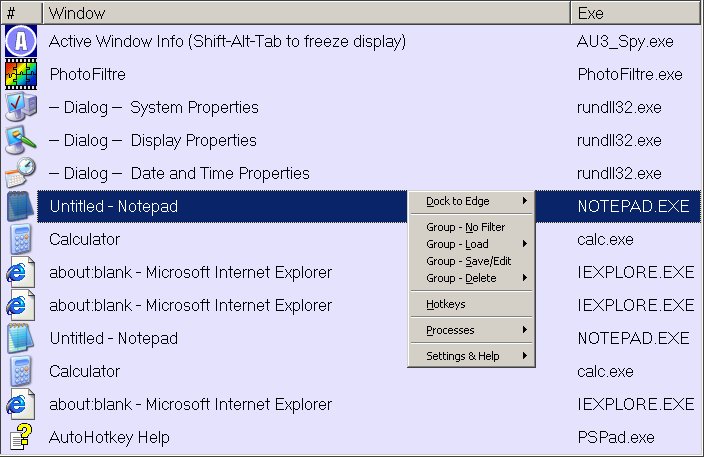
also try this alternative Alt-Tab replacement, coded in Autohotkey.


philip2005

  • Charter Member
  • Joined in 2005
  • ***
  • Posts: 25
Re: ALT-TAB edge of the screen (new)
« Reply #3 on: October 30, 2007, 04:01 AM »
Thanks for the response's - alot to try out  ;D

philip2005

  • Charter Member
  • Joined in 2005
  • ***
  • Posts: 25
Re: ALT-TAB edge of the screen (new)
« Reply #4 on: October 30, 2007, 04:12 AM »
X-Mouse Button Control works great!!! Thanks Nighted  :D

Nighted

  • Meat Popsicle
  • Charter Honorary Member
  • Joined in 2005
  • ***
  • Posts: 572
Re: ALT-TAB edge of the screen (new)
« Reply #5 on: October 30, 2007, 04:55 AM »
Hey, glad someone likes it too! :)
I`m a firm believer in the philosophy of a ruling class, especially since I rule.

justice

  • Solve issues simply.
  • Supporting Member
  • Joined in 2006
  • **
  • Posts: 1,898
    • Participated in NANY Challenge Four Times
    • Cody Award
    • Coding Snacks
    • DJ Badge - DJ
Re: ALT-TAB edge of the screen (new)
« Reply #6 on: October 30, 2007, 04:38 PM »
You can try my AltTab Fingertips It uses an assignable hotkey to show you the windows to switch right at your mousepointer. That saves mousemovement.

yotta

  • Supporting Member
  • Joined in 2008
  • **
  • Posts: 50
Re: ALT-TAB edge of the screen (new)
« Reply #7 on: January 24, 2008, 05:42 PM »
try winExpose(http://www.matiasmoreno.com.ar/winexpose) for a mac-like expose function on windows

Darwin

  • Charter Member
  • Joined in 2005
  • ***
  • Posts: 6,985
    • Gathering Badge
Re: ALT-TAB edge of the screen (new)
« Reply #8 on: January 24, 2008, 06:23 PM »
The "Expose clone for Windows" category is CROWDED. Defintely a category in which one is spoiled for choice, both free and shareware. yatta, are you by chance the developer of winExpose?
"Some people have a way with words, other people,... oh... have not way" - Steve Martin

PhilB66

  • Supporting Member
  • Joined in 2007
  • **
  • Posts: 1,522
Re: ALT-TAB edge of the screen (new)
« Reply #9 on: January 24, 2008, 10:59 PM »

yotta

  • Supporting Member
  • Joined in 2008
  • **
  • Posts: 50
Re: ALT-TAB edge of the screen (new)
« Reply #10 on: February 07, 2008, 04:46 PM »
The "Expose clone for Windows" category is CROWDED. Defintely a category in which one is spoiled for choice, both free and shareware. yatta, are you by chance the developer of winExpose?

nope, ive just used it, and it is the quickest and lightest of the winExpose clones that i have seen, its also free.

skrommel

  • Fastest code in the west
  • Developer
  • Joined in 2005
  • ***
  • Posts: 933
    • Participated in NANY Challenge Twice
    • Coding Snacks
Re: ALT-TAB edge of the screen (new)
« Reply #11 on: February 09, 2008, 09:32 PM »
:) Here's AltEdge.

AltEdge - Sends Alt-Tab when the mouse is on the left edge of the screen.

Features:
- Keep it there to tab through the other windows.
- Rightclick the tray menu to change screen edge.

You'll find the downloads and more info at 1 Hour Software by Skrommel.

Skrommel
« Last Edit: August 02, 2008, 01:06 PM by skrommel »

Armando

  • Charter Member
  • Joined in 2005
  • ***
  • Posts: 2,727
    • Coding Snacks
Re: ALT-TAB edge of the screen (new)
« Reply #12 on: February 10, 2008, 04:05 AM »
Ahaha! Nice.
"I suppose it can be said that I'm an absent-minded driver. It's true that I've driven through a number of red lights on occasion, but on the other hand, I've stopped at a lot of green ones but never gotten credit for it."
Glenn Gould

philip2005

  • Charter Member
  • Joined in 2005
  • ***
  • Posts: 25
Re: ALT-TAB edge of the screen (new)
« Reply #13 on: February 10, 2008, 05:28 AM »
Thanks skrommel  :D

Much appreciated!!!

philip2005

  • Charter Member
  • Joined in 2005
  • ***
  • Posts: 25
Re: ALT-TAB edge of the screen (new)
« Reply #14 on: February 20, 2008, 07:35 PM »
I've been trying to change the code, could anyone help me do 2 things:

1. Invoke ALT + TAB when at the right edge of the screen
2. Have the program work not on the whole edge, but on a certain part (eg. the middle)

Thanks

AndyM

  • Charter Member
  • Joined in 2006
  • ***
  • Posts: 616
Re: ALT-TAB edge of the screen (new)
« Reply #15 on: February 20, 2008, 09:34 PM »
I've been trying to change the code, could anyone help me do 2 things:

1. Invoke ALT + TAB when at the right edge of the screen
2. Have the program work not on the whole edge, but on a certain part (eg. the middle)

Probably revise the If(mx=0) line to If(mx=whatever your right edge is and my is greater than the top of your middle range but less than the bottom)
« Last Edit: February 20, 2008, 10:32 PM by AndyM »

AndyM

  • Charter Member
  • Joined in 2006
  • ***
  • Posts: 616
Re: ALT-TAB edge of the screen (new)
« Reply #16 on: February 20, 2008, 10:55 PM »
Here's the line I have to invoke the script by holding the mouse against the right edge of my monitor (it's wide 1920x1200) and only in a large center area:

  If (mx=1919) and (my>200) and (my<800)

I also prefer the Alt-Escape behavior to Alt-Tab, so I changed two lines to:

  Send,{Alt Down}{Esc}

This is cool, I'm keeping it!

Thanks Skrommel!!!

skrommel

  • Fastest code in the west
  • Developer
  • Joined in 2005
  • ***
  • Posts: 933
    • Participated in NANY Challenge Twice
    • Coding Snacks
Re: ALT-TAB edge of the screen (new)
« Reply #17 on: February 20, 2008, 11:55 PM »
:) The first version I made, before reading the request properly, again, actually changed programs as they were layed out on the Taskbar. Much harder to do, maybe not so useful.

Skrommel

AndyM

  • Charter Member
  • Joined in 2006
  • ***
  • Posts: 616
Re: ALT-TAB edge of the screen (new)
« Reply #18 on: February 21, 2008, 03:00 AM »
If I drag a window border all the way to the right edge, I don't want to Alt-Tab/Esc, so I checked first if the Left Mouse Button wasn't down, dragging:
Code
Loop
{
  MouseGetPos,mx,my
  GetKeyState,lbutton,LButton,P
  If (mx=1919) and (my>200) and (my<800) and (lbutton="U")
  {
    .
    .
    . 
Except as soon as I let go, the script does it's thing.  Any clues on how to fix this?

philip2005

  • Charter Member
  • Joined in 2005
  • ***
  • Posts: 25
Re: ALT-TAB edge of the screen (new)
« Reply #19 on: February 21, 2008, 08:56 AM »
Thank you so much AndyM and skrommel --> It's perfect!!!!  :Thmbsup:

AndyM

  • Charter Member
  • Joined in 2006
  • ***
  • Posts: 616
Re: ALT-TAB edge of the screen (new)
« Reply #20 on: February 21, 2008, 07:36 PM »
Quote
Except as soon as I let go, the script does it's thing.  Any clues on how to fix this?

I did something crude but effective, at least for when I end up at the right edge of the screen while resizing a window by dragging the right edge.  If the left button is down and in the hot space at the right edge, when I let go the mouse gets moved two pixels away from the edge and the loop continues:

Code
Loop
{
  MouseGetPos,mx,my
  GetKeyState,lbutton,LButton,P
  If (mx=1919) and (my>200) and (my<800) and (lbutton="D")
  {
  keywait,LButton
  MouseMove,1917,my
  }
  If (mx=1919) and (my>200) and (my<800) and (lbutton="U")
  {
    If tabbed=0
    {
   .
   .
   .

better suggestions welcome!

cbbibleboy

  • Honorary Member
  • Joined in 2008
  • **
  • Posts: 17
Re: ALT-TAB edge of the screen (new)
« Reply #21 on: June 02, 2008, 02:33 AM »
This thread may have already been exhausted but I've made a quick app (Edge Roll) for this purpose. Unlike (I think) the other apps posted though, it reserves the edges of the screen (like, but not using, coral desktop) so there's no issues with scrolling, highlights the edges on hover with an adjustable delay time and can optionally mimic Alt+Tab or Alt+Esc behavior. Enjoy!  :)


In the zip is both the installer (for standard users) and the Edge Roll standalone (for users who don't need to work through the "Add/Remove Progams" control panel interface).

lanux128

  • Global Moderator
  • Joined in 2005
  • *****
  • Posts: 6,277
    • Coding Snacks
    • Volunteers/Staff
    • Gathering Badge
    • Participated in NANY Challenge Once
    • Linux User
Re: ALT-TAB edge of the screen (new)
« Reply #22 on: June 02, 2008, 03:07 AM »
@cbbibleboy: nice program, works well! :Thmbsup:

wep

  • Honorary Member
  • Joined in 2008
  • **
  • Posts: 31
Re: ALT-TAB edge of the screen (new)
« Reply #23 on: July 01, 2008, 06:31 PM »
try this ahk-code:

;;;;;;;;;;;;start;;;;;;;;;;;;;;
#CapsLock::
WinGetActiveTitle, Title
WinSet, Transparent, 125, %Title%
KeyWait, CapsLock
WinSet, Transparent, off, %Title%

#Esc::
WinGetActiveTitle, Title
WinMinimize, %Title%
KeyWait, Esc
WinRestore, %Title%
WinActivate, %Title%
Return
;;;;;;;;;;;;;end;;;;;;;;;;;;;;;;;

or try this compiled WinEsc.exe to make you life easier :)

wep

  • Honorary Member
  • Joined in 2008
  • **
  • Posts: 31
Re: ALT-TAB edge of the screen (new)
« Reply #24 on: July 01, 2008, 06:33 PM »
Hi,

I was working on an assignment over the weekend and found myself constantly pressing ALT-TAB to switch between two windows, I was wondering if anyone knew of a program or could script a small program to invoke ALT-TAB whn i move my mouse to the edge of the screen - like hot corners except instead of corners - edges of the screen.

Thanks !!!  :Thmbsup:

Phil

try this code

#CapsLock::
WinGetActiveTitle, Title
WinSet, Transparent, 125, %Title%
KeyWait, CapsLock
WinSet, Transparent, off, %Title%

#Esc::
WinGetActiveTitle, Title
WinMinimize, %Title%
KeyWait, Esc
WinRestore, %Title%
WinActivate, %Title%
Return

or try this compiled WinEsc.exe Maybe this one make you life easier :)

Original address: https://www.donationcoder.com/forum/index.php?topic=10620.0