Nice. Now, be careful with GRUB... 


 Topic: Multibooting and Partitioning Experiments (Read 53,034 times)


I'm sure there was something with sdxxx to be seen inside Ubuntu
Where do you think can I get the boot sector of that partition.
Yes, if believe that if your hard drive is sata or scsi, then it will be identified as "sda" ...
Quote from: wolf.bWhere do you think can I get the boot sector of that partition.What do you mean ? You want to be able to read it? or change where GRUB resides...?
title		Ubuntu 7.10
root		(hd0,5)
kernel		/boot/vmlinuz-2.6.22-14-generic root=UUID=06031e16-7deb-44ad-b2b1-74736c0c3e5f ro quiet splash
initrd		/boot/initrd.img-2.6.22-14-generic
quiet


What is the quickest way to mess it all up?
 I am getting better at doing a fresh reinstall.
sudo su
find / -name stage1
cd /usr/lib/grub/i386-pc
dd if=stage1 of=/dev/fd0 bs=512 count=1
dd if=stage2 of=/dev/fd0 bs=512 seek=1saikee@saikee-desktop:~$ sudo su
Password:
root@saikee-desktop:/home/saikee# find / -name stage1
/boot/grub/stage1
/home/saikee/big_iso/boot/grub/stage1
/home/saikee/big_iso/boot-berry/Setup/stage1
/usr/lib/grub/i386-pc/stage1
root@saikee-desktop:/home/saikee# cd /usr/lib/grub/i386-pc
root@saikee-desktop:/usr/lib/grub/i386-pc# ls
e2fs_stage1_5 jfs_stage1_5 reiserfs_stage1_5 stage2 xfs_stage1_5
fat_stage1_5 minix_stage1_5 stage1 stage2_eltorito
root@saikee-desktop:/usr/lib/grub/i386-pc# dd if=stage1 of=/dev/fd0 bs=512 count=1
1+0 records in
1+0 records out
512 bytes (512 B) copied, 0.278956 seconds, 1.8 kB/s
root@saikee-desktop:/usr/lib/grub/i386-pc# dd if=stage2 of=/dev/fd0 bs=512 seek=1
215+1 records in
215+1 records out
110132 bytes (110 kB) copied, 8.42257 seconds, 13.1 kB/s I have found another way here to create a GRUB floppy on a FAT formatted floppy (uses mkfs -t msdos /dev/fd0). That one, funny enough, is the other way round, works on my desktop and inside VM, but not on my laptop. Anyway, I now think that my first attempts were not all that bad, I might have tested that first floppy on the wrong machine. So thanks again for encouraging me to give it another go.
I don't own the PC standard but just use it like everybody else.Yeah, right. Reading your publications I would say: you use it like nobody else.

If there is a way to get more partitions out in the normal way then I would love to know.Sorry for this stupid question: is your understanding of "normal way" the same as: only grub build in commands allowed?
LVM is not universally supported ...What is LVM, please? Linux Virtual Machine
 , no, but maybe Linux Volume Manager.
 I just try to get things straight in my mind. And also I like to discuss rather than argue.
... a Bios that will read off the first sector of the first hard disk it is asked to boot. The Bios goes into the 446th to 51oth byte position to read off the 4 primaries.I think, the BIOS will read the first sector of the hard disk, if it is asked to boot from it. Agreed. It seems to be ?standard? behavior to put it into RAM at location 0000:7C00. But the BIOS does not show any interest in the partition table (447th to 510th byte of the MBR). It is the Initial Program Loader (IPL = the first 446 bytes of the MBR) that copies the entire MBR (512 bytes =446 bytes IPL + 4*16 bytes partition table + 2 bytes signature) to a ?standard? location in memory (from 0000:7C00 to 0000:0600).
If a partition happens to be fat32 which is supported by virtually all OSes then every OS can read/write its content.Maybe I have a lot of old hardware with old OS, but I think FAT16 is supported by a lot more OS's than FAT32. Not even Windows 95 or Windows NT 4.0 supported FAT32, not to mention MS DOS previous to version 7.1.
fat16 filing system has a maximum address of 4Gb and putting it beyond the first 4Gb area in the hard disk means no OS can access it.I would like to repeat my statement of reply#6 of this thread:
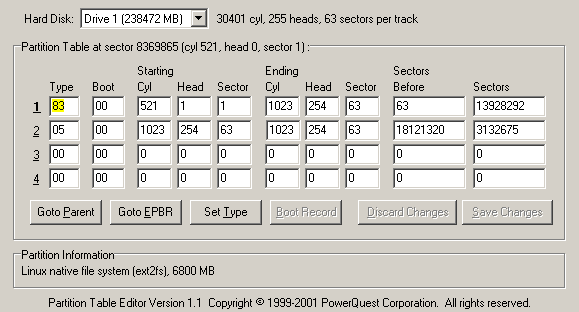
I have tested my Windows 98 SE again, just to be sure. It is installed on a logical drive. That logical drive is located 12 GB past the start of the drive.And I want to add that it is a FAT16 formatted partition. It starts 12 GB past the start of the disk and ends 14 GB past the start of the disk. In case of interest, I can try to copy it to the very end of the hard disk (size is 250 GB or 240 GiB) and see if it is bootable. Actually I am interested myself now, so I will check it out and post the result.CodeIt boots OK.First physical sector = 25,430,958 (Cyl 1,583, Hd 1 , Sect 1) Last physical sector = 29,623,859 (Cyl 1,843, Hd 254, Sect 63)
I am aware 256 primaries is no object by putting in a hard disk management layer.Would you mind very much if I took that technical phrase "hard disk management layer" and use it to describe my batch files? It makes it sound as if I knew what I am talking about.
What is good about installing a Linux as a virtual machine inside a Windows host if that Linux cannot communicate with other Linux partition and read/write information?I have VMware running on Windows XP. In there I can boot Linux from a CDROM (have not yet installed it to a virtual disk) and I get read/write access to my Ubuntu partition which is installed on a logical drive of my physical hard disk. After finishing this post, I reboot into that Ubuntu installation and post what damage I have done. (I have created an empty file: "/WolfWasHere"). Have I misunderstood that question?
Most (maybe all) OS for PC run well when they are installed on a logical drive and I boot from a matching DOS floppy. So I thought maybe they also run well when booting from a small primary DOS partition
; MSDOS.SYS
; edited by Wolfgang Bernady
; This version is for MS-DOS 7.10 (Windows 98 SE)

[Paths]
WinDir=E:\WINDOWS
WinBootDir=E:\WINDOWS
HostWinBootDrv=E

[Options]
Logo=0
BootSafe=1
DisableLog=1
DoubleBuffer=2
WinVer=4.10.2222Can you verify by booting the last official Dos (6.22?) floppy to see if your fat16 partition, created by Win98E, can be seen by it?MS DOS 6.22 can not see that particular partition, nor can it see the other partition which was between 12 and 14 GB. Furthermore DOS 6.22 was only able to see my DATA partition (physically first logical drive, sits between 2 and 4 GB, FAT16) after I have changed the 5th byte (partition ID) of the extended partition from 0F hex (Extended LBA) to 05 hex (Extended). Even then it could still not see the 12-14 GB partition nor the 248-250 GB partition (BTW both are type 06 hex FAT16, not type 0E hex). That would have been something. Maybe I could try and use NTFS4DOS to find out what happens then.
My puzzle is if a MS system can survive as a "stand alone" OS in a logical partition how does it boot itself? Everything about its MBR say it cannot be done.Sorry, my mistake. It needs a floppy, CDROM, USB boot stick, bootable SD card, network or a small primary hard disk partition to boot first, as far as I know only PTS-DOS 32 boots itself on a logical drive.
... according to whatever I've read you shouldn't be able to do either, and that's obviously wrong.I'm glad to see that I am not alone. I regard my computer as a toy, I take it apart and put it back together again as I please. And when somebody says "You are not supposed to do ..." I find myself quite often in the process of checking what happens, if I don't listen.
On the VMware side my free version of an installed Linux inside a MS Windows is just a file. I can't even from one Linux see another guest Linux under the same Host. If you have done it from an boot up CD that may be something different or you have extra bits and pieces over and above the free VMware server software that I have.I am not sure if I understand everything here. I have got several VMware versions: Player 1.1, 1.4, 2.0. Also workstation version 5.5 from a German magazine with a special trial period of 6 months. I can tell you that somewhere was an option to mount a physical disk. Here I could choose to mount the entire disk or to select one or several partitions. So with the physical disk mounted and the ubuntu iso mounted, this VM booted from CD and gave me access to my physical ubuntu installation.
Original address: https://www.donationcoder.com/forum/index.php?topic=10491.0