I still think a good feature would be to save grid "states" I should add it to the list (I'll do it at home).
"Grid > Save item state" doesn't do what you want ?


 Topic: SQLNotes...what is it exactly? (Read 1,173,506 times)


I still think a good feature would be to save grid "states" I should add it to the list (I'll do it at home).


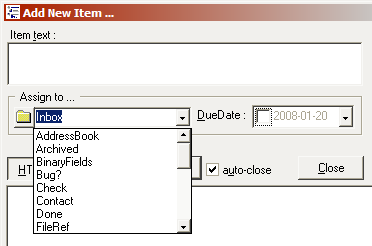
As part of the GTD implementation, new quick Add Item form is now available. CTRL-N to open it. A system-wide shortcut is also available to open it from anywhere (CTRL-ALT-N): (see attachment in previous post)[attachimg=#]
You can enter item text, decide into which folder to put it in (normally, the inbox) and put a due date if required
I'm trying to figure out what they are in the drop down list - are they all yes/no fields maybe/I think - yes, apart from "Adress"
You call them folders (thought there wasnt any of them in SQL)
What I would love to see:-
want to organise my ToDo by Projects & maybe a couple of miscellaneous or whatever
If (in this Crtl+Alt+N box) I could save stuff in ToDo grid - but also choose an item (Project) and make the note a sub-item of this item
So then when I go in to ToDo I can look at a particular project or two, or naturally I can sort in some other way if preferred
Then, even better, if I could number them in some way that if I drag an item up the line the number changes
I suspect that's not likely possible - I'm trying to think of some way that I can easily change the order of the items - in order to make them show in order of importance. eg. new item that I want to slot into place three in a list of ten items
Then I could hopefuly show the top few from each project by filtering
help...lost a few items from ToDo list -
I deselected box in inbox column
F5 gone
"ToDo or due or FollowUp or inbox"
cause they werent selected as done, I presumed they'd not dissapear!
There wasnt much but I cant remember what exactly they were so cant search..
THe "journal" idea sounds good Pierre (I hadnt any other fields filled except some html notes on one or two of them)
will go try
 so I tried the same thing
I have another problem now - I've lost the three most recent entries in "Billing" tooIt is right now "too" easy to change the grid source, and then the grid no longer displays what you want. I'll think of a better, safer way.
again without success - even though the missing things are visible in "Projects" (so they not "lost" as such..)
But my main problem right now is that I've changed the grid-source in Billing & want to change it back but didnt keep note of what it was...
Is one (=me!) supposed to keep track of that or is there some easy way to get back to last known or default source
that one has "StartDate and enddate and Billing"You can try using StartDate as the grid source. Should be fine.
which doesnt work here..
gotta go now will try later or tomorrow
 thanks Pierre!
 | duration >= 0 and StartDate is not null and BillingNo is null |
Now, I'm curious -When you make the invoice, you need to set the BillingNo field for each item that make up the invoice.
there's some items here where the job is finished so I've added invoice number to Billing number column -
I wouldnt have thought they'd show with that filter, but they do -
I'm wondering why?
Also wondering is this filter-speak/language something that's unique to SQL or is it something more universal -
and if there's anywhere I can get a few tips with it!!
 )
)you need to set the BillingNo field for each item that make up the invoice.now they disappear as expected, logical as usual! - not my strong point at times though
As to the filter syntax, the software is called... SQLNotes... Any idea why?I think I'll have to look at that again when I'm a bit fresher
Answer here: http://en.wikipedia.org/wiki/Where_%28SQL%29
you need to set the BillingNo field for each item that make up the invoice.now they disappear as expected, logical as usual! - not my strong point at times though
 )
)
Not exactly. I don't know if I described it before. Save Item State means more of save "current" item state. What I'm talking about is this: let's say you have a big, complex grid. There are several different "states" of the grids that is useful to me. If there was an option to save multiple different "named states" of the grid, that would be very useful.I still think a good feature would be to save grid "states" I should add it to the list (I'll do it at home).
"Grid > Save item state" doesn't do what you want ?
sounds good...works good too!
so, going back to that filter
this is maybe more an organisational question/thought than an SQL-Notes one...
-
I could really use the same grid for estimates and work-done/Billing
(kind-of what I was doing for the last while, but in a more chaotic uncomprehending kind of way
estimate items having no startdate
and work done having start/end dates
then,
simply use filter to remove one or the other as required...
doesnt work though cause source is "StartDate" (estimates having none)-
"StartDate or Duration" seems to work okay with filtering for estimates/work-done
any fundamental objections - shout, otherwise I'll try it for a while
off to dreamland, thanks again for help
There are several different "states" of the grids that is useful to me. If there was an option to save multiple different "named states" of the grid, that would be very useful.
It is right now "too" easy to change the grid source, and then the grid no longer displays what you want. I'll think of a better, safer way.
Yet another way would be to arrange it this way
+ Project name+ Project 2
- Estimates
- - Task 1
- - Task 2
- Work done
- - Task 3
- - Task 4
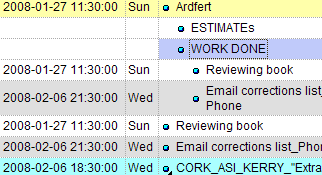
Your grid setting is to show context parents but not hierarchy. You also requested a sort by startdate.So,
Since Hierarchy is not set, the grid will display items in the sort order requested. Notice that if you omit the context parent shown, all items are perfectly sorted. This is exactly what you want...
So... Items must be shown in the correct order since you have specified a sort. Now, you also specified Context Parents, so these are added when required.
There are several different "states" of the grids that is useful to me. If there was an option to save multiple different "named states" of the grid, that would be very useful.Could you not handle this with separate grids ?
using that structure now with:-
source: Duration
Filter: BillingNo is null
Context Parents; Hierarchy; both on
Sort: by start date -
WorkTime( StartDate , EndDate , 8) - ( NonBillable )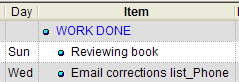 SQLnotes06.png
(2.3 KB, 239x82 - viewed 2973 times.)
SQLnotes06.png
(2.3 KB, 239x82 - viewed 2973 times.)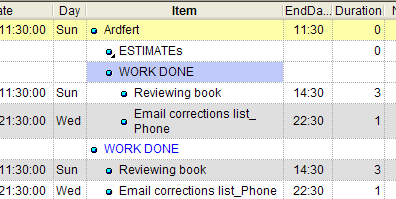 SQLnotes07.png
(8.1 KB, 396x199 - viewed 2887 times.)
SQLnotes07.png
(8.1 KB, 396x199 - viewed 2887 times.)I would set the grid source to a yes/no field named "Projects" (and set it for Ardfert)ehh
Ardfret has a start and end time, so the row equation calculates a duration. Conflict between the row and column equations. One of the two has to win. It seems that the row equation wins, I'll see if it is logical to have it that way. For now you can remove the start-end times for Ardfert-
Original address: https://www.donationcoder.com/forum/index.php?topic=10432.0