I think I am going to have to write a song about SQLNotes.I better change the name real quick then


 Topic: SQLNotes...what is it exactly? (Read 1,173,506 times)


I think I am going to have to write a song about SQLNotes.I better change the name real quick then


 )
)oooohhhh... Really nice!!! Thanks Pierre!Check out this thread regarding the new bug tracking software. You'll see the calendar in the Roadmap...
(And I can't wait for the "Outlook like" calendar feature


I think I am going to have to write a song about SQLNotes.

There are a number of ways to do this, each with advantages and disadvantages. The first way that comes to mind is to:
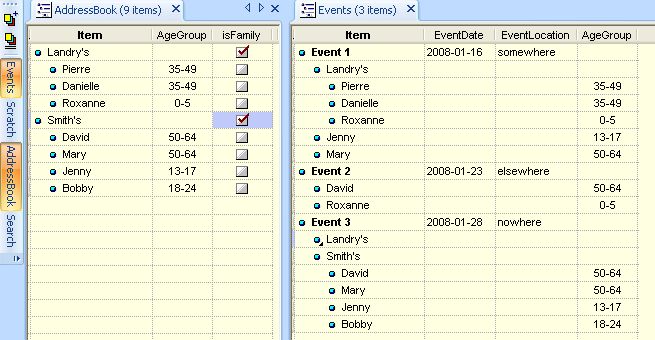
1- In the "AddressBook" grid, create families and members as sub-items. Add pertinent information (age group, etc)
2- In an "Events" grid, create events with all pertinent information (date, location, etc)
3- To link the two, select participants (families or individual persons) and add them as sub-items of the event (tag the items and add tagged items as subs). More details if desired.
Visually, it will work quite well.
As for the pivot table analysis, a proposed modification (by superboyac) will allow the pivot table to compile statistics for such a grid (the current pivot cannot since the source is not well defined).
I can build such a solution if you wish. Approx time: 10-15 min.
I got "Dancing Alone" with a date of 28/11/2007 appearing as a sub item under the first individual in the first family. I found that item is in the Music Libray grid - and can't see how it got connected
I got "Dancing Alone" with a date of 28/11/2007 appearing as a sub item under the first individual in the first family. I found that item is in the Music Libray grid - and can't see how it got connected
going by my previous post,
you could try removing all items from tag list (again, in context menu its in with "add items to tag list" entry) and then try again
I got "Dancing Alone" with a date of 28/11/2007 appearing as a sub item under the first individual in the first family. I found that item is in the Music Libray grid - and can't see how it got connected
going by my previous post,
you could try removing all items from tag list (again, in context menu its in with "add items to tag list" entry) and then try again
tried a couple of test items here -
when I clear the tag list, it works as expected

Just a reminder that I'm waiting for the import features (the texnotes one I mentioned earlier, and the import/export grids between files). I don't mean to rush, I've just put my involvement on hold because I haven't been able to transfer my data into the program. As soon as it's possible, everything I have is going inside SQLNotes.I haven't forgotten... I've been busy setting-up the bug tracking web site (you can input all your desired features in it if you want) and with some other consulting work.
Yes, where you have a situation of families attending a regular event and you want to be able to record both the presence of family units at one or more events and also individual presence at one or more events (when sometimes only some family members are present). It would be be good to be able to produce a pivot table/chart showing attendance by family and/or individual on a per week/month/year basis. A further refinement is where individuals might also belong to one of three or four age brackets and you want to analyse attendance by either family representation, or perhaps individual participation, within those age brackets.
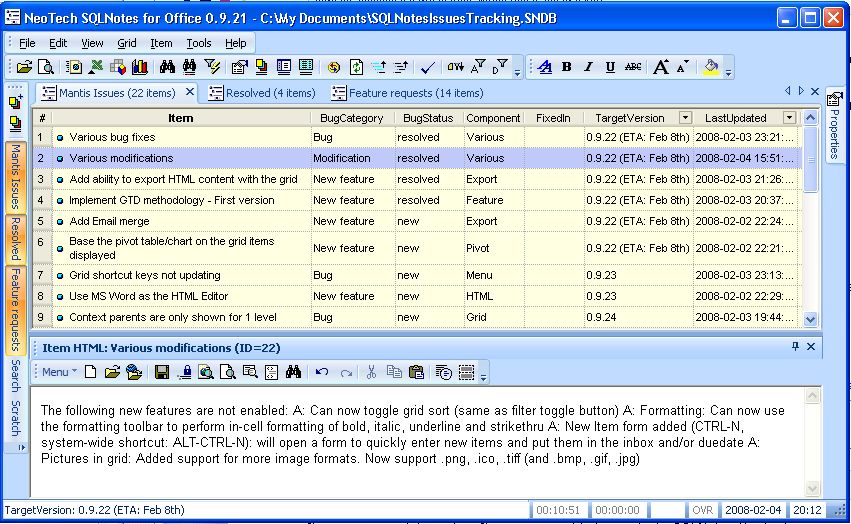
bug tracking is here: http://mantis.sqlnotes.net/login_page.php

@superboyac and Armando:
The following 2 issues are now fixed
1- CPU utilisation is now 0 when idle
2- Pivot table/chart are now based on the grid displayed items
3- Item grouping improvements


1- CPU utilisation is now 0 when idle
2- Pivot table/chart are now based on the grid displayed items
3- Item grouping improvements
Nice!
I'm getting the following error when I try to connect to the mantis database: (see attachment in previous post)I have a firewall at work, I don't know if that's the problem. I have internet access, but sometimes stuff like this gets blocked. For example, I can't use irc.
Also, as far as the pivot table added functionality, when it reads items arranged in a hierarchy, it only seems to read down two sublevels. So, my items that are in sublevels beyond that won't be read. Take my transcript grid for example:
Degree program
--Year
----Semester
------Class
It will stop reading at Semester, so the classes won't appear.
As for the pivot, it works fine here, you may need to right-click on a blank area and do "refresh data" (make sure that when you right-click, you get a context menu with just 2 items. If you get more, you've right-clicked in the wrong place. I need to fix that)Ah!! My bad! I had the grid such that the courses were collapsed. OK, so the pivot table reads only the data that is showing in the grid, even if there are sublevels that are hidden.
Original address: https://www.donationcoder.com/forum/index.php?topic=10432.0