DonationCoder.com forum
 
Read-only archive. This is a static copy of the DonationCoder.com forum. Reading and searching work as before; logging in, posting and private messages do not.
Archive of 2026-10-21 · About this archive · Main site

Last post Author Topic: Managing projects with OUTLOOK  (Read 62,375 times)

Armando

  • Charter Member
  • Joined in 2005
  • ***
  • Posts: 2,727
    • Coding Snacks
Managing projects with OUTLOOK
« on: October 08, 2007, 05:33 AM »
I was kind of satisfied with my home brewed project management system in Outlook until… now.

Question :

Do you know any affordable or free add-on/application to help managing projects in conjunction with Outlook’s “tasks” feature?


Here are some of the options I’ve found, googling around (maybe some will find it useful):

-  TrackerOffice :  Just mentioning it, even if not really an option : expensive and… “Minimum licensing begins at 50 named users, with a beginning price of $15,000 for a single module.”  Ouch.

- EasyProjectPlan (Excel Project Plan) :  Price:  $ 219.36 (CAD); pretty expensive if you ask me… [edit : 2007 10 25 -- 13 10 : Only expensive for a single user, not teams, since : " Each license includes UNLIMITED DISTRIBUTION to project team members" -- it should be noted though that "Each person accessing the EasyProjectPlan© Admin Screen must purchase a license".]  But seems to ingrate nicely with Outlook, lots of features… Excell oriented. A bit overkill for my needs, most probably.

    EasyProjectPlan features include:

Quote
- Track project tasks, action items, issues, bugs, defects, risks, change requests.
- Import over 30 MSProject task fields – custom select from over 700 MSProject fields.
- Create and Print Gantt Charts directly from Excel – MSProject NOT required.
- Synchronize EasyProjectPlan© tasks with Microsoft Project.
- Synchronize EasyProjectPlan© tasks with Outlook Tasks/Calendar/Email.
- Automatically assign and send Outlook tasks and calendar appointments.
- Merge EasyProjectPlan© data with MSProject and maintain Dependency/Predecessor/Successor links.
- Merge multiple EasyProjectPlan© files into a single master file.
- I-mport MSProject tasks with UNLIMITED number of levels into EasyProjectPlan©.
- Schedule tasks Finish-To-Start.
- TIME support for Start and Finish dates.
- Supports Import/Export for any 3rd party product including Project Viewers.
- Group tasks by project plan hierarchy - collapse and expand task groups.
- Email task information directly from the spreadsheet.
- UK date formatting (dd/mm/yy) is automatically detected and set on open.
- EasyProjectPlan©  file is only 2MB (the entire project plan can be emailed as a single 2MB file attachment).
- Track changes on the spreadsheet.
- Advanced version control features.


- EasyTaskSync : same company as EasyProjectPlan. Same price tag. Syncs MS project with Outlook — handy if you’ve got MS project (expensive), I guess…


EasyTaskSync features include:


Quote
- Synchronize Microsoft Project tasks with Outlook Tasks.
- Automatically assign and send Outlook tasks.
- Add tasks to team member calendars using Outlook Calendar.
- Email task information directly from Microsoft Project.
- Automated Status Column.
- Post-Sync Reports.
- Re-Link broken task links.
- Outlook tasks are automatically categorized by project plan hierarchy.
- Easy to use Admin Screen with password protection.
- EasyTaskSync© is compatible with EasyProjectPlan©

- Gantt for Outlook : 
seems to ingrate nicely with Outlook. Aesthetically pleasing??... Seems also a bit expensive for what it is : $121.

Feature list :

Quote
• Gantt view including percent complete info for task time bars
• Gantt views on any task folder. Both private and public folders are supported
• Category color support (Outlook 2007)
• Group by Task owner and Categories
• Zoom in/out
• Moving and resizing a time bar automatically modifies the actual task/appointment accordingly
• Schedule Printout


- Project KickStart : 159.95 $, 99$ academic pricing. Seems pretty nice. A bit Less expensive than the 2 previous solutions…

Some Features:

Quote
• Fast & Easy Planning Wizard
• Easily Integrates with MS Programs
• Gantt Chart Software
• Work with any size project: Up to 1000 tasks & 10 levels of subtasking.
• Drag and drop hints from libraries of goals, phases and obstacles.
• Gantt chart for "big picture" scheduling.
• Reports Generator for custom reports
• Save as HTML for website use or post project plans on your Intranet.
• Easily include project plans in proposals and business plans.
• Outlook project management add-in. Seamlessly integrates into Microsoft Outlook.
• Link to Microsoft Project, SureTrak, P3, FastTrack Schedule, Milestones, WBS Chart, MindManager and ACT! Great for novice users.
• 10 sample projects. Create process templates.
• FREE technical support

- Outlook GTD add-in : well, the name says it all… $69.95.  Not many project oriented features.

Allows 2 levels of tasks, if I remember well?


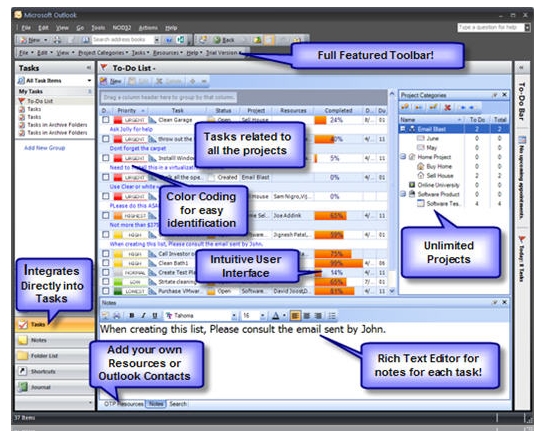
-  4Team for Microsoft Outlook : at $49.95, it’s a deal, compared to other solutions… A bit too basic, maybe, as it doesn’t seem to allow nested sub-tasks (hierarchies of tasks). BUT, seems to integrate perfectly well with Outlook and does provide some kind of gantt chart functionality. Not sure if that solution is future proof… would have to try it.

Some features:

Quote
click on the feature to learn more
A powerful new collaboration tool for Microsoft Outlook®.
Create and manage multiple shared projects in Microsoft Outlook.
3 Levels of Effective Management:
Share you and your teammate Calendar, set up meetings and appointments.
Share documents & synchronize updates.
Create and share a team task list.
Create and share a contact list.
Discussions.
Simultaneous control of an unlimited number of teams and projects
Synchronize data with your teammates.
News, links and other information are available to all team members.
4Team Folder/4Team Dashboard & Reports
Outlook integration:
Track Team members and Contacts activities
Synchronize your personal project data with your PDA or Palm device.
Encrypt your messages, back up and store your project data for better security.
Without server:
With central server:
Web access.  Accessible from Anywhere in the World.
Support for the Microsoft Exchange profile available.
Work offline or online:
Etc.

- Action Project Manager : beta project. Have no idea when it will be ready and how much it will cost… I’ve registered for beta testing, but haven’t got any answer… yet. (Sent the email 7 days ago) [edit : just got an answer today 2007 10 10. Project is alive and, according to Ishan at OutlookSync-PSTSync, [s]the first release should happen in about a week][/color][/s]

The software seems to be ready.
Features here : http://www.outlooksync.com/products/action-project-manager/action-project-manager-overview.html
Price is $99.99 for a single licence.

[attach]

"I suppose it can be said that I'm an absent-minded driver. It's true that I've driven through a number of red lights on occasion, but on the other hand, I've stopped at a lot of green ones but never gotten credit for it."
Glenn Gould
« Last Edit: February 12, 2008, 03:24 AM by Armando »

laughinglizard

  • Supporting Member
  • Joined in 2007
  • **
  • Posts: 95
You may want to have a look at these two open source programs:

Open Workbench
http://www.openworkbench.org/index.php
Open Workbench is an open source desktop application that provides robust project scheduling and management functionality. Already the scheduling standard for more than 100,000 project managers worldwide, Open Workbench is a free and powerful alternative to Microsoft Project.

GanttPV
http://www.pureviolet.net/ganttpv/index.html

Zoho Projects has a plugin for Office, though they do charge according to how many projects you need to manage.
http://www.zoho.com/

Curt

  • Supporting Member
  • Joined in 2006
  • **
  • Posts: 7,565
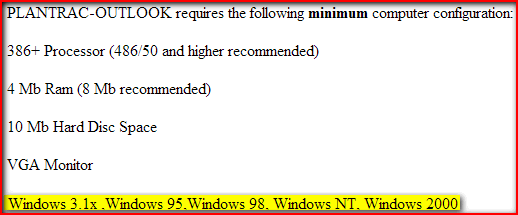
- PLANTRAC-OUTLOOK : ...… a tad old fashioned?

Yes, you can say it is old fashioned...:

[attachimg=#]

Curt

  • Supporting Member
  • Joined in 2006
  • **
  • Posts: 7,565
Zoho Projects has a plugin for Office, though they do charge according to how many projects you need to manage. http://www.zoho.com/

Quote from: Zoho
Zoho Projects is 100% free for open-source projects.
To get an unlimited account for your open-source project contact our support.

laughinglizard

  • Supporting Member
  • Joined in 2007
  • **
  • Posts: 95
Quote
Zoho Projects is 100% free for open-source projects.
To get an unlimited account for your open-source project contact our support.

Good catch Curt!

Curt

  • Supporting Member
  • Joined in 2006
  • **
  • Posts: 7,565
Thanks, laughinglizard

- and may I add: Zoho Projects is also free ("free" as in gratis, not "FREE") if you merely are to create a single (one; 1) not-open-source project.

Armando

  • Charter Member
  • Joined in 2005
  • ***
  • Posts: 2,727
    • Coding Snacks
laughinglizard :

Open Workbench and  GanttPV are quite nice, of course, but, unless I’m mistaken, I don’t think that any of them interacts with Outlook’ tasks lists or calendar in any obvious way. Same thing for Zoho, actually. Seems very nice, but I don’t see any easy way to have it interact with Outlook…


Interaction/integration with Outlook is fundamental for me (all the add-ons and applications I've mentioned integrate in some ways with Outlook). This is where I manage my tasks and calendar events.


[edit 2007 10 08 -- 21:24 : PS : added "TaskWorks Outlook 2007 Add-in" to my first post... even if not that interesting for me]
"I suppose it can be said that I'm an absent-minded driver. It's true that I've driven through a number of red lights on occasion, but on the other hand, I've stopped at a lot of green ones but never gotten credit for it."
Glenn Gould
« Last Edit: October 10, 2007, 06:56 AM by Armando »

Armando

  • Charter Member
  • Joined in 2005
  • ***
  • Posts: 2,727
    • Coding Snacks
Re: Managing projects with OUTLOOK
« Reply #7 on: October 10, 2007, 05:14 AM »
So... Nobody wants to share experiences about project management with Outlook -- trics, add-ons, plug-ins experiments, home-brewed systems... (Or even enrich the "Outlook project management add-ons" list started in my first post)?  :)
"I suppose it can be said that I'm an absent-minded driver. It's true that I've driven through a number of red lights on occasion, but on the other hand, I've stopped at a lot of green ones but never gotten credit for it."
Glenn Gould

Curt

  • Supporting Member
  • Joined in 2006
  • **
  • Posts: 7,565
Re: Managing projects with OUTLOOK
« Reply #8 on: October 10, 2007, 06:39 AM »
I was looking through hundreds of addons for Outlook but didn't find any project manager.

Maybe there is no-one?  :o

Armando

  • Charter Member
  • Joined in 2005
  • ***
  • Posts: 2,727
    • Coding Snacks
Re: Managing projects with OUTLOOK
« Reply #9 on: October 10, 2007, 07:07 AM »
Thanks Curt... Yes, not easy to find good (and cheap) project management solutions for Outlook! :tellme:

I found another pretty expensive solution for those using MindManager : Gyronix ResultsManager. Added to my list (first post)

Still willing to hear about others' experiences... :)

"I suppose it can be said that I'm an absent-minded driver. It's true that I've driven through a number of red lights on occasion, but on the other hand, I've stopped at a lot of green ones but never gotten credit for it."
Glenn Gould
« Last Edit: October 10, 2007, 07:18 AM by Armando »

PPLandry

  • Supporting Member
  • Joined in 2007
  • **
  • Posts: 702
Re: Managing projects with OUTLOOK
« Reply #10 on: October 10, 2007, 09:11 PM »
>Yes, not easy to find good (and cheap) project management solutions for Outlook!

Armando, you may have read that full-featured project management is coming soon to SQLNotes in the form of an advanced Gantt chart. Other may not know, and so I wanted to mention this.

Combined with Ecco-style outliner/grid and an Outlook-linked calendar, you have quite the project management tool.

The calendar is expected in 2 weeks and the Gantt another 2 weeks after that.

p.s. Just got your first comments on the SQLNotes forum. Thanks! I'll reply within a few days (busy also on other work)
Real generosity toward the future lies in giving all to the present -- Albert Camus -- www.InfoQube.biz
« Last Edit: October 10, 2007, 09:56 PM by PPLandry »

Veign

  • Charter Honorary Member
  • Joined in 2005
  • ***
  • Posts: 993
    • Gathering Badge
    • Participated in NANY Challenge Twice
Re: Managing projects with OUTLOOK
« Reply #11 on: October 10, 2007, 09:32 PM »
You may able to modify TaskFreak to sync with Outlook Tasks.  TasksFreak does a decent job of creating a centralized location for tasks.  You can even mark tasks as public so your client can see its progress.

TaskFeak:
http://www.taskfreak.com/

Its free

Armando

  • Charter Member
  • Joined in 2005
  • ***
  • Posts: 2,727
    • Coding Snacks
Re: Managing projects with OUTLOOK
« Reply #12 on: October 10, 2007, 10:23 PM »
Veign : thanks! I'm more or less looking for a way to easily track progress and schedules (through gantt charts, preferably) and create nested hierarchies of subtasks -- I'm not sure the modifications you're referring too would be worth the trouble in my specific case. Do you use TaskFreak yourself?

PPLandry : thanks for the info, Pierre. I'll certainly be very happy to test any new version of SQLNotes, especially if it comes with some project management features! The Outlook-like calendar looks nice (ran the demo). It'll be interesting to see how it integrates with the other components...
"I suppose it can be said that I'm an absent-minded driver. It's true that I've driven through a number of red lights on occasion, but on the other hand, I've stopped at a lot of green ones but never gotten credit for it."
Glenn Gould

Veign

  • Charter Honorary Member
  • Joined in 2005
  • ***
  • Posts: 993
    • Gathering Badge
    • Participated in NANY Challenge Twice
Re: Managing projects with OUTLOOK
« Reply #13 on: October 10, 2007, 10:50 PM »
Do you use TaskFreak yourself?

Yes.  Not as much as I should...

Armando

  • Charter Member
  • Joined in 2005
  • ***
  • Posts: 2,727
    • Coding Snacks
Re: Managing projects with OUTLOOK
« Reply #14 on: October 11, 2007, 02:13 AM »
First attempt at trialing one of the above mentionned solutions :
4Team for Microsoft Outlook

No luck. Error message at the end of the installation process : "ActiveX component can't create object at line 118 errors while creating scripting object "  :(

Tried to repair Office, repair my PST file, etc. To no avail.
I could contact 4team support, but will investigate other options before loosing to much time on that one.

Reminds me of the problems I had with MS Word, trying to install the Word Toys plugin. Maybe some conflicts between addins or somthing like that.

Next!
"I suppose it can be said that I'm an absent-minded driver. It's true that I've driven through a number of red lights on occasion, but on the other hand, I've stopped at a lot of green ones but never gotten credit for it."
Glenn Gould

Armando

  • Charter Member
  • Joined in 2005
  • ***
  • Posts: 2,727
    • Coding Snacks
Re: Managing projects with OUTLOOK
« Reply #15 on: October 11, 2007, 02:33 AM »
Got some news concerning "Action Project Manager". See first post. Project should go live in a week if everything goes well.
"I suppose it can be said that I'm an absent-minded driver. It's true that I've driven through a number of red lights on occasion, but on the other hand, I've stopped at a lot of green ones but never gotten credit for it."
Glenn Gould

Curt

  • Supporting Member
  • Joined in 2006
  • **
  • Posts: 7,565
Re: Managing projects with OUTLOOK
« Reply #16 on: October 11, 2007, 01:45 PM »
A pitty, the line 118 error, as I would imagine 4Team to be a fine affordable solution.
-Edit2: maybe you should try to close the firewall and install on top / again?

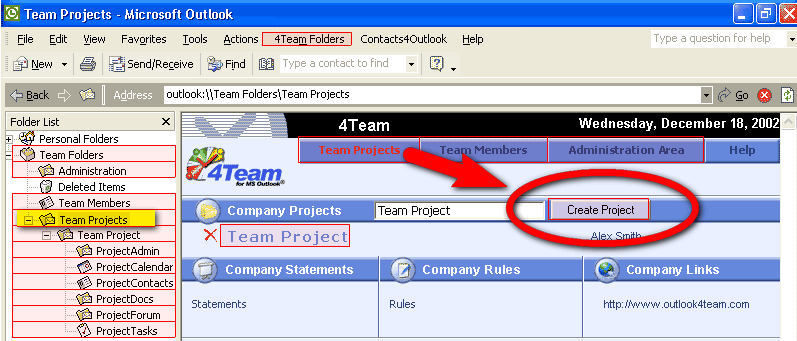
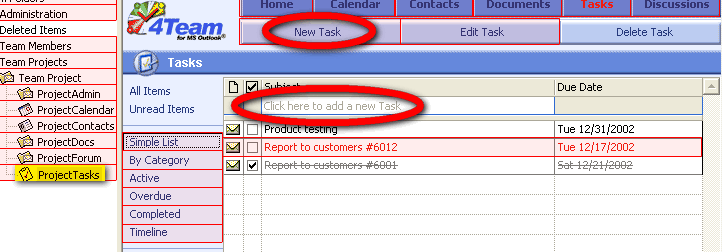
I think the number of tasks / subtasks / subprojects are unlimited:

4TeamProjects.gif

4TeamTasks.gif

- if this was what you were afraid might be missing?
« Last Edit: October 11, 2007, 02:00 PM by Curt »

Armando

  • Charter Member
  • Joined in 2005
  • ***
  • Posts: 2,727
    • Coding Snacks
Re: Managing projects with OUTLOOK
« Reply #17 on: October 11, 2007, 02:55 PM »
Thanks for your answer, encouragements, and... nice screenshots, Curt.

The error 118 is probably VBA related, but I'm not a programmer, and have less and less time to tinker as we approach December.

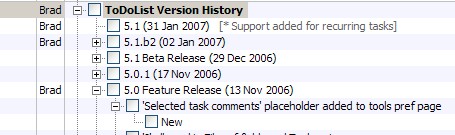
Yes, the number of tasks / subtasks / subprojects might be unlimited, but, how many levels (if any) can the software accommodate (I'm talking about "nested" tasks hierarchies here). This is what I meant by : "a bit too basic, maybe, as it doesn’t seem to allow nested sub-tasks (hierarchies of tasks)."


edit : Classic example (taken from the nice todolist, which I don't use because of a lack of Outlook integration and palm syncing) :


"I suppose it can be said that I'm an absent-minded driver. It's true that I've driven through a number of red lights on occasion, but on the other hand, I've stopped at a lot of green ones but never gotten credit for it."
Glenn Gould
« Last Edit: October 11, 2007, 03:02 PM by Armando »

TomColvin

  • Participant
  • Joined in 2007
  • *
  • Posts: 65
Re: Managing projects with OUTLOOK
« Reply #18 on: October 15, 2007, 04:33 AM »
Armando, keep an eye open for version 2.3 of Essential PIM Pro.  If you are willing to manage projects is a tree outline form, it may work for you.

Once the new version is out [by December at lastest], I expect to use it as a Getting Things Done manager.  I'll be doing a rather full review of the system I expect to work into the software.

Essential PIM Pro also sync's with Outlook.

Tom
www.becoming-a-writer-seriously.com
www.words-sounds-images.com

Armando

  • Charter Member
  • Joined in 2005
  • ***
  • Posts: 2,727
    • Coding Snacks
Re: Managing projects with OUTLOOK
« Reply #19 on: October 15, 2007, 05:15 AM »
Thanks Tom! I'll check that out.
I think that SQLNotes will also be a very interesting option when it's ready. (I wonder when will the first release candidate be launched though. Maybe not that soon.)
"I suppose it can be said that I'm an absent-minded driver. It's true that I've driven through a number of red lights on occasion, but on the other hand, I've stopped at a lot of green ones but never gotten credit for it."
Glenn Gould

thomthowolf

  • Bad software makes me tired
  • Charter Member
  • Joined in 2005
  • ***
  • Posts: 106
Re: Managing projects with OUTLOOK
« Reply #20 on: October 21, 2007, 09:56 PM »
I have just ordered Outlook project management from http://www.outlookproject.com/
From the website:
Quote
This Extension to Microsoft Outlook will provide you with the tools needed to enable you to effectively manage a project.
The solution encompasses out-of-the-box tools and processes that enable you to:


    * Break a complex project into manageable sub-projects
    * Assign responsibility/ownership of project components
    * Gain real-time project visibility into resources, processes, status
    * Focus on highest-priority items and ensure resources are allocated appropriately
    * Develop and complete a project plan


Your projects can be as simple or complex as you prefer. It can be projects with only 1 participant, or with a group of people taking part.


Effective project management requires more than just good project managers; you also need effective processes. This Extension will integrate your project management with your Outlook features, giving you a familiar interface, and solid contact management.
Seems a lot to promise for a whopping $9.99.  This is something they email to you, no test version available as yet, so I will just test it for all of us and let you know how it goes.
Any society that would give up a little liberty to gain a little security will deserve neither and lose both.  - Benjamin Franklin

PPLandry

  • Supporting Member
  • Joined in 2007
  • **
  • Posts: 702
Re: Managing projects with OUTLOOK
« Reply #21 on: October 21, 2007, 10:04 PM »
Quote
I think that SQLNotes will also be a very interesting option when it's ready. (I wonder when will the first release candidate be launched though. Maybe not that soon.)
I'm going at it step by step. Expected release is first quarter 2008. Exact feature list in the first release is not finalized. Make your preferences known.

Have you seen the Gantt chart integrated?
http://www.donationcoder.com/forum/index.php?topic=9827.200

For a different application, but it gives a good idea.
Real generosity toward the future lies in giving all to the present -- Albert Camus -- www.InfoQube.biz

Curt

  • Supporting Member
  • Joined in 2006
  • **
  • Posts: 7,565
Re: Managing projects with OUTLOOK
« Reply #22 on: October 21, 2007, 10:38 PM »
I have just ordered Outlook project management from http://www.outlookproject.com/
...
This is something they email to you, ...

Interesting to hear if you ever receive this file! The site has not been updated for two years, and their forum has been closed for at least half a year. But the extension sure sounds ideal for the purpose in question.

Armando

  • Charter Member
  • Joined in 2005
  • ***
  • Posts: 2,727
    • Coding Snacks
Re: Managing projects with OUTLOOK
« Reply #23 on: October 22, 2007, 05:27 PM »
I'm going at it step by step. Expected release is first quarter 2008. Exact feature list in the first release is not finalized. Make your preferences known.

Have you seen the Gantt chart integrated?
http://www.donationcoder.com/forum/index.php?topic=9827.200

For a different application, but it gives a good idea.

Yes, Pierre, very interesting! It'll be a very cool thing to try when it's ready. Thanks for keeping in touch! I'll keep downloading the betas until then! (one is "due" soon if I remember well...)

I have just ordered Outlook project management from http://www.outlookproject.com/
...
This is something they email to you, ...

Interesting to hear if you ever receive this file! The site has not been updated for two years, and their forum has been closed for at least half a year. But the extension sure sounds ideal for the purpose in question.

Interesting indeed. keep us posted,  thomthowolf. Thanks!
"I suppose it can be said that I'm an absent-minded driver. It's true that I've driven through a number of red lights on occasion, but on the other hand, I've stopped at a lot of green ones but never gotten credit for it."
Glenn Gould

thomthowolf

  • Bad software makes me tired
  • Charter Member
  • Joined in 2005
  • ***
  • Posts: 106
Re: Managing projects with OUTLOOK
« Reply #24 on: October 23, 2007, 08:22 PM »
I have just ordered Outlook project management from http://www.outlookproject.com/
...
This is something they email to you, ...

Interesting to hear if you ever receive this file! The site has not been updated for two years, and their forum has been closed for at least half a year. But the extension sure sounds ideal for the purpose in question.
I paid for the file on Sunday evening, and the email came to me Monday afternoon, my time.  I was starting to worry because it got caught in Gmail's spam filter, but all is well.  I will do a review this weekend after I get to play with it a bit more, but it is a very clever use of the the features available in Outlook.  Seems promising so far.
Any society that would give up a little liberty to gain a little security will deserve neither and lose both.  - Benjamin Franklin

Original address: https://www.donationcoder.com/forum/index.php?topic=10285.0