DonationCoder.com forum
 
Read-only archive. This is a static copy of the DonationCoder.com forum. Reading and searching work as before; logging in, posting and private messages do not.
Archive of 2026-10-21 · About this archive · Main site

Last post Author Topic: change cursor appearance  (Read 46,135 times)

kalos

  • Member
  • Joined in 2006
  • **
  • Posts: 1,824
change cursor appearance
« on: September 11, 2007, 10:27 AM »
hello

can you tell me please if I can change the appearance of I-Beam cursor when it is over a specific control/program?

and what are the available appearances

I want to do this because I-Beam hides characters when I type sometimes..

thanks

lanux128

  • Global Moderator
  • Joined in 2005
  • *****
  • Posts: 6,277
    • Coding Snacks
    • Volunteers/Staff
    • Gathering Badge
    • Participated in NANY Challenge Once
    • Linux User
Re: change cursor appearance
« Reply #1 on: September 11, 2007, 11:35 AM »
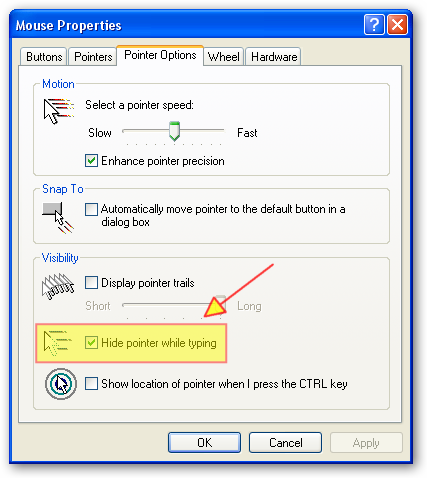
if you want to hide the i-beam while typing, there is an option for that in the contol panel..

[attach=#]

kalos

  • Member
  • Joined in 2006
  • **
  • Posts: 1,824
Re: change cursor appearance
« Reply #2 on: September 11, 2007, 05:44 PM »
yeap, I know, but it doesnt work...

kalos

  • Member
  • Joined in 2006
  • **
  • Posts: 1,824
Re: change cursor appearance
« Reply #3 on: September 14, 2007, 11:53 PM »
if you know any way to change cursor please inform me...

lanux128

  • Global Moderator
  • Joined in 2005
  • *****
  • Posts: 6,277
    • Coding Snacks
    • Volunteers/Staff
    • Gathering Badge
    • Participated in NANY Challenge Once
    • Linux User
Re: change cursor appearance
« Reply #4 on: September 17, 2007, 04:12 AM »
how about this tool, then? you have to remember to start the app & also remember to close it later but it's worth the try..

[attach=#] nomousy.exe - A small utility designed to hide and/or restrict mouse cursor movement.

Options: (all options are NOT case sensitive)
Hide the mouse cursor:/hide
/h
-hide
-h
hide
h
Restrict the mouse to its' current location:/freeze
/f
-freeze
-f
freeze
f
Cursor hiding options:Hide all:
/all
-all
all
Selective hiding:These following options (with - sign) should not have any spaces between them but may be in any order

UPARROW: -up
ARROW: -ar
IBEAM: -ib
CROSS: -cr
SIZENWSE: -nwse
SIZENESW: -nesw
SIZEWE: -we
SIZENS: -ns
WAIT: -wa
APPSTARTING: -as
ICON: -ic
HAND: -ha
SIZE: -si
SIZEALL: -sa
NO: -no
Restore mouse cursor:To restore the cursor run nomousy.exe again (with or without options)

• http://www.apps4apps.filetap.com/nomousy.html

kalos

  • Member
  • Joined in 2006
  • **
  • Posts: 1,824
Re: change cursor appearance
« Reply #5 on: September 17, 2007, 08:59 AM »
thanks it seems like what I need!

lanux128

  • Global Moderator
  • Joined in 2005
  • *****
  • Posts: 6,277
    • Coding Snacks
    • Volunteers/Staff
    • Gathering Badge
    • Participated in NANY Challenge Once
    • Linux User
Re: change cursor appearance
« Reply #6 on: September 18, 2007, 01:15 AM »
you're welcome.. btw, nomousy comes with an AHK script but i made another to toggle I-Beam's visibility with Win+H. maybe it'll be useful to you.. :)

Quote
;in case of I-Beam, Win+h hides the I-Beam
#h::
If A_Cursor = IBeam
Run, nomousy.exe -ib ;hide I-Beam
Else
Run, nomousy.exe    ;restore
Return

kalos

  • Member
  • Joined in 2006
  • **
  • Posts: 1,824
Re: change cursor appearance
« Reply #7 on: September 18, 2007, 01:33 AM »
thanks

but my main problem is this:

when I type in a specific control (classnn) the IBeam hides the character below it (mainly the character I want to edit, so I move the IBeam over there)

I think there are 2 solutions: I must either make IBeam disappear or change its appearance so that it wont hide any characters (eg make it an underscore or anything better)

if I make it disappear, how then, I will be able to go to the exact position I need to edit characters of the text?
to prevent this, it should disappear ONLY when I am typing
but the problem still exists: when I am not typing, IBeam may hide a character (the one below the IBeam)

so, I think making cursor change appearance (like PSpad does) would be much better, however I dont know which appearance it should have not to hide the character below it and at the same time to point precisely to the position that the next typed character will be entered

maybe a dot, a small vertical line, an underscore... I cant imagine something good

please feel free to suggest any other solutions to this problem

thanks

lanux128

  • Global Moderator
  • Joined in 2005
  • *****
  • Posts: 6,277
    • Coding Snacks
    • Volunteers/Staff
    • Gathering Badge
    • Participated in NANY Challenge Once
    • Linux User
Re: change cursor appearance
« Reply #8 on: September 18, 2007, 02:10 AM »
that's why i made the ahk script so that you can toggle the visibility but i'd like to see how the I-Beam hides the characters.. can you make a screenshot & post it here?

kalos

  • Member
  • Joined in 2006
  • **
  • Posts: 1,824
Re: change cursor appearance
« Reply #9 on: September 18, 2007, 02:19 AM »
mm unfortunately taking screenshots makes cursor disappear

the font I use is Verdana 9 and the IBeam may hide the below character very easily...
this is a very big problem for me that I check the spelling of the document and I often correct single characters

lanux128

  • Global Moderator
  • Joined in 2005
  • *****
  • Posts: 6,277
    • Coding Snacks
    • Volunteers/Staff
    • Gathering Badge
    • Participated in NANY Challenge Once
    • Linux User
Re: change cursor appearance
« Reply #10 on: September 18, 2007, 02:30 AM »
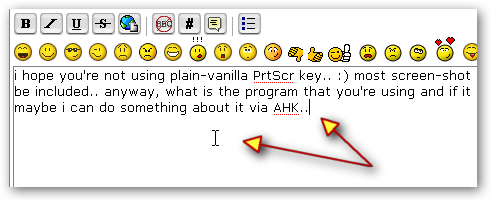
i hope you're not using plain-vanilla PrtScr key.. :) most screen-shot programs allows the cursor to be included.. anyway, what is the program that you're using? if it is specific to this program then maybe i can do something about it via AHK..

[attach=#]

kalos

  • Member
  • Joined in 2006
  • **
  • Posts: 1,824
Re: change cursor appearance
« Reply #11 on: September 18, 2007, 09:42 AM »
its Emeditor

thanks

lanux128

  • Global Moderator
  • Joined in 2005
  • *****
  • Posts: 6,277
    • Coding Snacks
    • Volunteers/Staff
    • Gathering Badge
    • Participated in NANY Challenge Once
    • Linux User
Re: change cursor appearance
« Reply #12 on: September 19, 2007, 01:38 AM »
okay, i'll download EmEditor Free & see if i can reproduce the same problem you're having..

Quote
but my main problem is this:

when I type in a specific control (classnn) the IBeam hides the character below it (mainly the character I want to edit, so I move the IBeam over there)

this "specific control" you mention, it's the EmEditor's edit area, right?

kalos

  • Member
  • Joined in 2006
  • **
  • Posts: 1,824
Re: change cursor appearance
« Reply #13 on: September 19, 2007, 01:45 AM »
yes, this is the control

by the way, can you tell me please a program that can take screenshot including cursor?

lanux128

  • Global Moderator
  • Joined in 2005
  • *****
  • Posts: 6,277
    • Coding Snacks
    • Volunteers/Staff
    • Gathering Badge
    • Participated in NANY Challenge Once
    • Linux User
Re: change cursor appearance
« Reply #14 on: September 19, 2007, 01:57 AM »
by the way, can you tell me please a program that can take screenshot including cursor?
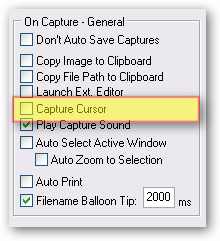
being a DC'er, i can recommend Screenshot Captor.. :) but there are other programs as well, check out the "Related Programs" section in Screenshot Captor's online help..

Include cursor option in Screenshot Captor
[attach=#]

lanux128

  • Global Moderator
  • Joined in 2005
  • *****
  • Posts: 6,277
    • Coding Snacks
    • Volunteers/Staff
    • Gathering Badge
    • Participated in NANY Challenge Once
    • Linux User
Re: change cursor appearance
« Reply #15 on: September 20, 2007, 12:56 AM »
it's still a bit rough on the edges but try this script and let me know..

Hide-IBeam
• hides the I-Beam when over EmEditor's Edit control
• requires NoMousy to be in the same folder.
• needs Autohotkey to modify the script.

[attachurl=#]
[attachurl=#]

kalos

  • Member
  • Joined in 2006
  • **
  • Posts: 1,824
Re: change cursor appearance
« Reply #16 on: September 20, 2007, 09:49 PM »
thanks

there is a problem that I dont know where the cursor lays...

the best would be to change cursor appearance

lanux128

  • Global Moderator
  • Joined in 2005
  • *****
  • Posts: 6,277
    • Coding Snacks
    • Volunteers/Staff
    • Gathering Badge
    • Participated in NANY Challenge Once
    • Linux User
Re: change cursor appearance
« Reply #17 on: September 21, 2007, 12:54 AM »
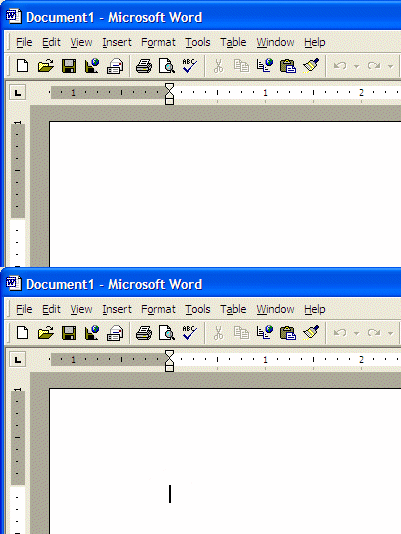
i was planning to change but then i noticed that you can use the caret.. also if you move your mouse to the toolbar area, the cursor will re-appear..

The caret is a blinking I beam that allows you to know the current position of the keyboard on the screen.
[attach=#]
Source:http://functionx.com/word/Lesson03.htm

kalos

  • Member
  • Joined in 2006
  • **
  • Posts: 1,824
Re: change cursor appearance
« Reply #18 on: September 21, 2007, 01:51 PM »
ok, but it will be a waste of time to go to the toolbar in order to make the cursor appear

is it possible to replace IBeam with a "1/3 of the IBeam" vertical line, a dot, an underscore or something like these?

lanux128

  • Global Moderator
  • Joined in 2005
  • *****
  • Posts: 6,277
    • Coding Snacks
    • Volunteers/Staff
    • Gathering Badge
    • Participated in NANY Challenge Once
    • Linux User
Re: change cursor appearance
« Reply #19 on: September 24, 2007, 02:44 AM »
AHK only allows changing the current cursor into another cursor form, i'm not sure if another image/character can be used instead.. :-\

A_CursorThe type of mouse cursor currently being displayed. It will be one of the following words: AppStarting, Arrow, Cross, Help, IBeam, Icon, No, Size, SizeAll, SizeNESW, SizeNS, SizeNWSE, SizeWE, UpArrow, Wait, Unknown. The acronyms used with the size-type cursors are compass directions, e.g. NESW = NorthEast+SouthWest. The hand-shaped cursors (pointing and grabbing) are classfied as Unknown.

also, another similar request here in the AHK forums has not received much response suggesting a lack of options within AHK but i'd like to proved wrong, though.. :)

•  AutoHotkey Forum: change cursor appearance.

kalos

  • Member
  • Joined in 2006
  • **
  • Posts: 1,824
Re: change cursor appearance
« Reply #20 on: September 24, 2007, 03:02 AM »
there are some "cursor editors" that allow you to change cursor appearance, but I dont know how to make it work when the cursor is under a specific control

thefritz_j

  • Charter Honorary Member
  • Joined in 2005
  • ***
  • Posts: 75
Re: change cursor appearance
« Reply #21 on: September 27, 2007, 02:41 PM »
kalos, how about this, (in Win XP) Go to Control Panel, Mouse, Pointers tab.  Then in the lower "customize" list and find "Text Select" and highlight it.

Then click on "Browse..." near the bottom and find an alternate .cur file.  Perhaps "cross.cur" or one that fits what you are doing.  Try experimenting with a few of the ones there. 

If you don't find a cur file you like I could make you one.  (You could also check out my cursors I've made and posted at http://www.donationcoder.com/forum/index.php?topic=9376.msg69766#msg69766 )

kalos

  • Member
  • Joined in 2006
  • **
  • Posts: 1,824
Re: change cursor appearance
« Reply #22 on: September 27, 2007, 05:53 PM »
this is what I need thanks!

however, I didnt find a 'discreet' IBeam to replace it... an IBeam that wont hide much the underlying letter, maybe a dot? any idea?

EDIT: or another solution would be to make the IBeam always be between two characters (and not over any character)

thefritz_j

  • Charter Honorary Member
  • Joined in 2005
  • ***
  • Posts: 75
Re: change cursor appearance
« Reply #23 on: September 27, 2007, 07:45 PM »
kalos, try this "minimalist" horizontal beam for Text Select.  You'll need to save it somewhere on your comp first and then use Mouse, Pointer to browse for it.  (I had to zip it first, because its an ani file)

lemme know is this is helpful

kalos

  • Member
  • Joined in 2006
  • **
  • Posts: 1,824
Re: change cursor appearance
« Reply #24 on: September 27, 2007, 07:56 PM »
this is very nice

is it possible to remove the black brackets, make the white animated one black and stop its animation?

Original address: https://www.donationcoder.com/forum/index.php?topic=9939.0