DonationCoder.com forum
 
Read-only archive. This is a static copy of the DonationCoder.com forum. Reading and searching work as before; logging in, posting and private messages do not.
Archive of 2026-10-21 · About this archive · Main site

Author Topic: Repair hotkey in Maxthon 1.6 on XP ??  (Read 12,646 times)

Curt

  • Supporting Member
  • Joined in 2006
  • **
  • Posts: 7,565
Repair hotkey in Maxthon 1.6 on XP ??
« on: August 10, 2007, 02:07 PM »
XP Home SP2 & Maxthon 1.6 & "Ctrl+Shift+Arrow versus Ctrl+Arrow".

Whenever I write a forum post (like now) my memory will tell me that Ctrl+Shift+Arrow will mark the words to the right/left. In Maxthon, Ctrl+Arrow (without Shift) will change tab focus. But somehow my versions of Maxthon can not figure out to differ between Ctrl+Arrow and Ctrl+Shift+Arrow, so whenever I try to mark the words in a post, Maxthon will swift to another tab! This is frustrating, and I have of course searched and searched inside Maxthon to find this shortcut, or at least find anything related on how to change it / correct it - but in vain. It *seems* that I have to manipulate the registries?

I have of course installed a new version on top of the "old", but that didn't change anything.
I also have tried to uninstall various plugins, and that didn't help either.
I have removed as many hotkeys as posible.
The problem is not new to me.

So now I am asking if any of you hot shots know where I can change / repair this hotkey?  :tellme:

[attachimg=#] (image for no reason)

lanux128

  • Global Moderator
  • Joined in 2005
  • *****
  • Posts: 6,277
    • Coding Snacks
    • Volunteers/Staff
    • Gathering Badge
    • Participated in NANY Challenge Once
    • Linux User
Re: Repair hotkey in Maxthon 1.6 on XP ??
« Reply #1 on: August 10, 2007, 03:17 PM »
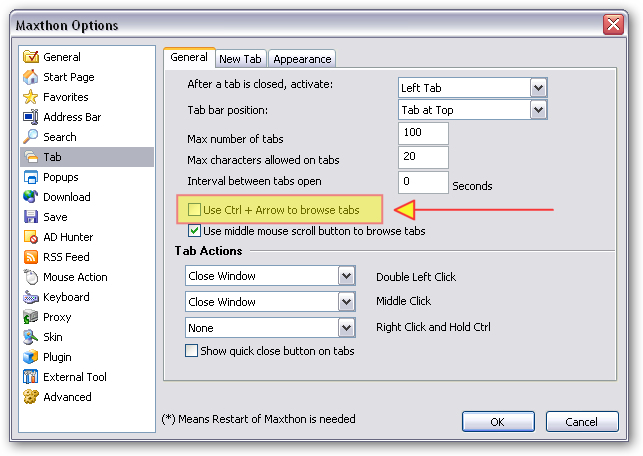
Curt, i'm not a Maxthon power user but there is this option (see pic) that you may try disabling to see if it helps you.. :)

[attach=#]

Curt

  • Supporting Member
  • Joined in 2006
  • **
  • Posts: 7,565
Re: Repair hotkey in Maxthon 1.6 on XP ??
« Reply #2 on: August 10, 2007, 04:11 PM »
Yes, lanux, and thank you: now the problem is hidden,

- but then again, that is all it is; hidden. I was imaging that someone could direct me so I somehow could edit a registry key and make the problem go all away... but I surely can live with this, because Ctrl+Shift+Arrow is far more important to me than a hotkey for tab switching.

Thanks a lot!   :up:

hamradio

  • Amateur Radio Guy
  • Charter Honorary Member
  • Joined in 2006
  • ***
  • Posts: 893
    • Plugin Coding Medal
    • Participated in NANY Challenge Fifteen Times
    • Cody Award
    • Coding Snacks
    • Volunteers/Staff
    • Hardware Hacker
Re: Repair hotkey in Maxthon 1.6 on XP ??
« Reply #3 on: August 10, 2007, 07:28 PM »
You can also hit I believe Ctrl + Tab to switch tabs with a thing like the Alt + Tab of windows if you still want a hotkey for tab switching.

Curt

  • Supporting Member
  • Joined in 2006
  • **
  • Posts: 7,565
Re: Repair hotkey in Maxthon 1.6 on XP ??
« Reply #4 on: August 10, 2007, 08:56 PM »
You're right; Ctrl+Tab is the same; one more feature I didn't know of!
Thanks a lot, hamradio!  :up:

jgpaiva

  • Artificial Idiocy
  • Global Moderator
  • Joined in 2006
  • *****
  • Posts: 4,727
    • Cody Award
    • Participated in NANY Challenge Once
    • Coding Snacks
    • Portugal Inhabitant
    • Linux User
Re: Repair hotkey in Maxthon 1.6 on XP ??
« Reply #5 on: August 10, 2007, 09:26 PM »
You're right; Ctrl+Tab is the same; one more feature I didn't know of!
Thanks a lot, hamradio!   :up:
You'd be surprised with how many programs work with ctrl+tab. In any default windows control (like display properties, or the "system" item under control panel), that cycles through the tabs ;)

In general, any tabbed program supports ctrl+tab ;)

Curt

  • Supporting Member
  • Joined in 2006
  • **
  • Posts: 7,565
Re: Repair hotkey in Maxthon 1.6 on XP ??
« Reply #6 on: August 10, 2007, 09:47 PM »
In general, any tabbed program supports ctrl+tab ;)

I have had no experience with tabbed programs before I got this XP five months ago. Well, there was Firefox, but I always just clicked the tab, because I didn't know there were more to be discovered. Thanks a lot, all of you, it has beeen educating to read your answers to this little question of mine.

----
But still, @anyone, How does one repair the error, this frustrating "Ctrl+Arrow versus Ctrl+Shift+Arrow" situation? Do I need to edit the registry? Do "you" KNOW??

----
Edit: We have handled the problem but not the reason...: there is an error on my PC!! >:(
« Last Edit: August 10, 2007, 09:51 PM by Curt »

Armando

  • Charter Member
  • Joined in 2005
  • ***
  • Posts: 2,727
    • Coding Snacks
Re: Repair hotkey in Maxthon 1.6 on XP ??
« Reply #7 on: September 27, 2007, 04:31 AM »
Curt : I'm in the same annoying situation. See Maxthon 1.6.2 "ctrl + shift + arrow" annoyance... !  :)
"I suppose it can be said that I'm an absent-minded driver. It's true that I've driven through a number of red lights on occasion, but on the other hand, I've stopped at a lot of green ones but never gotten credit for it."
Glenn Gould

lanux128

  • Global Moderator
  • Joined in 2005
  • *****
  • Posts: 6,277
    • Coding Snacks
    • Volunteers/Staff
    • Gathering Badge
    • Participated in NANY Challenge Once
    • Linux User
Re: Repair hotkey in Maxthon 1.6 on XP ??
« Reply #8 on: September 27, 2007, 04:55 AM »
Armando, you can use Ctrl+Tab to move among tabs..

Armando

  • Charter Member
  • Joined in 2005
  • ***
  • Posts: 2,727
    • Coding Snacks
Re: Repair hotkey in Maxthon 1.6 on XP ??
« Reply #9 on: September 27, 2007, 04:57 AM »
Thanks.
Yes... I know but it's not the same.
Will do anyway -- just a matter of getting used to it!
"I suppose it can be said that I'm an absent-minded driver. It's true that I've driven through a number of red lights on occasion, but on the other hand, I've stopped at a lot of green ones but never gotten credit for it."
Glenn Gould

hamradio

  • Amateur Radio Guy
  • Charter Honorary Member
  • Joined in 2006
  • ***
  • Posts: 893
    • Plugin Coding Medal
    • Participated in NANY Challenge Fifteen Times
    • Cody Award
    • Coding Snacks
    • Volunteers/Staff
    • Hardware Hacker
Re: Repair hotkey in Maxthon 1.6 on XP ??
« Reply #10 on: September 27, 2007, 05:05 AM »
Another hotkey you could also use that I just remembered is F2 = Previous Tab (from current) and F3 = Next Tab (from current). Works here. :)

Armando

  • Charter Member
  • Joined in 2005
  • ***
  • Posts: 2,727
    • Coding Snacks
Re: Repair hotkey in Maxthon 1.6 on XP ??
« Reply #11 on: September 27, 2007, 05:09 AM »
Yup! Cool!  :Thmbsup:
Thanks hamradio, that fixes everything.
I can now move on to thesis stuff.  :)
"I suppose it can be said that I'm an absent-minded driver. It's true that I've driven through a number of red lights on occasion, but on the other hand, I've stopped at a lot of green ones but never gotten credit for it."
Glenn Gould

Curt

  • Supporting Member
  • Joined in 2006
  • **
  • Posts: 7,565
Re: Repair hotkey in Maxthon 1.6 on XP ??
« Reply #12 on: September 27, 2007, 05:24 PM »
... F2 = Previous Tab (from current) and F3 = Next Tab (from current). ...

Yes, I too have disabled Ctrl(+Shift)+arrow and started learning to use F2 and F3

Original address: https://www.donationcoder.com/forum/index.php?topic=9523.0