


Here's an alias that uses nircmd to do several useful functions 
Here's the table describing this alias:
Note: Everything assigned in bold is a farr keyword. If you find any keyword is too long, just type part of it, then when it's the first result, press tab to autocomplete.
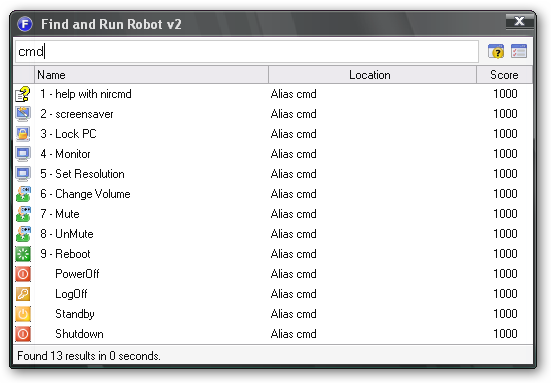
Here's the table describing this alias:
| Command | Description | Example |
| cmd | List all the commands | cmd |
| Screensaver | Start your Screensaver | screensaver |
| Monitor | Turn your monitor on or off | Monitor on or Monitor off |
| LockPc | Lock your computer (the same as pressing windows+L) | LockPc |
| Set Resolution | Set the resolution of your computer (width, height and depth) | SetRes 800 600 32 |
| ChangeVolume | Increase or Decrease the master volume of your computer (varies from 0 to 65) | ChangeVol +10 or ChangeVol -10 |
| Mute | Toggle the mute status the computer sound | mute or unmute |
| Reboot | Restart the computer | Reboot or Restart |
| Shutdown | Shutdown computer | Shutdown or PowerOff |
| Standby | Get the computer in standby state | Standby |
| Logoff | Logoff from the current session | Logoff |
Note: Everything assigned in bold is a farr keyword. If you find any keyword is too long, just type part of it, then when it's the first result, press tab to autocomplete.
 nircmd.zip


 i also would like to propose that a child board for Farr's aliases & plugins would make it easier to locate them..


 so not quite sure if that correct location)


