DonationCoder.com forum
 
Read-only archive. This is a static copy of the DonationCoder.com forum. Reading and searching work as before; logging in, posting and private messages do not.
Archive of 2026-10-21 · About this archive · Main site

Author Topic: Encrypt single file?  (Read 20,265 times)

jgpaiva

  • Artificial Idiocy
  • Global Moderator
  • Joined in 2006
  • *****
  • Posts: 4,727
    • Cody Award
    • Participated in NANY Challenge Once
    • Coding Snacks
    • Portugal Inhabitant
    • Linux User
Encrypt single file?
« on: July 18, 2007, 09:18 PM »
Hello there... Here i seek the immense knowledge of the people of DC :)

I'm looking for a program that is command line, small, and can encrypt files safelly.
There are inumerous options in google, but i'm looking for an already-tested/safe alternative.

Thanks!

Lashiec

  • Member
  • Joined in 2006
  • **
  • Posts: 2,374
Re: Encrypt single file?
« Reply #1 on: July 18, 2007, 09:36 PM »
You hit the jackpot then :D. Dariusz Stanislawek has all these tiny programs, with a bunch of them focused in file encryption. All of them are portable, they use encryption standards, and they're recommended by people like Gizmo. I tried most of them in the past, and they worked like a charm. The only problem is choosing one, so pick your poison, but I'd go for dsCrypt, which uses AES, and comes both in GUI and commandline versions.

Edvard

  • Coding Snacks Author
  • Charter Honorary Member
  • Joined in 2005
  • ***
  • Posts: 3,027
    • Participated in NANY Challenge Once
    • Coding Snacks
    • Linux User
Re: Encrypt single file?
« Reply #2 on: July 18, 2007, 09:45 PM »
Well, Windows 2000 on up has a handy little utility called cipher.exe.
If you like open source, there's Animesh Srivastava's Crypt.

That's all I have...
All children left unattended will be given a mocha and a puppy.

jgpaiva

  • Artificial Idiocy
  • Global Moderator
  • Joined in 2006
  • *****
  • Posts: 4,727
    • Cody Award
    • Participated in NANY Challenge Once
    • Coding Snacks
    • Portugal Inhabitant
    • Linux User
Re: Encrypt single file?
« Reply #3 on: July 18, 2007, 09:45 PM »
Damn, those are cool!
But apparently, all of those require that the key is in an external file.. I wanted to pass the key as a command line argument :(
(i guess that isn't very safe, is it?)

The idea was to make an alias action for farr that would encrypt files, but now that i come to think about it, maybe it'd be a job more suited for a plugin than an alias.

Lashiec

  • Member
  • Joined in 2006
  • **
  • Posts: 2,374
Re: Encrypt single file?
« Reply #4 on: July 18, 2007, 09:56 PM »
Not really. As you can see, dsCrypt accept both methods.

jgpaiva

  • Artificial Idiocy
  • Global Moderator
  • Joined in 2006
  • *****
  • Posts: 4,727
    • Cody Award
    • Participated in NANY Challenge Once
    • Coding Snacks
    • Portugal Inhabitant
    • Linux User
Re: Encrypt single file?
« Reply #5 on: July 18, 2007, 10:32 PM »
Not really. As you can see, dsCrypt accept both methods.
Unfortunatelly, apparently that only stands for the GUI version. The GUI version can create key files, to be used with both the GUI and the CLI version. But the CLI version, can only get key files as input :(

f0dder

  • [Well, THAT escalated quickly!]
  • Charter Honorary Member
  • Joined in 2005
  • ***
  • Posts: 9,153
    • Participated in NANY Challenge Once
Re: Encrypt single file?
« Reply #6 on: July 18, 2007, 10:33 PM »
No, wouldn't be very safe...

RAR could be a choice too btw, it compresses and encrypts, using AES.
- carpe noctem

app103

  • That scary taskbar girl
  • Global Moderator
  • Joined in 2006
  • *****
  • Posts: 5,888
    • Participated in NANY Challenge Six Times
    • Coding Snacks
    • Gathering Badge
    • Cody Award
    • Volunteers/Staff
Re: Encrypt single file?
« Reply #7 on: July 18, 2007, 10:51 PM »
Maybe you could talk Martin into adding the command line features you want/need to Ligare.

Edvard

  • Coding Snacks Author
  • Charter Honorary Member
  • Joined in 2005
  • ***
  • Posts: 3,027
    • Participated in NANY Challenge Once
    • Coding Snacks
    • Linux User
Re: Encrypt single file?
« Reply #8 on: July 18, 2007, 11:04 PM »
One more: OpenSSL
Here's a Windows port: http://www.slproweb.com/products/Win32OpenSSL.html
and usage: http://www.openssl.org/docs/apps/enc.html

The enc function allows encryption with either keys or password, with the -salt option it won't make the same key from the same password.

Looks like you can encrypt with Base 64, Blowfish, CAST, DESX, IDEA, RC2, 4 and 5 in many different modes.

Nice.
All children left unattended will be given a mocha and a puppy.

mwb1100

  • Supporting Member
  • Joined in 2006
  • **
  • Posts: 1,645
Re: Encrypt single file?
« Reply #9 on: July 18, 2007, 11:17 PM »
You might want to look at GnuPG.  It's been a while since I've used it, but you could encrypt using a passphrase with the command:

Code
echo testing123|gpg --symmetric --passphrase-fd 0 --output EncryptedFilename FilenameToEncrypt

If you want the encrypted file to be email-safe you can also have it ASCII-encoded:

Code
echo testing123|gpg --symmetric --passphrase-fd 0 --output EncryptedFilename --armour FilenameToEncrypt

Decrypt like so:
Code
echo testing123|gpg -d --passphrase-fd 0 --output UnEncryptedFilename EncryptedFilename

The echo command pipes the passphrase into stdin for the gpg command.  The "--passphrase-fd 0" option tells gpg to grab the passphrase from stdin.  They used to have a plain old "--passphrase" option that let you give it on the gpg command itself, but they considered that too insecure (what a pain).

If you leave off the "--passphrase-fd 0" option (leave off the echo command as well), gpg will prompt you for a passphrase.

crono

  • Charter Honorary Member
  • Joined in 2005
  • ***
  • Posts: 179
Re: Encrypt single file?
« Reply #10 on: July 19, 2007, 12:08 AM »
I like GnuPG too and used it a lot, but now I basically use AxCrypt . Its Open source under GNU General Public License and comes with a very nice commandline Interface. It can produce "self-decrypting" Exe-Files to decrypt the data on Machine with no AxCrypt Installation.

patthecat

  • Member
  • Joined in 2006
  • **
  • Posts: 88
Re: Encrypt single file?
« Reply #11 on: July 19, 2007, 02:46 AM »
How about the 7-zip command line version?
http://downloads.sourceforge.net/sevenzip/7za442.zip

You can compress, use AES-256 encryption (for .7z and .zip files), and create a self-extracting exe file.

jgpaiva

  • Artificial Idiocy
  • Global Moderator
  • Joined in 2006
  • *****
  • Posts: 4,727
    • Cody Award
    • Participated in NANY Challenge Once
    • Coding Snacks
    • Portugal Inhabitant
    • Linux User
Re: Encrypt single file?
« Reply #12 on: July 19, 2007, 10:20 AM »
How about the 7-zip command line version?
http://downloads.sourceforge.net/sevenzip/7za442.zip
Given the fact that i already need 7zip in the package, this is the option i'll opt for.
Thanks a lot patthecat!!

PS:I even unninstalled the trial version of winrar, to install 7zip :D

f0dder

  • [Well, THAT escalated quickly!]
  • Charter Honorary Member
  • Joined in 2005
  • ***
  • Posts: 9,153
    • Participated in NANY Challenge Once
Re: Encrypt single file?
« Reply #13 on: July 19, 2007, 10:52 AM »
PS:I even unninstalled the trial version of winrar, to install 7zip :D
Heretic!
- carpe noctem

Lashiec

  • Member
  • Joined in 2006
  • **
  • Posts: 2,374
Re: Encrypt single file?
« Reply #14 on: July 19, 2007, 12:04 PM »
PS:I even unninstalled the trial version of winrar, to install 7zip :D

You did WHAT?? :o

jgpaiva

  • Artificial Idiocy
  • Global Moderator
  • Joined in 2006
  • *****
  • Posts: 4,727
    • Cody Award
    • Participated in NANY Challenge Once
    • Coding Snacks
    • Portugal Inhabitant
    • Linux User
Re: Encrypt single file?
« Reply #15 on: July 19, 2007, 12:06 PM »
hmm... i see that might not have been the best idea i've had.

jgpaiva

  • Artificial Idiocy
  • Global Moderator
  • Joined in 2006
  • *****
  • Posts: 4,727
    • Cody Award
    • Participated in NANY Challenge Once
    • Coding Snacks
    • Portugal Inhabitant
    • Linux User
Re: Encrypt single file?
« Reply #16 on: July 26, 2007, 02:29 PM »
Yep, it wasn't the greatest of ideas.
I had no knowledge that 7zip couldn't handle winrar archives.
I've changed to Alzip, which feels better than winrar and 7zip (i like the tree view), and has the added bonus of having sexy icons.. eheh
:-* :-*

dhuser

  • King Dogbert
  • Honorary Member
  • Joined in 2006
  • **
  • Posts: 96
    • Participated in NANY Challenge Once
Re: Encrypt single file?
« Reply #17 on: July 26, 2007, 03:27 PM »
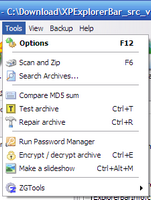
I know that ZipGenius has an option to encrypt a zip file and also create an application:
tn_1.png

Also See Help Topic:
http://help.zipgenius.it/archivio/zg6/eng_zghlp/Criptare_un_archivio_Zip.htm


Can you zip the file and encrypt it?
dhuser
My StumbleUpon Profile
Imagine.Explore.Create!

jgpaiva

  • Artificial Idiocy
  • Global Moderator
  • Joined in 2006
  • *****
  • Posts: 4,727
    • Cody Award
    • Participated in NANY Challenge Once
    • Coding Snacks
    • Portugal Inhabitant
    • Linux User
Re: Encrypt single file?
« Reply #18 on: July 26, 2007, 03:37 PM »
I don't know il alzip can do it, dhuser. But i ended up solving that problem with 7-zip, which can make self-decompressing encripted zip files through command line :)

I just gave up using it for regular use, i've kept it in my file management alias for find and run.

Original address: https://www.donationcoder.com/forum/index.php?topic=9269.0