DonationCoder.com forum
 
Read-only archive. This is a static copy of the DonationCoder.com forum. Reading and searching work as before; logging in, posting and private messages do not.
Archive of 2026-10-21 · About this archive · Main site

Author Topic: [bug] v2.00.130 start farr via alias hotkey does not execute alias  (Read 9,971 times)

justice

  • Solve issues simply.
  • Supporting Member
  • Joined in 2006
  • **
  • Posts: 1,898
    • Participated in NANY Challenge Four Times
    • Cody Award
    • Coding Snacks
    • DJ Badge - DJ
I have assigned a hotkey to my fav alias to launch farr with it. This works fine, however it comes up with the Alias name as the start of the command, not the regex pattern.

So now whatever i type is not executed because it doesn't start with the regex pattern.
Try this alias:
Code
1000>>>Feeling Lucky>->Google - $$1 | http://www.google.co.uk/search?hl=en&q=$$1&btnI=I%27m+Feeling+Lucky /ICON=icons\google.ico>+>^!(.*)>/>24762
I have to type !<some query> for it to work, however using the hotkey farr comes up with "feeling lucky <cursor>" instead, which is not recognised. BTW this alias also still does not come up with an icon, which is a bug in the other thread in case you missed it.

Keep it up.
« Last Edit: July 14, 2007, 11:23 PM by justice »

jgpaiva

  • Artificial Idiocy
  • Global Moderator
  • Joined in 2006
  • *****
  • Posts: 4,727
    • Cody Award
    • Participated in NANY Challenge Once
    • Coding Snacks
    • Portugal Inhabitant
    • Linux User
Well... I know it doesn't make much sense, but you can always call that alias "!" ;)
The thing is: a regex pattern can't be filled out, as it can correspond to a lot of text.
For example: how should a pattern like ^([0-9]*)hello[a-z]*$ be filled out? That could represent 0089123helloaasdfasds or just hello or something else.

nitrix-ud

  • Charter Member
  • Joined in 2005
  • ***
  • Posts: 560
Quote
For example: how should a pattern like ^([0-9]*)hello[a-z]*$ be filled out? That could represent 0089123helloaasdfasds or just hello or something else.

that's why i once suggested that there could be a other text box near the regex pattern box to tell FARR what to autocomplete... (it would be up to the user)

for the moment I just name the alias like the regex mask (i'm talking about the simple ones ;)) like jgpaiva suggested

justice

  • Solve issues simply.
  • Supporting Member
  • Joined in 2006
  • **
  • Posts: 1,898
    • Participated in NANY Challenge Four Times
    • Cody Award
    • Coding Snacks
    • DJ Badge - DJ
right thanks peeps

mouser

  • First Author
  • Administrator
  • Joined in 2005
  • *****
  • Posts: 40,931
    • Gathering Badge
    • Plugin Coding Medal
    • Participated in NANY Challenge Seventeen Times
    • Cody Award
    • Coding Snacks
    • Volunteers/Staff
I hesitate to add this because i think it's going to get so little use, BUT i could add a field to each alias where you can specify a kind of "default text string" that would be used if triggered via a hotkey or selected from the agroups "menu".  thoughts?

justice

  • Solve issues simply.
  • Supporting Member
  • Joined in 2006
  • **
  • Posts: 1,898
    • Participated in NANY Challenge Four Times
    • Cody Award
    • Coding Snacks
    • DJ Badge - DJ
no that's not needed. could you detect if the regex starts with static text instead of the variable text and then allow calling the static text?

For example if i had a regex alias starting wtih "loc ^(.)" then if farr could know it always started with "loc " then that would solve the problem. Honestly though if it's a lot of work then don't bother because it's probably not very important.

mouser

  • First Author
  • Administrator
  • Joined in 2005
  • *****
  • Posts: 40,931
    • Gathering Badge
    • Plugin Coding Medal
    • Participated in NANY Challenge Seventeen Times
    • Cody Award
    • Coding Snacks
    • Volunteers/Staff
yeah i thought of that solution justice..
here is what i came up with however that might be better:

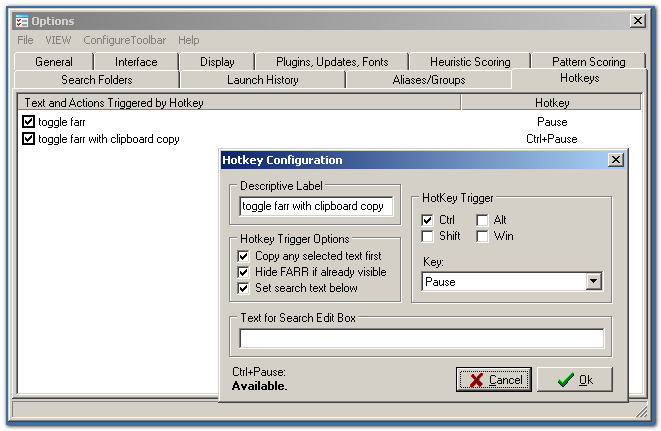
what if i removed the hotkey settings from aliases, and made hotkeys a separate tab, where you just basically configure hotkey + text pairs.  hit a hotkey and it pops up farr and starts searching for the text.

seems more sensible to me and easier to keep track of and manage your hotkeys too..

thoughts?

nitrix-ud

  • Charter Member
  • Joined in 2005
  • ***
  • Posts: 560
That is just perfect i think...

It would be even more perfect if :
  • we could add a space at the end ;) (like the restartsearch command)
  • we could add an {Enter} command at the end (somehow it would allow commands to hotkeys...)

related to my post concerning the "clipboard trick", if one could add an {Enter} command, you could then assign an hotkey to paste the clipboard content in the search box

hotkey1 <---> clip{Enter}

imagine you create the following "fcc" alias
^fcc$
Code
$$c | restartsearch fc $$c

then you could create this pair :
hotkey2 <---> fcc{Enter}

just select an mathematical expression... press hotkey2 ... FCalc gives you the result

it would be even more perfect  :D if we could add the special variable $$c, we would just have to do :
hotkey2 <---> fc $$c{Enter}

Nitrix


nitrix-ud

  • Charter Member
  • Joined in 2005
  • ***
  • Posts: 560
maybe the best solution is to be able to assign hotkeys to a restartsearch commands it would allow anything...

  • any text... even with space at the end thanks to the new /s variable
  • any text with special variables...$$c

and if you add features they would be available right away...

thoughts ?

mouser

  • First Author
  • Administrator
  • Joined in 2005
  • *****
  • Posts: 40,931
    • Gathering Badge
    • Plugin Coding Medal
    • Participated in NANY Challenge Seventeen Times
    • Cody Award
    • Coding Snacks
    • Volunteers/Staff
a whole new wonderful hotkey system is coming in the next release..
no more hotkeys associated with aliases.. now all hotkeys (main ones for showing farr), and helper ones for starting searches, will be unified, and you'll be able to create as many hotkeys as you want to do different searches and alter the way farr shows on they keypress.

[attach]

jgpaiva

  • Artificial Idiocy
  • Global Moderator
  • Joined in 2006
  • *****
  • Posts: 4,727
    • Cody Award
    • Participated in NANY Challenge Once
    • Coding Snacks
    • Portugal Inhabitant
    • Linux User
Whoa...... Now that's impressive!
And all that on one night? Man, you're incredible :D

justice

  • Solve issues simply.
  • Supporting Member
  • Joined in 2006
  • **
  • Posts: 1,898
    • Participated in NANY Challenge Four Times
    • Cody Award
    • Coding Snacks
    • DJ Badge - DJ
MouserPower to the rescue!

nitrix-ud

  • Charter Member
  • Joined in 2005
  • ***
  • Posts: 560
Sounds great !  :D

I hope we will be able to have that kind of "search string"
Code
fc $$c{Enter}

that is using the dynamic variable $$c
and an "Enter command"...

it would really be powerful... with the correct settings :
just select an mathematical expression, press the hotkey
that's it you have the result in the clipboard !


whouah, that would be awesome !

Original address: https://www.donationcoder.com/forum/index.php?topic=9217.0