DonationCoder.com forum
 
Read-only archive. This is a static copy of the DonationCoder.com forum. Reading and searching work as before; logging in, posting and private messages do not.
Archive of 2026-10-21 · About this archive · Main site

Author Topic: windows xp sound broke  (Read 6,680 times)

nite_monkey

  • Member
  • Joined in 2006
  • **
  • Posts: 753
windows xp sound broke
« on: June 29, 2007, 06:49 PM »
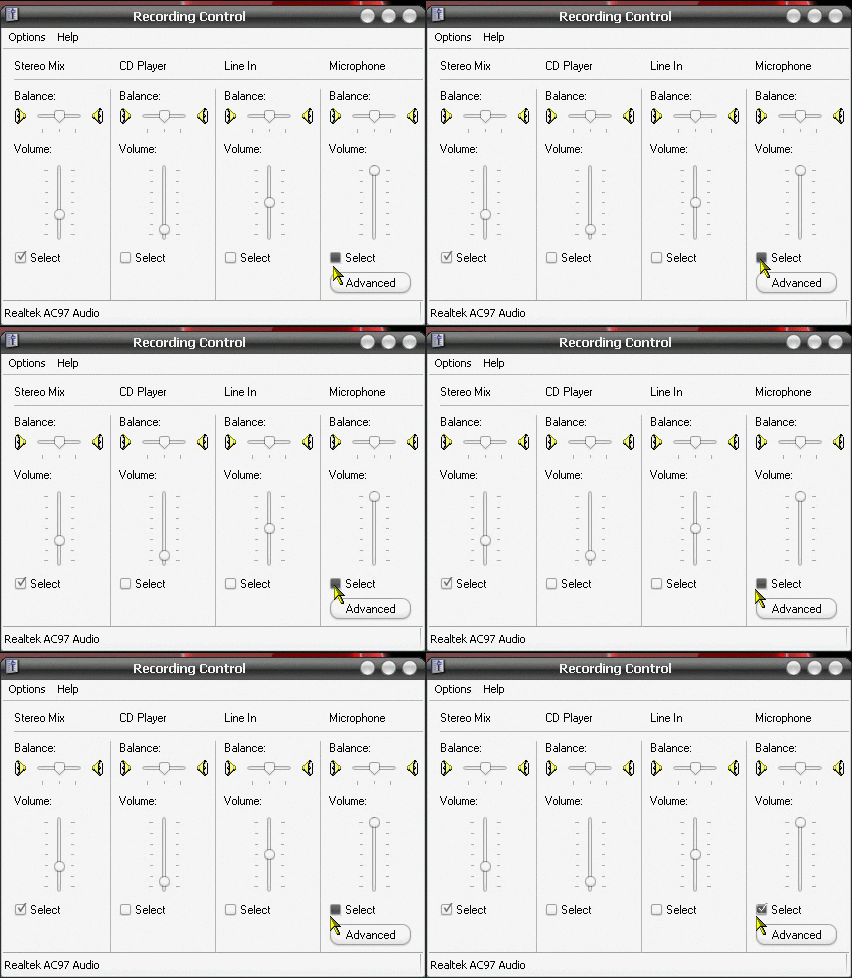
My computer won't let me change audio recording sources. When ever I select anything, it just unselects it and selects the stereo mix input. I don't want to select just stereo, because I have to turn it down really low, otherwise when I record anything it sounds like crap, but my mic is too quiet going through the stereo input because it is turned down too low. That isn't too confusing is it? Let me make a screen shot and see if that makes more sense.
[attachimg=#]
That is what happens when I try to select anything other than the stereo input.
[Insert really cool signature here]

Nighted

  • Meat Popsicle
  • Charter Honorary Member
  • Joined in 2005
  • ***
  • Posts: 572
Re: windows xp sound broke
« Reply #1 on: June 29, 2007, 09:28 PM »
Try running in safe mode and see if it still does that. Looks like something else is overriding your sound console.
I`m a firm believer in the philosophy of a ruling class, especially since I rule.

nite_monkey

  • Member
  • Joined in 2006
  • **
  • Posts: 753
Re: windows xp sound broke
« Reply #2 on: June 29, 2007, 10:25 PM »
Yeah thats what I was thinking, but I haven't found out what keeps changing it back yet, I'm gonna look and see if I can, and then I'll go into safe mode and see what that does.

edit:ok, so I booted into safe mode, but there was no soundcard in safe mode. I don't know if there was something I was missing, I never use safe mode. And I couldn't find any program or anything running that would be doing it either, so I will have to do more research, unless someone has had this problem before and knows what to do to fix it.
[Insert really cool signature here]
« Last Edit: June 29, 2007, 10:35 PM by nite_monkey »

Nighted

  • Meat Popsicle
  • Charter Honorary Member
  • Joined in 2005
  • ***
  • Posts: 572
Re: windows xp sound broke
« Reply #3 on: June 30, 2007, 08:41 AM »
Post a screen shot of your task manager or send it to me.
I`m a firm believer in the philosophy of a ruling class, especially since I rule.

Eóin

  • O'Callaghan
  • Charter Member
  • Joined in 2006
  • ***
  • Posts: 1,401
Re: windows xp sound broke
« Reply #4 on: June 30, 2007, 01:53 PM »
It could be a service running either. Msconfig has a nice feature in it's services tab where you can hide the MS ones which would be unlikely to be causing this problem anyway. A screenshot of that list would be helpful too.

A useful thing to note though is that msconfig isn't the best for managing services, a better bet if you want to fiddle with them yourself is after having gotten the list of non-ms ones fire up Control Panel >> Administrative Tools >> Services and tweak them there. Or get Sysinternals Autoruns.
Interviewer: Is there anything you don't like?
Bjarne Stroustrup: Marketing hype as a substitute for technical argument. Thoughtless adherence to dogma. Pride in ignorance.

nite_monkey

  • Member
  • Joined in 2006
  • **
  • Posts: 753
Re: windows xp sound broke
« Reply #5 on: June 30, 2007, 06:07 PM »
ok, free screenshots for everyone

there's you a free task manager screenshot


and there's you a free services screenshot
[Insert really cool signature here]

nite_monkey

  • Member
  • Joined in 2006
  • **
  • Posts: 753
Re: windows xp sound broke
« Reply #6 on: June 30, 2007, 06:18 PM »
I'm downloading drivers for my sound card, just to see if that will do something. I doubt it will though, because I updated the sound drivers not to long ago and it didn't cause this problem, but it's still worth a try I guess.

edit: Ok, so the sound didn't break, my computer broke the sound drivers. I just got done installing the sound driver update, and now the problem is fixed.
Thanks for your help anyways guys.
[Insert really cool signature here]
« Last Edit: June 30, 2007, 06:26 PM by nite_monkey »

justice

  • Solve issues simply.
  • Supporting Member
  • Joined in 2006
  • **
  • Posts: 1,898
    • Participated in NANY Challenge Four Times
    • Cody Award
    • Coding Snacks
    • DJ Badge - DJ
Re: windows xp sound broke
« Reply #7 on: July 02, 2007, 12:30 PM »
realtek has its own volume manager called Soundman, it should be in your system tray. It may override it. Ah its fixed.  :up:

Original address: https://www.donationcoder.com/forum/index.php?topic=9030.0