DonationCoder.com forum
 
Read-only archive. This is a static copy of the DonationCoder.com forum. Reading and searching work as before; logging in, posting and private messages do not.
Archive of 2026-10-21 · About this archive · Main site

Last post Author Topic: Ultra Explorer; I am impressed!  (Read 70,404 times)

Curt

  • Supporting Member
  • Joined in 2006
  • **
  • Posts: 7,565
Ultra Explorer; I am impressed!
« on: June 24, 2007, 11:09 PM »
I goofed and was forced to look for a temporary replacement for Explorer, so I could finish my work. So I looked a little, and within two minutes I found an alternative I have never heard of before: Ultra Explorer. After 3 hours I must say, I am impressed! Why did I never hear of this before?
Quote
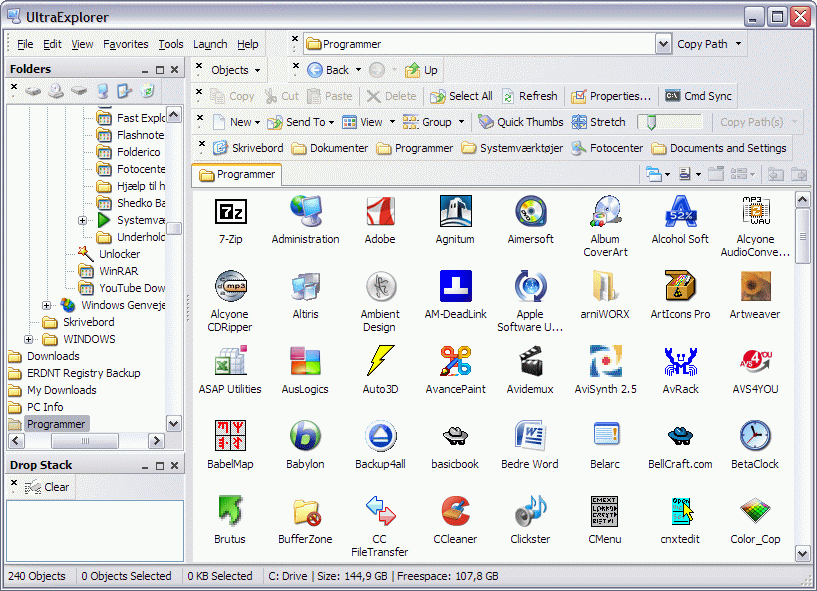
Some of the key features of UltraExplorer are:

Drop Stack Window - Drop blocks of files into the drop stack for quick access later

Favorites Window - Build a favorites tree with any object you like from the shell.  The tree is fully aware of drag and drop and the clipboard.  Use the objects in the favorites tree just like the normal treeview and listview controls.

Command Line Window - Can't give up DOS and a command line?  UltraExplorer has a built in command line window that stays synced with the current view of the application.

Filter Window - Too many files to find what you want?  Use UltraExplorers Filter window.  Create new filter arguments by:

dragging and dropping objects to the window

using the selected objects in the active listview
Folders Window - Ultra fast Folder treeview that is positionable anywhere in the application.


History Window - User defined level of previously browsed folder.  Objects in this window can be used just as in the treeview or listviews, drag drop and clipboard aware.


Listview Window - A secondary listview window that can be used identical to the fixed listview.  Allows for a dual listview display if desired.


Tabbed Folders - There are several ways to create a new tab


Simply press the Control key when clicking on a folder and the folder is browsed in a new tab.

CTRL-T creates a clone of the current tab (CTRL-W closes the current tab)

Use the menu item in the Main Menu under "File"

Use the right mouse click context menu while hovering over the Tabs
Task Window - The Task window accepts plug in DLLs to extend UltraExplorer beyond its powerful built in capablilites.  The DLL can be built in Borland Delphi and distributed separately.  All that is necessary is the DLL file be places in the Plug In folder within the UltraExplorer install folder and the plugin will be available to the user.

Examples of plugins and the source code for the default plug in that come with UltraExplorer can be downloaded here.


Fast Access to Common Tasks through Detachable Toolbars

ultraexplorer0.gif

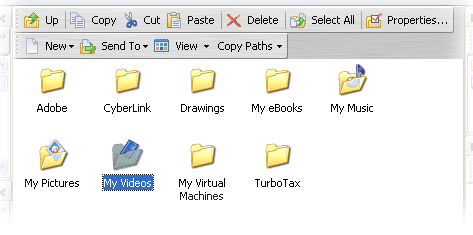
Common tasks such as Copy, Cut, Paste, and Show Properties can be access through normal context menus or through speedbutton right on the listview.  Also less common tasks can be access through the speed buttons, these include:

Up

Select All

Delete

New Object...

Send To...

View of Listview

Copy selected file paths to clipboard in either long or short filename
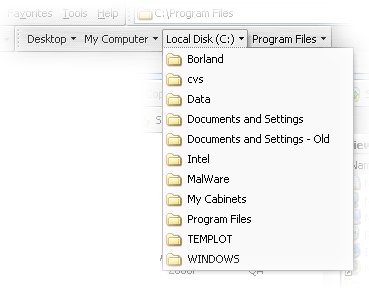
Breadcrumb Bar to quickly move back up through the folder path

ultraexplorer½.gif

Click the button itself to browse to the folder or click the arrow down button to select from the folders contained with the particular crumb
ultraexplorer1.gif

Does it miss anything? Yes; I am disappointed that there is no Search engine integrated yet - but it is on its way, they say. And my popup thumbnail pictures have gone; they were 3'rd party features. Other than that, it seems you can have this app almost anyway you want.

Check it out!: :Thmbsup:
http://ultraexplorer.mustangpeak.net

http://www.mustangpeak.net/
http://wiki.mustangpeak.net/index.php?title=Help_for_UltraExplorer

Curt

  • Supporting Member
  • Joined in 2006
  • **
  • Posts: 7,565
Re: Ultra Explorer; I am impressed!
« Reply #1 on: June 24, 2007, 11:18 PM »
Oops! I forgot to tell it is FREE!  ;)

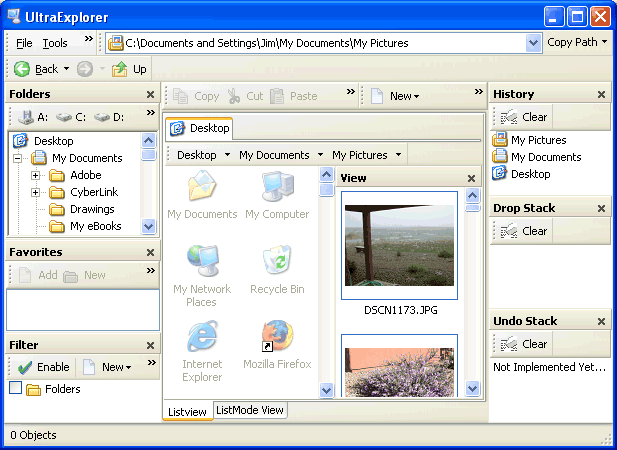
My version:
[attachthumb=#]

http://ultraexplorer.mustangpeak.net/


Edit:

Here's the UltraExplorer forum:
http://www.mustangpeak.net/phpBB2/index.php?c=6

Thanks, twinkler!  :up:
« Last Edit: July 11, 2007, 10:08 PM by Curt »

Perry Mowbray

  • N.A.N.Y. Organizer
  • Charter Member
  • Joined in 2005
  • ***
  • Posts: 1,817
    • Participated in NANY Challenge Three Times
    • Plugin Coding Medal
Re: Ultra Explorer; I am impressed!
« Reply #2 on: June 25, 2007, 12:06 AM »
I'm sure that UltraExplorer was mentioned here (although I can't find it now), as I installed it some months ago... and like you I'm impressed as well.

Where ever I originally found it had some criticisms about the programming method ("gluing different modules together opposed to coding it from scratch" from memory), but it works and I like the way it works... ;)

...and the author is active and answers emails...

edbro

  • Charter Member
  • Joined in 2006
  • ***
  • Posts: 426
Re: Ultra Explorer; I am impressed!
« Reply #3 on: June 25, 2007, 12:57 AM »
I really like UltraExplorer also. Currently, I'm torn between xplorer2 and UE. Xplorer2 is less powerful but I really like it's simple interface. Of course, I modded mine with Skrommel's Barnacle to add a menu bar for my favorites. What I don't like about UltraExplorer is 1) it is definitely slower to load than xplorer2, 2) it only displays tabs for one pane at a time which I find confusing, and 3) I can't set the startup folder in the second pane. Yes, I know that is something small but it bothers me. In xplorer2 I can set both panes to start where I want them to.

Having said all that, I am using UE more and more over xplorer2. I am coming off of Directory Opus but had to give it up when I switched to Vista. I can't afford that updgrade price.

lanux128

  • Global Moderator
  • Joined in 2005
  • *****
  • Posts: 6,277
    • Coding Snacks
    • Volunteers/Staff
    • Gathering Badge
    • Participated in NANY Challenge Once
    • Linux User
Re: Ultra Explorer; I am impressed!
« Reply #4 on: June 25, 2007, 02:18 AM »
if you want more choices, take a look here: 12 Windows Explorer Alternatives Compared.

urlwolf

  • Charter Member
  • Joined in 2006
  • ***
  • Posts: 1,837
    • Gathering Badge
    • Linux User
Re: Ultra Explorer; I am impressed!
« Reply #5 on: June 25, 2007, 02:31 AM »
Here:
http://www.wilderssecurity.com/showthread.php?t=176343&page=3
UE seems to be liked.
I find it pretty impressive.
Just when my Dopus 9 demo license is about to expire...
I just need a keyboard shortcut that takes me to the address bar, and I might be set wit UE!

Perry Mowbray

  • N.A.N.Y. Organizer
  • Charter Member
  • Joined in 2005
  • ***
  • Posts: 1,817
    • Participated in NANY Challenge Three Times
    • Plugin Coding Medal
Re: Ultra Explorer; I am impressed!
« Reply #6 on: June 25, 2007, 04:57 AM »
I just need a keyboard shortcut that takes me to the address bar, and I might be set wit UE!

Have you asked the author?

You could do one in AutoIT/AHK pretty easily too.

I think I had two grumbles:
  • Copy FileName+Path functionality wasn't what I needed. I'll keep using my AutoIT script...
  • I also had issues with multiple tabs open, sometimes the wrong tab [read: not the one I was expecting] would change when I clicked on the shortcut (folder/etc)

zridling

  • Friend of the Site
  • Charter Member
  • Joined in 2005
  • ***
  • Posts: 3,299
Re: Ultra Explorer; I am impressed!
« Reply #7 on: June 25, 2007, 12:57 PM »
Couldn't get this to download. Any mirrors?
- zaine

justice

  • Solve issues simply.
  • Supporting Member
  • Joined in 2006
  • **
  • Posts: 1,898
    • Participated in NANY Challenge Four Times
    • Cody Award
    • Coding Snacks
    • DJ Badge - DJ
Re: Ultra Explorer; I am impressed!
« Reply #8 on: June 25, 2007, 01:54 PM »

Curt

  • Supporting Member
  • Joined in 2006
  • **
  • Posts: 7,565
Re: Ultra Explorer; I am impressed!
« Reply #9 on: June 25, 2007, 02:21 PM »
http://www.snapfiles.com/reviews/ultraexplorer/ultraexplorer.html
... intimidating for new users.

- thats why I wrote "after 3 hours". But I have SEVERAL apps installed that have been a lot harder to understand how to use, than this - remember my tag: "IT-analphabetic" - so, because I can use it: everybody can use it. Just do; it is very forgiving.
;)

Curt

  • Supporting Member
  • Joined in 2006
  • **
  • Posts: 7,565
Re: Ultra Explorer; I am impressed!
« Reply #10 on: June 25, 2007, 03:42 PM »
I have noticed that Explorer's Open with ... also is missing.  :(

I have Open with ... , but it is from some 3'rd party program and is not as good as the Windows standard.

edbro

  • Charter Member
  • Joined in 2006
  • ***
  • Posts: 426
Re: Ultra Explorer; I am impressed!
« Reply #11 on: June 25, 2007, 04:44 PM »
I have noticed that Explorer's Open with ... also is missing.  :(
It is there on my system here at work. UE 1.4.2 on XP SP2. All the standard Windows context menus are there.

dantheman

  • Be good if you can!
  • Charter Member
  • Joined in 2005
  • ***
  • Posts: 743
Re: Ultra Explorer; I am impressed!
« Reply #12 on: June 25, 2007, 10:37 PM »
I wonder why i went to PowerDesk Pro and then paid for it?

FreeCommander is a pretty nifty one too!

I use Copernic Desktop Search for file content search.
Otherwise, FARR is the tops in that area!

Curt

  • Supporting Member
  • Joined in 2006
  • **
  • Posts: 7,565
Re: Ultra Explorer; I am impressed!
« Reply #13 on: June 25, 2007, 10:49 PM »
I wonder why i went to PowerDesk Pro and then paid for it?

- because you only paid $10 ..?  ;)

I know that was my reason!  :D

dantheman

  • Be good if you can!
  • Charter Member
  • Joined in 2005
  • ***
  • Posts: 743
Re: Ultra Explorer; I am impressed!
« Reply #14 on: June 26, 2007, 12:04 AM »
I wonder why i went to PowerDesk Pro and then paid for it?

- because you only paid $10 ..?  ;)

I know that was my reason!  :D

Wish it was true Curt.
But no, i tried the freeware then decided to go for the Pro version and (ugh!) did this before reading up on other available options here at DC. Mind you, i like the program but with so many others which are quicker to start up and practically loaded (if not more) with just about the same tasks, i have some regrets.    :(

urlwolf

  • Charter Member
  • Joined in 2006
  • ***
  • Posts: 1,837
    • Gathering Badge
    • Linux User
Re: Ultra Explorer; I am impressed!
« Reply #15 on: June 27, 2007, 08:17 AM »
I'm still impressed :)

The only problem I see switching from Dopus to UE is that Jim, the developer, doesn't consider this his main product;I mailed him 2 days ago, with kudos and a feature request, and never heard back from him yet.

I think this is the best file management solution available to date.

To the guys who do TC... which plugins are recommended? I want source code highlighting for example...

It's a pity that there is no forum for this program.

Curt

  • Supporting Member
  • Joined in 2006
  • **
  • Posts: 7,565
Re: Ultra Explorer; I am impressed!
« Reply #16 on: June 27, 2007, 01:03 PM »
No forum, alas, but remember to check out the Help section:
http://wiki.mustangpeak.net/index.php?title=Help_for_UltraExplorer

--

I am also missing right-click undo
:tellme:

steeladept

  • Fettucini alfredo is macaroni & cheese for adults
  • Supporting Member
  • Joined in 2006
  • **
  • Posts: 1,061
    • Linux User
    • Military Service Badge - US Air Force
Re: Ultra Explorer; I am impressed!
« Reply #17 on: June 29, 2007, 12:01 AM »
Okay Curt, maybe I just didn't figure it out yet, but do you know of any way to make UltraExplorer a multipane environment.  I know there are several out there that do dualpane, but I can't seem to find any good, stable software out there that does multipane.

Curt

  • Supporting Member
  • Joined in 2006
  • **
  • Posts: 7,565
Re: Ultra Explorer; I am impressed!
« Reply #18 on: June 29, 2007, 12:08 AM »
Sorry; I don't even care for dualpane, less multi.
Edit: Sorry (again) I said that the wrong way
I use multipane: mtexplorer
http://www.mtexplorer.com/
« Last Edit: June 29, 2007, 12:11 AM by Curt »

steeladept

  • Fettucini alfredo is macaroni & cheese for adults
  • Supporting Member
  • Joined in 2006
  • **
  • Posts: 1,061
    • Linux User
    • Military Service Badge - US Air Force
Re: Ultra Explorer; I am impressed!
« Reply #19 on: June 29, 2007, 12:22 AM »
Yeah, that is the one I liked the idea of, but wasn't stable on my system for some reason...It kept shutting down when I would try to move files.

Perry Mowbray

  • N.A.N.Y. Organizer
  • Charter Member
  • Joined in 2005
  • ***
  • Posts: 1,817
    • Participated in NANY Challenge Three Times
    • Plugin Coding Medal
Re: Ultra Explorer; I am impressed!
« Reply #20 on: June 29, 2007, 04:28 AM »
Okay Curt, maybe I just didn't figure it out yet, but do you know of any way to make UltraExplorer a multipane environment.

Do you mean Open New Tab? From memory, I could open as many Tabs as I wanted? Or have I missed something?

Curt

  • Supporting Member
  • Joined in 2006
  • **
  • Posts: 7,565
Re: Ultra Explorer; I am impressed!
« Reply #21 on: June 29, 2007, 01:25 PM »
My mtExplorer is version 1.1 - from after Aug 13, 2006; it hasn't crashed on me, though, as you tried to, I use it exactly for moving files or folders.

I take it you meant multiPANE, not multiTABs?

tomos

  • Charter Member
  • Joined in 2006
  • ***
  • Posts: 11,970
    • Gathering Badge
    • Participated in NANY Challenge Once
Re: Ultra Explorer; I am impressed!
« Reply #22 on: June 29, 2007, 02:11 PM »
Okay Curt, maybe I just didn't figure it out yet, but do you know of any way to make UltraExplorer a multipane environment.

Do you mean Open New Tab? From memory, I could open as many Tabs as I wanted? Or have I missed something?

or do they not mean like dual-pane, like Total Commander style ?
Tom

Curt

  • Supporting Member
  • Joined in 2006
  • **
  • Posts: 7,565
Re: Ultra Explorer; I am impressed!
« Reply #23 on: June 29, 2007, 03:02 PM »
I was quite certain it was not dual pane but several more panes
:tellme:

Armando

  • Charter Member
  • Joined in 2005
  • ***
  • Posts: 2,727
    • Coding Snacks
Re: Ultra Explorer; I am impressed!
« Reply #24 on: June 29, 2007, 05:24 PM »
I installed Ultra Explorer 2 week ago and... was impressed too.

BUT... The only problem is that it crashes very often on my PC (and I lost my configuration each time it did).

Anybody experienced crashes?
"I suppose it can be said that I'm an absent-minded driver. It's true that I've driven through a number of red lights on occasion, but on the other hand, I've stopped at a lot of green ones but never gotten credit for it."
Glenn Gould

Original address: https://www.donationcoder.com/forum/index.php?topic=8989.0