DonationCoder.com forum
 
Read-only archive. This is a static copy of the DonationCoder.com forum. Reading and searching work as before; logging in, posting and private messages do not.
Archive of 2026-10-21 · About this archive · Main site

Author Topic: IDEA: mklink gui (symbolic links)  (Read 12,275 times)

justice

  • Solve issues simply.
  • Supporting Member
  • Joined in 2006
  • **
  • Posts: 1,898
    • Participated in NANY Challenge Four Times
    • Cody Award
    • Coding Snacks
    • DJ Badge - DJ
IDEA: mklink gui (symbolic links)
« on: June 22, 2007, 10:54 AM »
I've started to use the new mklink command to create symbolic links, junctionpoints etc with windows vista. However I would really appreciate either a gui for creating these links (with overview of already created links) or context menu options for quickly creating the various types of links via drag/drop or right click.

As basically you can make a symbolic link to a folder with symbolic links to your recent projects, then have them work as regular folders in the quick launch toolbar. (navigating through folders without clicking). It would be a great timesaver not to have to start an elevated commandprompt and do copy and pasting paths to make up the right mklink.

If you don't know what I am on about see the article.

justice

  • Solve issues simply.
  • Supporting Member
  • Joined in 2006
  • **
  • Posts: 1,898
    • Participated in NANY Challenge Four Times
    • Cody Award
    • Coding Snacks
    • DJ Badge - DJ
Re: IDEA: mklink gui (symbolic links)
« Reply #1 on: June 27, 2007, 12:53 PM »
Noone must be using Vista!  ;D
« Last Edit: June 27, 2007, 01:02 PM by justice »

Lashiec

  • Member
  • Joined in 2006
  • **
  • Posts: 2,374
Re: IDEA: mklink gui (symbolic links)
« Reply #2 on: June 27, 2007, 01:28 PM »
Of course not! ;D

But the tool mentioned in the article is interesting. Thanks for the link!

justice

  • Solve issues simply.
  • Supporting Member
  • Joined in 2006
  • **
  • Posts: 1,898
    • Participated in NANY Challenge Four Times
    • Cody Award
    • Coding Snacks
    • DJ Badge - DJ
Re: IDEA: mklink gui (symbolic links)
« Reply #3 on: June 27, 2007, 01:32 PM »
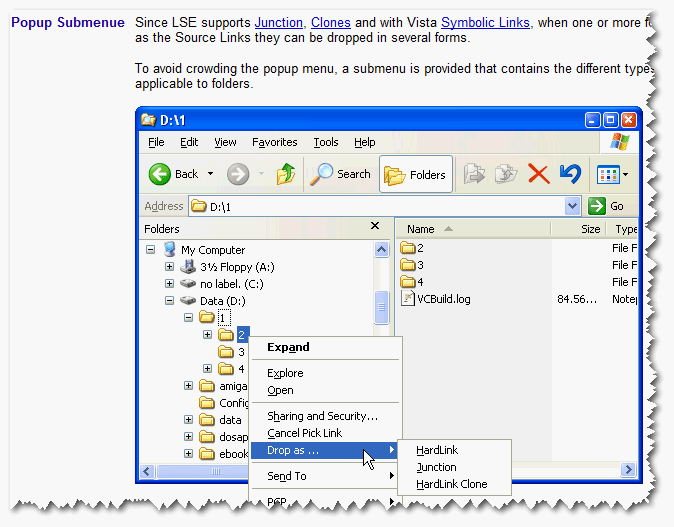
I have found a shell extension that allows you to create Hard links, junction points, symbolic links and Folder Clones without having to use the command prompt. http://schinagl.priv.at/nt/hardlinkshellext/hardlinkshellext.html

It also has a great article on what these things are. As you can see it works from windows NT4 upwards, including Vista, which is bettre than any other alternative.
[attachimg=#]
« Last Edit: June 27, 2007, 01:37 PM by justice »

lanux128

  • Global Moderator
  • Joined in 2005
  • *****
  • Posts: 6,277
    • Coding Snacks
    • Volunteers/Staff
    • Gathering Badge
    • Participated in NANY Challenge Once
    • Linux User
Re: IDEA: mklink gui (symbolic links)
« Reply #4 on: June 27, 2007, 02:13 PM »
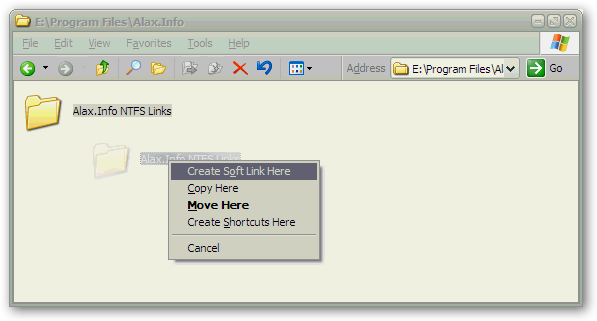
another program in the same category: Alax.Info NTFS Links

[attach=#]
http://alax.info/blog/ntfslinks

justice

  • Solve issues simply.
  • Supporting Member
  • Joined in 2006
  • **
  • Posts: 1,898
    • Participated in NANY Challenge Four Times
    • Cody Award
    • Coding Snacks
    • DJ Badge - DJ
Re: IDEA: mklink gui (symbolic links)
« Reply #5 on: June 27, 2007, 03:06 PM »
That one didn't work for me but it was my first choice as the interface seems more integrated. :)

ak_

  • Supporting Member
  • Joined in 2007
  • **
  • Posts: 223
Re: IDEA: mklink gui (symbolic links)
« Reply #6 on: June 27, 2007, 03:22 PM »
But the tool mentioned in the article is interesting. Thanks for the link!
Same here. Thanks for the link, very cool tool indeed :)

Original address: https://www.donationcoder.com/forum/index.php?topic=8971.0