DonationCoder.com forum
 
Read-only archive. This is a static copy of the DonationCoder.com forum. Reading and searching work as before; logging in, posting and private messages do not.
Archive of 2026-10-21 · About this archive · Main site

Author Topic: Clipboard Text Scrubber  (Read 8,464 times)

tinjaw

  • I'm so glad breakbeat techno isn't an illegal drug
  • Supporting Member
  • Joined in 2006
  • **
  • Posts: 1,927
    • Participated in NANY Challenge Twice
    • Coding Snacks
    • Military Service Badge - US Army
    • Linux User
Clipboard Text Scrubber
« on: June 18, 2007, 06:30 PM »
I use ClipMate, but this may be of interest to others that don't.

Quote
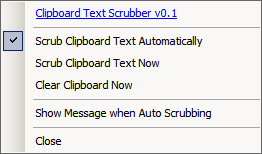
Clipboard Text Scrubber is a handy little application that sits in your system tray and monitors your clipboard. When it finds any text on the clipboard it will “scrub” (or “clean”) that text, to remove all formatting. This is great for copying and pasting text into emails, documents or anywhere else. Anyone that uses notepad to scrub their text will love this application. You can have Clipboard Text Scrubber automatically scrub text as it detects it, or you can manually scrub it by right-clicking on the system tray icon. When Clipboard Text Scrubber is scrubbing text the system tray icon will turn green, just to let you know it’s hard at work.

[attachimg=#1]
Boxer Software

  • Author of the Boxer Text Editor
  • Supporting Member
  • Joined in 2007
  • **
  • Posts: 31
Re: Clipboard Text Scrubber
« Reply #1 on: June 18, 2007, 08:27 PM »
>> Clipboard Text Scrubber is a handy little application that sits in your system tray and monitors your clipboard. When it finds any text on the clipboard it will “scrub” (or “clean”) that text, to remove all formatting.

On a very similar note, my company developed and sells Text Monkey PRO, which likewise sits in the system tray watching the clipboard.  When it detects over-quoted email text, it will automatically (if so configured) clean the text on the clipboard so that it can be pasted anew.  It also has dozens of other common text processing operations, and they all perform their function by manipulating the text on the Windows clipboard.

There's an animated screenshot here that shows the concept: http://www.boxersoftware.com/tminaction.htm

Full details: http://www.textmonkey.com

Best,

David.

Nighted

  • Meat Popsicle
  • Charter Honorary Member
  • Joined in 2005
  • ***
  • Posts: 572
Re: Clipboard Text Scrubber
« Reply #2 on: June 18, 2007, 10:43 PM »
Yeah, I tried your text editor once. I remember how flabbergasted I was that a 60 dollar text editor didn't even have working word wrap. I also emailed about this and received no response. Anyway, that's my little rant. Just thought I'd point that out now that you seem to be here, alive and well.
I`m a firm believer in the philosophy of a ruling class, especially since I rule.

Boxer Software

  • Author of the Boxer Text Editor
  • Supporting Member
  • Joined in 2007
  • **
  • Posts: 31
Re: Clipboard Text Scrubber
« Reply #3 on: June 18, 2007, 11:04 PM »
Quote
Yeah, I tried your text editor once. I remember how flabbergasted I was that a 60 dollar text editor didn't even have working word wrap.

At the risk of flabbergasting you yet again: Classical word wrap yes, visual wrapping (aka wrap-to-window), not at this time.

Quote
I also emailed about this and received no response.

I've just scanned the email logs for the terms "deviant" and "nighted" and got no hits.  The only emails that don't get replies are those which are inflammatory or disrespectful.  Could that have been the problem?  I don't remember the message.

Quote
Anyway, that's my little rant. Just thought I'd point that out now that you seem to be here, alive and well.

I appreciate your concern for my wellbeing.  :)

Best,

David.

Original address: https://www.donationcoder.com/forum/index.php?topic=8931.0