DonationCoder.com forum
 
Read-only archive. This is a static copy of the DonationCoder.com forum. Reading and searching work as before; logging in, posting and private messages do not.
Archive of 2026-10-21 · About this archive · Main site

Author Topic: thinBasic 1.4.0.0 released as stable version  (Read 13,813 times)

erosolmi

  • Charter Honorary Member
  • Joined in 2005
  • ***
  • Posts: 33
thinBasic 1.4.0.0 released as stable version
« on: June 18, 2007, 04:34 PM »
List of changes for this version: http://www.thinbasic.com/public/products/thinBasic/help/html/version_1_4_0_0.htm

Some videos showing what thinBasic can do: http://www.youtube.com/results?search_query=thinbasic

Give it a try and test the many script examples you will find under thinBasic\SampleScripts directory.
You will found even more advanced scripts in thinBasic forum at http://community.thinbasic.com/index.php

Have fun.
Eros
www.thinbasic.com | community.thinbasic.com |  psch.thinbasic.com
WinXP Pro SP2 - Centrino Core 2 2GHz - 2Gb Ram - Ati Radeon Mobility X1600 512Mb

cthorpe

  • Discount Coordinator
  • Supporting Member
  • Joined in 2006
  • **
  • Posts: 738
Re: thinBasic 1.4.0.0 released as stable version
« Reply #1 on: June 18, 2007, 08:20 PM »
What is thinBasic?  Is it an automation type thing or more of a programming language?

erosolmi

  • Charter Honorary Member
  • Joined in 2005
  • ***
  • Posts: 33
Re: thinBasic 1.4.0.0 released as stable version
« Reply #2 on: June 18, 2007, 09:43 PM »
Yes, you are right. What is thinBasic?
thinBasic is a fast Basic like interpreter with more than 1000 predefined commands covering many programming aspects from simple automations scripts to full OpenGL games creation. thinBasic is based on modules: collections of commands stored in special files.
Mainly all numeric and string data types are supported, functions and subs, parameters passed byref or byval, all flow control structures, pointers, user data types are there. Complete on the fly WIN32 api integration let you call any Windows function.

It is also possible to create standalone executable using thinBundle, a tool integrated into thinAir (thinBasic editor) will let create independent scripts able to be executed without thinBasic installed.
Obfuscated scripts are also supported.

To get an idea, see online help at http://www.thinbasic.com/public/products/thinBasic/help/html/index.html
Download it from here: http://www.thinbasic.com/index.php?name=CmodsDownload&file=index&req=viewsdownload&sid=9&orderby=dateD

Ciao
Eros
www.thinbasic.com | community.thinbasic.com |  psch.thinbasic.com
WinXP Pro SP2 - Centrino Core 2 2GHz - 2Gb Ram - Ati Radeon Mobility X1600 512Mb
« Last Edit: June 18, 2007, 10:35 PM by erosolmi »

erosolmi

  • Charter Honorary Member
  • Joined in 2005
  • ***
  • Posts: 33
Re: thinBasic 1.4.0.0 released as stable version
« Reply #3 on: June 18, 2007, 10:07 PM »
An example. A 3D tree generated on the fly.
The folowing is the source code that can be executed just double clicking on it (having thinBasic installed and textures file).
Otherwise see attached independant executable.

Code: (thinbasic)
  Uses "TBGL" 

  randomize timer

  Dim hWnd As Dword 
  MsgBox 0, "Use [space bar] to generate new tree"+$CRLF+$CRLF+ _
            "Arrows to rotate"+$CRLF+$CRLF+ _
            "[PageUp], [PageDown] to zoom"+$CRLF+$CRLF+ _
            "[ESC] to quit", _
            %MB_OK or %MB_ICONINFORMATION,"StromekVFX"

  dim x,y,b as long
  tbgl_GetDesktopInfo x,y,b
  hWnd = TBGL_CreateWindowEx("StromekVFX demo", x, y, b, 1) 
  TBGL_ShowWindow 

  tbgl_LoadTexture "Textures\bark"+FORMAT$( rnd(1,7))+".bmp", 1, %TBGL_TEX_MIPMAP      
  tbgl_LoadTexture "Textures\listek1.tga", 2, %TBGL_TEX_MIPMAP      
  tbgl_BindTexture 1
  tbgl_usetexture 1
  
  tbgl_setPrimitiveQuality 8
  TBGL_GetAsyncKeyState(-1) ' Resets status of all keys 
  tbgl_UseLighting 1
  tbgl_UseLightsource %GL_LIGHT0, 1
  tbgl_setLightParameter %GL_LIGHT0, %TBGL_LIGHT_DIFFUSE, 1, 0.5, 0, 0

  dim tangle, tsize, tlevel, ttwist, tlength as single

  ' Precaching of geometry parts
  ' First tree
  tbgl_NewList 1
    DrawBranch(0.5, 2,9, 30,30)    
  tbgl_endList
  
  ' Leaf quad
  tbgl_NewList 2
  tbgl_PushMatrix

    tbgl_BeginPoly %GL_QUADS
      tbgl_Normal 0,0,1
      tbgl_TexCoord2d 0,0
      tbgl_vertex -0.2, 0, 0
      tbgl_TexCoord2d 1,0
      tbgl_vertex  0.2, 0, 0        
      tbgl_TexCoord2d 1,1
      tbgl_vertex 0.2, 0.4, 0        
      tbgl_TexCoord2d 0,1
      tbgl_vertex -0.2, 0.4, 0        
    tbgl_EndPoly
  tbgl_PopMatrix    
  tbgl_endList
  
  dim FrameRate as double
  dim deltacamanglelr, deltacamangleud, deltacamdistance as single
  dim camanglelr, camangleud, camdistance as single  
  camdistance = 30  
  
   
  While TBGL_IsWindow(hWnd) 
  
    tbgl_ClearFrame 
    
      If TBGL_GetWindowKeyState( hWnd, %VK_ESCAPE) Then Exit While     
      
      FrameRate = TBGL_GetFrameRate
      
      tbgl_Translate 0,-7,-camdistance
      tbgl_Rotate CamAngleUD,1,0,0
      tbgl_Rotate CamAngleLR,0,1,0
      
      tbgl_setLightParameter %GL_LIGHT0, %TBGL_LIGHT_position, sin(gettickcount/2000)*50, 7, cos(gettickcount/2000)*50, 1     

      tbgl_CallList 1


    tbgl_DrawFrame 

      if tbgl_getWindowKeyState( hWnd, %VK_UP ) then deltaCamAngleUD += 30/FrameRate
      if tbgl_getWindowKeyState( hWnd, %VK_DOWN ) then deltaCamAngleUD -= 30/FrameRate

      if tbgl_getWindowKeyState( hWnd, %VK_LEFT ) then deltaCamAngleLR += 30/FrameRate
      if tbgl_getWindowKeyState( hWnd, %VK_RIGHT ) then deltaCamAngleLR -= 30/FrameRate
      
      if tbgl_getWindowKeyState( hWnd, %VK_PGUP ) then deltaCamDistance -= 10/FrameRate
      if tbgl_getWindowKeyState( hWnd, %VK_PGDn ) then deltaCamDistance += 10/FrameRate
      CamAngleUD += deltaCamAngleUD
      deltaCamAngleUD /= 1.5
      
      CamAngleLR += deltaCamAngleLR
      deltaCamAngleLR /= 1.5

      CamDistance += deltaCamDistance
      deltaCamDistance /= 1.5
      
      ' Creation of new tree
      if tbgl_getWindowKeyState( hWnd, %VK_SPACE ) then
        tbgl_LoadTexture "Textures\bark"+FORMAT$( rnd(1,7))+".bmp", 1, %TBGL_TEX_MIPMAP      
        tbgl_LoadTexture "Textures\listek"+FORMAT$(rnd(1,3))+".tga", 2, %TBGL_TEX_MIPMAP            
        tbgl_deletelist 1       
        
        tbgl_NewList 1
          tsize   = rndf(0.2, 1)
          tlength = rndf(1, 3)
          tlevel  = rndf(7, 10)
          tangle  = rndf(10, 30)
          ttwist  = rndf(20, 40)        

          DrawBranch(tsize, tlength, tlevel, tangle, ttwist)    
        tbgl_endList
        
      end if  


  Wend 

  TBGL_DestroyWindow 
  
  ' Recursive function to create branched branches :) 
  sub DrawBranch( startRadius as single, startlength as single, levels as long, openangle as single, twist as single )
    local i as long

    local length as single
    local radiusS as single
    local radiusE as single
    if levels < 3 then 
      
      tbgl_BindTexture 2
      
      ' Hot Alpha handling stuff
      tbgl_UseAlphaTest 1
      tbgl_AlphaFunc %tbGL_GREATER, 0.5

      
      for i = 1 to 3
        tbgl_rotate 120,1,0,1
        tbgl_calllist 2' 0.2,0.4,0.1
      next

      tbgl_BindTexture 1
      tbgl_UseAlphaTest 0

      if levels = 0 then exit sub
    end if  
    
    radiusS = startRadius
    radiusE = radiusS - startRadius/levels 
    length = startlength
    tbgl_PushMatrix
      for i = 1 to levels
'        tbgl_setPrimitiveQuality levels/1.5        ' possible optional optimization
        tbgl_Cylinder radiusS , radiusE, length
        tbgl_Translate  0,  length, 0
        
        tbgl_Rotate openangle,0,0,1
        tbgl_Rotate twist,0,1,0

        tbgl_PushMatrix

          tbgl_Rotate -openangle*2,0,0,1
          if i = 1  then
            DrawBranch(radiusE, length, levels-1, -openangle, twist)
          else
            DrawBranch(radiusE,  length, levels-i, openangle, twist)
          end if  
            
        tbgl_PopMatrix

        radiusS = radiusE
        radiusE = radiusS - startRadius/levels 
        length = length - startlength/levels

      next  
    tbgl_Popmatrix      

  end sub
www.thinbasic.com | community.thinbasic.com |  psch.thinbasic.com
WinXP Pro SP2 - Centrino Core 2 2GHz - 2Gb Ram - Ati Radeon Mobility X1600 512Mb

erosolmi

  • Charter Honorary Member
  • Joined in 2005
  • ***
  • Posts: 33
Re: thinBasic 1.4.0.0 released as stable version
« Reply #4 on: June 18, 2007, 10:18 PM »
The following code loads any CSV text files into a matrix. Matrix is dimensioned on the fly.
90% of the code is just presentation while the main load is done by a single line.

Code: (thinBasic)
  uses "file"
  uses "console"
  
  dim FileToLoad  as string value app_sourcepath & "CSV_SampleData.csv"
  dim MyMatrix()  as string
  dim nLines      as long
  dim nCols       as long
  dim T0, T1      as double

  console_writeline "This script demonstrate the use of PARSE function for loading, parsing and filling a string array with the content of a CSV file. All with only one line of code."
  console_writeline "Input file: " & FileToLoad
  console_writeline "File size : " & file_size(FileToLoad) & " bytes"
  console_writeline "Press any key to start."
  console_writeline repeat$(79, "-")
  console_waitkey
  
  '---
  '---Starting to load and parse input file
  '------
  T0 = timer
    '---
    '---Just one line do the job of loading file data, parsing text lines, dimensioning and filling the matrix.
    '------
    PARSE(FILE_Load(FileToLoad), MyMatrix(), $crlf , ",")

    '--Now get the number of lines and max number of columns parsed
    nLines = ubound(MyMatrix(1))
    nCols  = ubound(MyMatrix(2))
    
  T1 = timer
  
  '---Write some info
  console_writeline "Total loading and parsing time: " & format$(T1 - T0, "#0.000000") & " secs"
  console_writeline "Total number of lines : " & nLines
  console_writeline "Total number of colums: " & nCols
  console_writeline "Press any key to show result on screen"
  console_writeline repeat$(79, "-")
  console_waitkey
  
  dim CountLine   as long
  dim CountCol    as long
  
  for CountLine = 1 to nLines
    for CountCol = 1 to nCols
      console_write(MyMatrix(CountLine, CountCol) & " ")
    next
    console_writeline("")
  next

  console_writeline repeat$(79, "-")
  console_writeline "Program terminated. Press any key to close."
  console_waitkey
www.thinbasic.com | community.thinbasic.com |  psch.thinbasic.com
WinXP Pro SP2 - Centrino Core 2 2GHz - 2Gb Ram - Ati Radeon Mobility X1600 512Mb

erosolmi

  • Charter Honorary Member
  • Joined in 2005
  • ***
  • Posts: 33
Re: thinBasic 1.4.0.0 released as stable version
« Reply #5 on: June 18, 2007, 10:21 PM »
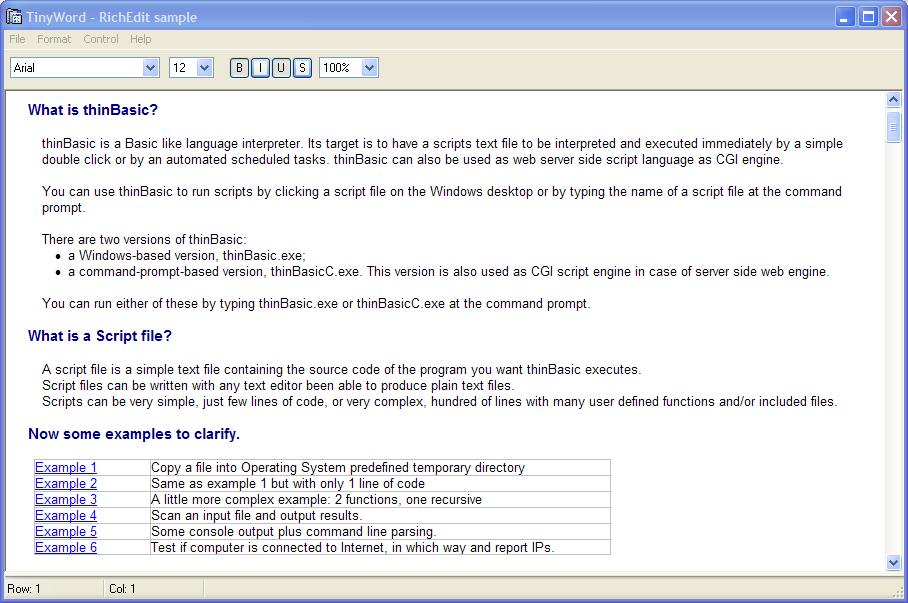
A user interface example.
The following code is a simple editor using rich edit control.

Code: (thinbasic)
  USES "UI"
  USES "FILE"
  'uses "console"
  
  #include "%APP_INCLUDEPATH%\RichEdit32.inc"

  DECLARE FUNCTION GetDlgItem LIB "USER32.DLL" ALIAS "GetDlgItem" (BYVAL hDlg AS DWORD, BYVAL nIDDlgItem AS LONG) AS DWORD


  %IDBTN_BOLD     = %WM_USER + 110
  %IDBTN_ITALIC   = %WM_USER + 111
  %IDBTN_ULINE    = %WM_USER + 112
  %IDBTN_STRIKE   = %WM_USER + 113
  %IDCHK_COLOR    = %WM_USER + 120
  %IDCB_FONTNAME  = %WM_USER + 130
  %IDCB_FONTSIZE  = %WM_USER + 131
  %IDCB_ZOOM      = %WM_USER + 132
  
  %ID_EDITOR      = %WM_USER + 150
  %ID_STATUSBAR   = %WM_USER + 151
  
  '%IDM_UNDO       = %WM_USER + 220
  '%IDM_CUT        = %WM_USER + 222
  '%IDM_COPY       = %WM_USER + 223
  '%IDM_PASTE      = %WM_USER + 224
  '%IDM_DELETE     = %WM_USER + 225
  '%IDM_SELALL     = %WM_USER + 226


  GLOBAL hDlg AS LONG
  global hEdit AS LONG
 
  DIM Msg       AS LONG
  DIM wParam    AS LONG
  DIM lParam    AS LONG

  dim lColor  as long

  dim sFileName as string

  '---Menu handle
    LOCAL hMenu         AS dword
    LOCAL hPopupFile    AS dword
    local hPopupEdit    as dword
    local hPopupFormat  as dword
    local hPopupControl as dword
    LOCAL hPopupHelp    AS dword

  '---Menu commands
    '---File
    %ID_MENU_FILE_OPEN        = 401
    %ID_MENU_FILE_SAVEAS      = 405
    %ID_MENU_FILE_EXIT        = 410

    '---Edit
    
    '---Format
    %ID_MENU_FORMAT_BG_COLOR  = 510
    %ID_MENU_FORMAT_FG_COLOR  = 511

    '---RTF Control
    %ID_MENU_CONTROL_BG_COLOR = 610
    %ID_MENU_CONTROL_TEST_UBB = 615

    '---Help
    %ID_MENU_HELP             = 700
    %ID_MENU_ABOUT            = 705


  '---First create a top-level menu:
    MENU NEW BAR TO hMenu

  '---Add a top-level menu item with a popup menu:
    MENU NEW POPUP TO hPopupFile
    MENU ADD POPUP,  hMenu, "&File", hPopupFile, %MF_ENABLED
    MENU ADD STRING, hPopupFile, "&Open ...", %ID_MENU_FILE_OPEN, %MF_ENABLED
    MENU ADD STRING, hPopupFile, "&Save as ...", %ID_MENU_FILE_SAVEAS, %MF_ENABLED
    MENU ADD STRING, hPopupFile, "-",      0, 0
    MENU ADD STRING, hPopupFile, "&Exit", %ID_MENU_FILE_EXIT, %MF_ENABLED

  '---Add a top-level menu item with a popup menu:
    MENU NEW POPUP TO hPopupFormat
    MENU ADD POPUP,  hMenu, "&Format", hPopupFormat, %MF_ENABLED
    MENU ADD STRING, hPopupFormat, "&Background color ...", %ID_MENU_FORMAT_BG_COLOR, %MF_ENABLED
    MENU ADD STRING, hPopupFormat, "&Foreground color ...", %ID_MENU_FORMAT_FG_COLOR, %MF_ENABLED

  '---Add a top-level menu item with a popup menu:
    MENU NEW POPUP TO hPopupControl
    MENU ADD POPUP,  hMenu, "&Control", hPopupControl, %MF_ENABLED
    MENU ADD STRING, hPopupControl, "&Background color ...", %ID_MENU_CONTROL_BG_COLOR, %MF_ENABLED
    MENU ADD STRING, hPopupControl, "-"      , 0, 0
    MENU ADD STRING, hPopupControl, "Test UBB Code", %ID_MENU_CONTROL_TEST_UBB, %MF_ENABLED

  '---Finally, we'll add a second top-level menu and popup
  '---For this popup, we can reuse the first popup variable:
    MENU NEW POPUP TO hPopupHelp
    MENU ADD POPUP , hMenu     , "&Help"  , hPopupHelp, %MF_ENABLED
    MENU ADD STRING, hPopupHelp, "&Help"  , %ID_MENU_HELP, %MF_ENABLED
    MENU ADD STRING, hPopupHelp, "-"      , 0, 0
    MENU ADD STRING, hPopupHelp, "&About" , %ID_MENU_ABOUT, %MF_ENABLED


  DIALOG NEW 0, "TinyWord - RichEdit sample", -1, -1, 600, 350, _
                                                %WS_DLGFRAME          OR  _
                                                %ds_center            or  _
                                                %WS_CAPTION           OR  _
                                                %WS_SYSMENU           OR  _
                                                %WS_OVERLAPPEDWINDOW  ,   _
                                                0 TO hDlg

  DIM lx, ly, wx, hy AS LONG
  DIALOG GET SIZE   hDlg TO lx, ly
  DIALOG GET CLIENT hDlg TO wx, hy
  '---Status Bar
  Control Add "msctls_statusbar32", hDlg, %ID_STATUSBAR, "", %NULL, %NULL, %NULL, %NULL, _
                                                    %WS_CHILD           Or _
                                                    %WS_CLIPSIBLINGS    Or _
                                                    %WS_DLGFRAME        Or _
                                                    %WS_VISIBLE
  DIM sbParts(3) AS LONG
  'hStatusbar = CreateStatusWindow(%WS_CHILD OR %WS_VISIBLE, BYVAL %NULL, hDlg, 200)
  sbParts(1) = 100
  sbParts(2) = 200
  sbParts(3) = -1
  control send hDlg, %ID_STATUSBAR, %SB_SETPARTS, 3, VARPTR(sbParts(1))
 
  CONTROL ADD rtf_GetClass, hDlg, %ID_EDITOR, "", 0, 24, 600, 310, _
                                                    %WS_CHILD           OR _
                                                    %WS_CLIPCHILDREN    OR _
                                                    %WS_VISIBLE         OR _
                                                    %ES_MULTILINE       OR _
                                                    %WS_VSCROLL         OR _
                                                    %ES_AUTOVSCROLL     OR _
                                                    %ES_AUTOHSCROLL     OR _
                                                    %ES_WANTRETURN      , _
                                                    %WS_EX_CLIENTEDGE
                                                    '%WS_HSCROLL         OR _

  '---Set event mask so we'll get EN_SELCHANGE and %ENM_MOUSEEVENTS notifications
    CONTROL SEND hDlg, %ID_EDITOR, %EM_SETEVENTMASK, 0, %ENM_SELCHANGE OR %ENM_MOUSEEVENTS
    '---Set some options
    CONTROL SEND hDlg, %ID_EDITOR, %EM_SETOPTIONS, %ECOOP_OR, %ECO_SELECTIONBAR
    '---Allow 1 meg files
    control send hDlg, %ID_EDITOR, %EM_LIMITTEXT, 1000000, 0

    '---Set automatic url detection to true. The following link are usable: http: file: mailto: ftp: https: gopher: nntp: prospero: telnet: news: wais:
    'control send hDlg, %ID_EDITOR, %EM_AUTOURLDETECT, %TRUE, 0


  '---Return window handle to richedit text
    CONTROL HANDLE hDlg, %ID_EDITOR TO hEdit

  '---Create combo box for font names
    dim FontList() as string
    PARSE(Font_List, FontList, $tab)
    CONTROL ADD COMBOBOX, hDlg, %IDCB_FONTNAME, FontList(), 4, 4, 100, 120, %CBS_DROPDOWNLIST OR %CBS_SORT OR %WS_VSCROLL
 
  '---Create combo box for font size
    DIM FontSize() AS STRING
    dim tmpFontSizeString as string
    tmpFontSizeString = "2 4 6 8 9 10 11 12 14 16 18 20 22 24 26 28 30 32 34 36 40 42 44 46 48 50 60 72"
    PARSE(tmpFontSizeString, FontSize, $spc)
    CONTROL ADD COMBOBOX, hDlg, %IDCB_FONTSIZE, FontSize(), 110, 4, 30, 120, %CBS_DROPDOWNLIST OR %WS_VSCROLL

  '---Create some push button
    CONTROL ADD BUTTON, hDlg, %IDBTN_BOLD,     "&B",    150, 4, 14,  14, %BS_AUTOCHECKBOX OR %BS_PUSHLIKE
    CONTROL ADD BUTTON, hDlg, %IDBTN_ITALIC,   "&I",    164, 4, 14,  14, %BS_AUTOCHECKBOX OR %BS_PUSHLIKE
    CONTROL ADD BUTTON, hDlg, %IDBTN_ULINE ,   "&U",    178, 4, 14,  14, %BS_AUTOCHECKBOX OR %BS_PUSHLIKE
    CONTROL ADD BUTTON, hDlg, %IDBTN_STRIKE ,  "&S",    192, 4, 14,  14, %BS_AUTOCHECKBOX OR %BS_PUSHLIKE

  '---Create combo box for font size
    DIM Zooms() AS STRING
    dim tmpZoomsString as string
    tmpZoomsString = "10% 20% 30% 40% 50% 60% 70% 80% 90% 100% 110% 120% 130% 140% 150% 160% 170% 180% 190% 200% 250% 300%"
    PARSE(tmpZoomsString, Zooms, $spc)
    CONTROL ADD COMBOBOX, hDlg, %IDCB_ZOOM, Zooms(), 210, 4, 40, 100, %CBS_DROPDOWNLIST OR %WS_VSCROLL
    COMBOBOX SELECT hDlg, %IDCB_ZOOM, 10

    control set resize hDlg, %ID_EDITOR    , 1, 1, 1, 1
    control set resize hDlg, %ID_STATUSBAR , 1, 1, 0, 1

  DIALOG SHOW MODELESS hDlg
'  

  dim pNmh    AS NMHDR
  dim tmpStr  as string
  dim tmpVal  as ext
  dim Refresh as long value %false
  dim looper  as long

  '------
  ' Start of the main message pump loop
  '---
  dim counter as long
  WHILE IsWindow(hDlg)                  
  
    '---Get the message and fill wParam and lParam
    Msg = getMessage(hDlg, wParam, lParam)
'incr Counter
'if Msg <> 0 and Msg <> 512 then
'  console_writeline(  _
'                      "msg:"   & msg            & _
'                      " WP:"   & wParam         & _
'                      " lwWP:" & lowrd(wParam)  & _
'                      " hwWP:" & hiwrd(wParam)  & _
'                      " LP:"   & lParam         & _
'                      " lwLP:" & lowrd(lParam)  & _
'                      " hwLP:" & hiwrd(lParam)  & _
'                      "")
'                      
'end if

    '---Now test the message
    SELECT CASE Msg

      case %WM_INITDIALOG  '---Message fired at the very beginning when dialog is initialized
        '---Attach menu to dialog          
        MENU ATTACH hMenu, hDlg
        '---Fill richedit with above created text
        'CONTROL REDRAW hDlg, %ID_EDITOR
        RTF_SetFontName(hDlg, %ID_EDITOR, "Courier New")
        RTF_SetFontSize(hDlg, %ID_EDITOR, 12)

        '---This set word wrap mode ON
        control send  hDlg, %ID_EDITOR, %EM_SETTARGETDEVICE, 0, 0
        
        
        'sendmessage hDlg, %wm_size, 0, 0
        'control send hDlg, %ID_STATUSBAR, %SB_SETPARTS, 3, VARPTR(sbParts(1))

      CASE %WM_NOTIFY
        '---Get notification UDT
        'pNmh = peek$(lParam, sizeof(NMHDR))

        SELECT CASE lowrd(wParam)
          CASE %ID_EDITOR
            Refresh = %TRUE

        end select

        
      CASE %WM_COMMAND
        
        SELECT CASE lowrd(wParam)
          case %ID_MENU_FILE_EXIT, %IDCANCEL
            exit while
              
          case %ID_MENU_FILE_OPEN
            sFileName = RichEdit_OpenFile
            if sFileName <> "" then
              select case ucase$(FILE_PATHSPLIT(sFileName, %Path_Ext))
                case "RTF"
                  RTF_LoadFromFile(hDlg, %ID_EDITOR, sFileName, %SF_rtf)
                case else
                  
                  RTF_LoadFromFile(hDlg, %ID_EDITOR, sFileName, %sf_text)
              end select
            else
              'msgbox 0, "No file selected"
            end if
            Refresh = %TRUE
            
          case %ID_MENU_FILE_SAVEAS
            '---Ask for file name
            sFileName = RichEdit_SaveFile
            sFileName = trim$(sFileName)
            '---If not empty ...
            if sFileName <> "" then

              '---Check if file exists and if yes ask if to be replaced
              if RichEdit_Check_FileExistsGO(sFileName) = %true then
                '---Now call relevant save function depending on file extension
                select case ucase$(right$(sFileName, 4))
                  case ".TXT"
                    RTF_SaveToFile(hDlg, %ID_EDITOR, sFileName, %SF_TEXT)
                    'msgbox 0, "File saved as " & sFileName
                  case ".RTF"
                    RTF_SaveToFile(hDlg, %ID_EDITOR, sFileName, %SF_rtf)
                    'msgbox 0, "File saved as " & sFileName
                end select
              end if
            end if            

          case %ID_MENU_FORMAT_FG_COLOR
            '---Set foreground color of current word or selected text
            'lColor = Dialog_ChooseColor(hDlg, RTF_GetFGColor(hDlg, %ID_EDITOR), %CC_RGBINIT OR %CC_FULLOPEN )
            lColor = Dialog_ChooseColor(hDlg, rgb(255, 0, 0), %CC_RGBINIT OR %CC_FULLOPEN )
            RTF_SetFGColor(hDlg, %ID_EDITOR, lColor)
            Refresh = %TRUE
            
          case %ID_MENU_FORMAT_BG_COLOR
            '---Set background color of current word or selected text
            'lColor = Dialog_ChooseColor(hDlg, RTF_GetBGColor(hDlg, %ID_EDITOR), %CC_RGBINIT OR %CC_FULLOPEN )
            lColor = Dialog_ChooseColor(hDlg, rgb(255, 0, 0), %CC_RGBINIT OR %CC_FULLOPEN )
            RTF_SetBGColor(hDlg, %ID_EDITOR, lColor)
            Refresh = %TRUE

          case %ID_MENU_CONTROL_BG_COLOR
            '---Set background color of control
            lColor = Dialog_ChooseColor(hDlg, rgb(255, 0, 0), %CC_RGBINIT OR %CC_FULLOPEN )
            if lColor <> -1 then
              CONTROL SEND hDlg, %ID_Editor, %EM_SETBKGNDCOLOR, 0, lColor
              Refresh = %TRUE
            end if
                                    
          CASE %IDCB_FONTNAME
            IF hiwrd(wParam) = %CBN_SELENDOK THEN
              COMBOBOX GET TEXT hDlg, %IDCB_FONTNAME TO tmpStr
              if tmpStr <> "" then RTF_SetFontName(hDlg, %ID_Editor, tmpStr)
              Refresh = %TRUE
            END IF

          CASE %IDCB_FONTSIZE
            IF hiwrd(wParam) = %CBN_SELENDOK THEN
              COMBOBOX GET TEXT hDlg, %IDCB_FONTSIZE TO tmpStr
              if val(tmpStr) > 0 then RTF_SetFontSIZE(hDlg, %ID_Editor, val(tmpStr))
              Refresh = %TRUE
            END IF

          CASE %IDCB_ZOOM
            IF hiwrd(wParam) = %CBN_SELENDOK THEN
              COMBOBOX GET TEXT hDlg, %IDCB_ZOOM TO tmpStr
              tmpStr = remove$(tmpStr, "%")
              if val(tmpStr) > 0 then
                tmpVal = val(tmpStr)
                control send  hDlg, %ID_EDITOR, %EM_SETZOOM, tmpVal, 100
                Refresh = %TRUE
              end if
            END IF
              
          CASE %IDBTN_BOLD
            IF SendMessage(GetDlgItem(hDlg, %IDBTN_BOLD), %BM_GETCHECK, 0, 0) THEN
              RTF_SetEffect(hDlg, %ID_Editor, RTF_GetEffect(hDlg, %ID_Editor) OR %CFE_BOLD)
            ELSE
              RTF_SetEffect(hDlg, %ID_Editor, RTF_GetEffect(hDlg, %ID_Editor) AND NOT %CFE_BOLD)
            END IF
            Refresh = %TRUE

          CASE %IDBTN_ITALIC
            IF SendMessage(GetDlgItem(hDlg, %IDBTN_ITALIC), %BM_GETCHECK, 0, 0) THEN
              RTF_SetEffect(hDlg, %ID_Editor, RTF_GetEffect(hDlg, %ID_Editor) OR %CFE_ITALIC)
            ELSE
              RTF_SetEffect(hDlg, %ID_Editor, RTF_GetEffect(hDlg, %ID_Editor) AND NOT %CFE_ITALIC)
            END IF
            Refresh = %TRUE

          CASE %IDBTN_ULINE
            IF SendMessage(GetDlgItem(hDlg, %IDBTN_ULINE), %BM_GETCHECK, 0, 0) THEN
              RTF_SetEffect(hDlg, %ID_Editor, RTF_GetEffect(hDlg, %ID_Editor) OR %CFE_UNDERLINE)
            ELSE
              RTF_SetEffect(hDlg, %ID_Editor, RTF_GetEffect(hDlg, %ID_Editor) AND NOT %CFE_UNDERLINE)
            END IF
            Refresh = %TRUE
 
          CASE %IDBTN_STRIKE
            IF SendMessage(GetDlgItem(hDlg, %IDBTN_STRIKE), %BM_GETCHECK, 0, 0) THEN
              RTF_SetEffect(hDlg, %ID_Editor, RTF_GetEffect(hDlg, %ID_Editor) OR %CFE_STRIKEOUT)
            ELSE
              RTF_SetEffect(hDlg, %ID_Editor, RTF_GetEffect(hDlg, %ID_Editor) AND NOT %CFE_STRIKEOUT)
            END IF
            Refresh = %TRUE
            
          case %ID_MENU_CONTROL_TEST_UBB
            rtf_appendtext(hDlg, %ID_Editor, _
                    "[b]t[/b] [u]e[/u] [i]s[/i] [s]t[/s]" & $crlf & $crlf, %RTF_UBB)

            rtf_appendtext(hDlg, %ID_Editor, _
                    "This is [b]Bold[/b] and this is not bold"      & $crlf & _
                    "This is [i]Italic[/i] and this is not italic"  & $crlf & _
                    "This is [u]Underlined[/u] and this is not underlined"  & $crlf & _
                    "This is [s]Strikeout[/s] and this is not strikeout"  & $crlf & _
                    "[RIGHT]This is on the RIGHT side" & $crlf & _
                    "[CENTER]This is in the CENTER"  & $crlf & _
                    "[LEFT]This is on the LEFT side"  & $crlf & _
                    "[font=arial]This line should be Arial"  & $crlf & _
                    "[font=courier new]This line should be Courier New"  & $crlf & _
                    "[font=times new roman]This line should be Times New Roman"  & $crlf & _
                    "[font=courier new][size=6]This line 6 points font"  & $crlf & _
                    "[size=12]This line 12 points font"  & $crlf & _
                    "[size=18]This line 18 points font"  & $crlf & _
                    "[size=24]This line 24 points font"  & $crlf & _
                    "[size=40]This line 40 points font"  & $crlf & _
                    "[size=12]Back to 12 points font."  & $crlf & _
                    "", %RTF_UBB)

            randomize
            rtf_appendtext(hDlg, %ID_Editor, _
                    "[b]And now some random foreground color:[/b]"      & $crlf & _
                    "", %RTF_UBB)
            for looper = 1 to 10
              rtf_appendtext(hDlg, %ID_Editor, _
                      "[color=" & rgb(rnd(0, 255), rnd(0,255), rnd(0, 255)) & "]colored foregound color, colored foregound color"      & $crlf & _
                      "", %RTF_UBB)
            next
            rtf_appendtext(hDlg, %ID_Editor, _
                    "[color=0][b]followed by some random background color:[/b]"      & $crlf & _
                    "", %RTF_UBB)

            for looper = 1 to 5
              rtf_appendtext(hDlg, %ID_Editor, _
                      "[bcolor=" & rnd(0, 255) & "," & rnd(0,255) & "," & rnd(0, 255) & "]colored backgound color, colored backgound color"      & $crlf & _
                      "", %RTF_UBB)
            next

            rtf_appendtext(hDlg, %ID_Editor, _
                    "[bcolor=255,255,255][b]to finish with both fore/back color at the same time:[/b]"      & $crlf & _
                    "", %RTF_UBB)

            for looper = 1 to 5
              rtf_appendtext(hDlg, %ID_Editor, _
                      "[color=" & rnd(0, 255) & "," & rnd(0,255) & "," & rnd(0, 255) & "]" & "[bcolor=" & rnd(0, 255) & "," & rnd(0,255) & "," & rnd(0, 255) & "]colored foregound color, colored backgound color"      & $crlf & _
                      "", %RTF_UBB)
            next

            msgbox 0, "OK, now we will change the control color."
            for looper = 1 to 100
              rtf_appendtext(hDlg, %ID_Editor, "[ccolor=" & rnd(0, 255) & "," & rnd(0,255) & "," & rnd(0, 255) & "]", %RTF_UBB)
            next
'                    "--- finish ---"  & $crlf & _

            Refresh = %TRUE

'                    "[b][i][u][s]This is bold, italic, underlined and strikeout[/s][/u][/i][/b] "  & $crlf & _
                        
        END SELECT 

      CASE %WM_SIZE
       'DIALOG GET CLIENT hDlg TO wx, hy
       'sbParts(1) = wx - 5
       'sbParts(2) = wx - 0
       'sbParts(3) = -1
       'control send hDlg, %ID_STATUSBAR, %SB_SETPARTS, 3, VARPTR(sbParts(1))

        
      CASE %WM_SYSCOMMAND

        SELECT CASE wParam

          CASE %SC_CLOSE
            EXIT WHILE

        END SELECT  

      CASE ELSE
      
    END SELECT


    '---In case we need to update editor control ...
    if Refresh = %true then
      UpdateControls
      Refresh = %false
    end if

  WEND

  '---Close the dialog
  DIALOG END hDlg

   
  '--------------------------------------------------------------------
  ' Update comboboxes and font effect buttons
  '--------------------------------------------------------------------
  SUB UpdateControls()
    LOCAL lRet AS LONG, txt AS STRING
    local cRange      as CHARRANGE
    
    dim SelStart, SelEnd, SelNBytes as long
    dim CurLine, CurPos, LineStart, LineLen as long

    txt = RTF_GetFontName(hDlg, %ID_EDITOR)
    SendMessage GetDlgItem(hDlg, %IDCB_FONTNAME), %CB_SELECTSTRING, -1, STRPTR(txt)
    'console_writeline "GetRFname " & txt
   
    txt = FORMAT$(rtf_GetFontSize(hDlg, %ID_Editor))
    SendMessage GetDlgItem(hDlg, %IDCB_FONTSIZE), %CB_SELECTSTRING, -1, STRPTR(txt)
   
    lRet = RTF_GetEffect(hDlg, %ID_Editor)
    CONTROL SEND hDlg, %IDBTN_BOLD, %BM_SETCHECK, IIF((lRet AND %CFE_BOLD), %BST_CHECKED, %BST_UNCHECKED), 0
    
    
    CONTROL SEND hDlg, %IDBTN_ITALIC, %BM_SETCHECK, _
                 IIF((lRet AND %CFE_ITALIC), %BST_CHECKED, %BST_UNCHECKED), 0
   
    CONTROL SEND hDlg, %IDBTN_ULINE, %BM_SETCHECK, _
                 IIF((lRet AND %CFE_UNDERLINE), %BST_CHECKED, %BST_UNCHECKED), 0
   
    CONTROL SEND hDlg, %IDBTN_STRIKE, %BM_SETCHECK, _
                 IIF((lRet AND %CFE_STRIKEOUT), %BST_CHECKED, %BST_UNCHECKED), 0
   

    SendMessage(hEdit, %EM_EXGETSEL, 0, varptr(cRange)) '---Pass the simulated structure pointer
    SelStart = cRange.cpMin                             '---Get back data using binary conversion
    SelEnd   = cRange.cpMin
    CurLine = SendMessage(hEdit, %EM_EXLINEFROMCHAR, 0, SelStart) 'line number
    CurPos  = SelEnd - SendMessage(hEdit, %EM_LINEINDEX, -1, 0)   'pos. in line


'    SendMessage hStatusbar, %SB_SETTEXT, 0, BYVAL STRPTR(s)
'    END IF
'    CONTROL SEND hDlg, %IDC_Text, %EM_GETSEL, VARPTR(j), 0
'    CONTROL SEND hDlg, %IDC_Text, %EM_LINEFROMCHAR, j, 0 TO k
'    s = "Row:" + STR$(k + 1)
'    SendMessage hStatusbar, %SB_SETTEXT, 1, BYVAL STRPTR(s)
'    '----------------------------------------------------------------
'    CONTROL SEND hDlg, %IDC_Text, %EM_LINEINDEX, -1, 0 TO k
'    s = "Col:" + STR$(j - k + 1)
'    SendMessage hStatusbar, %SB_SETTEXT, 2, BYVAL STRPTR(s)

    txt = "Row: " & format$(CurLine + 1)
    control send hDlg, %ID_STATUSBAR, %SB_SETTEXT, 0, strPTR(txt)
    txt = "Col: " & format$(CurPos + 1)
    control send hDlg, %ID_STATUSBAR, %SB_SETTEXT, 1, strPTR(txt)
    'control set text hDlg, %ID_STATUSBAR, txt


    'SetFocus hEdit
    control set focus hDlg, %ID_EDITOR
    
  END SUB

  '-----------------------------------------------------------------------------
  ' Load a file inside rich edit control
  '-----------------------------------------------------------------------------
  function RichEdit_OpenFile() as string
    dim sFile   as string
    dim sFilter as string

    sFilter  = "Rich Text Format (*.rtf)|*.rtf|"
    sFilter += "thinBasic Files (*.tBasic, *.tBasicc)|*.tBasic;*.tBasicc|"
    sFilter += "Text Files (*.TXT)|*.TXT|"
    sFilter += "All Files (*.*)|*.*"

    sFile = Dialog_OpenFile(hDlg, _
                            "Open an file", _
                            DIR_GetCurrent, _
                            sFilter, _
                            "rtf", _
                            %OFN_FILEMUSTEXIST OR %OFN_HIDEREADONLY or %OFN_ENABLESIZING)
    function = sFile
  end function


  function RichEdit_SaveFile() as string
    dim sFile   as string
    dim sFilter as string

    sFilter  = "Rich Text Format (*.rtf)|*.rtf|"
    sFilter += "thinBasic Files (*.tBasic, *.tBasicc)|*.tBasic;*.tBasicc|"
    sFilter += "Text Files (*.TXT)|*.TXT|"
    sFilter += "All Files (*.*)|*.*"

    sFile = Dialog_SaveFile(hDlg, _
                            "Open an file", _
                            DIR_GetCurrent, _
                            sFilter, _
                            "tBasic", _
                            %OFN_FILEMUSTEXIST OR %OFN_HIDEREADONLY or %OFN_ENABLESIZING)
    function = sFile
  end function

  function RichEdit_Check_FileExistsGO(sFileName as string) as long
    DIM Message   AS STRING
    
    function = %true
        
    '---If file already exists, ask if to replace
    if file_exists(sFileName) then

      Message = "File " & sFileName & "\n\n"
      Message += "already exists. Do yoy want to replace?\n\n"
      DIM lResult AS LONG = MSGBOX(0, Message, %MB_YESNOcancel, "Replace file?")
      IF lResult = %IDNO or lResult = %idcancel THEN
        function = %false
      END IF
    end if
    
  end function
  
www.thinbasic.com | community.thinbasic.com |  psch.thinbasic.com
WinXP Pro SP2 - Centrino Core 2 2GHz - 2Gb Ram - Ati Radeon Mobility X1600 512Mb
« Last Edit: June 18, 2007, 10:24 PM by erosolmi »

erosolmi

  • Charter Honorary Member
  • Joined in 2005
  • ***
  • Posts: 33
Re: thinBasic 1.4.0.0 released as stable version
« Reply #6 on: June 18, 2007, 10:24 PM »
Some NeHe examples can be found here: http://community.thinbasic.com/index.php?board=87.0
www.thinbasic.com | community.thinbasic.com |  psch.thinbasic.com
WinXP Pro SP2 - Centrino Core 2 2GHz - 2Gb Ram - Ati Radeon Mobility X1600 512Mb
« Last Edit: June 18, 2007, 10:30 PM by erosolmi »

erosolmi

  • Charter Honorary Member
  • Joined in 2005
  • ***
  • Posts: 33
Re: thinBasic 1.4.0.0 released as stable version
« Reply #7 on: June 18, 2007, 10:38 PM »
What about a math evaluator? thinBasic has a module called EVAL that will let you evaluate math expressions at run-time also linking script variables dynamically with string expression.

See the following example:

Code: (thinbasic)
  uses "EVAL"
  uses "CONSOLE"

  '---
  ' This example shows how to connect thinBasic script variable with
  ' internal Eval variables in order to allow Eval to interact
  ' directly with script variable
  '---
    
  '---Some timing variable
  dim t0, t1 as double = timer
  
  '---This string will contain math function to eval
  dim MyFunction as string

  '---Define some y = f(x) ... function or whatever function
  MyFunction = "y = cos(x) * 10 + 20"

  '---Now define some script variable that will be used to interact
  '---with eval
  dim y, x as ext
  
  '---Here it is the trick. Using Eval_LinkExt you link together
  '---script variable with eval variables passing to eval
  '---the name of the eval variable name, the pointer to a script
  '---variable, and an initial value
  '---From now on every change in script variable value will effect
  '---the next eval execution and the other way round
  Eval_linkext("y", varptr(y), 0)
  Eval_linkext("x", varptr(x), 0)

  '---Define some globals
  dim MaxCount  as long value 500

  '---And now go in a loop
  for x = 1 to MaxCount

    '---Eval MyFunction. Remember x and y in script are linked at x, y in Eval formula
    Eval(MyFunction)

    '---Write some info output
    console_writeline format$(x, "0000") & " " & y

  next 

  '---Measure the ending time
  t1 = timer

  '---Final results    
  Console_writeline "------------------------------------------------------"
  Console_writeline "Total execution time for " & MaxCount & " loops: " & format$(t1-t0, "#0.00000")

  '---Stop execution
  console_waitkey
  
www.thinbasic.com | community.thinbasic.com |  psch.thinbasic.com
WinXP Pro SP2 - Centrino Core 2 2GHz - 2Gb Ram - Ati Radeon Mobility X1600 512Mb

Original address: https://www.donationcoder.com/forum/index.php?topic=8928.0