DonationCoder.com forum
 
Read-only archive. This is a static copy of the DonationCoder.com forum. Reading and searching work as before; logging in, posting and private messages do not.
Archive of 2026-10-21 · About this archive · Main site

Last post Author Topic: File Names : what should be avoided  (Read 26,597 times)

Armando

  • Charter Member
  • Joined in 2005
  • ***
  • Posts: 2,727
    • Coding Snacks
File Names : what should be avoided
« on: June 09, 2007, 10:11 PM »
I've been using a lot of  "periods" (and also commas) in my file naming lately, and, reading this http://msdn2.microsoft.com/en-us/library/aa365247.aspx, this http://support.microsoft.com/kb/115827, and other stuff, I'm now wondering if that could cause problems, eventually.

So, here are my questions :

a- If one wants to use (create) long file names (to avoid elusive descriptions or complex abbréviations), what would be the characters that should be avoided at all costs to 1- allow better compatibility in the long term, 2- and to insure seamless interoperability between 3 of most popular oS (Linux, Mac OSX and... Windows)? (of course, I'm not talking about the well known < > : " * ? / \ |)

b- should I avoid using periods ?  :huh:

I'll welcome any good references too!

Thanks!
"I suppose it can be said that I'm an absent-minded driver. It's true that I've driven through a number of red lights on occasion, but on the other hand, I've stopped at a lot of green ones but never gotten credit for it."
Glenn Gould

mouser

  • First Author
  • Administrator
  • Joined in 2005
  • *****
  • Posts: 40,931
    • Gathering Badge
    • Plugin Coding Medal
    • Participated in NANY Challenge Seventeen Times
    • Cody Award
    • Coding Snacks
    • Volunteers/Staff
Re: File Names : what should be avoided
« Reply #1 on: June 09, 2007, 10:15 PM »
some guidelines:
yes i would avoid using periods except to separate a file extension, as you will confuse programs that treat anything after the period as a file extension.
dont make 2 files with the same name except for differences in lowercase and uppercase -- windows will treat such files as having indistinguishable names.

Armando

  • Charter Member
  • Joined in 2005
  • ***
  • Posts: 2,727
    • Coding Snacks
Re: File Names : what should be avoided
« Reply #2 on: June 09, 2007, 11:36 PM »
thanks mouser.

I guess I’ll be using Bulk Rename Utility tonight…

Apart from DOS apps, do some windows apps actually interpret the first period to be the extension separator?

I know that the absolute limit for the path length is 255 characters, but I wonder if you (or anybody here at DC) use another maximum “relative” upper limit for file names (to avoid known potential problems)?
"I suppose it can be said that I'm an absent-minded driver. It's true that I've driven through a number of red lights on occasion, but on the other hand, I've stopped at a lot of green ones but never gotten credit for it."
Glenn Gould

Ehtyar

  • That News Guy
  • Supporting Member
  • Joined in 2007
  • **
  • Posts: 1,237
    • Plugin Coding Medal
    • Gathering Badge
Re: File Names : what should be avoided
« Reply #3 on: June 10, 2007, 12:03 AM »
It would be an extremely lazy coder making the assumption that the first period in a file name is the start of the extension. All one has to do to be sure they have the extension is count backward from the end of the filename instead of forward from the start. Of course that makes the assumption that there is an extension at all, so it's best to have the length of the filename to count down to, and inform the user if any file they selected is missing an extension where one is required.
The laziness is even more stark given the Path* api, in particular PathFindExtension which do all path related work for you.

Ehtyar.

Eóin

  • O'Callaghan
  • Charter Member
  • Joined in 2006
  • ***
  • Posts: 1,401
Re: File Names : what should be avoided
« Reply #4 on: June 10, 2007, 12:20 AM »
Het Armando, this link is worth glancing through. It is referring to working with highly portable paths so is actually quite a limited subset of what, say, Windows supports. Then it is probably not a bad idea to develop good portable habits should you switch OS at some later stage. I know I haven't been following these guidelines, but think I will try and start from here on :). I'll repeat the recommendations below but the link also gives the rational behind them.

  • Limit file and directory names to the characters A-Z, a-z, 0-9, period, hyphen, and underscore.
  • Do not use a period or hyphen as the first character of a name. Do not use period as the last character of a name.
  • Do not use periods in directory names.
  • Do not use more that one period in a file name, and limit the portion after the period to three characters.
  • Do not assume names are case sensitive. For example, do not expected a directory to be able to hold separate elements named "Foo" and "foo".
  • Do not assume names are case insensitive.  For example, do not expect a file created with the name of "Foo" to be opened successfully with the name of "foo".
  • Don't use hyphens in names.
  • Limit the length of the string returned by path::string() to 255 characters.  Note that ISO 9660 has an explicit directory tree depth limit of 8, although this depth limit is removed by the Juliet extensions.
  • Limit the length of any one name in a path.  Pick the specific limit according to the operating systems and or file systems you wish portability to:
    • Not a concern::  POSIX, Windows, MAC OS X.
    • 31 characters: Classic Mac OS
    • 8 characters + period + 3 characters: ISO 9660 level 1
    • 32 characters: ISO 9660 level 2 and 3
    • 128 characters (64 if Unicode): ISO 9660 with Juliet extensions
Interviewer: Is there anything you don't like?
Bjarne Stroustrup: Marketing hype as a substitute for technical argument. Thoughtless adherence to dogma. Pride in ignorance.
« Last Edit: June 10, 2007, 12:22 AM by Eóin »

mouser

  • First Author
  • Administrator
  • Joined in 2005
  • *****
  • Posts: 40,931
    • Gathering Badge
    • Plugin Coding Medal
    • Participated in NANY Challenge Seventeen Times
    • Cody Award
    • Coding Snacks
    • Volunteers/Staff
Re: File Names : what should be avoided
« Reply #5 on: June 10, 2007, 01:03 AM »
do not use spaces in filenames or folder names.  legal in many cases but can be a pain to work with in some programs.

Armando

  • Charter Member
  • Joined in 2005
  • ***
  • Posts: 2,727
    • Coding Snacks
Re: File Names : what should be avoided
« Reply #6 on: June 10, 2007, 05:52 AM »
Everybody : thank you for your input.


@Eóin : an informative and interesting read. Thanks a lot for the link!

@mouser : it’s interesting you mention the “space” character since the “Path Name Portability Guide” omits to  mention it. I wonder why. edit : actually, the space is clearly not mentionned in the allowed characters... For a good reason.

@Ehtyar : are you suggesting that I shouldn’t worry about the "." character in files and folders names ?


Wow. I find it interesting, to say the least, that Windows allows all kinds of characters that could eventually cause problems (or could they?). Shouldn't there be some kind of message each time one uses “unorthodox” characters??? (I know there's already a partially complete message -- which is better than none, I guess. Linux will not say a word, except for the /, I think. Mac OS X never says a thing, if I remember well.)

Anyway. Since there are soooo many files to rename in one’s computer, I'm just wondering : is it worth the effort? (I'm sweating just thinking of all the work involved in changing all my pdf, doc, rtf, txt, etc. file names.)

Which leads me to the following questions :


Q1- In your opinion, what are the specific contexts one would run into problems and What kind of specific problem one might run into if :

1) one uses special characters like é à è â, etc. (I mean : what do Germans, Norwegians, Chinese, Japanese, etc. -- all non-English speakers -- do?) ?

2) one uses periods, commas, spaces and hyphens?


Q2- Would these problems be relatively easily solvable? (Ahem : is it worth it to break the rules...??)

Q3- AND… What are your file and folder naming habits like? :)


(If you think I should break this post in multiple threads, please tell me… I actually have more questions, but I'll wait...)
"I suppose it can be said that I'm an absent-minded driver. It's true that I've driven through a number of red lights on occasion, but on the other hand, I've stopped at a lot of green ones but never gotten credit for it."
Glenn Gould
« Last Edit: June 10, 2007, 07:13 PM by Armando »

Armando

  • Charter Member
  • Joined in 2005
  • ***
  • Posts: 2,727
    • Coding Snacks
Re: File Names : what should be avoided
« Reply #7 on: June 10, 2007, 06:49 AM »
I know it's not exactly the same subject, but, hey, it talks about characters... A pretty good article, i believe, on character encodings and characters sets :

http://www.joelonsoftware.com/articles/Unicode.html
"I suppose it can be said that I'm an absent-minded driver. It's true that I've driven through a number of red lights on occasion, but on the other hand, I've stopped at a lot of green ones but never gotten credit for it."
Glenn Gould

Armando

  • Charter Member
  • Joined in 2005
  • ***
  • Posts: 2,727
    • Coding Snacks
Re: File Names : what should be avoided
« Reply #8 on: June 10, 2007, 08:42 AM »
Not as rigorous, in some ways, but interesting nevertheless.

http://www.xaprb.com/blog/2005/11/17/maximizing-filesystem-portability

I wonder about the Upper case / Lower case differences in file names (can be valuable when you're removing spaces), and if they're preserved from one fs to another... But I'll let you guys digest a bit before I start again.  :-[
"I suppose it can be said that I'm an absent-minded driver. It's true that I've driven through a number of red lights on occasion, but on the other hand, I've stopped at a lot of green ones but never gotten credit for it."
Glenn Gould

Eóin

  • O'Callaghan
  • Charter Member
  • Joined in 2006
  • ***
  • Posts: 1,401
Re: File Names : what should be avoided
« Reply #9 on: June 10, 2007, 09:30 AM »
It seems like the humble underscore '_' is the only portable way of putting name separators in files. Which is a pity because it's not as nice, aesthetically, as CamelCase, period '.', hyphen '-' or a good old space. At least not to my eyes.
Interviewer: Is there anything you don't like?
Bjarne Stroustrup: Marketing hype as a substitute for technical argument. Thoughtless adherence to dogma. Pride in ignorance.

TucknDar

  • Advanced coder of Nowt
  • Charter Member
  • Joined in 2005
  • ***
  • Posts: 1,133
Re: File Names : what should be avoided
« Reply #10 on: June 10, 2007, 09:51 AM »
I've always preferred lowercase characters (a-z,0-9) with underscores as separators. Sometimes uppercase in beginning of words, but usually all lowercase. Don't know why, just a preference :)

Eóin

  • O'Callaghan
  • Charter Member
  • Joined in 2006
  • ***
  • Posts: 1,401
Re: File Names : what should be avoided
« Reply #11 on: June 10, 2007, 11:19 AM »
I was always a CamelCase fan, but recently I'm being converted over to lower case with '_' separators as that is what C++ libraries tend to use. I guess I just go with the flow :P
Interviewer: Is there anything you don't like?
Bjarne Stroustrup: Marketing hype as a substitute for technical argument. Thoughtless adherence to dogma. Pride in ignorance.

Armando

  • Charter Member
  • Joined in 2005
  • ***
  • Posts: 2,727
    • Coding Snacks
Re: File Names : what should be avoided
« Reply #12 on: June 10, 2007, 07:01 PM »
Thanks for your input!

1- UPPER CASE and lower case

@Eòwin and mouser: I understand that one should not assume that a program or OS is case sensitive or not. But, even if 2 file names can't be differentiated by their "case" in windows, would the case formatting be preserved from one FS to another? the link I provided tells an interesting file transfer story (vfat to ext2, and fat32 to HFS+, or something like that) about lower case words being converted into upper case (and also the contrary), but CamelCase being preserved.

Quote
In each case, when the file or directory name was mixed-case it survived without mangling. This led me to my next filesystem portability decision: from now on, I’m going to use InternalCapitalLetters to name files. I typically like lowercase with dashes because it’s easier to type, but I’ll do a little extra work to save myself these types of troubles in the future.

            Q: Anybody has something to add about upper case / lower case conversion during file transfer?


2- CamelCase, underscore and "searchability" or accessibility

You see, apart from the problem of portability and "durability", for me it's also a problem of data searchability and accessibility...

So I have to take into account my searching tools and needs if I'm going to rename my files...


For instance, if I convert this file name


Smith, A. P. The Intersubjective Meditator - A Critical Look at Ken Wiber's Integral Spirituality.doc


following these conventions (I've decided to keep using the hyphen for now, as it seems that it's only with ISO-9660 level 1 that it could cause problems) :


   -A-

   a) spaces are erased, CamelCase is used instead
   b) [,] = [_]
   c) [.] = [__]
   d) [']  = [_]
   e) [:]  or  [;] or [ - ] = [_-_]
   f) [-] =  [-] 

OR

   -B-

   a) spaces = [_]
   b) [,] = [__]
   c) [.] = [___]
   d) ['] =  [_]
   e) [:]  or [;]  =  [_-_]
   f) [-] = [-]
   g) and each word starts with an upper case


With -A-, I get something like:

Smith_A__P__TheIntersubjectiveMeditator_-_ACriticalLookAtKenWiber_sIntegralSpirituality.doc


If I then try to find Intersubjective Meditator :

- X1 won't be able to find the file (it doesn't look for patterns inside words)
- Copernic will show it
- Farr will show it


With -B-, I get something like:


Ar-Smith__A___P___The_Intersubjective_Meditator_-_A_Critical_Look_At_Ken_Wiber_s_Integral_Spirituality.doc

Trying to find Intersubjective Meditator :

- X1 will find it (treats punctuation marks and other special characters as spaces, except when the punctuation is used as part of a search term)
- Copernic will find it
- Farr will find it too


So, after this very small experiment, it definitely seems that using [_] to separate words (instead of using CamelCase) is the safest bet...

      Q2 : any comments ? :)

"I suppose it can be said that I'm an absent-minded driver. It's true that I've driven through a number of red lights on occasion, but on the other hand, I've stopped at a lot of green ones but never gotten credit for it."
Glenn Gould
« Last Edit: June 10, 2007, 07:04 PM by Armando »

Renegade

  • Tell me something you don't know...
  • Charter Member
  • Joined in 2005
  • ***
  • Posts: 13,291
    • Participated in NANY Challenge Three Times
    • Furry Fandom Badge - Furry Fandom
    • Linux User
Re: File Names : what should be avoided
« Reply #13 on: June 10, 2007, 11:44 PM »
I'm generally very conservative with file naming, but I do have some folders that will only exist on my own disk like, "日本 시장조사 - blah blah - 2007-06-11" which make sense to humans.

Doesn't it strike anyone as completely insane that here the tail is really wagging the dog? I mean that we're serving the computer and not the other way around?

Slow Down Music - Where I commit thought crimes...

Freedom is the right to be wrong, not the right to do wrong. - John Diefenbaker

f0dder

  • [Well, THAT escalated quickly!]
  • Charter Honorary Member
  • Joined in 2005
  • ***
  • Posts: 9,153
    • Participated in NANY Challenge Once
Re: File Names : what should be avoided
« Reply #14 on: June 10, 2007, 11:55 PM »
I use national chars (the Danish æøåÆØÅ), spaces, multiple periods, etc. Applications not supporting this really need to be updated, and their lazy authors should receive a good spanking. I used to think that case-sensitiveness was good in a filesystem (ie., what *U*X tends to do), but I've come to realize that it's really just lazyness from the developers - there's no good reason behind it, imho.

PS: the path limit on windows is 260 chars, not 255. And really it's 259 since the last byte is used for the NUL character. Afaik NT and NTFS itself can handle more than this, but the 260-limit is imposed by the win32 layer and just about every application you will find.
- carpe noctem

Armando

  • Charter Member
  • Joined in 2005
  • ***
  • Posts: 2,727
    • Coding Snacks
Re: File Names : what should be avoided
« Reply #15 on: June 10, 2007, 11:56 PM »
I'm generally very conservative with file naming

What are your motivations for that ?


Quote
but I do have some folders that will only exist on my own disk like, "日本 시장조사 - blah blah - 2007-06-11" which make sense to humans.

I like it.  :)

Quote
Doesn't it strike anyone as completely insane that here the tail is really wagging the dog? I mean that we're serving the computer and not the other way around?

Yes. And yes again?   :D
"I suppose it can be said that I'm an absent-minded driver. It's true that I've driven through a number of red lights on occasion, but on the other hand, I've stopped at a lot of green ones but never gotten credit for it."
Glenn Gould

gjehle

  • lonesome linux warrior
  • Member
  • Joined in 2006
  • **
  • Posts: 286
    • Gathering Badge
Re: File Names : what should be avoided
« Reply #16 on: June 11, 2007, 12:05 AM »
some guidelines:
yes i would avoid using periods except to separate a file extension, as you will confuse programs that treat anything

every windows program i used (except for some crappy 8+3 16bit stuff back in the days
was able to handle multiple periods just perfectly fine
/([^\.]+)$/ FTW

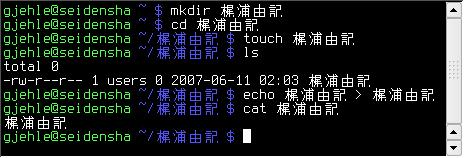
and while i'm a friend of the "strict US ascii", "no spaces", "all lower case" i have recently switched to unicode/utf8 for all filesystem related stuff
it's kinda nice to be able to browse folders like this without problems:

kanji.jpg

Armando

  • Charter Member
  • Joined in 2005
  • ***
  • Posts: 2,727
    • Coding Snacks
Re: File Names : what should be avoided
« Reply #17 on: June 11, 2007, 12:06 AM »
I use national chars (the Danish æøåÆØÅ), spaces, multiple periods, etc. Applications not supporting this really need to be updated, and their lazy authors should receive a good spanking.

I am part of your club as I got into the habit of using all the frenchy chars (éÉèÈêÊëËçÇàÀûÛùÙ) when I moved from windows 3.1 to Windows 95...


Quote
I used to think that case-sensitiveness was good in a filesystem (ie., what *U*X tends to do), but I've come to realize that it's really just lazyness from the developers - there's no good reason behind it, imho.

So, in terms of "cases", what do you use for your file names?

Quote
PS: the path limit on windows is 260 chars, not 255. And really it's 259 since the last byte is used for the NUL character. Afaik NT and NTFS itself can handle more than this, but the 260-limit is imposed by the win32 layer and just about every application you will find.

Thanks f0dder! I wonder where I got this 255 from...  :-[


So, in your opinion -- apart from portability issues with DOS and legacy FS -- there's not real "danger" to stick to my/your current file-naming habits (using multiple periods, Franch Chars, etc.) ? What issues could you encounter?
"I suppose it can be said that I'm an absent-minded driver. It's true that I've driven through a number of red lights on occasion, but on the other hand, I've stopped at a lot of green ones but never gotten credit for it."
Glenn Gould

Armando

  • Charter Member
  • Joined in 2005
  • ***
  • Posts: 2,727
    • Coding Snacks
Re: File Names : what should be avoided
« Reply #18 on: June 11, 2007, 12:15 AM »
every windows program i used (except for some crappy 8+3 16bit stuff back in the days
was able to handle multiple periods just perfectly fine
/([^\.]+)$/ FTW

Good to know.

Quote
and while i'm a friend of the "strict US ascii", "no spaces", "all lower case" i have recently switched to unicode/utf8 for all filesystem related stuff
it's kinda nice to be able to browse folders like this without problems:

Nice.
How does one switch to unicode/utf8 in windows? Through the control panel "Regional and Language Options"?  Please forgive my ignorance... :-[
"I suppose it can be said that I'm an absent-minded driver. It's true that I've driven through a number of red lights on occasion, but on the other hand, I've stopped at a lot of green ones but never gotten credit for it."
Glenn Gould

f0dder

  • [Well, THAT escalated quickly!]
  • Charter Honorary Member
  • Joined in 2005
  • ***
  • Posts: 9,153
    • Participated in NANY Challenge Once
Re: File Names : what should be avoided
« Reply #19 on: June 11, 2007, 11:58 AM »
Quote from: "Armando"
So, in terms of "cases", what do you use for your file names?
Depends on the purpose. Most of my filenames aren't that long... I tend to use CamelCase for my source code, for some reason I don't like spaces in my .cpp files. For things like word documents, I have spaces and whatnot. When ripping MP3's, I tend to replace spaces with underscores, I sometimes put them on my http server so I can grab them from somewhere else, and some browsers have a habit of replacing space with %20 when downloading, which looks messy.

Quote from: "Armando"
Thanks f0dder! I wonder where I got this 255 from... :-[
It's the largest byte-value, and there's probably a few stupid programs out there using this value (yes, some people hardcode these values instead of using MAX_PATH).

Quote from: "Armando"
So, in your opinion -- apart from portability issues with DOS and legacy FS -- there's not real "danger" to stick to my/your current file-naming habits (using multiple periods, Franch Chars, etc.) ? What issues could you encounter?
When sticking to western languages, various national chars should be okay - iirc NTFS always stores as unicode, so there's no clashes file-system wise. Most programs are still written for ansi, but as long as you're dealing with a western OEM charset that fits into "narrow" characters, things should work fine.
I guess there _could_ be problems if you receive some files from one language using some characters that can't be mapped to the codepage you're running, and you're using non-unicode apps... but I've never experienced that myself.

Windows does unicode automatically, even for FAT filesystems (though the implementation is damn hacky). I think gjehle is talking about linux where this is/has been problematic?
- carpe noctem

gjehle

  • lonesome linux warrior
  • Member
  • Joined in 2006
  • **
  • Posts: 286
    • Gathering Badge
Re: File Names : what should be avoided
« Reply #20 on: June 11, 2007, 10:44 PM »
How does one switch to unicode/utf8 in windows? Through the control panel "Regional and Language Options"?  Please forgive my ignorance... :-[

well, can't help you with that ;-)
i only know there are language packs so you can display asian stuff, but that was quite a while ago that i used it
now being linux-only i just have to tell my kernel what to use and set my locale ;-)

Armando

  • Charter Member
  • Joined in 2005
  • ***
  • Posts: 2,727
    • Coding Snacks
Re: File Names : what should be avoided
« Reply #21 on: June 12, 2007, 05:24 AM »
Thanks. Yup, that'S what F0dder guessed  ;)
"I suppose it can be said that I'm an absent-minded driver. It's true that I've driven through a number of red lights on occasion, but on the other hand, I've stopped at a lot of green ones but never gotten credit for it."
Glenn Gould

app103

  • That scary taskbar girl
  • Global Moderator
  • Joined in 2006
  • *****
  • Posts: 5,888
    • Participated in NANY Challenge Six Times
    • Coding Snacks
    • Gathering Badge
    • Cody Award
    • Volunteers/Staff
Re: File Names : what should be avoided
« Reply #22 on: February 13, 2009, 05:15 PM »
I am really surprised that nobody has mentioned what kind of trouble having a '#' anywhere in a path or file name can cause with some file types.

Try naming a .chm format ebook with '#' in the title (or folder name) and then opening it. (this was a big mistake I once made)

Not sure what may happen on other OS's, but in Windows, you won't be able to read it.

If a '#' appears in the file name, the table of contents list will show but the pages will all be blank or say "page cannot be displayed'.

If a '#' appears in a folder name, you will get an access violation when trying to open it.

You also should never include a '#' in the name of any file or folder you plan on uploading to a webserver.

The reason (and cause of the .chm problem, too) is that '#' is used in html (and related URL's) as anchors to a specific part of a page.

Edvard

  • Coding Snacks Author
  • Charter Honorary Member
  • Joined in 2005
  • ***
  • Posts: 3,027
    • Participated in NANY Challenge Once
    • Coding Snacks
    • Linux User
Re: File Names : what should be avoided
« Reply #23 on: February 13, 2009, 08:39 PM »
And do absolutely everything you can to avoid a trailing space in the file name. :wallbash:

I don't know if it's a Windows-only thing or if Linux has the same problems, but I have accidentally done this twice and hilarity ensued...
:mad: :mad:
All children left unattended will be given a mocha and a puppy.

f0dder

  • [Well, THAT escalated quickly!]
  • Charter Honorary Member
  • Joined in 2005
  • ***
  • Posts: 9,153
    • Participated in NANY Challenge Once
Re: File Names : what should be avoided
« Reply #24 on: February 14, 2009, 08:36 PM »
app103: yeah, .chm files can't be on UNC paths, or have a # anywhere in file or pathname. Darn annoying, shoddily written software that simply tokenizes based on '#' without checking if it's part of filename/path and not referring to an anchor. I considered reverse-engineering the CHM viewer components to fix the parsing bug. UNC path support would also be nice, having reference material on my fileserver and all.

Edvard: leading or trailing space is a bad idea, input sanitizing/trimming and all that :)
- carpe noctem

Original address: https://www.donationcoder.com/forum/index.php?topic=8820.0