Make sure you update to the latest version of DcUpdater if you have it installed. It includes fixes nessecary for PutAside to update.
Sometimes you'll want to put aside what you are working on to complete an important task. But the taskbar is such a mess!
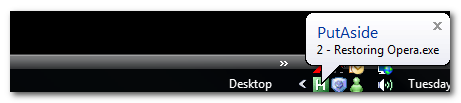
So I created PutAside. Run the program and press Shift-ScrollLock and all open windows are hidden, you can then work on your tempory task. Cycle through the hidden windows with ScrollLock. Press Shift-ScrollLock again and all hidden windows are restored. You can exclude windows.
PutAside is a combination between alt-tab, Show Desktop, a boss-key, and virtual desktops. I've always found virtual desktops to be too complex: I can never remember what is on the other desktops. I never used bosskeys, and with show desktop/alt-tab the taskbar is so cluttered. PutAside is then a middle way to temporarily hide windows without making them inaccessible.
Feedback welcome!
Download Page
Sometimes you'll want to put aside what you are working on to complete an important task. But the taskbar is such a mess!
So I created PutAside. Run the program and press Shift-ScrollLock and all open windows are hidden, you can then work on your tempory task. Cycle through the hidden windows with ScrollLock. Press Shift-ScrollLock again and all hidden windows are restored. You can exclude windows.
PutAside is a combination between alt-tab, Show Desktop, a boss-key, and virtual desktops. I've always found virtual desktops to be too complex: I can never remember what is on the other desktops. I never used bosskeys, and with show desktop/alt-tab the taskbar is so cluttered. PutAside is then a middle way to temporarily hide windows without making them inaccessible.
Feedback welcome!
Code
CHANGELOG:
v1.12
        * Updated DcUpdater and compiled PutAside without executable compression. (no more false positives)

v1.11
	* Fixed updater

v1.10
	* Added readme
	* Added DcUpdater code - check for and install updates using
		this terrific tool (http://www.donationcoder.com/Software/Mouser/Updater/index.html)

v1.01
	* Fixed preferences dialogue crash as reported by cemole and proposed fix by lanux128
Download Page
 VanDragt.com


 ohh me oh my, it hid everything, even my cursor lol had to restart oh well


 i don't mind PutAside hiding windows on start but only later that a toggle will be useful, saves me from closing and opening the program..