DonationCoder.com forum
 
Read-only archive. This is a static copy of the DonationCoder.com forum. Reading and searching work as before; logging in, posting and private messages do not.
Archive of 2026-10-21 · About this archive · Main site

Author Topic: How to get the perfect (looking) résumé / CV  (Read 10,862 times)

gjehle

  • lonesome linux warrior
  • Member
  • Joined in 2006
  • **
  • Posts: 286
    • Gathering Badge
How to get the perfect (looking) résumé / CV
« on: May 08, 2007, 08:06 PM »
Quote
After avoiding the 7 deadly sins of résumé design,
you may be asking, “If I can’t use crazy colors, clip art, and other types of decoration, how do I make my résumé stand out from the crowd?”
Like many things, the answer lies in the details.

Even if you can’t hire a fancy designer and are stuck with Microsoft Word,
a few tweaks can turn your blasé résumé into an elegant and functional showpiece.

Pretty nice step-by-step guide helping you with getting the layout of your future right (pun intended).
Everyone has to write some of these in his/her life time, so check this page out!

There are enough pages on the net already covering what has to be part of a CV, content wise,
but it's hard to find something dealing with the layout part which I'd say is a very important part.
After all it's what makes the HR person take a second look at it (hopefully).
Grorgy

  • Supporting Member
  • Joined in 2007
  • **
  • Posts: 821
Re: How to get the perfect (looking) résumé / CV
« Reply #1 on: May 08, 2007, 08:36 PM »
This is useful, some good tips thanks

Darwin

  • Charter Member
  • Joined in 2005
  • ***
  • Posts: 6,985
    • Gathering Badge
Re: How to get the perfect (looking) résumé / CV
« Reply #2 on: May 08, 2007, 09:19 PM »
Yes - I didn't know that about Times New Roman...  :-[
"Some people have a way with words, other people,... oh... have not way" - Steve Martin

tomos

  • Charter Member
  • Joined in 2006
  • ***
  • Posts: 11,970
    • Gathering Badge
    • Participated in NANY Challenge Once
Re: How to get the perfect (looking) résumé / CV
« Reply #3 on: May 09, 2007, 06:45 AM »
Very helpful tips
and
a helpful reminder  :-[

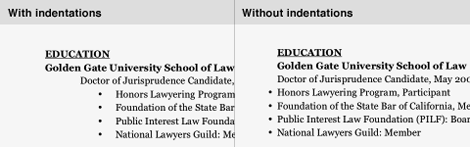
I was a bit surprised though with the final version -
have a look at these

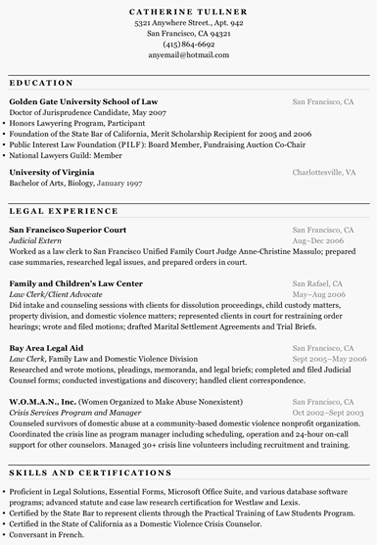
original final version from site:
-
[attachimg=#]


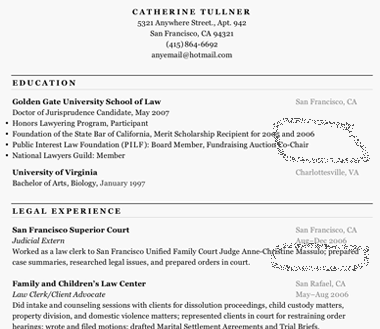
I find this aspect of layout a bit distracting
-
[attachimg=#]


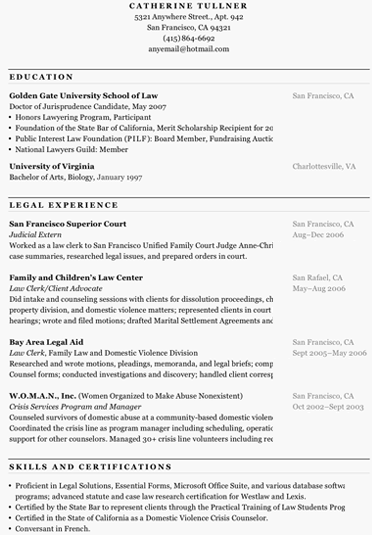
With a possible final version so
-
[attachimg=#]

(I moved the bullets in as well - there's a bit of a debate about that in the first few comments there)
Tom
« Last Edit: May 09, 2007, 06:48 AM by tomos »

nudone

  • Cody's Creator
  • Columnist
  • Joined in 2005
  • ***
  • Posts: 4,119
    • Cody Award
Re: How to get the perfect (looking) résumé / CV
« Reply #4 on: May 09, 2007, 06:47 AM »
very good point, tomos. i agree with you.

tomos

  • Charter Member
  • Joined in 2006
  • ***
  • Posts: 11,970
    • Gathering Badge
    • Participated in NANY Challenge Once
Re: How to get the perfect (looking) résumé / CV
« Reply #5 on: May 09, 2007, 06:50 AM »
:)

Quote
Times doesn’t read well on-screen and lacks typographic subtleties such as non-lining numbers. Because it’s available on virtually all computers and designed to be readable on on-screen, try Georgia instead.

does anyone know if Georgia is on most Macs too?
Tom

lanux128

  • Global Moderator
  • Joined in 2005
  • *****
  • Posts: 6,277
    • Coding Snacks
    • Volunteers/Staff
    • Gathering Badge
    • Participated in NANY Challenge Once
    • Linux User
Re: How to get the perfect (looking) résumé / CV
« Reply #6 on: May 09, 2007, 06:52 AM »
yes, the bullets should be in, it gives a nice aligned layout.. :Thmbsup:

P.S. tomos, maybe you should try this program for marking screenshots. it took a while for me to find out the hazy circle.. :)

tomos

  • Charter Member
  • Joined in 2006
  • ***
  • Posts: 11,970
    • Gathering Badge
    • Participated in NANY Challenge Once
Re: How to get the perfect (looking) résumé / CV
« Reply #7 on: May 09, 2007, 07:33 AM »
yes, the bullets should be in, it gives a nice aligned layout.. :Thmbsup:

P.S. tomos, maybe you should try this program for marking screenshots. it took a while for me to find out the hazy circle.. :)

yes  :)

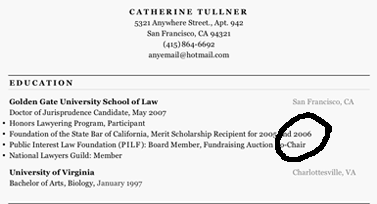
actually i just saved the image from their website
and modified it - it's some sort of greyscale gif that doesnt seem to accept "grey".
Odd -
I could only seem to draw on it in a "hazy" bitmapped grey kindof way

but I didnt try very hard  -
just had another look, using the brush tool (PShop) did the job more assertively  :)

[attachimg=#]

Maybe I should have tried Screenshot captor to modify it ...
Tom

gjehle

  • lonesome linux warrior
  • Member
  • Joined in 2006
  • **
  • Posts: 286
    • Gathering Badge
Re: How to get the perfect (looking) résumé / CV
« Reply #8 on: May 09, 2007, 08:04 PM »
yes!
tomos i have to agree ;-)

Original address: https://www.donationcoder.com/forum/index.php?topic=8438.0