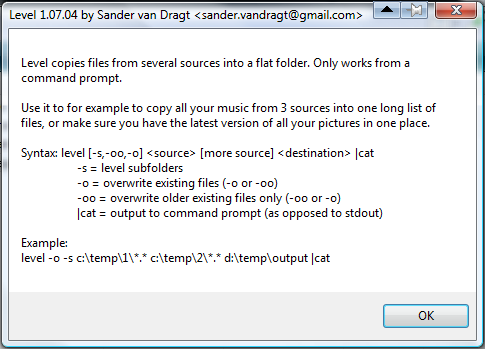
I've created an AHK script that takes multiple folders and copies all files inside to a destination folder, making a flattened copy as it were. At the moment I specifiy the folders in the script but to make the script more general I would like to allow the user to specifiy an 'unknown' amount of input folders and one output folder.
What would be the way to go? I could create an ini file but am not sure how to read in unknown amount of keys? I've never created an interface like that either.
What would be the way to go? I could create an ini file but am not sure how to read in unknown amount of keys? I've never created an interface like that either.
code below
Code
;
; AutoHotkey Version: 1.0
; Language: English
; Platform: Win XP / Vista Tested
; Author: justice <>
;
; Script Function:
; Copies photos from multiple folders without subfolders into 1 target folder
;
#NoEnv
SendMode Input
#SingleInstance,Force
Menu, Tray, Icon, Shell32.dll, 174
SetBatchLines, -1 ; Make the operation run at maximum speed.
CopyDest = c:\temp
NewFilesCopied = 0
; Example: A moving progress bar overlayed on a background image.
Gui, Color, White
Gui, Add, Picture, x0 y0 h350 w450, %A_WinDir%\system32\ntimage.gif ;doesn't exist in vista
gui, font, s16, Arial
Gui, Add, Text,BackgroundTrans x10 y10, PhotoUpdate
gui, font, s9, Arial
Gui, Add, Text, BackgroundTrans, Copying updated photos into `n%CopyDest%.
Gui, Add, Progress, vMyProgress x10 w430
Gui, Add, Text, vMyText wp ; wp means "use width of previous".
Gui, Add, Picture, w140 h170 x155 y90 BackgroundTrans vMyPic,
Gui, Show
IfNotExist, %CopyDest%
FileCreateDir, %CopyDest%
CopySourcePattern = d:\temp\01\*.jpg
GoSub, CopyIfNewer
CopySourcePattern = d:\temp\02\*.jpg
GoSub, CopyIfNewer
Sleep, 10000
ExitApp
; Example #5: Copy only the source files that are newer than their counterparts
; in the destination:
CopyIfNewer:
timesCalled += 1
GuiControl,, MyText, %timesCalled% (%NewFilesCopied%) - Reading %CopySourcePattern%...
i = 1
; Caller has set the variables CopySourcePattern and CopyDest for us.
Loop, %CopySourcePattern%,0,1
{
Sleep, 10
if i > 100
{
i = 1
}
GuiControl,, MyProgress, %i%
i +=1
copy_it = n
StringReplace, FileNoSpaces, A_LoopFileName, %A_Space%,, All ;Take out spaces
IfNotExist, %CopyDest%\%FileNoSpaces% ; Always copy if target file doesn't yet exist.
copy_it = y
else
{
; File exists
FileGetTime, time, %CopyDest%\%FileNoSpaces%
EnvSub, time, %A_LoopFileTimeModified%, seconds ; Subtract the source file's time from the destination's.
if time < 0 ; Source file is newer than destination file.
copy_it = y
}
if copy_it = y
{
NewFilesCopied += 1
GuiControl,, MyPic, %A_LoopFileFullPath%
GuiControl,, MyText, %A_LoopFileFullPath%
FileCopy, %A_LoopFileFullPath%, %CopyDest%\%FileNoSpaces%, 1 ; Copy with overwrite=yes
if ErrorLevel
MsgBox, Could not copy "%A_LoopFileFullPath%" to "%CopyDest%\%FileNoSpaces%".
}
}
GuiControl,, MyProgress, 100
GuiControl,, MyText, %timesCalled% (%NewFilesCopied%) - Finished copying %CopySourcePattern%.
Return
GuiClose:
ExitApp VanDragt.com


 level.rar