DonationCoder.com forum
 
Read-only archive. This is a static copy of the DonationCoder.com forum. Reading and searching work as before; logging in, posting and private messages do not.
Archive of 2026-10-21 · About this archive · Main site

Author Topic: Configuring wordweb to search from FARR  (Read 15,920 times)

mouser

  • First Author
  • Administrator
  • Joined in 2005
  • *****
  • Posts: 40,931
    • Gathering Badge
    • Plugin Coding Medal
    • Participated in NANY Challenge Seventeen Times
    • Cody Award
    • Coding Snacks
    • Volunteers/Staff
Configuring wordweb to search from FARR
« on: March 28, 2007, 03:04 PM »
Quote
You can type "ww definition" and that word will show up in WordWeb if you have SlickRun configured correctly.

want to be able to bring up wordweb with definition for the word you type in farr in exactly the same way as you cite for slickrun? add the following alias (just select this text, go to alias tab and right click and say paste preformatted alias):
Code
1000>>>ww>->WordWeb - $$1 | C:\WINDOWS\system32\rundll32.exe WWEB32.DLL,ShowRunDLL $$1>+>^ww (.*)

ps.
farr (v2) has a built in alias "define" so you can type define WORDNAME and get a menu of online dictionaries to search for the definition of your word.

of course you can add your own aliases, etc.

mouser

  • First Author
  • Administrator
  • Joined in 2005
  • *****
  • Posts: 40,931
    • Gathering Badge
    • Plugin Coding Medal
    • Participated in NANY Challenge Seventeen Times
    • Cody Award
    • Coding Snacks
    • Volunteers/Staff
Configuring wordweb to search from FARR
« Reply #1 on: March 28, 2007, 03:10 PM »
Part of the problem with FARR aliases is that they are a hard concept to explain, so people tend to get excited when some other launch program claims to have a few special built in keywords that do special things, wheras FARR uses the much more generic concept of aliases.

FARR v2 now comes pre-installed with a ton of default ones (most actually contain menus of subcommands), but the main point is that you can create your own powerful aliases that:

  • launch programs, open documents, present menus, open urls, parse regular expressions, copy and past clipboard text, conduct more complicated virtual searches, and more.

And this of course doesn't even include the new FARR v2 plugin system which really extends the kinds of things you can do with FARR.

« Last Edit: March 28, 2007, 03:13 PM by mouser »

f0dder

  • [Well, THAT escalated quickly!]
  • Charter Honorary Member
  • Joined in 2005
  • ***
  • Posts: 9,153
    • Participated in NANY Challenge Once
Configuring wordweb to search from FARR
« Reply #2 on: March 28, 2007, 10:02 PM »
Hm, the FARR alias syntax looks somewhat daunting!
- carpe noctem

mouser

  • First Author
  • Administrator
  • Joined in 2005
  • *****
  • Posts: 40,931
    • Gathering Badge
    • Plugin Coding Medal
    • Participated in NANY Challenge Seventeen Times
    • Cody Award
    • Coding Snacks
    • Volunteers/Staff
Configuring wordweb to search from FARR
« Reply #3 on: March 28, 2007, 10:12 PM »
Quote
the FARR alias syntax looks somewhat daunting!
thats not the syntax you use when configuring an alias, just the format for pasting one in that someone else wants to give you.

FARR alias dialog and list:
Screenshot - 3_28_2007 , 5_13_25 PM.png
« Last Edit: March 28, 2007, 10:13 PM by mouser »

lanux128

  • Global Moderator
  • Joined in 2005
  • *****
  • Posts: 6,277
    • Coding Snacks
    • Volunteers/Staff
    • Gathering Badge
    • Participated in NANY Challenge Once
    • Linux User
Configuring wordweb to search from FARR
« Reply #4 on: March 30, 2007, 05:29 AM »
want to be able to bring up wordweb with definition for the word you type in farr in exactly the same way as you cite for slickrun? add the following alias...

cool tip, mouser.. :Thmbsup: hopefully more will come forward with ingenious ways of interacting with DLLs.. :)

lanux128

  • Global Moderator
  • Joined in 2005
  • *****
  • Posts: 6,277
    • Coding Snacks
    • Volunteers/Staff
    • Gathering Badge
    • Participated in NANY Challenge Once
    • Linux User
Configuring wordweb to search from FARR
« Reply #5 on: April 04, 2007, 02:45 AM »
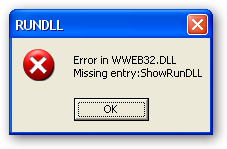
mouser, there's an error with the WordWeb alias in Farr.. any ideas why?

[attach=#]

mouser

  • First Author
  • Administrator
  • Joined in 2005
  • *****
  • Posts: 40,931
    • Gathering Badge
    • Plugin Coding Medal
    • Participated in NANY Challenge Seventeen Times
    • Cody Award
    • Coding Snacks
    • Volunteers/Staff
Configuring wordweb to search from FARR
« Reply #6 on: April 04, 2007, 03:15 AM »
what version of wordweb do you have installed?

lanux128

  • Global Moderator
  • Joined in 2005
  • *****
  • Posts: 6,277
    • Coding Snacks
    • Volunteers/Staff
    • Gathering Badge
    • Participated in NANY Challenge Once
    • Linux User
Configuring wordweb to search from FARR
« Reply #7 on: April 04, 2007, 03:19 AM »
the latest one, version 5..

mouser

  • First Author
  • Administrator
  • Joined in 2005
  • *****
  • Posts: 40,931
    • Gathering Badge
    • Plugin Coding Medal
    • Participated in NANY Challenge Seventeen Times
    • Cody Award
    • Coding Snacks
    • Volunteers/Staff
Configuring wordweb to search from FARR
« Reply #8 on: April 04, 2007, 03:32 AM »
hmm, i have v4, maybe that's the problem.  anyone know the dll function for wordweb 5 assuming it's different from ShowRunDLL?

lanux128

  • Global Moderator
  • Joined in 2005
  • *****
  • Posts: 6,277
    • Coding Snacks
    • Volunteers/Staff
    • Gathering Badge
    • Participated in NANY Challenge Once
    • Linux User
Configuring wordweb to search from FARR
« Reply #9 on: April 05, 2007, 03:56 AM »
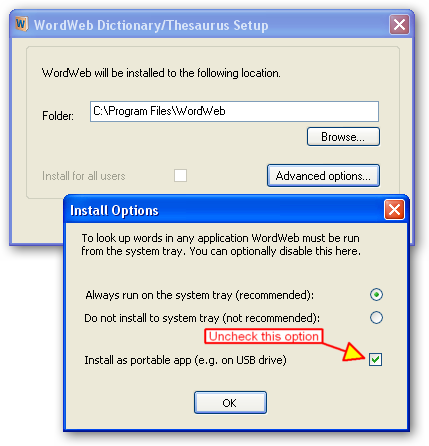
ok mouser, the problem was solved by doing the following: i uninstalled WordWeb 5, removed all the registry entries then reinstalled without the following options.. now, it's working fine. :)

[attach=#]

mouser

  • First Author
  • Administrator
  • Joined in 2005
  • *****
  • Posts: 40,931
    • Gathering Badge
    • Plugin Coding Medal
    • Participated in NANY Challenge Seventeen Times
    • Cody Award
    • Coding Snacks
    • Volunteers/Staff
Configuring wordweb to search from FARR
« Reply #10 on: April 05, 2007, 04:01 AM »
great! i think i better split this thread off so others can find this trick..

lanux128

  • Global Moderator
  • Joined in 2005
  • *****
  • Posts: 6,277
    • Coding Snacks
    • Volunteers/Staff
    • Gathering Badge
    • Participated in NANY Challenge Once
    • Linux User
Re: Configuring wordweb to search from FARR
« Reply #11 on: April 05, 2007, 04:22 AM »
yes, it's a good idea.. we were heading off-topic, anyway.. :)

thomthowolf

  • Bad software makes me tired
  • Charter Member
  • Joined in 2005
  • ***
  • Posts: 106
Re: Configuring wordweb to search from FARR
« Reply #12 on: April 07, 2007, 05:28 PM »
An easier (at least to me) solution was to make sure that the installer put wweb32.dll into the C:\WINDOWS\system32\  directory.  In my case  it hadn't, but the .dll was in the intallation folder (C:\Program Files\WordWeb)  I copied it over and the thing works a treat.  Thanks, Mouser, this is another useful tool added to FARR with almost no effort on my part. :Thmbsup: :D
Any society that would give up a little liberty to gain a little security will deserve neither and lose both.  - Benjamin Franklin

lanux128

  • Global Moderator
  • Joined in 2005
  • *****
  • Posts: 6,277
    • Coding Snacks
    • Volunteers/Staff
    • Gathering Badge
    • Participated in NANY Challenge Once
    • Linux User
Re: Configuring wordweb to search from FARR
« Reply #13 on: April 10, 2007, 03:09 AM »
... to make sure that the installer put wweb32.dll into the C:\WINDOWS\system32\  directory...

ok, now i see what the "portable app" function does.. thanks for the tip, thomthowolf  :)

Nighted

  • Meat Popsicle
  • Charter Honorary Member
  • Joined in 2005
  • ***
  • Posts: 572
Re: Configuring wordweb to search from FARR
« Reply #14 on: May 16, 2007, 04:16 AM »
WordWeb isn't very portable unless you have wweb32.dll installed on the host machine. Too bad you find this out only after having tried the portable install on a machine without this library.  >:(

It does work if you copy this into the directory of the portable install. However, this is very odd considering this SHOULD be done automatically by the installer when choosing the portable install in the first place!!!!!!
I`m a firm believer in the philosophy of a ruling class, especially since I rule.

Original address: https://www.donationcoder.com/forum/index.php?topic=7989.0