you guys all like sooooooooooooooo rock!!
lol
lol


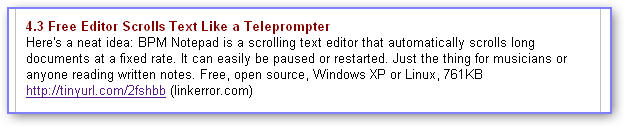
 Topic: DONE: a self-scrolling, BPM adjustable html/notepad/text file gizmo (Read 116,213 times)


is it possible to make a control to make the BPM stay on top of other windows??
Here's what I have noticed though, if you right click on an XML file you have the option to open the file in BPM. But BPM opens a blank document.
From a musician's standpoint, Im looking to be able to simply sort a folder by name, choose view->list and click.

Hey pink, just curious, if you are using Audacity to play your backing tracks? I use audacity for recording ideas, but I'm interested in how you are using the application live.hey bro, i don;t use audacity live, i use it strictly for recording...i have it on my laptop to use to RECORD live , but that's about it...tho i may use the BPM gizmo to make my life easier singing unfamiliar stuff!!but live?
Thanks,
Todd


link=topic=7815.msg57191#msg57191 date=1176347195]
maybe i'll just do a small one with some suggestions implemented from here




 This is a pretty whicked idea, and you seem to have acomplished it with grand perfection, gothi[c]!
 ...and you seem to have acomplished it with grand perfection, gothi[c]!You must have overlooked my 'Some small bugs I just noticed' section
link=topic=7815.msg57449#msg57449 date=1176475219]
Ok, finished the new version, folks
New features:
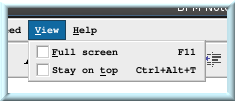
-Full screen / stay on top settings (hit the F11 button to toggle full screen)
[attachment 1 not found]
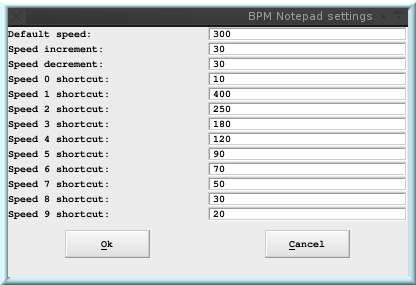
- Adjustable speeds for the keyboard shortcuts/default speed, which gets saved along with your text when you save as .XML
[attachment 2 not found]
[attachment 3 not found]
So in other words, now you can hit the play button, and then hit F11 to have it scrolling full screen, you can still control the speed with the keyboard shortcuts, and pause/resume with the space bar.
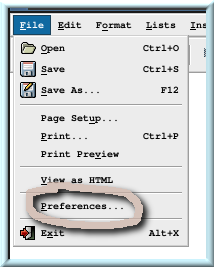
Since different songs have different tempo or bpm (which is I guess, the modern term these days.) you no longer have to keep changing the speed every time you load a song, it will just use whatever settings you have set for it as soon as you load it. ( File -> Preferences to change the speed settings )
You can go download it from http://linkerror.com/bpmnotepad.cgi?section=download
I haven't yet put all of you who suggested the features I added in the about box, but you will be in the next version. A BIG THANK YOU for all of your input everyone
Still no smooth scrolling though, that one is going to involve a bit more work. The next one may or may not have it; same with the mirroring feature.
[edit]
Some small bugs i just noticed:
- You may get a window popup complaining about xml parsing when you open/save a non-xml file.
- Anything under the list menu seems broken?
Will fix it later, I will be away this weekend and have to leave soon, so I won't have time now
And saving as non-xml no longer nags.
Original address: https://www.donationcoder.com/forum/index.php?topic=7815.0