Basic Info
Intro:
Best I've seen in this category. It delivers on these features GLOBALLY in any application you work with:
- Check your spelling as you type
- Quickly access a Dictionary and Thesaurus so you can find just the right word when you need it...
- Helps you to type much faster by expanding shortcuts you've created into phrases.
- Performs checking on text selections that you've already typed.
- Processes text selections including counting the number of words, sentences, capitalizing sentences, removing multiple spaces, search and replace text strings, get statistics, convert case and more.
- spell Catcher is also a multi-lingual tool. It can check your words if you're working in nine different languages.
- Spell Catcher waits in the back ground until you want it, not taking up valuable screen space
See here for more details http://www.rainmakerinc.com/products/spellcatcherplus/
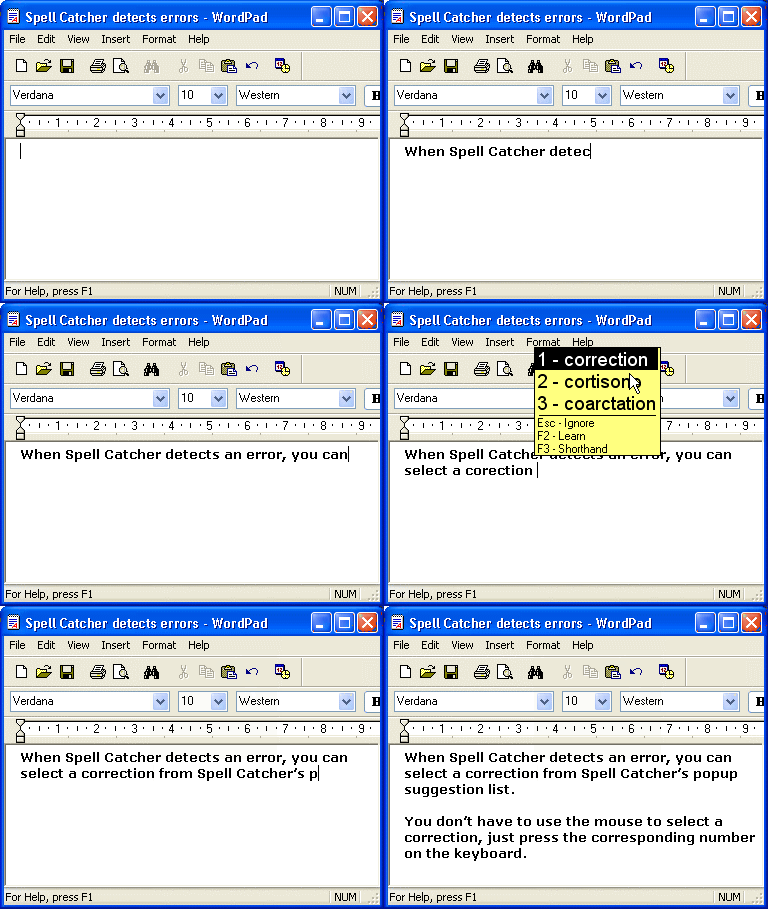
SCREENSHOT OF APP INTERFACE HERE
http://www.rainmakerinc.com/products/spellcatcherplus/tour/
Who is this app designed for:
Anyone who uses a keyboard.
The Good
- It does what it says it can and does it very well.
- Used it for > 2 years. Stable and performing. Do not remember it crashing on me once.
- GLOBAL is global. It always worked in all applications I've used. Never had issues. You can selectively disable it on a any application you like too.
- Feature full. The option panel has at least over 100 different options.
- Developer is responsive via forums.
The needs improvement section
- development has been slow. No major updates over a year now except for a interim one for IE7 and vista compatibility.
- Some features can benefit from some improvements like the application executions lists.
- text expansion does not support RTF
Why I think you should use this product
- Offers 5 major text manipulation features, all in one package. Will never find these features in one app.
- Check spelling in any application as you type it and if already typed too.
- Run format scripts on any text e.g. remove line breaks, capitalize first letter, do a character count and much more.
- shorthand expansion is nicest I've seen. show a little popup for you to see before accepting it.
How does it compare to similar apps
- this Comparison applies on the ones I listed below.
- None has this many features.
- None offers stability and performance I've seen in this one.
This is what I tested with ...
http://www.isota.com/product/4_3.asp
http://www.tech-pro.net/as-u-type.html
http://www.wamasoft.com/index.htm?app
http://www.humanized.com/products/enso/words/
http://www.flashpeak.com/
http://www.spellcheckanywhere.com/default.asp
http://www.spellex.com/support/custsvce_sa.htm#How%20does%20Spellex%20Anywhere%20work?
http://www.smartlinkcorp.com/new/spellink-2002-english-IN99101-info.html?cat=Proofing%20Tools&plat=Windows%20NT/2000/XP&lang=English
http://www.alcodasoftware.com/spell-magic.htm
http://zwliang.bizhat.com/p_screen_shot.htm
http://www.whitesmoke.com/landing_flash/grammer.html
http://www.crossword-compiler.com/
Conclusions
Best in breed software
| Name of app reviewed | SpellCatcher Plus |
| App URL | http://www.rainmakerinc.com/products/spellcatcherplus/ |
| App Version Reviewed | 3 (latest) |
| Test System Specs | WinXp Pro |
| Supported OSes | Mac and most of Windows including Vista |
| Support Methods | forum and email (i.e., forum, email, phone, etc) |
| Upgrade Policy | Policy for upgrades. If pay per upgrade, put price here for upgrades |
| Trial Version Available? | 14 day trial. |
| Pricing Scheme | lite and plus version for $30 and $40, see here http://www.rainmakerinc.com/products/spellcatcherplus/difference.html |
| Screencast Video URL | http://www.rainmakerinc.com/products/spellcatcherplus/tour/ |
| Relationship btwn. Reviewer and Product | REVIEWER: Just a user. |
Intro:
Best I've seen in this category. It delivers on these features GLOBALLY in any application you work with:
- Check your spelling as you type
- Quickly access a Dictionary and Thesaurus so you can find just the right word when you need it...
- Helps you to type much faster by expanding shortcuts you've created into phrases.
- Performs checking on text selections that you've already typed.
- Processes text selections including counting the number of words, sentences, capitalizing sentences, removing multiple spaces, search and replace text strings, get statistics, convert case and more.
- spell Catcher is also a multi-lingual tool. It can check your words if you're working in nine different languages.
- Spell Catcher waits in the back ground until you want it, not taking up valuable screen space
See here for more details http://www.rainmakerinc.com/products/spellcatcherplus/
SCREENSHOT OF APP INTERFACE HERE
http://www.rainmakerinc.com/products/spellcatcherplus/tour/
Who is this app designed for:
Anyone who uses a keyboard.
The Good
- It does what it says it can and does it very well.
- Used it for > 2 years. Stable and performing. Do not remember it crashing on me once.
- GLOBAL is global. It always worked in all applications I've used. Never had issues. You can selectively disable it on a any application you like too.
- Feature full. The option panel has at least over 100 different options.
- Developer is responsive via forums.
The needs improvement section
- development has been slow. No major updates over a year now except for a interim one for IE7 and vista compatibility.
- Some features can benefit from some improvements like the application executions lists.
- text expansion does not support RTF
Why I think you should use this product
- Offers 5 major text manipulation features, all in one package. Will never find these features in one app.
- Check spelling in any application as you type it and if already typed too.
- Run format scripts on any text e.g. remove line breaks, capitalize first letter, do a character count and much more.
- shorthand expansion is nicest I've seen. show a little popup for you to see before accepting it.
How does it compare to similar apps
- this Comparison applies on the ones I listed below.
- None has this many features.
- None offers stability and performance I've seen in this one.
This is what I tested with ...
http://www.isota.com/product/4_3.asp
http://www.tech-pro.net/as-u-type.html
http://www.wamasoft.com/index.htm?app
http://www.humanized.com/products/enso/words/
http://www.flashpeak.com/
http://www.spellcheckanywhere.com/default.asp
http://www.spellex.com/support/custsvce_sa.htm#How%20does%20Spellex%20Anywhere%20work?
http://www.smartlinkcorp.com/new/spellink-2002-english-IN99101-info.html?cat=Proofing%20Tools&plat=Windows%20NT/2000/XP&lang=English
http://www.alcodasoftware.com/spell-magic.htm
http://zwliang.bizhat.com/p_screen_shot.htm
http://www.whitesmoke.com/landing_flash/grammer.html
http://www.crossword-compiler.com/
Conclusions
Best in breed software