DonationCoder.com forum
 
Read-only archive. This is a static copy of the DonationCoder.com forum. Reading and searching work as before; logging in, posting and private messages do not.
Archive of 2026-10-21 · About this archive · Main site

Author Topic: program/trick in file manager to count number of files in a folder (recursive)  (Read 8,971 times)

urlwolf

  • Charter Member
  • Joined in 2006
  • ***
  • Posts: 1,837
    • Gathering Badge
    • Linux User
This must be an easy one...
you can get this kind of stats for dirs, one by one, in explorer, but it takes a while when there are many files.

Is there a program/trick in a file manager (e.g. Dopus) to count number of files in a folder (recursive)?

That'd help me planning my 'home' before I apply a serious backup strategy on a server.
Thanks
« Last Edit: March 15, 2007, 12:06 AM by urlwolf »

app103

  • That scary taskbar girl
  • Global Moderator
  • Joined in 2006
  • *****
  • Posts: 5,888
    • Participated in NANY Challenge Six Times
    • Coding Snacks
    • Gathering Badge
    • Cody Award
    • Volunteers/Staff
You mean something like right clicking the folder in Explorer, selecting properties?

It lists how many files...and how many subfolders...and how much space it is taking up.  ;)

urlwolf

  • Charter Member
  • Joined in 2006
  • ***
  • Posts: 1,837
    • Gathering Badge
    • Linux User
yes, like that, but recursive, example:
A - 200 files
    X 100
    Y  25
    z  75

That's the idea.

urlwolf

  • Charter Member
  • Joined in 2006
  • ***
  • Posts: 1,837
    • Gathering Badge
    • Linux User
to answer my own question:
in Dopus, rightclick the gray fields on top of each column in the listers (the one that has name| size | etc). select more. add Files (total).

Sorting by Files (total) didn't work but it's pretty close.

f0dder

  • [Well, THAT escalated quickly!]
  • Charter Honorary Member
  • Joined in 2005
  • ***
  • Posts: 9,153
    • Participated in NANY Challenge Once
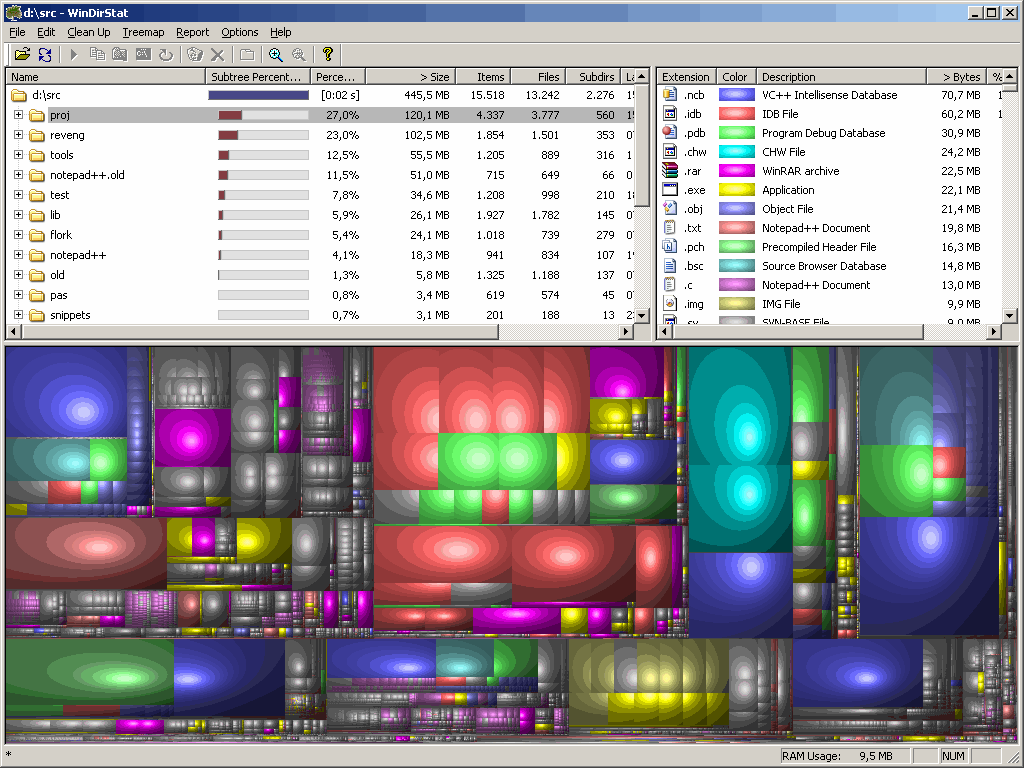
When I do cleanups and need some stats, I use http://windirstat.info
windirstat.png

Note: there's a lot of color banding because I saved in 256-color mode, jpeg version wasn't much prettier at the same filesize. App looks a lot better in real life :)
- carpe noctem

Original address: https://www.donationcoder.com/forum/index.php?topic=7767.0