Will we ever find a good solution? (rethinking how to solve this problem)
Re: List of disc catalogers
« Reply #50 on: May 10, 2007, 11:40 PM »


 Topic: List of disc catalogers (Read 277,492 times)


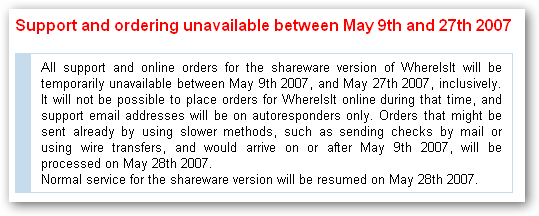
 however owner is on vacation, it seems until May 28.. guess i have a bit more time assess the program..

Will we ever find a good solution? (rethinking how to solve this problem)
) created by Crush 
 why not incorporate the app name and its website as one column since hyper-linking them would reduce the table's width..
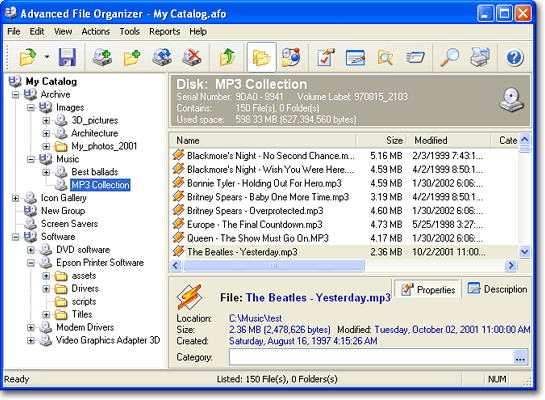
| Advanced File Organizer is a cataloguer for your digital data collection. It supports all kinds of media recognized by Windows as drives: CDs, DVDs, Memory Stick cards, ZIP disks, floppies, hard drives, network drives and folders. The key point is an ability to organize the information for most effective using it later, including convenient navigation, quick and powerful search, making reports and export to other formats. |
tomos, i know you are tired but i have a little suggestion to make..
| This application is quick at loading all the information from media to the application, considering the sheer amount of information offloaded from the media to the catalog. This helps a lot for those who are willing to take the leap from another application into this one, and has hundreds (Thousands?) of CDs and DVDs and doesn’t want to spend a month re-indexing their collection. There is a lot of features to help you with your organizing as well. You can change the name of the media (As well as folders and sub-folders) to reflect what may be labeled directly on the media as opposed to the volume label (Which may be a less-than-helpful date code or similar.) You can also add a description to each media unit, as well as folders and files. The same goes for categorizing; You can organize your entire collection by category as well to aid you further in searching later. Something I haven’t seen often in my previous searches for similar application is the ability for the application to crawl through ZIP and RAR files as if they were just another folder; Very handy indeed. This means that you don’t have to worry about ZIPping up previous versions of a project and the files not being indexed as well. The author has included a feature to make indexing media other than CDs and DVDs useful. Rather than removing and adding an entire drive (USB, hard drive, network attached storage, rewritable CDs & DVDs, etc.) to have it re-indexed, you simply select the drive under ‘My Catalog’ and click ‘Update Disk’ button. It retains your descriptions and categories for all folders and files when you use ‘Update Disk’, which is definitely nice. The print options are stellar as well. The number of options are pretty impressive; From full catalog printouts, to simple disc listing, and a lot in-between. This is nice to have because it is not always an option to be able to sit on the computer to go through your disc index, or you have a rough idea already what you are looking for and you just need a quick lookup. One aspect I did find nice is the ‘Export’ functionality. You can export to HTML, Excel, XML or CSV. I’d likely use HTML and place it up on our Intranet just so others can thumb through the index as well without having to come and antagonize me to find an old file they are looking for. |
Tom - you're not BladedThoth, are you?

AFO is a few times faster and more stable than Whereisit (V2.61 was one of the fastest in my tests and V3 seems to reach at least the same speed - some other programs got slower during further development steps).yes, AFO is quite good and comparable to WhereIsIt..
 i have to make up mind soon.. if not, i'll wear out my CDs.. i will do just that.. also maybe i can pose the query here & see if it's already in the program..
  9000$/8000€
  commercial licence (ok for 5 installations).
 !
!Original address: https://www.donationcoder.com/forum/index.php?topic=7764.0