DonationCoder.com forum
 
Read-only archive. This is a static copy of the DonationCoder.com forum. Reading and searching work as before; logging in, posting and private messages do not.
Archive of 2026-10-21 · About this archive · Main site

Last post Author Topic: Bug with the "below normal" , "above normal" , "real time" priorities  (Read 43,418 times)

shmate

  • Participant
  • Joined in 2007
  • *
  • Posts: 19
Hi!

I'm trying this nice unique utility, but unfortunately it may have a problematic behavior:

PT misbehave processes with the "below normal" , "above normal" and "real time" priorities.

Example:
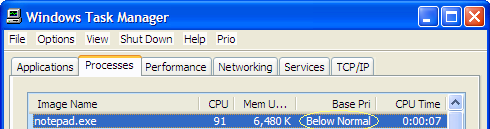
I started Notepad.exe with "below normal" priority.
I opened a big heavy file that demands high CPU usage.
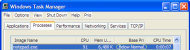

Notepad started with 'below normal' priority.png


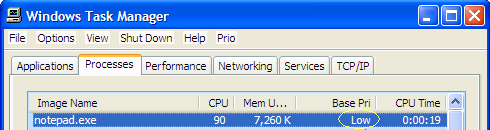
This will trigger PT to Decrease the process priority to "low" priority.
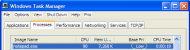

Notepad decreased to 'low' priority.png


After Notepad.exe succeed to open the big file it stopped demands high CPU usage.
Hence PT should restore the process to its previous original priority (which is "below normal").
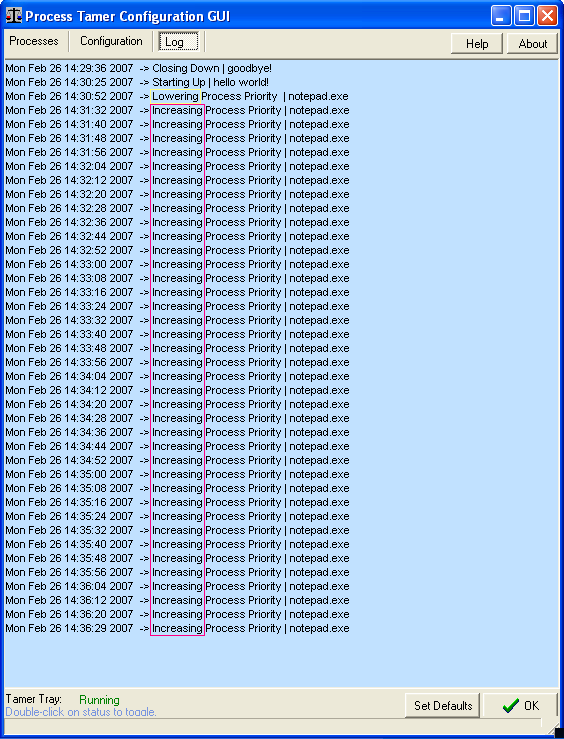
But instead PT increased the priority to "Normal" and after a while to "high"
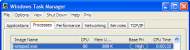

Notepad increased to 'high' priority.png


In addition, PT continues to increase the priority unstoppably!
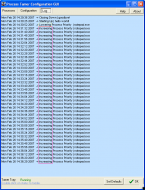

Notepad is unstoppably increased.png


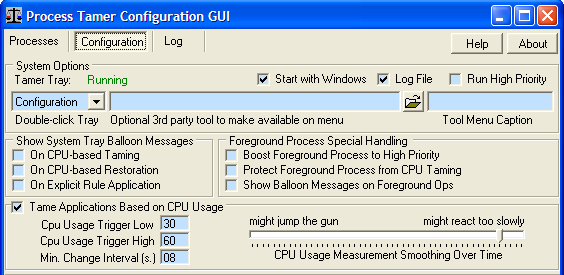
I attached my Configuration (although to my understanding this misbehavior is not caused by the PT Configuration)
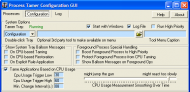
Configuration.png


Thank you,
Shmate


« Last Edit: February 26, 2007, 01:12 PM by shmate »

mouser

  • First Author
  • Administrator
  • Joined in 2005
  • *****
  • Posts: 40,931
    • Gathering Badge
    • Plugin Coding Medal
    • Participated in NANY Challenge Seventeen Times
    • Cody Award
    • Coding Snacks
    • Volunteers/Staff
Re: Bug with the "below normal" , "above normal" , "real time" priorities
« Reply #1 on: February 27, 2007, 08:07 AM »
Thank you for the report Shmate - I agree with you about what PT *should* do, and I will try to fix it in the next week or two!  I hope you will stay around to help test.  (ps. you can email me at mouser@donationcoder.com) to remind me or talk about this problem as I work on it.

-mouser (Jesse)

shmate

  • Participant
  • Joined in 2007
  • *
  • Posts: 19
Re: Bug with the "below normal" , "above normal" , "real time" priorities
« Reply #2 on: February 27, 2007, 11:01 AM »

Thank you Mouser for the quick answer  8)

I would be glad to help.

Shmate

shmate

  • Participant
  • Joined in 2007
  • *
  • Posts: 19

Hello, 

Is there any progress ?

I am here, if help would be needed  :)

Shmate

mouser

  • First Author
  • Administrator
  • Joined in 2005
  • *****
  • Posts: 40,931
    • Gathering Badge
    • Plugin Coding Medal
    • Participated in NANY Challenge Seventeen Times
    • Cody Award
    • Coding Snacks
    • Volunteers/Staff
THanks for reminding me -- i've just moved and so lost a couple weeks of time.. It's on my todo list.

shmate

  • Participant
  • Joined in 2007
  • *
  • Posts: 19
My best congratulations !!   :beerchug:
 
Shmate
« Last Edit: April 11, 2007, 07:18 PM by shmate »

mouser

  • First Author
  • Administrator
  • Joined in 2005
  • *****
  • Posts: 40,931
    • Gathering Badge
    • Plugin Coding Medal
    • Participated in NANY Challenge Seventeen Times
    • Cody Award
    • Coding Snacks
    • Volunteers/Staff
I'll be working on this for the update coming this month.

shmate

  • Participant
  • Joined in 2007
  • *
  • Posts: 19
I'll be working on this for the update coming this month.

Hi Mouser,

Is there any news ?
I am long waiting for a bug-fix .  (since February actually :( )

Thank you
Shmate


.

mouser

  • First Author
  • Administrator
  • Joined in 2005
  • *****
  • Posts: 40,931
    • Gathering Badge
    • Plugin Coding Medal
    • Participated in NANY Challenge Seventeen Times
    • Cody Award
    • Coding Snacks
    • Volunteers/Staff
Sorry, i forgot about it, i will put it back on top of my todo list.

shmate

  • Participant
  • Joined in 2007
  • *
  • Posts: 19
Re: Bug with the "below normal" , "above normal" , "real time" priorities
« Reply #9 on: February 01, 2008, 04:24 AM »
.

THanks for reminding me -- i've just moved and so lost a couple weeks of time.. It's on my todo list.

I'll be working on this for the update coming this month.

Sorry, i forgot about it, i will put it back on top of my todo list.


Hi Mouser,

Is there any news ?
I am long waiting for a bug-fix .  (since February 2007 till 2008)

Thank you
Shmate


.

mouser

  • First Author
  • Administrator
  • Joined in 2005
  • *****
  • Posts: 40,931
    • Gathering Badge
    • Plugin Coding Medal
    • Participated in NANY Challenge Seventeen Times
    • Cody Award
    • Coding Snacks
    • Volunteers/Staff
Re: Bug with the "below normal" , "above normal" , "real time" priorities
« Reply #10 on: February 02, 2008, 02:21 PM »
I apologize I've just been working on a project that will be taking most of my time all the way through february, but i do promise their will be a real Process Tamer update with this bug fix as soon as i get a little free time.  I'll aim for March.

shmate

  • Participant
  • Joined in 2007
  • *
  • Posts: 19
Any news to this bug ?

f0dder

  • [Well, THAT escalated quickly!]
  • Charter Honorary Member
  • Joined in 2005
  • ***
  • Posts: 9,153
    • Participated in NANY Challenge Once
- carpe noctem

mouser

  • First Author
  • Administrator
  • Joined in 2005
  • *****
  • Posts: 40,931
    • Gathering Badge
    • Plugin Coding Medal
    • Participated in NANY Challenge Seventeen Times
    • Cody Award
    • Coding Snacks
    • Volunteers/Staff
thank you for reminding me -- you might have noticed that i FINALLY got around to updating Process Tamer after a long break.. so i'll see if i can take a look at this now.  :up:

shmate

  • Participant
  • Joined in 2007
  • *
  • Posts: 19
Re: Bug with the "below normal" , "above normal" , "real time" priorities
« Reply #14 on: October 01, 2009, 03:03 AM »

I hope you will find time for this bug.

.

shmate

  • Participant
  • Joined in 2007
  • *
  • Posts: 19

Reminder:
This bug is very annoying  :(

.

mouser

  • First Author
  • Administrator
  • Joined in 2005
  • *****
  • Posts: 40,931
    • Gathering Badge
    • Plugin Coding Medal
    • Participated in NANY Challenge Seventeen Times
    • Cody Award
    • Coding Snacks
    • Volunteers/Staff
this thread is to my everlasting shame :(
ok let me try to fix once again.

Kruskal

  • Supporting Member
  • Joined in 2007
  • **
  • Posts: 72
I could have asked my question in a new thread, but it seemed to fit in here:

When I set a process Force Normal, say, is it still subject to CPU Smoothing? I assume from the above that it is and "should be". That is what I want to happen. Is it?

But in general, it seems as though it should be an option.  That is Force and Ignore are really orthogonal concepts. Am I right in this? Is this generally recognized as a possible improvement to this wonderful program?

Thanks -- Vincent

mouser

  • First Author
  • Administrator
  • Joined in 2005
  • *****
  • Posts: 40,931
    • Gathering Badge
    • Plugin Coding Medal
    • Participated in NANY Challenge Seventeen Times
    • Cody Award
    • Coding Snacks
    • Volunteers/Staff
My memory is that setting any Force option will keep it from being "tamed", because taming by definition means changing its priority to a lower level.

So normally if one sets a process to "Force Below Normal" you are telling Process Tamer: "don't bother watching this and assigning it a low priority when it hogs the cpu, instead just always keep it below normal priority".

Can you give me an example case of when you'd want it forced to something AND at the same time want PT to watch it and reduce its priority to something else when it starts using too much of the cpu?

Kruskal

  • Supporting Member
  • Joined in 2007
  • **
  • Posts: 72
My memory is that setting any Force option will keep it from being "tamed", because taming by definition means changing its priority to a lower level.

So normally if one sets a process to "Force Below Normal" you are telling Process Tamer: "don't bother watching this and assigning it a low priority when it hogs the cpu, instead just always keep it below normal priority".

Can you give me an example case of when you'd want it forced to something AND at the same time want PT to watch it and reduce its priority to something else when it starts using too much of the cpu?
The example is in my other recent post, "Can Process Tamer tame Firefox ?". Firefox was running High and using 98%+ CPU. I don't know why it was High. If I changed it to Normal in the Task Manager, it soon went back to High. So I wanted ProcessTamer to set it Normal, but it still needed taming.

The final wrinkle of the story is that my changes to the ProcessTamer  Config tamed Firefox BUT there was nothing in the Log to show how. Changing the Config tamed it but ProcessTamer did nothing. (See the other thread.)

Thanks -- Vincent
« Last Edit: August 13, 2010, 03:00 AM by Kruskal »

Kruskal

  • Supporting Member
  • Joined in 2007
  • **
  • Posts: 72
My memory is that setting any Force option will keep it from being "tamed", because taming by definition means changing its priority to a lower level.

So normally if one sets a process to "Force Below Normal" you are telling Process Tamer: "don't bother watching this and assigning it a low priority when it hogs the cpu, instead just always keep it below normal priority".

Can you give me an example case of when you'd want it forced to something AND at the same time want PT to watch it and reduce its priority to something else when it starts using too much of the cpu?

And, also, the original post in this thread defined the bug that this thread is about as (my words):

He used ProcessTamer to force Notepad to Below Normal. Then ProcessTamer lowered its priority due to very heavy usage. Then ProcessTamer raised its priority back to Below Normal when the abnormality cleared up.

And, then the bug, ProcessTamer kept raising the priority forever.

That's why I thought it was established that forcing priority only set a high limit and ProcessTamer would lower it as needed for CPU Smoothing.

Thanks -- Vincent

mouser

  • First Author
  • Administrator
  • Joined in 2005
  • *****
  • Posts: 40,931
    • Gathering Badge
    • Plugin Coding Medal
    • Participated in NANY Challenge Seventeen Times
    • Cody Award
    • Coding Snacks
    • Volunteers/Staff
good points.. i guess i have to dive back into process tamer for a bit and see what i can find.

shmate

  • Participant
  • Joined in 2007
  • *
  • Posts: 19
Hello mouser & Kruskal

Quote
He used ProcessTamer to force Notepad to Below Normal
No that wasn't the case. I didn't use PT to force any priority.
I used other utility (Process Explorer) to change the notepad priority to Below Normal.
The bug explained in this thread is not related to the FORCE rules of PT.

As explained PT misbehave processes with the "below normal" , "above normal" and "real time" priorities. in that mean it doesn't restore them to their previous original priority But instead PT increased the priority to "Normal" and after a while to "high" priority continuously.
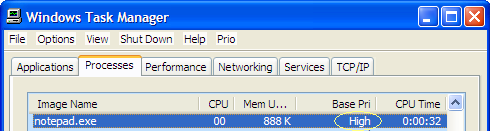
My first post demonstrate it visually.

This bug was exposed more than three years ago (on Feb 2007). I hope it will finally be fixed (it's about time .....  am i wrong?)

Thanks

mouser

  • First Author
  • Administrator
  • Joined in 2005
  • *****
  • Posts: 40,931
    • Gathering Badge
    • Plugin Coding Medal
    • Participated in NANY Challenge Seventeen Times
    • Cody Award
    • Coding Snacks
    • Volunteers/Staff
you are not wrong.. i shall try.

Russ V

  • Supporting Member
  • Joined in 2008
  • **
  • Posts: 12
shmate:  i'm not sure if this applies but i use notepad++ to open large text files.  100 meg +
http://notepad-plus-plus.org/

Original address: https://www.donationcoder.com/forum/index.php?topic=7589.0