DonationCoder.com forum
 
Read-only archive. This is a static copy of the DonationCoder.com forum. Reading and searching work as before; logging in, posting and private messages do not.
Archive of 2026-10-21 · About this archive · Main site

Author Topic: Run  (Read 14,404 times)

nite_monkey

  • Member
  • Joined in 2006
  • **
  • Posts: 753
Run
« on: February 23, 2007, 10:25 PM »
I was just looking at your program called run, the one that opens the run dialog box. If you hold down the right mouse button on the run button in the start menu, and then drag it to the desktop, or the quick launch thing(the one on the start bar), then it will let you put a shortcut to the run dialog, I don't know if this only works with windows xp or not. Just drag it to your quick launch, and then you got a quick run dialog. Works with the search button too.
[Insert really cool signature here]

Ruffnekk

  • Uhm yeah...
  • Honorary Member
  • Joined in 2006
  • **
  • Posts: 332
    • Programming School - Stage 1 Medal
    • Programming School - Deluxe Bonus Medal
    • Participated in NANY Challenge Once
    • Linux User
Re: Run
« Reply #1 on: February 24, 2007, 12:09 AM »
That doesn't work on my version of XP (XP Pro, SP2). I can't drag and create a link for the Run... entry. However, you can press [WIN] + R to show the Run Dialog. Or you can use Fixed Run Dialog.
Regards,
RuffNekk

Programming is an art form that fights back.

nite_monkey

  • Member
  • Joined in 2006
  • **
  • Posts: 753
Re: Run
« Reply #2 on: February 24, 2007, 03:48 AM »
all that run prog that skrommal made was hit win + r. I have successfully made a shortcut to the run dialog using windows xp home edition SP2, and using windows xp pro SP2. Just drag and drop the run dialog in the start menu to the desktop, it should work, thats what I did.
[Insert really cool signature here]
« Last Edit: February 24, 2007, 03:51 AM by nite_monkey »

Ruffnekk

  • Uhm yeah...
  • Honorary Member
  • Joined in 2006
  • **
  • Posts: 332
    • Programming School - Stage 1 Medal
    • Programming School - Deluxe Bonus Medal
    • Participated in NANY Challenge Once
    • Linux User
Re: Run
« Reply #3 on: February 24, 2007, 07:50 AM »
Just drag and drop the run dialog in the start menu to the desktop, it should work, thats what I did.

I really can't do that :huh: I might have to do with a security policy though. I'm using a company laptop and it has all sorts of restrictions.
Regards,
RuffNekk

Programming is an art form that fights back.

nite_monkey

  • Member
  • Joined in 2006
  • **
  • Posts: 753
Re: Run
« Reply #4 on: February 24, 2007, 06:28 PM »
Yeah that might have something to do with it. Im using my personal home computer with an admin account because I am to lazy to make a user account. I should try it at school on monday and see if I can do it there, I have like no privileges at school.
[Insert really cool signature here]

nite_monkey

  • Member
  • Joined in 2006
  • **
  • Posts: 753
Re: Run
« Reply #5 on: February 26, 2007, 07:15 PM »
It's just something messed up with your computer, I am able to do it here at school also, and at school I have like no privleges on the computer, other than surf the internet ( some restrictions apply), and open programs.
[Insert really cool signature here]

cthorpe

  • Discount Coordinator
  • Supporting Member
  • Joined in 2006
  • **
  • Posts: 738
Re: Run
« Reply #6 on: February 27, 2007, 06:20 AM »
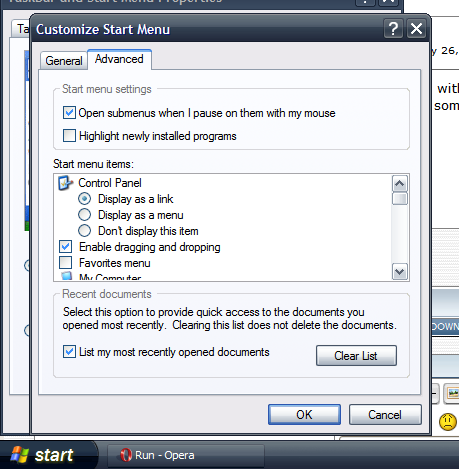
Check to see if the option to allow dragging and dropping on the start menu is disabled.

Clipboard01.png

Ruffnekk

  • Uhm yeah...
  • Honorary Member
  • Joined in 2006
  • **
  • Posts: 332
    • Programming School - Stage 1 Medal
    • Programming School - Deluxe Bonus Medal
    • Participated in NANY Challenge Once
    • Linux User
Re: Run
« Reply #7 on: February 27, 2007, 06:42 AM »
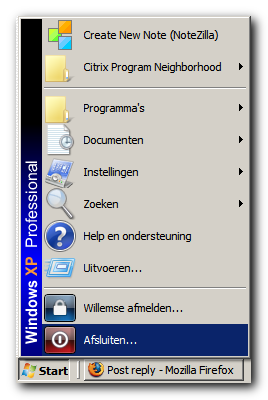
The option is enabled... but my start menu looks different than the default (by domain policies) and I cannot change anything about it. Therefore I think that somehow it's disabled. I can drag and drop any other item though...

StartMenu.png
Regards,
RuffNekk

Programming is an art form that fights back.

lanux128

  • Global Moderator
  • Joined in 2005
  • *****
  • Posts: 6,277
    • Coding Snacks
    • Volunteers/Staff
    • Gathering Badge
    • Participated in NANY Challenge Once
    • Linux User
Re: Run
« Reply #8 on: February 28, 2007, 02:03 AM »
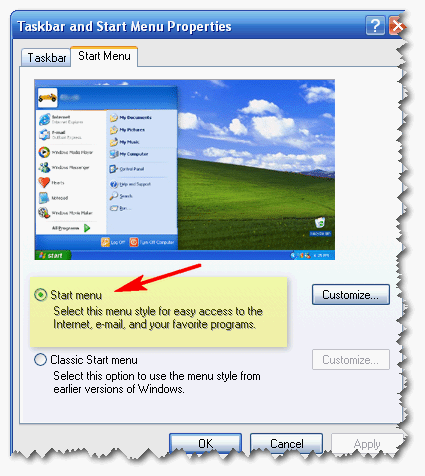
you can try this.. right-click on start button and choose "properties" then select WinXP's start menu instead of the classic one..

[attach=#]

Ruffnekk

  • Uhm yeah...
  • Honorary Member
  • Joined in 2006
  • **
  • Posts: 332
    • Programming School - Stage 1 Medal
    • Programming School - Deluxe Bonus Medal
    • Participated in NANY Challenge Once
    • Linux User
Re: Run
« Reply #9 on: February 28, 2007, 06:05 AM »
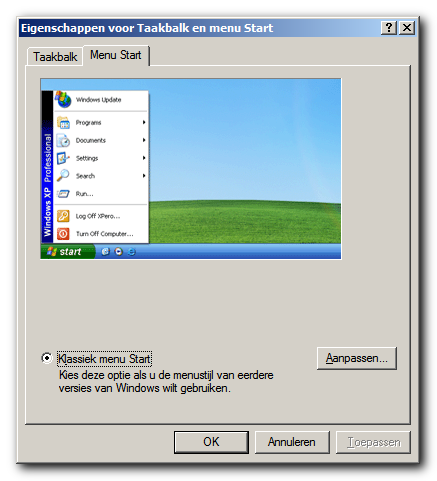
StartMenu2.png

Not possible :D
Regards,
RuffNekk

Programming is an art form that fights back.

nite_monkey

  • Member
  • Joined in 2006
  • **
  • Posts: 753
Re: Run
« Reply #10 on: March 01, 2007, 12:09 AM »
I can't read that language, but if the run button is there, you should be able to drag it to the desktop, I don't know a whole lot about user privileges, but I do know that school privileges allow you to drag and drop the run button.

Edit: no never mind, I just switched my start menu to the classic menu right quick, and you can't drag it to the desktop in classic, you would have to either use skrommel's run program, or press the windows button and r, or just click start run.
[Insert really cool signature here]
« Last Edit: March 01, 2007, 12:11 AM by nite_monkey »

Ruffnekk

  • Uhm yeah...
  • Honorary Member
  • Joined in 2006
  • **
  • Posts: 332
    • Programming School - Stage 1 Medal
    • Programming School - Deluxe Bonus Medal
    • Participated in NANY Challenge Once
    • Linux User
Re: Run
« Reply #11 on: March 01, 2007, 09:19 AM »
I don't need it any way, I'm just wondering why I can't do it :D I'm using my own Fixed Run Dialog for the functionality ;)
Regards,
RuffNekk

Programming is an art form that fights back.

Original address: https://www.donationcoder.com/forum/index.php?topic=7566.0